30 Hook Events Fire in a Claude Code Session. Only 3 Can Talk Back.
The complete list of Claude Code hook events, when each one fires, which 15 can block, and the stdout rule that silently swallows most hook output. A field reference built from running hooks in production across thousands of agent sessions.
Two failures show up again and again when people wire hooks into Claude Code, and they look nothing alike.
The first: you add a hook, nothing happens. No error, no warning, no log line. The hook simply never runs.
The second: the hook clearly runs, you can see its side effects on disk, but the message it prints for the agent never arrives. The agent behaves as if the hook had said nothing.
Both come from the same place. The hook system is bigger and less uniform than the handful of events most write-ups cover, and the rules about who can speak to the agent are not the ones you would guess. This is the reference we wish we had had. We build AgentsRoom on top of these hooks, and everything below is either quoted from the official reference or measured in production.
There are 30 events, not six
Most guides cover PreToolUse, PostToolUse, UserPromptSubmit, Stop, Notification and SubagentStop. Those six are real, and they carry most of the useful work. They are also a fifth of what exists.
The complete list, grouped by what they observe:
| Group | Events |
|---|---|
| Session | SessionStart, SessionEnd, Setup |
| Prompt | UserPromptSubmit, UserPromptExpansion |
| Tools | PreToolUse, PostToolUse, PostToolUseFailure, PostToolBatch |
| Permissions | PermissionRequest, PermissionDenied |
| Turn | Stop, StopFailure |
| Subagents and tasks | SubagentStart, SubagentStop, TaskCreated, TaskCompleted, TeammateIdle |
| Context | PreCompact, PostCompact, InstructionsLoaded |
| Environment | FileChanged, CwdChanged, ConfigChange |
| Worktrees | WorktreeCreate, WorktreeRemove |
| Interface | Notification, MessageDisplay |
| MCP elicitation | Elicitation, ElicitationResult |
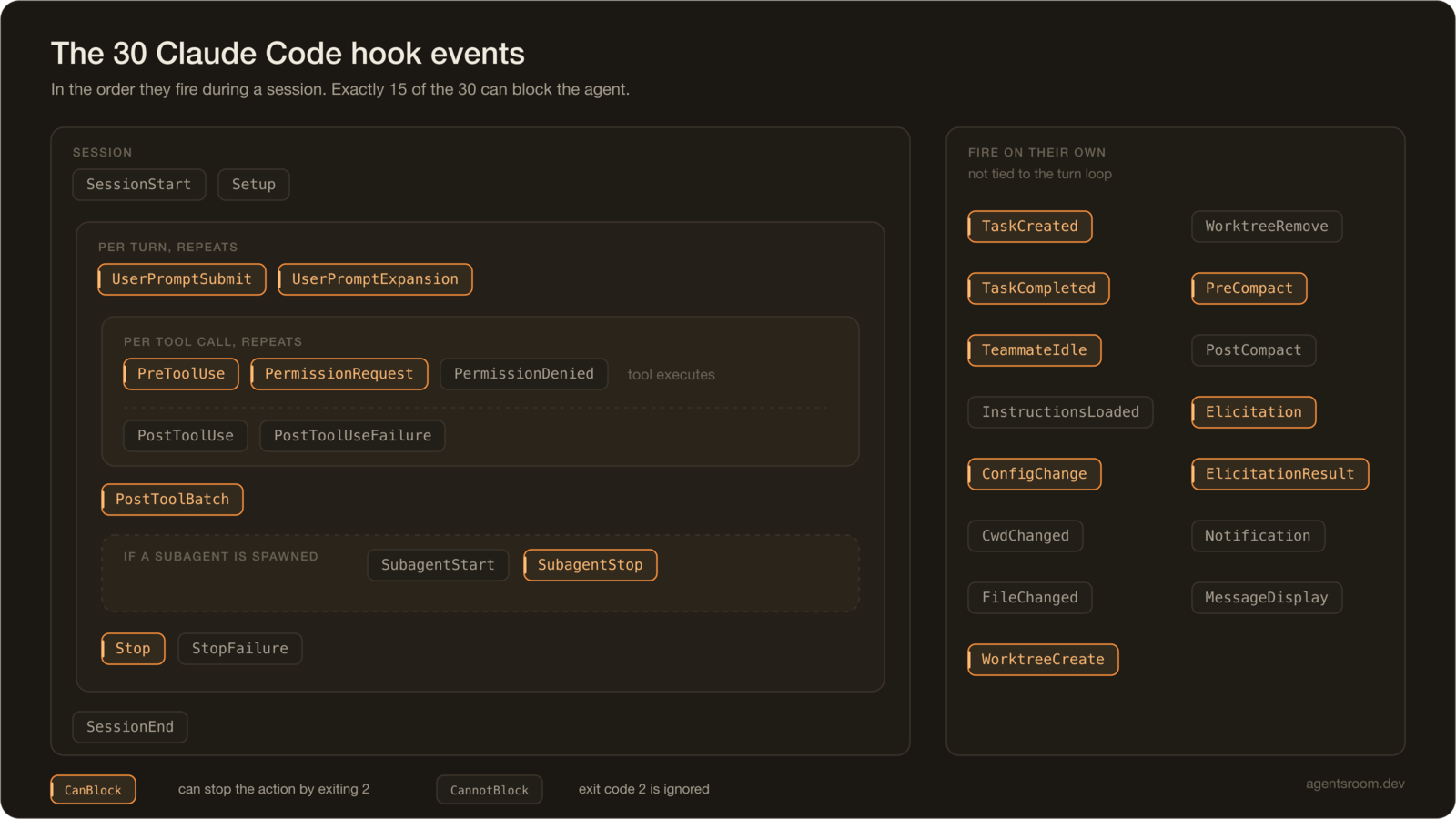
The order events fire in a single session. The tool block repeats once per tool call, and the whole prompt block repeats once per turn.
A few of these change how you think about the system. PostToolUseFailure exists, so the "did the tool work" branch is an event, not something you infer from a payload. PostToolBatch fires once after a batch of parallel tool calls resolves, which is the right place to run a linter once instead of once per edit. InstructionsLoaded fires when CLAUDE.md is read, which gives you a hook point for checking that the agent actually loaded the rules you think it loaded.
The stdout rule that swallows most hook output
This is the single most useful thing on this page.
On exit code 0, Claude Code parses stdout for JSON output fields. But whether that stdout is ever shown to the agent depends on the event, and the exceptions are a short list. From the reference:
For most events, stdout is written to the debug log but not shown in the transcript. The exceptions are
UserPromptSubmit,UserPromptExpansion, andSessionStart, where stdout is added as context that Claude can see and act on.
Three events out of thirty. If you echo "warning: this migration is destructive" from a PostToolUse hook and expect the agent to read it, it never will. Your text went to the debug log.
There are exactly two ways to put text in front of the agent from any other event:
- Exit 2 and write to stderr. On exit 2, Claude Code ignores stdout and any JSON in it, and feeds stderr back to the agent as an error message.
- Exit 0 and print a JSON object carrying
hookSpecificOutput.additionalContext.
Note the asymmetry in the first one. Exit 0 means stdout matters and stderr does not. Exit 2 means stderr matters and stdout is discarded entirely. Getting this backwards is why a hook can look completely correct and still be mute.
Any other exit code is a non-blocking error. The transcript shows a <hook name> hook error notice with the first line of stderr, execution continues, and the full stderr lands in the debug log.
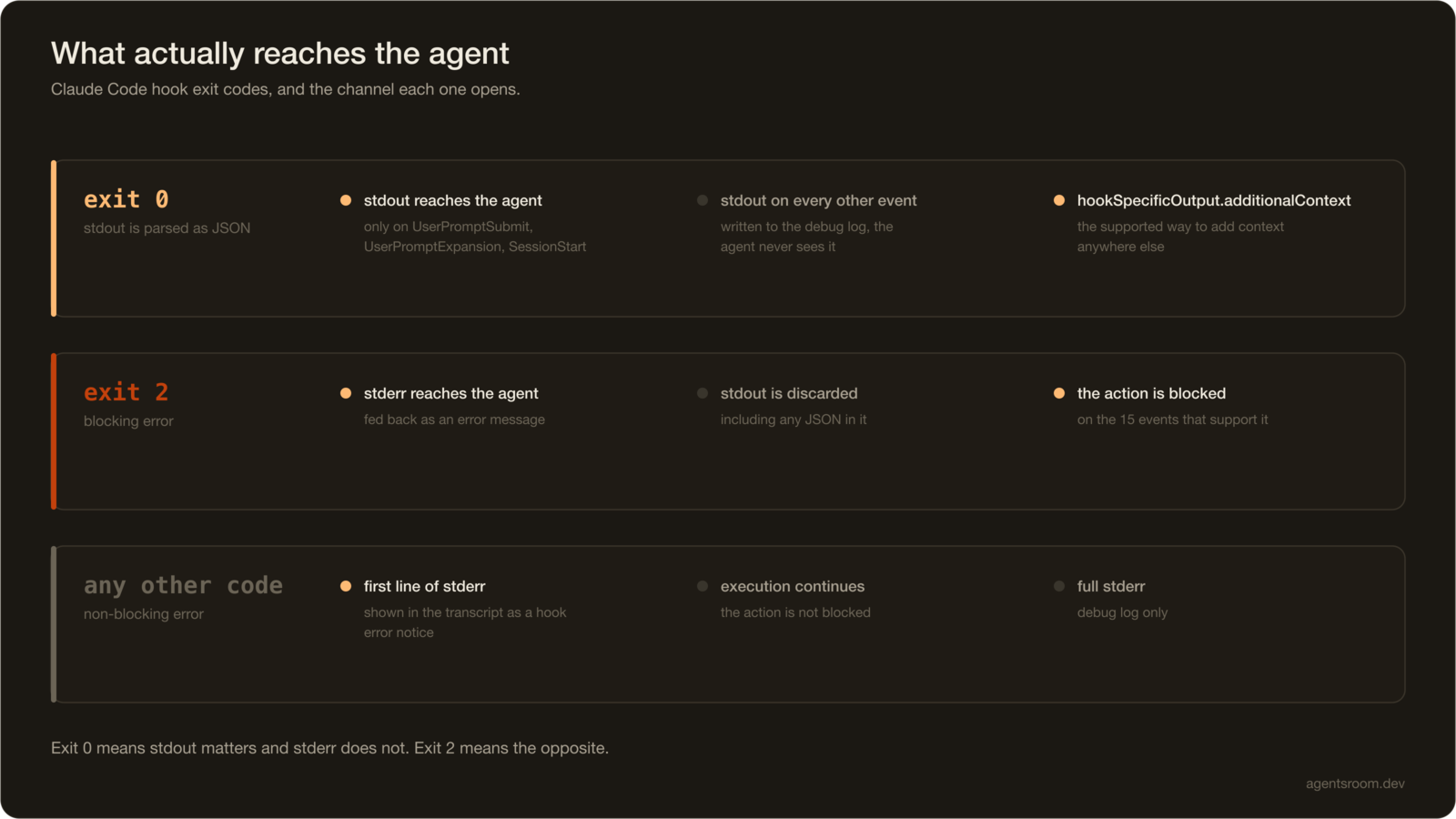
Which channel reaches the agent, per exit code. The dashed path is the one people assume exists and does not.
Exactly half of them can block
Fifteen events stop the action on exit 2. Fifteen ignore it and carry on.
Can block: PreToolUse, PermissionRequest, UserPromptSubmit, UserPromptExpansion, Stop, SubagentStop, TeammateIdle, TaskCreated, TaskCompleted, ConfigChange, PostToolBatch, PreCompact, Elicitation, ElicitationResult, WorktreeCreate.
Cannot block: PostToolUse, PostToolUseFailure, PermissionDenied, StopFailure, Notification, SubagentStart, SessionStart, Setup, SessionEnd, CwdChanged, FileChanged, PostCompact, WorktreeRemove, InstructionsLoaded, MessageDisplay.
The practical consequence: a guardrail belongs on PreToolUse, never on PostToolUse. PostToolUse fires after the tool succeeded. Exiting 2 there does not undo the write, it just prints an error while the damage sits on disk. If you want to stop rm -rf you have exactly one place to do it.
PostToolBatch blocking while PostToolUse does not is worth a second look. It means a batch-level check can still stop the turn after parallel edits land, which is the closest thing to a post-write veto the system offers.
Matchers are exact, until suddenly they are not
The matcher field switches evaluation strategy based on its own characters, and nothing tells you which path it took.
| Matcher | Evaluated as |
|---|---|
"*", "", or omitted | matches everything |
Only letters, digits, _, -, spaces, ,, | | exact string, or list of exact strings split on | or , |
| Anything else | unanchored JavaScript regular expression |
Unanchored is the trap. The reference is explicit that the regex is tested with RegExp.prototype.test, which succeeds on a match anywhere in the value. So Edit.* matches Edit and NotebookEdit. If you meant one tool, write ^Edit$.
Two version-dependent behaviours worth knowing before you debug the wrong thing:
- Comma separators and whitespace tolerance need Claude Code v2.1.191 or later.
- Hyphens joined the exact-match character set in v2.1.195. Before that, a matcher like
code-reviewerwas treated as an unanchored regex, so it also fired forsenior-code-reviewer.
In AgentsRoom we scope our own file-attribution hook with Write|Edit|MultiEdit|NotebookEdit, which stays on the exact-string path and matches those four tools and nothing else. The lifecycle hooks we install carry no matcher at all, because they always concern us.
Six places can define hooks, and they merge
The instinct is to look for a precedence order. There isn't one, and that is the interesting part.
| Location | Scope |
|---|---|
~/.claude/settings.json | all your projects, local to your machine |
.claude/settings.json | one project, committable |
.claude/settings.local.json | one project, gitignored by Claude Code |
| Managed policy settings | organization-wide, admin controlled |
Plugin hooks/hooks.json | while the plugin is enabled |
| Skill or agent frontmatter | while the component is active |
From the reference:
Hook entries merge across settings levels rather than replacing each other: user, project, and local settings add their own hooks without removing managed ones, and the
disableAllHookssetting can't disable managed hooks from outside managed settings.
So a project hook never overrides a global one, it stacks on top of it. Six sources, all additive. A PostToolUse formatter defined in your user settings and again in the project runs twice per edit, and the only symptom is that things feel slow.
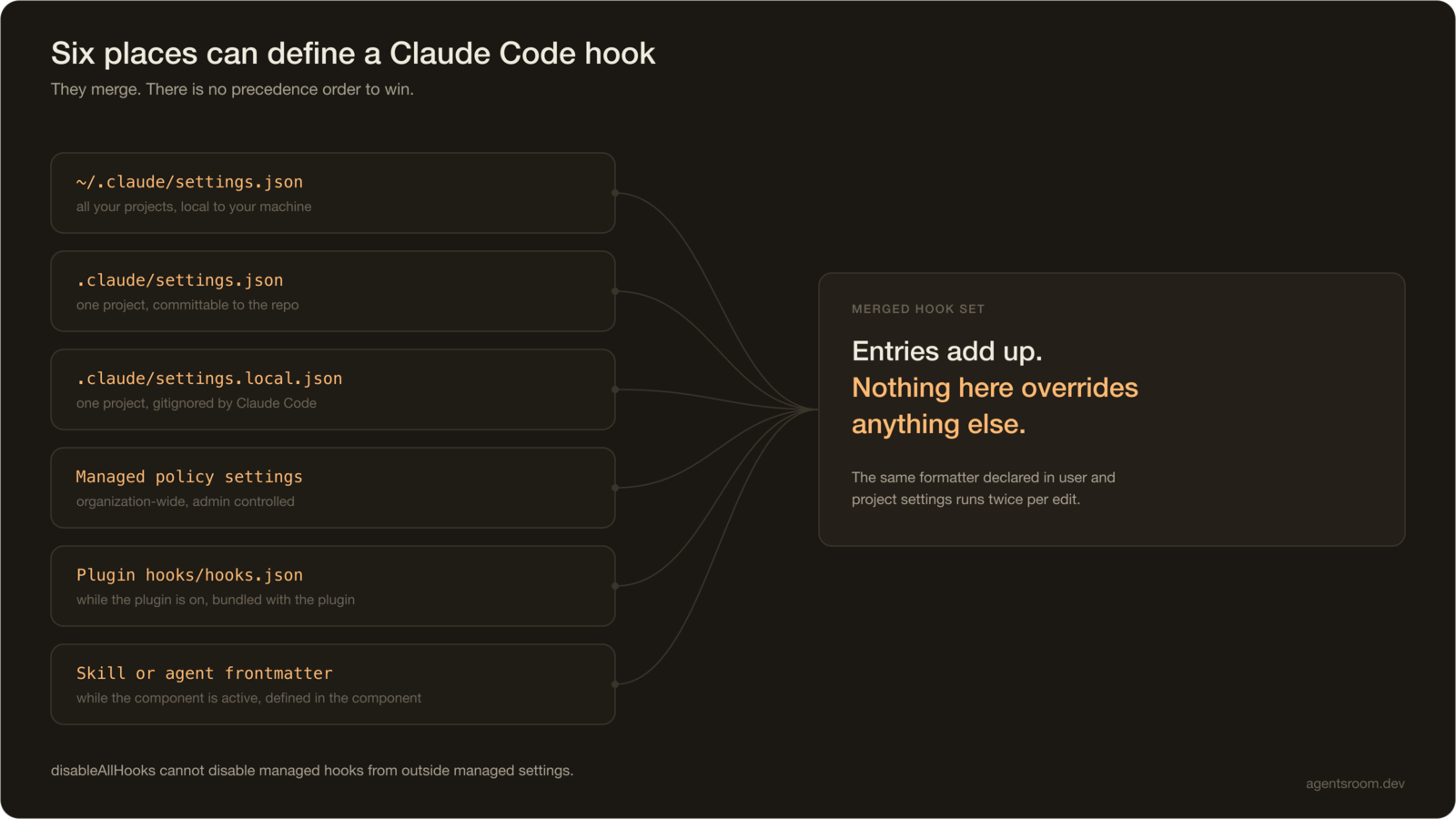
Six sources, one merged set. Nothing here overrides anything.
This also explains why .claude/settings.local.json is the right place for a tool to install a hook into someone's project. It is project-scoped, Claude Code gitignores it, and it is loaded with no CLI flag. That is where AgentsRoom writes its entries, so a user's committed .claude/settings.json is never touched and their colleagues never inherit a machine-specific path.
What running hooks in production taught us
AgentsRoom installs hooks into every project it opens, to track agent status deterministically and attribute edited files to the right agent. A few things only show up at that scale.
Unknown event names are silently ignored. This is not in the documentation, and we depend on it. When we add a new lifecycle event to our installer, users on an older CLI get a settings.local.json containing an event name their binary has never heard of. Nothing breaks, nothing warns, the entry is skipped. That is what makes the installer safe to ship ahead of a CLI release. It is also, inevitably, why a typo produces total silence rather than an error.
agent_id is how you know you are inside a subagent. The field is present only when the hook fires inside a subagent call. This matters more than it sounds: Stop fires when a subagent finishes its turn, not just the main agent. A naive "mark the session done on Stop" rule marks the whole session finished the first time any subagent returns. We skip turn events carrying agent_id for exactly this reason.
Do not read transcript_path for the current turn. The reference warns that the transcript is written asynchronously and may lag the in-memory conversation, so the most recent messages may not be there yet when your hook fires. Stop and SubagentStop receive last_assistant_message precisely so you never have to race the file.
Hooks are the only reliable status signal. Before hooks, we scraped the PTY to work out whether an agent was thinking, waiting or done. That breaks the moment the CLI renders through the terminal's alternate screen buffer, which is what /tui fullscreen does. Hooks fire identically under every renderer. If you are building anything that observes an agent from the outside, this is the layer to build on, and the scraping stays as a fallback at best.
async: true costs nothing. A hook command can declare async: true, and the agent does not wait for it. Our hook POSTs to a local endpoint with a 2-second cap and returns; the agent's turn latency is unaffected even when the receiving app is closed. If your hook only observes and never decides, make it async and stop paying for it.
Never let a hook write junk to the terminal. Our script swallows every exception, including at top level. An unhandled traceback from a hook does not just fail quietly, it prints a Python stack trace into the user's terminal session in the middle of their work.
Timeouts
Defaults are generous, with three exceptions that are not:
| Hook type | Default timeout |
|---|---|
command, http, mcp_tool | 600 s |
prompt | 30 s |
agent | 60 s |
UserPromptSubmit (command, http, mcp_tool) | 30 s |
MessageDisplay (command, http, mcp_tool) | 10 s |
SessionEnd | 1.5 s shared across all hooks, raised to match a longer per-hook timeout, up to 60 s |
The SessionEnd budget is the one that surprises people. It is a shared budget, not a per-hook allowance, so three cleanup hooks are splitting 1.5 seconds between them unless you raise it explicitly.
The short version
- 30 events exist. Six are famous.
- stdout reaches the agent on
UserPromptSubmit,UserPromptExpansionandSessionStartonly. Everywhere else, use exit 2 with stderr, oradditionalContextin JSON. - 15 events block on exit 2, 15 ignore it. Guardrails go on
PreToolUse. - Matchers are exact strings until a special character turns them into an unanchored regex.
- Six settings sources merge additively. Nothing overrides anything.
- A misspelled event name fails completely silently.
If you want to watch these events fire rather than reason about them, that is what we built: AgentsRoom shows every hook trigger per agent, per project, per run, across dozens of parallel agents and subagent sessions. The hooks you configure in your own settings keep working exactly as written, because it runs the real CLI.
Frequently asked questions
How many hook events does Claude Code have?
Thirty. The official reference lists SessionStart, Setup, UserPromptSubmit, UserPromptExpansion, PreToolUse, PermissionRequest, PermissionDenied, PostToolUse, PostToolUseFailure, PostToolBatch, Notification, MessageDisplay, SubagentStart, SubagentStop, TaskCreated, TaskCompleted, Stop, StopFailure, TeammateIdle, InstructionsLoaded, ConfigChange, CwdChanged, FileChanged, WorktreeCreate, WorktreeRemove, PreCompact, PostCompact, Elicitation, ElicitationResult and SessionEnd. Exactly 15 of them can block on exit code 2.
Why does my hook run but the agent never sees its output?
Because stdout is only added to the agent's context on three events: UserPromptSubmit, UserPromptExpansion and SessionStart. On every other event, exit 0 stdout goes to the debug log and nowhere else. To get text in front of the agent from any other event, either exit 2 and write to stderr, or exit 0 and print a JSON object carrying additionalContext.
Why does my hook never fire at all?
The most common cause is a misspelled event name. Claude Code ignores hook entries whose event name it does not recognise, and it does so silently: no error, no warning, no log line. The second most common cause is a matcher that took the regular expression path when you expected an exact string.
Does a hook matcher use exact matching or a regular expression?
It depends on the characters in the matcher. If it only contains letters, digits, underscores, hyphens, spaces, commas and pipes, it is treated as an exact string or a list of exact strings. As soon as any other character appears, it becomes an unanchored JavaScript regular expression, so Edit.* also matches NotebookEdit. Anchor with ^ and $ when you need a whole-string match.
Which settings file wins when several of them define hooks?
None of them. Hook entries merge across settings levels instead of replacing each other, so user, project and local settings all contribute their own hooks. This is why a project hook never overrides a global one, it stacks on top of it.
Download AgentsRoom
Run all your AI agents, on all your projects, from a single window.
Companion app: monitor your agents on the go
Bring your own: Claude, Codex, Antigravity CLI, or other AI provider.
Push bugs and requests straight to your public backlog.
Keep reading
Ten Agents Ran the Same Type Check at Once. The Fix Was a Directory.
Seventeen coding agents in one checkout, ten tsc processes at the same time, load average 37 and 87 MB of free RAM. A ninety second type check took 7 minutes 36. Here is the measurement, why the machine was not computing, and the small shared lock that fixed it. Copyable into any repository.
Read the articleMy AI Running Coach Is a Git Repo and a Claude Agent
I finish a run, my watch syncs, and three minutes later the analysis is written in my repository, the week has been adjusted, and my coach has left a comment under the Strava activity. No app built, no server written, no per-token API bill: a Claude subscription, AgentsRoom, and Markdown files. Here is the whole build, reproducible.
Read the articleHow to Scale AI Coding Agents Across a Dev Team
One developer with a coding agent is a productivity story. Five developers with twenty agents is a coordination problem. Here is what breaks first when a team scales up, and the setup that holds: committed context files, clear file ownership, review by blast radius, and cost you can actually see.
Read the article