Claude Ads: the Claude Code skill that audits your ad accounts
Claude Ads is an open source skill for Claude Code: 250+ checks on Google, Meta, LinkedIn, TikTok or Amazon Ads, a score out of 100 and a prioritized action plan, in about ten minutes. Install, commands, limits, and how to orchestrate it in AgentsRoom.
You may have seen the reel on Instagram: "do the work of your 3,000-a-month ads agency in ten minutes." Behind the slightly salesy hook, there is a very real open source project: Claude Ads, a skill for Claude Code that turns your terminal into an ad account auditor. More than 6,000 stars on GitHub, MIT license, and a number-backed promise: manually auditing a single Google Ads account takes a senior PPC consultant 4 to 6 hours, Claude Ads does the same audit in 10 to 15 minutes.
We installed the skill, read the repo cover to cover, and here is what it actually does, how to install it, where it stops, and why it really clicks when you orchestrate it in a multi-agent cockpit.
What Claude Ads actually is
Claude Ads is a Claude Code skill created by Daniel Agrici, an AI workflow architect. A skill is a bundle of instructions, references and agents that your coding agent loads on demand: here, the entire know-how of a senior PPC auditor, split into modules.
Concretely, the skill ships with:
- 250+ audit checks spread across 8 advertising platforms: Google, Meta, YouTube, LinkedIn, TikTok, Microsoft, Apple and Amazon Ads.
- A weighted scoring algorithm: every issue detected has a severity, all of it aggregated into a score from 0 to 100 with a grade from A to F, like a report card for your ad account.
- 10 specialized agents: 6 audit agents that run in parallel and 4 creative agents for campaign generation.
- 22 sub-skills organized into modules: one per platform, plus cross-cutting modules (attribution, server-side tracking, budget, financial calculations).
- 12 industry templates for strategic planning: SaaS, e-commerce, B2B, and other business types.
- A local-first architecture: your account data never leaves your machine, more on that below.
The project is actively maintained (v1.7.1 as we write these lines, with a public 12-month roadmap) and explicitly targets three profiles: PPC agencies managing more than 5 accounts, in-house marketers juggling several platforms, and freelance consultants who sell audits.
How it works under the hood
The heart of the system is parallel delegation. When you run /ads audit, the orchestrator does not walk through a checklist on its own: it dispatches six simultaneous sub-agents, each an expert in one domain. One agent picks apart Google Ads, another Meta, a third the quality of the creatives, a fourth the tracking, a fifth the budgets and bids, a sixth compliance. Their results are then aggregated, weighted and prioritized.
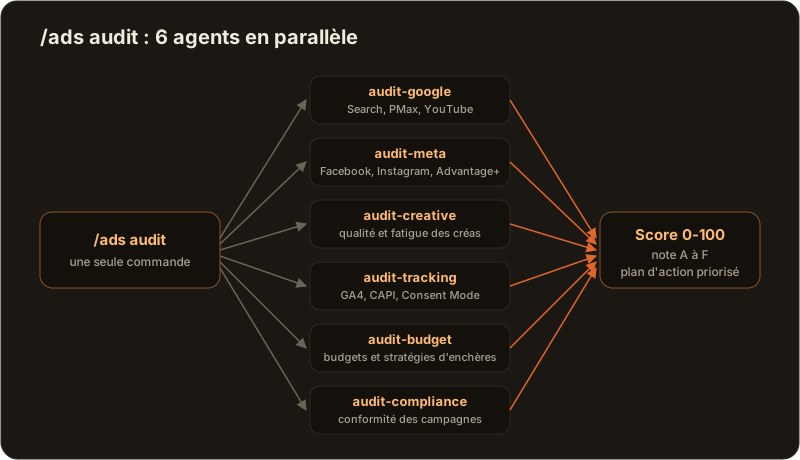
Six experts in parallel rather than one generalist in sequence: that is what brings the audit down from several hours to about ten minutes.
If you already use Claude Code to write code, you will recognize the pattern: it is exactly the mechanism of sub-agents and agent teams, applied to marketing instead of code. Each sub-agent has its own context, its own expertise, and the orchestrator keeps only the synthesis.
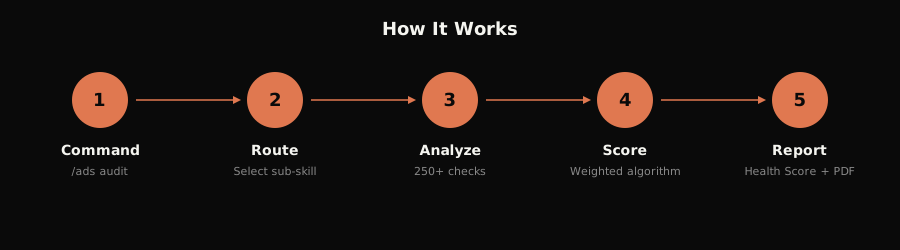
The full flow fits in five steps: you provide your account data (CSV export or API connection via MCP), the audit agents run in parallel, each check is scored and weighted by severity, the overall score is computed, and you get a prioritized action plan with issues ranked by impact.
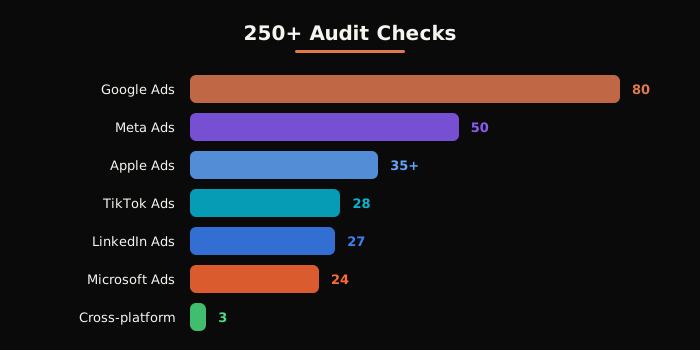
The platforms covered, in numbers
Coverage is not uniform, and that is actually a good sign: it reflects the real complexity of each platform.
| Platform | Checks | What is covered |
|---|---|---|
| Google Ads | 80 checks | Search, Performance Max, AI Max, Display, YouTube, Demand Gen |
| Meta Ads | 50 checks | Facebook, Instagram, Threads, Advantage+, the Andromeda ecosystem |
| Apple Ads | 35+ checks | Custom Product Pages, AdAttributionKit, Today Tab |
| Amazon Ads | 30+ checks | Sponsored Products, Brands, Display, ACOS and TACOS ratios |
| TikTok Ads | 28 checks | creatives, TikTok Shop, Smart+ |
| LinkedIn Ads | 27 checks | B2B, Lead Gen, Thought Leader Ads, ABM |
| Microsoft Ads | 24 checks | Bing, Copilot, Google import validation |
On top of that come cross-cutting modules: a cross-platform attribution audit (GA4, Consent Mode V2, MMP) and a server-side tracking audit (sGTM, CAPI Gateway, deduplication, data hashing). These are often the blind spots of human audits, because they require a dual skill set: media and technical.
The commands: one per agency role
Once installed, everything runs through slash commands. They fall into four families, which roughly map to a media agency's org chart.
The audit, the heart of the skill:
| Command | What it does |
|---|---|
/ads audit | full multi-platform audit, with the 6 agents in parallel |
/ads google, /ads meta, /ads youtube, /ads linkedin, /ads tiktok, /ads microsoft, /ads apple, /ads amazon | deep analysis of a single platform |
/ads attribution | cross-platform attribution audit |
/ads tracking | server-side tracking pipeline audit |
/ads creative | creative quality and ad fatigue detection |
/ads landing | evaluation of the landing pages tied to campaigns |
/ads budget | budget allocation and bidding strategies |
The strategy, the consultant's role:
| Command | What it does |
|---|---|
/ads plan <type> | strategic ad plan from the 12 industry templates |
/ads competitor | competitive ad intelligence across every platform |
/ads math | PPC financial calculator: CPA, ROAS, break-even, LTV:CAC |
/ads test | A/B test design: hypothesis, significance, sample size |
The creative work, the studio:
| Command | What it does |
|---|---|
/ads dna <url> | extracts a website's brand DNA into a reusable profile |
/ads create | generates campaign concepts and copy briefs |
/ads generate | generates AI ad visuals from the brief |
/ads photoshoot | product photos in 5 styles: studio, floating, ingredient, in use, lifestyle |
The deliverable, finally: /ads report compiles everything into a PDF report ready to send to a client. This is the command that ties back to the viral reel: audit, strategic plan, final report, the billable triptych of an agency.
Install in two minutes
The simplest way, inside Claude Code:
/plugin marketplace add AI-Marketing-Hub/claude-ads
/plugin install claude-ads@ai-marketing-hub-claude-ads
Or in a single shell command on macOS and Linux:
curl -fsSL https://raw.githubusercontent.com/AI-Marketing-Hub/claude-ads/main/install.sh | bash
And on Windows, in PowerShell:
irm https://raw.githubusercontent.com/AI-Marketing-Hub/claude-ads/main/install.ps1 | iex
A detail that matters if you do not want to lock yourself into a single vendor: the installer can also target other CLI agents. bash install.sh --target=codex installs it for Codex CLI, and targets exist for Cursor, Windsurf, Gemini CLI and Goose. The skill is not welded to Claude, it is portable know-how that moves from one agent to another.
The reel's workflow, step by step
The Instagram reel that made the skill famous shows three steps. Here they are, with what actually happens each time.
Step 1: install the skill. You paste the install command into your terminal, and Claude Code pulls down the orchestrator, the sub-skills, the agents and the 26 reference files that serve as its knowledge base.
Step 2: /ads plan with your business type. The skill asks you questions about your business (offer, audience, budget, markets), draws from its 12 industry templates, and produces a strategic ad plan: which platforms to prioritize, what campaign structure, which budgets, which messages. If you have a website, /ads dna <url> first extracts your positioning, your voice and your differentiators to anchor the plan in your real brand rather than in something generic.
Step 3: the PDF report. You ask to turn the plan into a deliverable, and /ads report generates a structured report: summary, scores, prioritized action plan, all laid out to be sent as-is to a client or to your leadership.
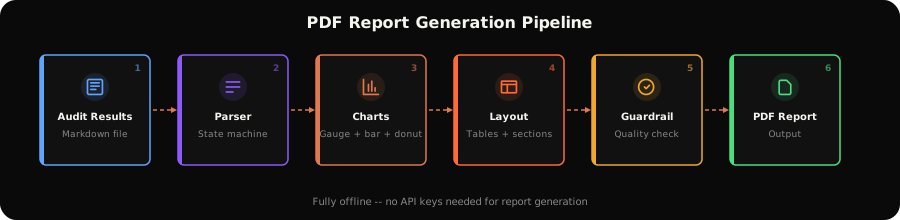
Where the reel simplifies: output quality depends directly on input quality. An /ads plan fed with vague answers produces a vague plan. And an audit without real account data (export or API connection) stays a structure analysis, not a performance diagnosis.
Your data stays with you
An important point for agencies and companies: the architecture is local-first. The skill runs in your terminal, analyzes the data you give it, and pushes nothing to a third-party service. No intermediary SaaS platform storing your clients' performance.
To move from manual exports to live data, the skill documents optional MCP integrations: a Google Ads MCP server with 29 GAQL tools to query the API in real time, Adspirer for Meta, GrowthSpree or Adzviser for LinkedIn. You are the one who chooses to open these connections, with your own API credentials. For a client account under NDA, you can stay in CSV export mode: nothing leaves your machine.
What it replaces, and what it does not
Let's be honest, because "replace your 3,000-a-month agency" deserves nuance.
What Claude Ads does very well: the systematic part of the job. Running 250 checks on an account without missing a single one, cross-referencing tracking settings with platform recommendations, detecting creative fatigue, recalculating break-even thresholds, producing a clean report. This is the part of the audit that is objective, repeatable, and that even a good consultant does more slowly than a machine.
What it does not do: press the buttons for you. The skill diagnoses and recommends, it does not modify your campaigns. Nor does it know the context your agency knows: your business's seasonality, the history of tests that failed, the relationship with your Google rep. And like any AI output, its recommendations should be verified before you commit real media budget.
The right framing: Claude Ads does not replace judgment, it replaces the hours billed to run through checklists. For an entrepreneur managing their own campaigns, it is a level of audit they simply did not have access to. For an agency, it is a multiplier: the audit that took half a day per account becomes a weekly checkpoint.
Claude Ads in AgentsRoom: your advertising unit next to your dev unit
This is where it gets interesting if you already use agents to write code. A skill like Claude Ads, launched by hand in a terminal, is a tool. The same skill, handed to a dedicated agent in a multi-agent cockpit, is a business unit that keeps running.
AgentsRoom is built for exactly this: each agent has a role, a live status and its own color, and you supervise the whole fleet from a single window. Nothing forces you to run only code agents. Create an agent with an advertising role, install the Claude Ads skill on it, and it becomes your junior media buyer: it picks up audit tickets from the backlog, runs its /ads commands, and drops the report as output.
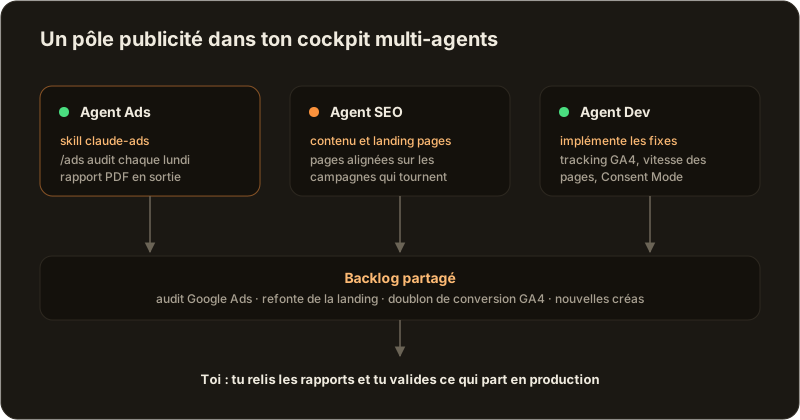
The full loop looks like this. The Ads agent runs /ads audit on your Monday morning exports and posts its conclusions to the backlog. The technical issues it surfaces (a GA4 conversion double-counted through deduplication, a misconfigured Consent Mode, a landing page that is too slow) become tickets that your dev agent picks up and fixes in the code, each in its own worktree so that agents running in parallel never step on each other. Meanwhile, an SEO agent keeps the landing pages aligned with the campaigns that are live. You review the reports and approve what ships to production.
And because Claude Ads also installs on Codex, Gemini CLI or Cursor, it slots naturally into a multi-provider fleet: your audit agent can run on a different provider than your code agents, in the same dashboard, and the compatibility matrix lists what is supported.
The unit next door has always been the hardest to integrate: dev does not speak media, media does not speak dev. A fleet of agents sharing the same backlog closes that gap better than any weekly meeting.
Install the skill, run your first /ads audit, and if you want it to run without you: download AgentsRoom and give your advertising unit the same infrastructure as your dev unit.
Download AgentsRoom
Run all your AI agents, on all your projects, from a single window.
Companion app: monitor your agents on the go
Bring your own: Claude, Codex, Antigravity CLI, or other AI provider.
Push bugs and requests straight to your public backlog.
Keep reading
Antigravity CLI Keeps One Google Login Per Machine. Here Is What Works Instead.
Why you cannot alternate two Google AI Pro subscriptions on the Antigravity CLI, where it actually stores your login, what the account switchers really do to your system keyring, why a family plan does not double your quota, and the one approach that genuinely runs several accounts in parallel.
Read the articleClaude Code Keeps One Login at a Time. Here Is How to Run Several.
A field guide to running a work account and a personal account on the same machine: the one environment variable that decides which login is active, why the shell approach breaks once you have more than two terminals, and how to pin an account per project.
Read the articleAgentsRoom x The Agency: 230+ Expert Agents, Built In
We integrated The Agency, the open-source (MIT) library of specialized AI agents by msitarzewski, into AgentsRoom. 230+ experts across 16 divisions, live and dynamic. Here is why, and how it looks.
Read the article