Dev Terminals
für all Ihre Services
Ihr Projekt hat ein Backend, ein Frontend, eine Mobile App, einen Relay-Server. Früher haben Sie 4 Terminal-Tabs geöffnet und jeden Startbefehl manuell eingetippt. Jetzt drücken Sie einen Knopf.
Und das Einzigartige: Mit der mobilen iOS- und Android-App lösen Sie Befehle aus der Ferne auf Ihrem Rechner aus. Starten Sie eine localhost-Website aus der U-Bahn, dem Fitnessstudio oder einem Café, und öffnen Sie sie dann über 4G/5G auf Ihrem Telefon durch den integrierten Live-Preview-Tunnel.
Mehrere Terminals gleichzeitig verwalten: Drag-and-drop split panes, vertikale und horizontale Layouts sowie ein vollständig abgetrenntes Fenster, das Sie auf einen dedizierten Monitoring-Bildschirm für Ihre Agenten, Logs und Builds verschieben können.
Dev Terminals ist weit mehr als ein Terminal-Emulator. Es ist ein echter Befehlsmanager pro Projekt, der den Dschungel aus iTerm2-, Warp-, Ghostty-, Kitty-, Alacritty- und Terminal.app-Tabs ersetzt, den Sie jeden Morgen öffnen. Jedes Projekt hat seine eigene Befehlsliste: Dev-Server, Backend, Mobile-Bundler, Worker, Datenbank, interne Skripte. Sie benennen sie einmal und starten sie für immer.
UX und UI sind bewusst kompromisslos auf maximale Geschwindigkeit beim Befehlsmanagement ausgelegt. Jeder Befehl merkt sich seinen Namen, seinen Shell-Befehl, sein Arbeitsverzeichnis (relativ zum Projektstamm), seine Framework-Kategorie (React, Next.js, Django, Rails, Go, Rust, Docker…) und seine Art (langlebiger Prozess oder einmaliges Snippet). Aktive Befehle wandern an den Anfang der Liste, und farbige Framework-Icons lassen Sie Ihr React-Frontend, Ihr Django-Backend und Ihre Docker-Services auf einen Blick erkennen.
Der große Vorteil eines direkt in AgentsRoom integrierten Terminals ist, dass Befehle im exakten Kontext Ihres Projekts laufen: gleicher Pfad, gleiche Umgebung, gleiches cwd. Null Reibung, kein endloses cd, keine Verwechslung zwischen Projekten. Und weil alles direkt neben Ihren KI-Agenten Claude, Codex und Antigravity liegt, hören Sie auf, zwischen fünfzehn verschiedenen Tools zu jonglieren, nur um Code auszuliefern.
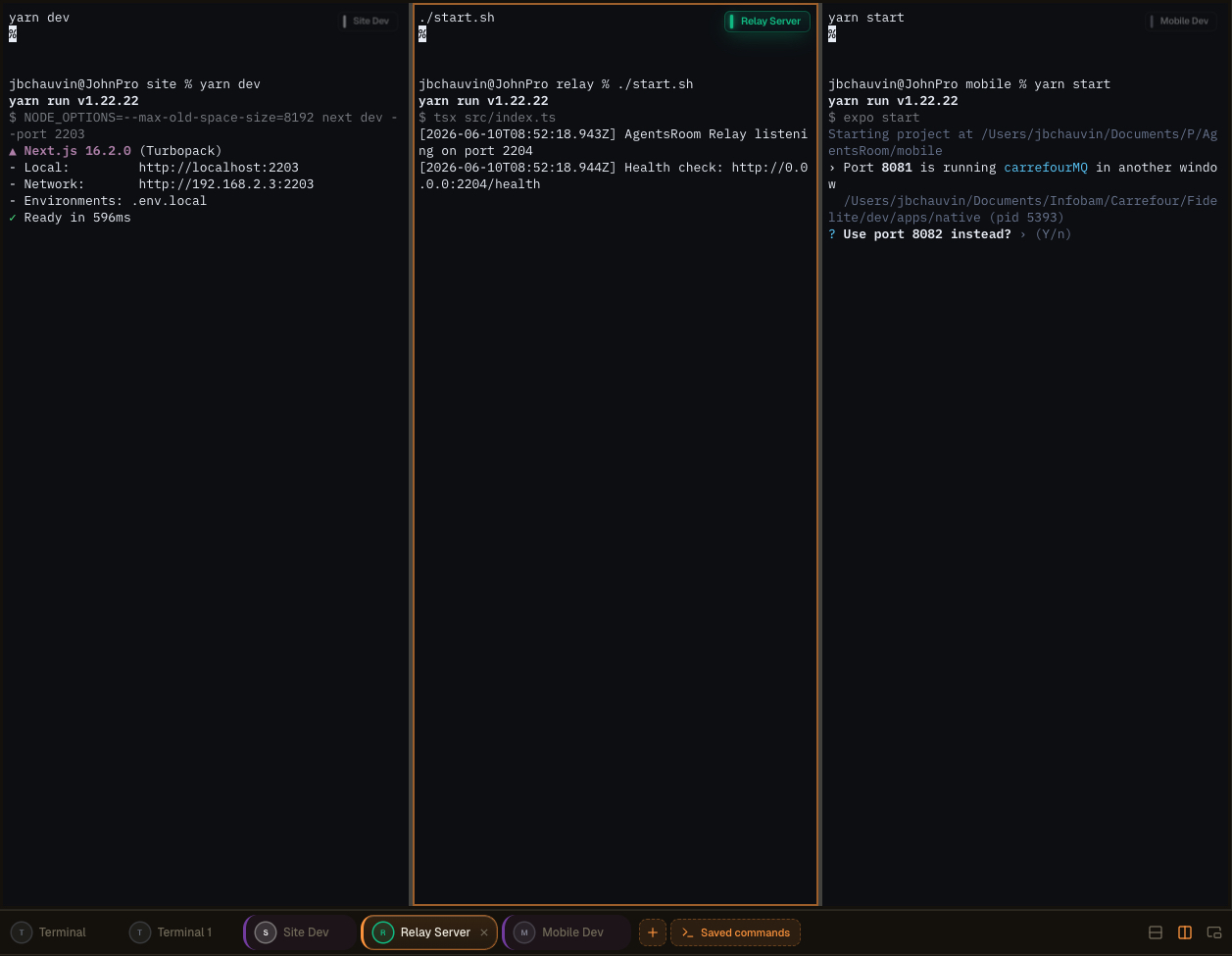
Multi-Pane-Terminal-Layout in AgentsRoom: Terminals aufteilen, auf einen zweiten Bildschirm auslagern und Agenten, Logs und Builds nebeneinander überwachen.
Ein echtes integriertes Terminal, kein Spielzeug
Jeder Befehl öffnet ein vollständiges xterm.js-Terminal mit ANSI-Farben, Scrollback, klickbaren Links, PTY-Resize und Unicode-Unterstützung. Das ist keine vorgetäuschte Log-Ansicht: Es ist ein echtes Pseudo-Terminal, identisch mit dem, was Sie in iTerm2 oder Terminal.app bekommen, nur für Sie verwaltet.
Der Status jedes Prozesses wird live angezeigt: laufend, startend, gestoppt, abgestürzt. Wenn ein Dev-Server zusammenbricht, sehen Sie es sofort. Ein Klick zum Neustart. Und wenn Sie mehrere Terminals parallel brauchen (Backend + Frontend + Mobile + Relay), startet der globale Button 'Alle starten' jeden langlebigen Prozess auf einmal, parallel, ohne dass Sie etwas tippen.
Befehle werden in Ordnern gruppiert, lassen sich mit der Maus umsortieren und werden in `.agentsroom/commands.json` im Stammverzeichnis Ihres Projekts gespeichert. Committen Sie diese Datei: Ihr ganzes Team erbt dasselbe Terminal-Setup. Persönliche Befehle (lokale Debug-Skripte, private Umgebungsvariablen) gehen in `commands-personal.json`, das automatisch zur `.gitignore` innerhalb von `.agentsroom` hinzugefügt wird. Niemand muss beim Beitritt zu einem neuen Repo jemals wieder `yarn dev --port 2203` aus dem Gedächtnis tippen.
Schließlich ist alles vereint: Ihre KI-Agenten, Ihre Terminals, Ihre Prompts, Ihr Backlog und Ihre Live-Preview leben alle im selben Fenster. Sie sparen enorm viel Zeit, indem Sie das Hin und Her zwischen AgentsRoom, Ihrem Terminal-Emulator, Ihrer IDE und Ihrem Browser abschaffen. Ein Bildschirm, alles nur einen Klick entfernt.
Abgetrennte Befehle und Multi-Screen-Setup
Dev Commands können jetzt vollständig in ein eigenständiges Fenster ausgelagert werden, getrennt von der Haupt-AgentsRoom-Oberfläche. Lösen Sie Ihre Terminals heraus und verschieben Sie sie dorthin, wo Sie am besten arbeiten: ein zweiter Bildschirm, ein Ultrawide oder ein vertikaler Monitor für Monitoring, Logs, Builds und KI-Agenten.
Ein vertikaler Bildschirm an der Seite wird zu einer Live-Wand für Ihre laufenden Prozesse. Behalten Sie Ihren Editor und Ihre Agenten im Hauptfenster und beobachten Sie jeden Server, jeden Build und jeden Log-Stream in Echtzeit auf dem Nebenpanel. Kein alt-tab, kein verlorener Kontext.
Bessere Arbeitsbereichsorganisation
Befreien Sie Ihr Hauptfenster für Code und Agenten. Abgetrennte Terminals leben eigenständig, sodass Ihre Entwicklungsoberfläche sauber und fokussiert bleibt, anstatt in einem einzigen Panel zusammengepfercht zu sein.
Optimiertes Multi-Screen-Layout
Platzieren Sie das abgetrennte Fenster auf einem zweiten Bildschirm oder einem vertikalen Monitor. Ihre Build-Ausgabe, Dev-Server und agent logs erhalten einen dedizierten Bildschirm, während Sie auf dem Hauptbildschirm weiterprogrammieren.
Echtzeit-Monitoring
Behalten Sie Ihre Agenten und Befehle ständig im Blick. Beobachten Sie, wie Prozesse starten, ausgeben und abstürzen auf einem Seitenbildschirm und reagieren Sie sofort, wenn etwas schiefläuft.
Höhere Produktivität
Entwickler, die mehrere Projekte oder Umgebungen jonglieren, wechseln den Kontext nicht mehr. Alles, was überwacht werden muss, bleibt sichtbar, sodass Sie schneller liefern und weniger unterbrochen werden.
Erweiterte Terminal-Layouts per Drag-and-drop erstellt
Sie können jetzt mehrere Terminals über eine äußerst intuitive Drag-and-drop-Oberfläche in einem einzigen Pane zusammenführen. Greifen Sie ein Terminal, legen Sie es dort ab, wo Sie es haben möchten, und AgentsRoom erstellt das Layout für Sie. Keine Konfigurationsdateien, keine Tastenkürzel zum Auswendiglernen.
Stellen Sie den Arbeitsbereich zusammen, der zur aktuellen Aufgabe passt:
Vertikale Teilungen
Platzieren Sie zwei Terminals nebeneinander, um Backend und Frontend gleichzeitig zu beobachten.
Horizontale Teilungen
Stapeln Sie Terminals übereinander, um Logs und einen laufenden Server in derselben Spalte zu behalten.
Komplexe kombinierte Layouts
Mischen Sie vertikale und horizontale Teilungen, um ein vollständiges Terminal-Raster für Ihren Stack zu erstellen.
In Sekunden neu anordnen
Ziehen Sie ein Terminal an eine neue Position und das Layout ordnet sich sofort neu an. Strukturieren Sie Ihr gesamtes Setup in wenigen Sekunden um.
Alles auf einmal überwachen
Behalten Sie mehrere Agenten, Server, Logs und Befehle gleichzeitig im Blick, alles innerhalb eines einzigen Panes.
Kein komplexes Setup, keine tmux-Konfiguration zu erlernen. Die Erfahrung ist so gestaltet, dass sie sich sofort und natürlich anfühlt, damit Sie Ihre Zeit mit Programmieren verbringen, anstatt Fenster zu arrangieren.
Weitere Möglichkeiten, Ihre Terminals zu steuern
Das abtrennbare Fenster, die KI-Befehlsgenerierung und der Remote-Start vom Mobilgerät sind alle Teil derselben Dev Terminals-Erfahrung. Hier ist der ursprüngliche Überblick.
AgentsRoom Terminal-Manager: abgetrenntes Terminal auf einem zweiten Bildschirm, remote ausgelöste Befehle vom Mobilgerät, integriertes xterm.js-Terminal pro Projekt.
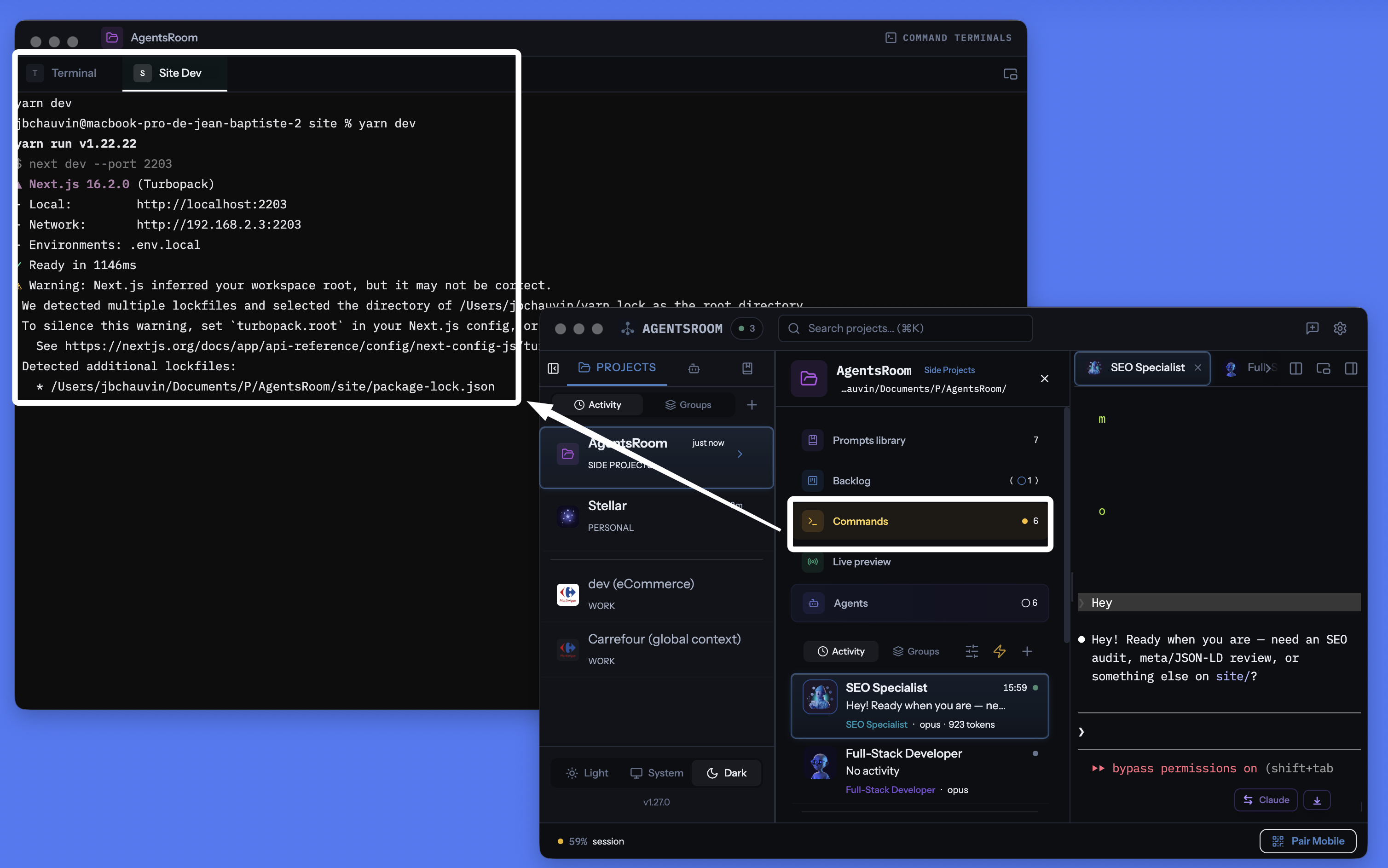
AgentsRoom Pro-Projekt-Terminal-Manager: abtrennbares Fenster, integriertes Terminal pro Befehl, KI-generierte Befehle, alles am selben Ort wie Ihre Agenten.
Jeden Service, jeden Befehl verwalten
Langlebige Prozesse, schnelle Skripte, Build-Befehle, Dev-Server. Alles pro Projekt organisiert, mit Live-Statusverfolgung, integrierter KI und mobiler Fernsteuerung.
Pro Projekt zugeordnet
Jedes Projekt speichert seine eigenen Befehle in .agentsroom/commands.json. Projekt wechseln, andere Befehle erhalten. Kein Durcheinander zwischen Repos.
Alle auf einmal starten
Ein Knopf startet jeden Prozess in Ihrem Projekt. Backend, Frontend, Mobile, Relay: alle parallel gestartet.
Remote-Start vom Mobilgerät
Lösen Sie Befehle aus der iOS- oder Android-App aus: Terminals werden auf Ihrem Rechner gestartet, und Sie sehen die Live-Ausgabe per 4G, 5G oder Wi-Fi auf Ihr Telefon gestreamt.
Abtrennbares Terminal-Fenster
Trennen Sie den Terminal-Bereich in ein eigenständiges, schwebendes Fenster ab. Legen Sie es auf einen zweiten Monitor, um Ihre Server im Blick zu behalten, während Sie im Hauptfenster programmieren.
KI-Befehlsgenerierung
Klicken Sie auf den Zauberstab: Claude scannt Ihr Repo, erkennt package.json, Dockerfiles und Makefiles und generiert jeden Startbefehl, jeden Pfad und jede Kategorie für Sie.
Live-Prozessstatus
Sehen Sie, welcher Service läuft, startet, gestoppt ist oder abgestürzt ist. Exit-Codes werden angezeigt, wenn ein Prozess fehlschlägt. Neustart mit einem Klick, ohne den Scrollback des Terminals zu verlieren.
Prozesse und Snippets
Langlebige Services sind Prozesse. Einmalige Build-Skripte und Deploy-Befehle sind Snippets. Beide leben im selben Dashboard.
Vollständiges Terminal pro Prozess
Jeder Prozess öffnet ein echtes xterm.js-Terminal mit Farben, Scrollback und klickbaren Links. Interagieren Sie direkt mit der Prozessausgabe.
Mit der localhost-Live-Preview verbunden
Starten Sie Ihre localhost-Website aus einem AgentsRoom-Terminal und erreichen Sie sie dann von außen über den integrierten HTTPS-Tunnel. Testen Sie per 4G/5G auf Ihrem Telefon, ohne zu deployen.
30+ Framework-Icons
React, Next.js, Vue, Nuxt, Angular, Svelte, Expo, Node.js, NestJS, Django, FastAPI, Rails, Laravel, Spring, Go, Rust, Docker, Redis und viele mehr, jeweils mit eigenem Icon und eigener Farbe.
In Git gespeichert
Befehle liegen in .agentsroom/commands.json, committet in Ihr Repo. Persönliche Befehle gehen in commands-personal.json, automatisch gitignored.
Terminals und KI-Agenten vereint
Ihre Terminals, Ihre Claude Code-Agenten, Ihre Prompts, Ihr Backlog und Ihre Live-Preview teilen sich dieselbe App. Verlieren Sie sich nicht mehr zwischen zehn verschiedenen Tools.
Starten Sie Terminals auf Ihrem Rechner vom Telefon aus
Das ist vermutlich das einzigartigste Feature von AgentsRoom. Aus der mobilen iOS- oder Android-App durchsuchen Sie die Befehlsliste jedes Projekts und starten jeden davon mit einem Tipp. Der Befehl läuft nicht auf Ihrem Telefon: Er läuft auf Ihrem Rechner, im richtigen Arbeitsverzeichnis, in einem echten PTY-Terminal. Die Ausgabe wird über den Ende-zu-Ende-verschlüsselten Relay live ans Mobilgerät gestreamt.
Konkret: Sie sind in der U-Bahn, im Fitnessstudio oder am anderen Ende der Welt. Sie wollen Ihre lokale Website starten, um ein Design zu prüfen, oder einen Worker neu starten, der abgestürzt ist, während Sie unterwegs waren. Sie öffnen AgentsRoom mobile, tippen auf 'yarn dev', und der Server fährt auf Ihrem Rechner zu Hause hoch. Sie können sogar über die Tastatur des Telefons mit dem Terminal interagieren.
In Kombination mit dem integrierten localhost-Preview-Tunnel können Sie Ihre lokale Website sogar im mobilen Browser öffnen, per 4G oder 5G, ganz ohne Deploy. Sie programmieren, starten, testen und validieren, alles aus Ihrer Hosentasche. AgentsRoom macht Ihren Rechner buchstäblich zu einem aus der Ferne gesteuerten Dev-Server.
Werden Sie benachrichtigt, wenn ein langer Befehl fertig ist
Ein Build, eine Testsuite oder ein Docker-Image kann mehrere Minuten laufen. Sie wechseln zu etwas anderem, und das Terminal steht zehn Minuten lang fertig da, bevor Sie es bemerken. Aktivieren Sie die Glocke auf einem Terminal-Tab, und AgentsRoom sagt Ihnen in der Sekunde Bescheid, in der der Befehl durch ist, mit dem Namen des Befehls und seiner Laufzeit.
Die Glocke sitzt im kleinen schwebenden Label oben rechts in jedem Terminal-Bereich. Ein Klick aktiviert sie, ein Klick deaktiviert sie, und sie bleibt für dieses Terminal aktiv, sodass jeder Durchlauf desselben Builds zurückmeldet. Ein Klick auf die Benachrichtigung öffnet genau diesen Terminal-Tab.
Eine Glocke pro Terminal
Aktivieren Sie sie nur dort, wo Sie sie brauchen. Es gibt nichts global zu konfigurieren und keine Benachrichtigung für Terminals, nach denen Sie nie gefragt haben.
Nur lange Befehle
Alles unter einer Minute gilt als interaktive Nutzung und bleibt stumm, sodass cd, ls und git status Sie nie stören. Aktivieren Sie die Glocke, während ein Befehl schon läuft, und genau dieser meldet sich immer zurück, egal wie lange er dauert.
Nie, während Sie zusehen
Wenn dieses Terminal bereits auf dem Bildschirm ist und die App den Fokus hat, erscheint nichts. Die Benachrichtigung ist für den Moment gedacht, in dem Sie weg sind, nicht für den Moment, in dem Sie die Ausgabe lesen.
macOS, Windows und Linux
Die Erkennung liest den Vordergrundprozess des Terminals, es wird also nichts in Ihre Konfiguration von zsh, bash, fish oder PowerShell geschrieben, und es funktioniert mit der Shell, die Sie ohnehin verwenden. Benachrichtigungen erreichen auch die iOS- und Android-App, wenn Sie nicht am Rechner sind.
Ihre KI-Agenten bekommen dieselbe Behandlung: Benachrichtigungen für KI-Agenten.
Detach-Modus: Ihre Terminals auf einem zweiten Monitor
Das Terminal-Panel lässt sich in ein eigenständiges, schwebendes Fenster abtrennen. Ziehen Sie es auf einen zweiten Bildschirm, und Ihre Logs von Backend, Frontend und Mobile-Bundler bleiben jederzeit sichtbar, während Sie im Haupt-AgentsRoom-Fenster programmieren. Genau das machen ernsthafte Entwickler mit tmux oder iTerm2 im Tiling-Modus, nur dass es in AgentsRoom nichts zu konfigurieren gibt.
Das abgetrennte Fenster behält jede Funktion: Starten, Stoppen, Neustarten, KI, Kategorien, Multi-Projekt. Sie können auf dem Zweitbildschirm weiter im Terminal tippen, während ein Claude-Agent im Hauptfenster arbeitet. Kein alt-tab, kein Kontextverlust, keine kryptische Konfiguration.
Eine moderne Alternative zu jedem Terminal, das Sie je genutzt haben
AgentsRoom Dev Terminals ist für die Projektarbeit die bessere Wahl gegenüber klassischen Terminal-Emulatoren. Hier sind die Tools, die unsere Nutzer bereits dadurch ersetzt haben:
iTerm2 ist seit Jahren der macOS-Goldstandard und Terminal.app ist auf jedem Mac vorinstalliert. Warp hat Befehls-Blöcke und integrierte KI popularisiert. Ghostty ist schnell und nativ. Kitty ist GPU-beschleunigt. Alacritty ist minimalistisch. WezTerm ist Lua-skriptfähig. Hyper basiert auf Web-Technologien. Tabby ist plattformübergreifend. Wave Terminal und Windows Terminal fördern beide moderne Multi-Pane-Workflows. Das sind alles hervorragende Produkte. AgentsRoom versucht nicht, bei der reinen Rendering-Geschwindigkeit zu konkurrieren: es bietet ein anderes Wertversprechen, nämlich ein in Ihre Entwicklungsumgebung integriertes Terminal, das jedem Projekt zugeordnet ist, mit Ihren KI-Agenten synchronisiert wird und von Ihrem Telefon aus steuerbar ist.
Alles, was ein modernes Terminal braucht, in einem Fenster
AgentsRoom ist nicht nur ein weiterer Terminal-Emulator. Es vereint alles, was ein moderner Coding-Workflow benötigt, und stellt es hinter einer einzigen Oberfläche bereit:
Wenn Sie Ihre Projekte bereits mit mehreren Terminal-Tabs namens 'backend', 'frontend', 'mobile', 'relay' verwalten, sparen Sie mit Dev Terminals Zeit. Wenn Sie tmux oder zellij zum Organisieren von Sessions nutzen, finden Sie dieselbe Idee wieder, ganz ohne Konfigurationsdatei.
So funktioniert es
Projekt öffnen
In der Projektansicht erscheint der Bereich Dev Terminals neben Ihren KI-Agenten, Ihrer Prompt-Bibliothek und Ihrem Backlog. Wenn noch keine Befehle existieren, wird automatisch ein Standard-Terminal im Projektstammverzeichnis erstellt.
Befehle hinzufügen
Klicken Sie auf +, um einen Befehl hinzuzufügen. Legen Sie den Namen, den Shell-Befehl, das Arbeitsverzeichnis (relativ zum Projektstamm) fest und wählen Sie eine Kategorie. Bestimmen Sie, ob es ein langlebiger Prozess oder ein einmaliges Snippet ist.
.agentsroom/commands.jsonOder lassen Sie die KI es machen
Klicken Sie auf das Zauberstab-Icon: Claude liest Ihre Repo-Struktur (package.json, Dockerfile, Makefile, pyproject.toml, Cargo.toml, go.mod, composer.json) und generiert die vollständige Liste Ihrer Startbefehle mit den richtigen Pfaden, Kategorien und Icons. Prüfen, bei Bedarf anpassen, speichern.
Alles mit einem Klick starten
Drücken Sie den globalen Play-Button, um alle Prozesse gleichzeitig zu starten. Oder starten Sie sie einzeln. Jeder Prozess öffnet ein echtes Terminal, in dem Sie Logs sehen und mit dem Service interagieren können.
Panel abtrennen
Klicken Sie auf das Abtrenn-Icon: Der Terminal-Bereich öffnet sich in einem eigenständigen, schwebenden Fenster, das Sie auf einen zweiten Monitor legen können. Ihre Server bleiben sichtbar, während Sie im Hauptfenster programmieren.
Steuern Sie es vom Telefon aus
Öffnen Sie AgentsRoom auf iOS oder Android, wählen Sie Ihr Projekt, tippen Sie auf einen Befehl: Er wird aus der Ferne auf Ihrem Rechner gestartet, und Sie sehen seine Ausgabe live von Ihrem Telefon aus per 4G, 5G oder Wi-Fi über den Ende-zu-Ende-verschlüsselten Relay.
Icons für jeden Stack
Jeder Befehl zeigt das Icon und die Farbe seines Frameworks. Erkennen Sie Ihr React-Frontend, Ihr Django-Backend und Ihre Docker-Services auf einen Blick.
KI-gestützte Befehlseinrichtung
Neues Projekt gestartet? Konfigurieren Sie nicht jeden Befehl manuell. Klicken Sie auf den Zauberstab, und Claude scannt Ihr Repository, erkennt den Paketmanager (yarn, pnpm, npm, bun), jeden langlaufenden Service, jedes Teilprojekt und jeden Startbefehl. Er generiert die vollständige Befehlsliste mit korrekten Pfaden, Framework-Kategorien, Icons und Ordnern. Sie prüfen das Ergebnis, passen bei Bedarf an und speichern. Die gesamte Einrichtung dauert Sekunden statt Minuten.
Standard-Prompt
"Analysiere meine Projektstruktur und generiere alle Startbefehle für jeden Service, jedes Teilprojekt und jeden Build-Schritt. Gib das korrekte Arbeitsverzeichnis, den Shell-Befehl und die passende Framework-Kategorie für jeden Eintrag an."
Sollen deine Agenten den Dev-Server selbst starten ?
AgentsRoom MCP stellt dieselben Terminal Commands, die du hier speicherst, als MCP-Werkzeuge bereit. Deine KI-Agenten rufen commands_list, commands_run und commands_create über den Terminal Commands MCP Server auf und starten Dev-Server, API oder Worker selbst.
Das ist nur einer von vier AgentsRoom MCP Servern. Backlog MCP, Prompt Library MCP und Browser MCP machen den Rest der AgentsRoom IDE zu einem agent-steuerbaren Arbeitsplatz. Manuell, wenn du willst, automatisiert, wenn nicht.
AgentsRoom MCP entdeckenFAQ
Wie unterscheidet sich das von iTerm2, Warp, Ghostty oder Terminal.app?
iTerm2, Warp, Ghostty, Kitty, Alacritty, WezTerm, Hyper und Terminal.app sind allesamt großartige Terminal-Emulatoren. AgentsRoom Dev Terminals versucht nicht, sie für allgemeine Systemarbeit zu ersetzen: Es ist ein projektbezogener Terminal-Manager. Befehle werden pro Projekt gespeichert, mit einem Klick gestartet, vom Mobilgerät aus steuerbar und leben direkt neben Ihren KI-Agenten. Wenn Sie hauptsächlich an Ihren eigenen Projekten arbeiten, verbringen Sie 90 % Ihrer Terminal-Zeit in AgentsRoom, ohne iTerm2 zu öffnen.
Nutzen die AgentsRoom-Terminals wirklich xterm.js?
Ja. Jeder Befehl öffnet ein echtes xterm.js-Terminal, das auf der Electron-Seite von einem Pseudo-TTY gestützt wird. Sie erhalten ANSI-Farben, Scrollback, klickbare Links, Tastatureingabe, dynamisches Resize und Unicode-Unterstützung, genau wie in einem nativen Terminal-Emulator.
Wie funktioniert der Remote-Befehlsstart vom Mobilgerät?
In der iOS- oder Android-App wählen Sie ein Projekt und einen Befehl. Die mobile App sendet eine Ende-zu-Ende-verschlüsselte Nachricht über den WebSocket-Relay. Die Desktop-App empfängt den Befehl, startet ein echtes PTY auf Ihrem Rechner im richtigen Arbeitsverzeichnis und streamt die Ausgabe in Echtzeit zurück ans Mobilgerät. Der Befehl läuft physisch auf Ihrem Rechner, nicht auf Ihrem Telefon. Perfekt, um einen Server oder Worker neu zu starten, während Sie unterwegs sind.
Funktioniert der Detach-Modus auf mehreren Bildschirmen?
Ja. Klicken Sie auf das Abtrenn-Icon: Der Dev Terminals-Bereich öffnet sich in einem eigenständigen, schwebenden Fenster, das Sie auf einen zweiten Monitor ziehen können. Ihre Logs und Server bleiben dauerhaft sichtbar, während Sie im Haupt-AgentsRoom-Fenster programmieren.
Was ist der Unterschied zwischen einem Prozess und einem Snippet?
Ein Prozess ist ein langlebiger Service wie ein Dev-Server, ein Backend oder ein File-Watcher. Er läuft, bis Sie ihn stoppen oder er abstürzt. Ein Snippet ist ein einmaliger Befehl wie ein Build-Skript, eine Datenbank-Migration oder ein Deploy-Schritt. Beide werden im selben Dashboard gespeichert, aber nur Prozesse werden mit dem 'Alle starten'-Button gestartet.
Werden Befehle mit meinem Team geteilt?
Ja. Öffentliche Befehle werden in .agentsroom/commands.json in Ihrem Projektverzeichnis gespeichert. Committen Sie diese Datei, und jeder, der das Repo pullt, erhält die gleichen Befehle. Persönliche Befehle (wie lokale Debug-Skripte) gehen in commands-personal.json, die automatisch zur .agentsroom/.gitignore hinzugefügt wird.
Wie funktioniert die KI-Befehlsgenerierung?
Wenn Sie auf den Zauberstab klicken, startet AgentsRoom eine Claude-Instanz, die Ihre Projektstruktur liest. Sie erkennt package.json-Dateien, Dockerfiles, Makefiles und andere Konfigurationsdateien, um jeden Service und seinen Startbefehl zu identifizieren. Das Ergebnis ist eine strukturierte Liste von Befehlen mit Pfaden, Kategorien und vorgeschlagenen Namen. Sie prüfen die Liste vor dem Speichern.
Kann AgentsRoom mich benachrichtigen, wenn ein Terminal-Befehl fertig ist?
Ja. Jeder Terminal-Tab trägt eine Glocke in seinem schwebenden Label. Aktivieren Sie sie, und AgentsRoom sendet eine Desktop-Benachrichtigung in dem Moment, in dem der laufende Befehl an den Prompt zurückgibt, mit dem Namen des Befehls und seiner Dauer, plus einen Push an die iOS- und Android-App, wenn Sie nicht am Rechner sind. Ein Klick auf die Benachrichtigung öffnet diesen Terminal-Tab.
Woher weiß AgentsRoom, dass ein Befehl fertig ist, wenn das Terminal offen bleibt?
Ein Terminal-Tab ist eine einzige langlebige Shell, es beendet sich also nichts, wenn ein Befehl endet. AgentsRoom beobachtet stattdessen die Vordergrund-Prozessgruppe des Terminals: Sobald sie wieder bei der Shell selbst liegt, ist der Prompt zurück und der Befehl durch. In Ihre Shell-Konfiguration wird nichts geschrieben, deshalb verhält es sich mit zsh, bash, fish oder PowerShell gleich und funktioniert für von Hand getippte Befehle genauso wie für gespeicherte.
Bekomme ich eine Benachrichtigung für jeden Befehl, den ich tippe?
Nein. Nur Befehle, die länger als eine Minute liefen, lösen eine Benachrichtigung aus, die alltägliche interaktive Nutzung bleibt also still. Eine bewusste Ausnahme: Wenn Sie die Glocke aktivieren, während ein Befehl bereits läuft, meldet sich genau dieser Befehl immer zurück, egal wie lange er dauert. Es passiert auch nichts, wenn das Terminal bereits auf dem Bildschirm ist und die App den Fokus hat.
Kann ein Befehl in jedem Projekt verfügbar sein?
Ja. Beim Speichern wählst du, wo er lebt: nur dieses Projekt oder global. Ein globaler Befehl gehört zu deinem Konto und erscheint in jedem Projekt, das du öffnest: genau richtig für einen Tunnel, einen gemeinsamen Docker-Stack oder einen Datenbank-Daemon, den du überall startest. Das Befehle-Fenster hat eine Suchleiste und einen Bereichsfilter (Alle / Dieses Projekt / Global), damit auch eine lange Liste lesbar bleibt.
Können meine KI-Agenten diese Befehle selbst starten?
Ja, über AgentsRoom MCP. Agenten rufen commands_list auf, um alles Verfügbare zu sehen (Projektbefehle und globale, jeweils mit ihrem Geltungsbereich), commands_run, um einen in einem echten Terminal-Tab zu starten, den du siehst und stoppen kannst, und commands_create, um einen neuen zu speichern. Sie dürfen keinen langlaufenden Prozess über eine rohe Shell starten: Was läuft, landet immer in einem Tab, den du kontrollierst. Ein beendeter Befehl wird in seinem bestehenden Tab erneut ausgeführt, statt einen neuen zu öffnen, und mit commands_stop kann ein Agent stoppen, was er gestartet hat, entweder indem er den Tab schließt oder indem er Ctrl-C sendet und ihn behält, um einen Server neu zu starten: So räumt er hinter sich auf, statt dir Tabs zum Schließen zu hinterlassen. Und wenn die eigene Sandbox eines Agenten einen Befehl verweigert, muss er die Zeile nicht mehr ausgeben, damit du sie in ein anderes Terminal einfügst: Er ruft commands_propose auf, der Befehl erscheint in seinem Panel als Karte „Diesen Befehl ausführen?" mit dem Grund, warum er ihn nicht ausführen kann, und ein Klick auf Ausführen startet ihn in einem Terminal-Tab, den der Agent anschließend selbst ausliest. Nichts läuft, bevor du entscheidest, es gibt keine Option „immer erlauben", und der Befehl wird weder gespeichert noch erneut abgespielt.
Zu viele Terminals, zu viele KI-Agenten: die kognitive Schuld, die dich ausbremst (und wie du da rauskommst)
Zehn KI-Agenten-Terminals zu jonglieren erzeugt kognitive, dokumentarische und finanzielle Schuld: Zeit und Tokens weg. So holst du dir die Kontrolle zurück.
Das beste Terminal für agentisches Coding 2026: cmux, Warp, tmux und was wirklich gewinnt
cmux, Warp, tmux, WezTerm, AgentsRoom: ein ehrlicher Vergleich des besten Terminals für agentisches Coding und Vibe Coding mit parallelen KI-Agenten.
Schluss mit dem Jonglieren von Terminal-Tabs
Laden Sie AgentsRoom herunter und starten Sie alle Ihre Services von einem Dashboard. Kostenlos für bis zu 2 Projekte.
Companion-App: Agenten auch unterwegs im Blick behalten
Nutzen Sie Claude, Codex, Antigravity CLI oder einen anderen KI-Anbieter.
Bugs und Wünsche direkt in dein öffentliches Backlog schicken.