One app, every AI provider
Claude · Codex · Gemini · OpenCode · Aider · Grok · Mistral Vibe
Stop choosing between Claude, Codex, Gemini CLI, OpenCode, Aider, Grok Build and Mistral Vibe. Use them all in the same project, at the same time. Switch provider on any agent mid-conversation and keep your full context: no lost work, no copy-paste, no restart from scratch.
Multi-provider AI coding, unified
Every major AI coding CLI in one interface. Switch providers, keep context, configure per agent.
Switch provider anytime
Change from Claude to Codex, Gemini CLI, OpenCode, Aider or Mistral Vibe mid-conversation. Your agent picks up where it left off with full handoff context.
Keep context on switch
When you switch provider, AgentsRoom builds a handoff summary: modified files, session activity, and last response. The new provider continues the work seamlessly.
7 AI providers supported
Claude (Anthropic), Codex (OpenAI), OpenCode, Gemini CLI (Google), Aider, Grok Build (xAI) and Mistral Vibe (Mistral AI). Each with its own models, CLI flags and capabilities.
Per-provider CLI settings
Configure CLI options per provider with quick toggles. Claude: skip permissions, verbose. Codex: full-auto, quiet. Gemini: sandbox, debug. Aider: auto-commits.
Different provider per agent
One agent uses Claude Opus for complex architecture. Another uses Codex for auto-mode tasks. A third uses Gemini for its free tier. Mix providers freely in the same project.
Live model switch (Claude)
Switching between Claude models (Opus, Sonnet, Haiku) is instant — no restart, no kill. AgentsRoom sends the model change command directly to the running session.
Switch from mobile
Long-press any agent on the mobile app to switch its provider. The command is sent to your desktop via encrypted relay. Switch providers from your phone, couch, or commute.
Handoff summary file
Before switching, the current agent can write a detailed handoff summary: work completed, remaining tasks, gotchas, key decisions. The new agent reads it and continues.
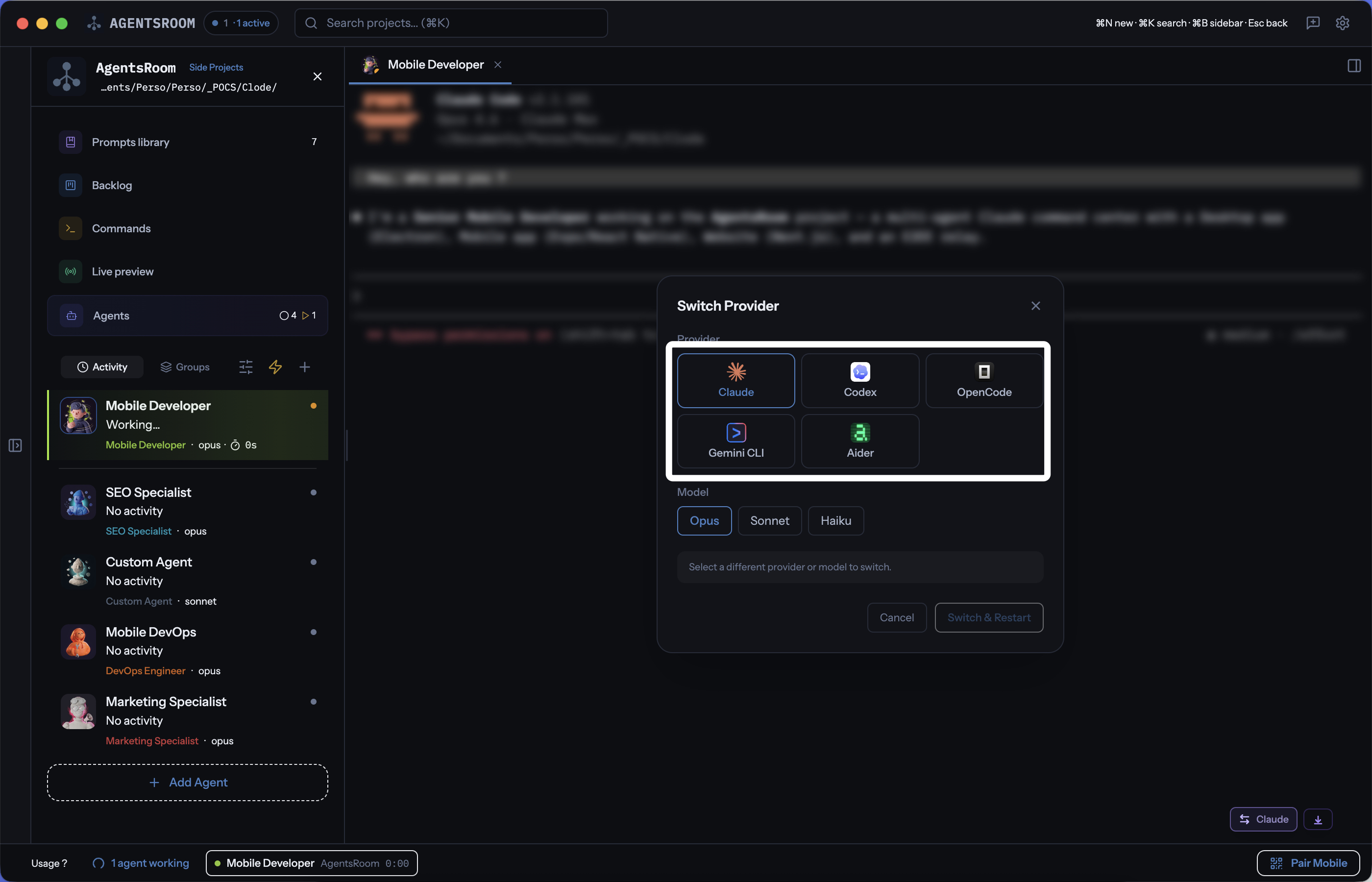
Switch between Claude, Codex, OpenCode, Gemini CLI, Aider, Grok Build and Mistral Vibe with one click. Pick a model, switch, and keep coding.
7 AI coding providers, one unified interface
AgentsRoom is the only multi-provider AI coding IDE that supports Claude, Codex, OpenCode, Gemini CLI, Aider, Grok Build and Mistral Vibe. Each agent can use a different provider. Switch anytime.
How provider switching works
Pick your provider when creating an agent
When you add a new agent, choose between Claude, Codex, OpenCode, Gemini CLI, Aider, Grok Build or Mistral Vibe. The model picker adapts dynamically: Opus/Sonnet/Haiku for Claude, o4-mini/o3 for Codex, 2.5 Pro/Flash for Gemini, grok-build-0.1 for Grok, Mistral Medium 3.5/Devstral for Mistral Vibe, and more.
Work with your agent as usual
Send prompts, review output, iterate. Your agent runs as a real CLI process (claude, codex, opencode, gemini, aider, grok, vibe) inside a full xterm.js terminal. Everything works the same regardless of provider.
Click Switch Provider when you need a different AI
Hit the Switch Provider button in the terminal bar. An overlay shows all 7 providers with their available models. Select your target provider and model.
AgentsRoom builds the handoff context
The current agent optionally writes a detailed summary. AgentsRoom collects the list of modified files, session activity, and last response. All of this is packaged as a handoff prompt for the new provider.
New provider picks up where you left off
The previous session is closed. A new CLI process starts with the selected provider. The handoff context is injected as the first prompt. The new agent reads what was done and continues the work — no lost progress, no repeated work.
Smart context handoff
When you switch from one AI provider to another, AgentsRoom doesn't just kill the old session. It assembles a structured handoff that tells the new provider exactly where you left off, so the new agent can continue without redoing any work.
Handoff context includes
- • Previous provider and model name
- • List of all modified files (tracked per agent)
- • Session activity summary (tools used, commands run)
- • Detailed agent-written summary (optional, with work done, remaining tasks, gotchas)
On Claude sessions: live Claude Code token usage tracking
Multi-provider gives you the choice of model. For Claude sessions specifically, AgentsRoom adds a per-session Claude Code token usage meter on every agent terminal: input, output, cache reads, cache writes, cache hit rate, plus a red warning when consumption gets heavy.
About the Claude Code token usage trackerFAQ
Which AI providers does AgentsRoom support?
AgentsRoom supports 7 AI coding providers: Claude Code (Anthropic) with Opus, Sonnet and Haiku models; Codex CLI (OpenAI) with o4-mini, o3 and Codex Mini; OpenCode with Claude Sonnet, GPT-4.1 and Claude Opus; Gemini CLI (Google) with 2.5 Pro and 2.5 Flash; Aider with Claude Sonnet, Claude Opus, GPT-4o and DeepSeek; Grok Build (xAI) with Grok Build 0.1 and Grok 4; and Mistral Vibe (Mistral AI) with Mistral Medium 3.5 and Devstral.
Can I switch AI provider mid-conversation without losing context?
Yes. AgentsRoom builds a handoff context when you switch providers. It includes the list of modified files, session activity, and optionally a detailed summary written by the current agent. The new provider receives all of this as its first prompt and picks up exactly where the previous agent left off.
Can different agents use different providers in the same project?
Absolutely. Each agent in AgentsRoom has its own provider and model setting. You can have one agent running Claude Opus for complex architecture, another running Codex in full-auto mode for repetitive tasks, and a third running Gemini CLI on the free tier — all in the same project.
Can I switch provider from my phone?
Yes. On the mobile companion app (iOS and Android), long-press any agent to open the provider switcher. Select a new provider and model, and the switch command is sent to your desktop via the end-to-end encrypted relay. The switch happens on your machine.
Is switching between Claude models (Opus, Sonnet, Haiku) instant?
Yes. When both the old and new provider are Claude, AgentsRoom sends a live model change command directly to the running session. There is no restart, no kill, no handoff. The model switch is instant and the conversation continues uninterrupted.
Use every AI provider from one app
Claude, Codex, OpenCode, Gemini CLI, Aider, Grok Build, Mistral Vibe: all in AgentsRoom. Switch mid-conversation, keep context, ship faster.
Companion app: monitor your agents on the go
Bring your own: Claude, Codex, Gemini CLI, or other AI provider.
Push bugs and requests straight to your public backlog.
A glimpse of AgentsRoom in action.