Dev Terminals
para todos tus servicios
Tu proyecto tiene un backend, un frontend, una app móvil, un servidor relay. Antes abrías 4 pestañas de terminal y escribías cada comando de inicio a mano. Ahora pulsas un botón.
Y la parte más singular: con la app móvil iOS y Android, disparas tus comandos de forma remota en tu ordenador. Levanta tu sitio en localhost desde el metro, el gimnasio o una cafetería, y luego ábrelo en tu teléfono por 4G/5G a través del túnel de vista previa en vivo integrado.
Gestiona varios terminales a la vez: paneles divididos con drag-and-drop, disposiciones verticales y horizontales, y una ventana completamente independiente que puedes mover a una pantalla de supervisión dedicada para tus agentes, logs y builds.
Dev Terminals es mucho más que un emulador de terminal. Es un verdadero gestor de comandos por proyecto, diseñado para reemplazar la jungla de pestañas de iTerm2, Warp, Ghostty, Kitty, Alacritty y Terminal.app que abres cada mañana. Cada proyecto tiene su propia lista de comandos: servidor de desarrollo, backend, bundler móvil, worker, base de datos, scripts internos. Los nombras una vez y los lanzas para siempre.
La UX y la UI están llevadas al límite de forma deliberada para que gestionar comandos sea lo más rápido posible. Cada comando recuerda su nombre, su comando shell, su directorio de trabajo (relativo a la raíz del proyecto), su categoría de framework (React, Next.js, Django, Rails, Go, Rust, Docker…) y su tipo (proceso de larga duración o snippet puntual). Los comandos activos suben a la parte superior de la lista, y los iconos de colores de cada framework te permiten identificar de un vistazo tu frontend React, tu backend Django y tus servicios Docker.
La gran ventaja de un terminal integrado dentro de AgentsRoom es que los comandos se ejecutan en el contexto exacto de tu proyecto: la misma ruta, el mismo entorno, el mismo cwd. Cero fricción, cero cd interminables, cero confusión entre proyectos. Y como todo vive junto a tus agentes de IA Claude, Codex y Antigravity, dejas de hacer malabares entre quince herramientas distintas solo para enviar código.
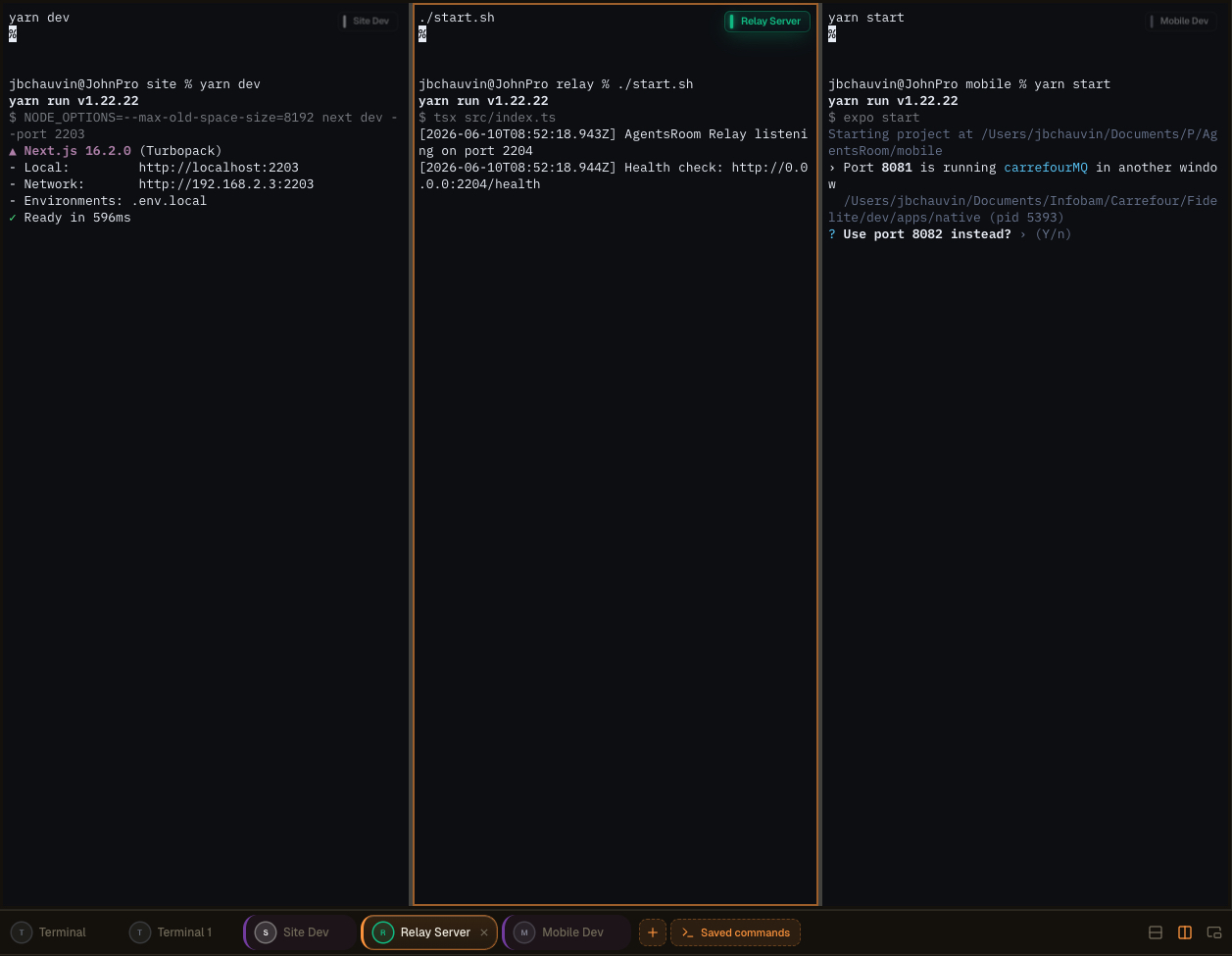
Disposición de terminales en paneles múltiples en AgentsRoom: divide tus terminales, desacóplalos a una segunda pantalla y supervisa agentes, logs y builds en paralelo.
Un terminal integrado de verdad, no un juguete
Cada comando abre un terminal xterm.js completo con colores ANSI, scrollback, enlaces clicables, redimensionado de PTY y soporte Unicode. No es un visor de logs falso: es un pseudo-terminal real, idéntico al que obtienes en iTerm2 o Terminal.app, pero gestionado para ti.
El estado de cada proceso se muestra en vivo: en ejecución, arrancando, detenido o caído. Cuando un servidor de desarrollo se cae, lo ves de inmediato. Un clic para reiniciar. Y cuando necesitas varios terminales en paralelo (backend + frontend + móvil + relay), el botón global 'Iniciar todo' lanza todos los procesos de larga duración a la vez, en paralelo, sin escribir nada.
Los comandos se agrupan en carpetas, se reordenan con el ratón y se almacenan en `.agentsroom/commands.json` en la raíz de tu proyecto. Commitea este archivo: todo tu equipo hereda la misma configuración de terminal. Los comandos personales (scripts de depuración locales, variables de entorno privadas) van a `commands-personal.json`, añadido automáticamente al `.gitignore` dentro de `.agentsroom`. Nadie tiene que volver a escribir `yarn dev --port 2203` de memoria al incorporarse a un nuevo repo.
Por último, todo está unificado: tus agentes de IA, tus terminales, tus prompts, tu backlog y tu vista previa en vivo conviven en la misma ventana. Ahorras una cantidad enorme de tiempo al eliminar el ir y venir entre AgentsRoom, tu emulador de terminal, tu IDE y tu navegador. Una sola pantalla, todo a un clic de distancia.
Comandos independientes y configuración multi-pantalla
Los Dev Commands ahora pueden desacoplarse completamente en una ventana independiente, separada de la interfaz principal de AgentsRoom. Extrae tus terminales y colócalos donde mejor trabajes: una segunda pantalla, un ultrawide, o un monitor vertical dedicado a la supervisión, logs, builds y agentes de IA.
Una pantalla vertical en un lado se convierte en un panel en vivo para todos tus procesos en ejecución. Mantén tu editor y tus agentes en la ventana principal, y observa cada servidor, cada build y cada log en tiempo real en el panel de al lado. Sin alt-tab, sin perder el contexto.
Mejor organización del espacio de trabajo
Libera tu ventana principal para el código y los agentes. Los terminales desacoplados viven por su cuenta, así tu superficie de desarrollo se mantiene limpia y enfocada en lugar de comprimida en un solo panel.
Disposición multi-pantalla optimizada
Coloca la ventana desacoplada en una segunda pantalla o en un monitor vertical. La salida de tus builds, los servidores de desarrollo y los logs de los agentes tienen una pantalla dedicada mientras sigues programando en la principal.
Supervisión en tiempo real
Mantén una vista permanente de tus agentes y comandos. Observa cómo los procesos arrancan, transmiten y fallan en directo en una pantalla lateral, y reacciona en el momento en que algo va mal.
Mayor productividad
Los desarrolladores que gestionan varios proyectos o entornos dejan de cambiar de contexto. Todo lo que necesita supervisión permanece visible, así entregas más rápido con menos interrupciones.
Disposiciones avanzadas de terminales, creadas con drag-and-drop
Ahora puedes combinar varios terminales en el mismo panel mediante una interfaz de drag-and-drop extremadamente intuitiva. Coge un terminal, suéltalo donde quieras y AgentsRoom construye la disposición por ti. Sin archivos de configuración, sin atajos de teclado que memorizar.
Compone el espacio de trabajo que se adapta a la tarea que tienes delante:
Divisiones verticales
Coloca dos terminales uno al lado del otro para ver tu backend y tu frontend al mismo tiempo.
Divisiones horizontales
Apila terminales uno encima del otro para mantener los logs y un servidor en ejecución en la misma columna.
Disposiciones combinadas complejas
Mezcla divisiones verticales y horizontales para crear una cuadrícula completa de terminales adaptada a tu stack.
Reorganiza en segundos
Arrastra cualquier terminal a una nueva posición y la disposición se reorganiza al instante. Reestructura toda tu configuración en pocos segundos.
Supervisa todo a la vez
Mantén varios agentes, servidores, logs y comandos visibles simultáneamente, todo dentro de un solo panel.
Sin configuración compleja, sin necesidad de aprender tmux. La experiencia está diseñada para ser inmediata y natural, así dedicas tu tiempo a programar en lugar de ordenar ventanas.
Más formas de controlar tus terminales
La ventana desacoplable, la generación de comandos con IA y el lanzamiento remoto desde el móvil forman parte de la misma experiencia Dev Terminals. Aquí tienes el recorrido original.
Gestor de terminales de AgentsRoom: terminal desacoplado en una segunda pantalla, comandos lanzados remotamente desde el móvil, terminal xterm.js integrado por proyecto.
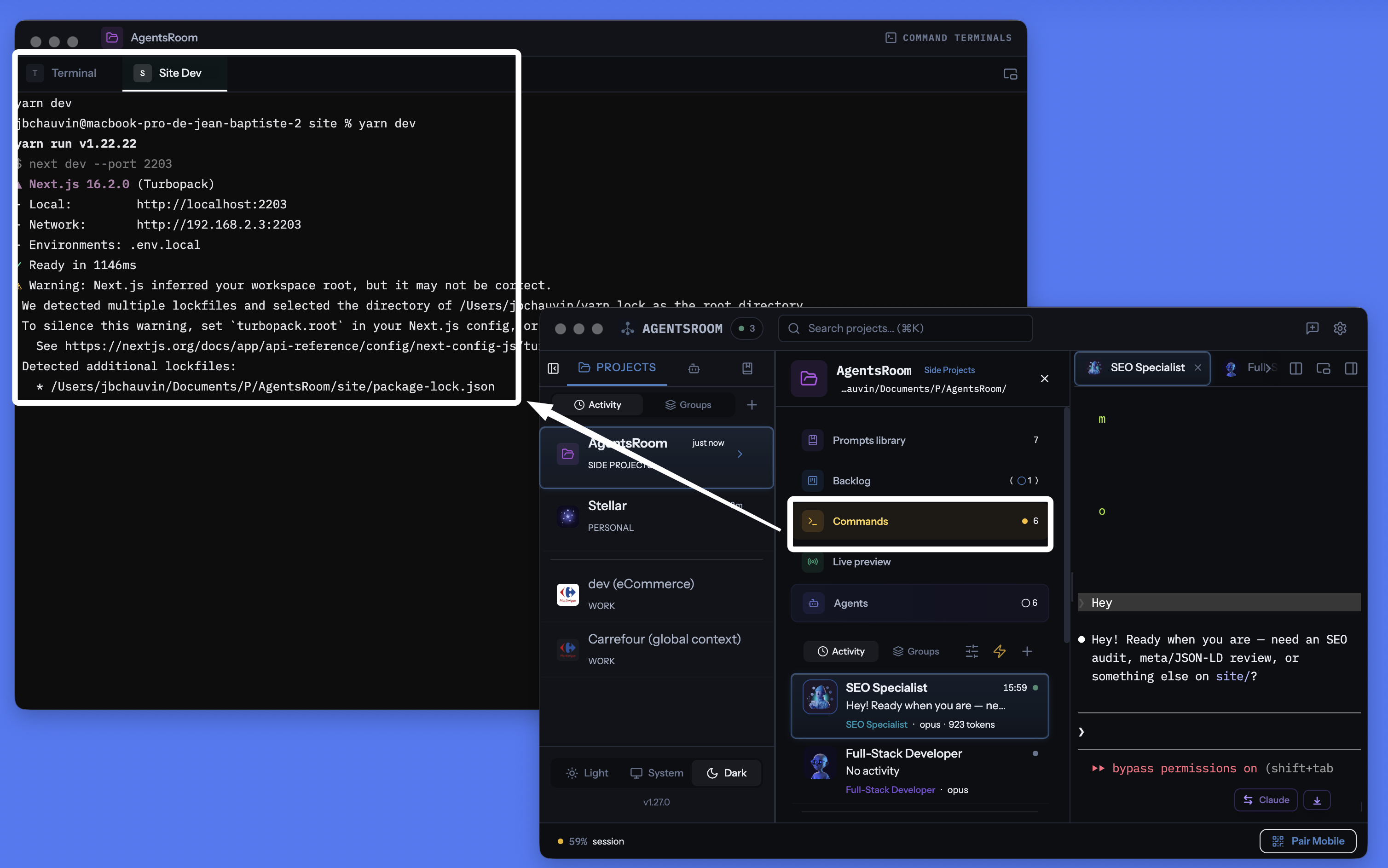
Gestor de terminales por proyecto de AgentsRoom: ventana desacoplable, terminal integrado por comando, comandos generados por IA, todo en el mismo lugar que tus agentes.
Gestiona cada servicio, cada comando
Procesos de larga duración, scripts rápidos, comandos de build. Todo organizado por proyecto, con seguimiento de estado y asistencia de IA.
Alcance por proyecto
Cada proyecto almacena sus propios comandos en .agentsroom/commands.json. Cambias de proyecto, obtienes comandos distintos. Sin confusión.
Inicia todo a la vez
Un solo botón lanza cada proceso de tu proyecto. Backend, frontend, móvil, relay: todos arrancados en paralelo.
Lanzamiento remoto desde el móvil
Dispara comandos desde la app iOS o Android: los terminales se abren en tu ordenador y ves la salida en vivo transmitida a tu teléfono por 4G, 5G o Wi-Fi.
Ventana de terminal desacoplable
Desacopla la sección de terminales en una ventana flotante independiente. Colócala en un segundo monitor para vigilar tus servidores mientras programas en la ventana principal.
Generación de comandos con IA
Haz clic en la varita mágica. Claude analiza la estructura de tu proyecto y genera todos los comandos de inicio, rutas y categorías por ti.
Estado de procesos en vivo
Ve qué servicio está en ejecución, arrancando, detenido o caído. Los códigos de salida se muestran cuando un proceso falla. Reinicia con un clic.
Procesos y snippets
Los servicios de larga duración son procesos. Los scripts de build y los comandos de deploy puntuales son snippets. Ambos conviven en el mismo panel.
Terminal completo por proceso
Cada proceso abre un terminal xterm.js real con colores, scroll y enlaces clicables. Interactúa con la salida de tu proceso directamente.
Conectado a la vista previa de localhost
Lanza tu sitio en localhost desde un terminal de AgentsRoom y accede a él desde el exterior a través del túnel HTTPS integrado. Pruébalo en tu teléfono por 4G/5G sin desplegar.
Más de 30 iconos de frameworks
React, Next.js, Django, Rails, Go, Rust, Docker, Expo, NestJS, Spring y más. Cada comando muestra el icono y el color de su framework.
Almacenado en git
Los comandos se guardan en .agentsroom/commands.json, commiteado en tu repositorio. Los comandos personales van a commands-personal.json, ignorado automáticamente por git.
Terminales y agentes de IA juntos
Tus terminales, tus agentes Claude Code, tus prompts, tu backlog y tu vista previa en vivo comparten la misma app. Deja de perderte entre diez herramientas distintas.
Lanza terminales en tu ordenador desde tu teléfono
Es probablemente la funcionalidad más singular de AgentsRoom. Desde la app móvil iOS o Android, recorres la lista de comandos de cualquier proyecto y lanzas el que quieras con un toque. El comando no se ejecuta en tu teléfono: se ejecuta en tu ordenador, en el directorio de trabajo correcto, en un terminal PTY real. La salida se transmite en vivo al móvil a través del relay cifrado de extremo a extremo.
En concreto: estás en el metro, en el gimnasio o al otro lado del mundo. Quieres levantar tu sitio local para revisar un diseño, o reiniciar un worker que se cayó mientras estabas fuera. Abres AgentsRoom móvil, tocas 'yarn dev', el servidor arranca en tu ordenador en casa. Incluso puedes interactuar con el teclado del terminal desde el teléfono.
Combinado con el túnel de vista previa de localhost integrado, incluso puedes abrir tu sitio local en el navegador móvil, por 4G o 5G, con cero despliegues. Programas, arrancas, pruebas y validas, todo desde tu bolsillo. AgentsRoom convierte literalmente tu ordenador en un servidor de desarrollo controlado a distancia.
Recibe notificaciones cuando un comando largo finaliza
Una compilación, un conjunto de pruebas o una imagen de Docker pueden tardar varios minutos. Cambias a otra cosa y la terminal se queda ahí terminada durante diez minutos antes de que te des cuenta. Activa la campana en una pestaña de terminal y AgentsRoom te avisa en el segundo en que el comando ha terminado, con el nombre del comando y cuánto tiempo estuvo en ejecución.
La campana vive en la pequeña etiqueta flotante en la parte superior derecha de cada panel de terminal. Un clic la activa, un clic la desactiva, y se mantiene activa para esa terminal, así que cada ejecución de la misma compilación reporta de vuelta. Hacer clic en la notificación abre esa pestaña de terminal exacta.
Una campana por terminal
Actívala solo donde la necesites. No hay nada global que configurar y no hay alertas para las terminales que nunca preguntaste.
Solo comandos largos
Cualquier cosa por debajo de un minuto cuenta como uso interactivo y permanece en silencio, así que cd, ls y git status nunca te molestan. Activa la campana mientras un comando ya está en ejecución y ese siempre reporta de vuelta, sin importar su longitud.
Nunca mientras estés mirando
Si esa terminal ya está en pantalla y la aplicación tiene el foco, no aparece nada. La alerta existe para el momento en que te alejaste, no para el momento en que estás leyendo la salida.
macOS, Windows y Linux
La detección lee el proceso en primer plano de la terminal, así que no se agrega nada a tu configuración de zsh, bash, fish o PowerShell y funciona con el shell que ya usas. Las alertas también llegan a la aplicación de iOS y Android cuando estás lejos de tu máquina.
Tus agentes de IA reciben el mismo trato: Notificaciones de agentes de IA.
Modo desacoplado: tus terminales en un segundo monitor
El panel de terminales se puede desacoplar en una ventana flotante independiente. Arrástralo a una segunda pantalla y los logs de tu backend, frontend y bundler móvil permanecen visibles en todo momento mientras programas en la ventana principal de AgentsRoom. Es exactamente lo que hacen los desarrolladores serios con tmux o iTerm2 en modo mosaico, salvo que en AgentsRoom no hay nada que configurar.
La ventana desacoplada conserva todas las funcionalidades: lanzar, detener, reiniciar, IA, categorías, multiproyecto. Puedes seguir escribiendo en el terminal de la pantalla secundaria mientras un agente Claude trabaja en la ventana principal. Cero alt-tab, cero pérdida de contexto, cero configuración oscura.
Una alternativa moderna a todos los terminales que has usado
AgentsRoom Dev Terminals es la mejor opción para trabajar en proyectos frente a los emuladores de terminal clásicos. Estas son las herramientas que nuestros usuarios ya han reemplazado por él:
iTerm2 ha sido el referente de macOS durante años y Terminal.app viene preinstalado en todos los Mac. Warp popularizó los bloques de comandos y la IA integrada. Ghostty es rápido y nativo. Kitty usa aceleración GPU. Alacritty apuesta por el minimalismo. WezTerm es configurable en Lua. Hyper está construido sobre tecnología web. Tabby es multiplataforma. Wave Terminal y Windows Terminal impulsan flujos de trabajo modernos con múltiples paneles. Todos son productos excelentes. AgentsRoom no compite en velocidad de renderizado: ofrece una propuesta de valor diferente, un terminal integrado en tu entorno de desarrollo, con alcance por proyecto, sincronizado con tus agentes de IA y controlable desde tu teléfono.
Todo lo que necesita un terminal moderno, en una sola ventana
AgentsRoom no es un emulador de terminal más. Reúne todo lo que necesita un flujo de trabajo de desarrollo moderno y lo pone detrás de una sola interfaz:
Si ya gestionas tus proyectos con varias pestañas de terminal llamadas 'backend', 'frontend', 'mobile', 'relay', ahorrarás tiempo con Dev Terminals. Si usas tmux o zellij para organizar tus sesiones, encontrarás la misma idea, sin ningún archivo de configuración que escribir.
Cómo funciona
Abre tu proyecto
En la vista de proyecto, los Dev Terminals aparecen junto a tus agentes y prompts. Si no existen comandos todavía, se crea automáticamente un terminal por defecto en la raíz del proyecto.
Añade tus comandos
Haz clic en + para añadir un comando. Define el nombre, el comando shell, el directorio de trabajo (relativo a la raíz del proyecto) y elige una categoría. Selecciona si es un proceso de larga duración o un snippet puntual.
.agentsroom/commands.jsonO deja que la IA lo haga
Haz clic en el icono de la varita mágica. Claude analiza la estructura de tu proyecto (archivos package.json, Dockerfiles, Makefiles) y genera todos los comandos con las rutas y categorías correctas. Revisa, ajusta si es necesario y guarda.
Inicia todo
Pulsa el botón Play global para lanzar todos los procesos a la vez. O inícialos individualmente. Cada proceso abre un terminal real donde puedes ver los logs e interactuar con el servicio.
Desacopla el panel
Haz clic en el icono de desacople: la sección de terminales se abre en una ventana flotante independiente que puedes colocar en un segundo monitor. Tus servidores permanecen visibles mientras programas en la ventana principal.
Contrólalo desde tu teléfono
Abre AgentsRoom en iOS o Android, elige tu proyecto, toca un comando: se lanza de forma remota en tu ordenador y ves su salida en vivo desde tu teléfono por 4G, 5G o Wi-Fi a través del relay cifrado de extremo a extremo.
Iconos para cada stack
Cada comando muestra el icono y el color de su framework. Identifica de un vistazo tu frontend React, tu backend Django y tus servicios Docker.
Configuración de comandos con IA
¿Empezando un nuevo proyecto? No configures cada comando manualmente. Haz clic en la varita mágica y Claude analiza la estructura de tu repositorio para detectar cada servicio, cada script de build y cada comando de inicio. Genera la lista completa de comandos con rutas, categorías e iconos correctos. Revisas el resultado, ajustas si es necesario y guardas. La configuración completa tarda segundos en lugar de minutos.
Prompt por defecto
"Analiza la estructura de mi proyecto y genera todos los comandos de inicio para cada servicio, cada subproyecto y cada paso de build. Incluye el directorio de trabajo correcto, el comando shell y la categoría de framework apropiada para cada entrada."
¿Quieres que tus agentes inicien el dev server por sí mismos ?
AgentsRoom MCP expone los mismos Terminal Commands que guardas aquí como herramientas MCP. Tus agentes IA pueden llamar commands_list, commands_run y commands_create vía el servidor Terminal Commands MCP, e iniciar tu dev server, API o worker solos.
Es solo uno de los cuatro servidores AgentsRoom MCP. Backlog MCP, Prompt Library MCP y Browser MCP convierten el resto del IDE AgentsRoom en un workspace pilotable por agentes. Manual cuando quieras, automatizado cuando no.
Descubre AgentsRoom MCPFAQ
¿En qué se diferencia de iTerm2, Warp, Ghostty o Terminal.app?
iTerm2, Warp, Ghostty, Kitty, Alacritty, WezTerm, Hyper y Terminal.app son todos excelentes emuladores de terminal. AgentsRoom Dev Terminals no intenta reemplazarlos para el trabajo general del sistema: es un gestor de terminales con alcance por proyecto. Los comandos se guardan por proyecto, se lanzan con un clic, se controlan desde el móvil y conviven junto a tus agentes de IA. Si trabajas principalmente en tus propios proyectos, pasarás el 90% de tu tiempo de terminal dentro de AgentsRoom sin abrir iTerm2.
¿Los terminales de AgentsRoom usan realmente xterm.js?
Sí. Cada comando abre un terminal xterm.js real respaldado por un pseudo-TTY del lado de Electron. Obtienes colores ANSI, scrollback, enlaces clicables, entrada de teclado, redimensionado dinámico y soporte Unicode, exactamente como en un emulador de terminal nativo.
¿Cómo funciona el lanzamiento de comandos a distancia desde el móvil?
Desde la app iOS o Android, eliges un proyecto y un comando. La app móvil envía un mensaje cifrado de extremo a extremo a través del relay WebSocket. La app de escritorio recibe el comando, crea un PTY real en tu ordenador en el directorio de trabajo correcto y transmite la salida en tiempo real de vuelta al móvil. El comando se ejecuta físicamente en tu ordenador, no en tu teléfono. Perfecto para reiniciar un servidor o un worker mientras te desplazas.
¿El modo desacoplado funciona en varias pantallas?
Sí. Haz clic en el icono de desacople: la sección Dev Terminals se abre en una ventana flotante independiente que puedes arrastrar a un segundo monitor. Tus logs y servidores permanecen visibles de forma permanente mientras programas en la ventana principal de AgentsRoom.
¿Cuál es la diferencia entre un proceso y un snippet?
Un proceso es un servicio de larga duración como un servidor de desarrollo, un backend o un vigilante de archivos. Se mantiene activo hasta que lo detienes o se cae. Un snippet es un comando puntual como un script de build, una migración de base de datos o un paso de despliegue. Ambos se almacenan en el mismo panel, pero solo los procesos se inician con el botón 'Iniciar todo'.
¿Se comparten los comandos con mi equipo?
Sí. Los comandos públicos se almacenan en .agentsroom/commands.json dentro del directorio de tu proyecto. Commitea este archivo y cualquiera que haga pull del repositorio obtiene los mismos comandos. Los comandos personales (como scripts de depuración locales) van a commands-personal.json, que se añade automáticamente a .agentsroom/.gitignore.
¿Cómo funciona la generación de comandos con IA?
Cuando haces clic en la varita mágica, AgentsRoom lanza una instancia de Claude que lee la estructura de tu proyecto. Detecta archivos package.json, Dockerfiles, Makefiles y otros archivos de configuración para identificar cada servicio y su comando de inicio. El resultado es una lista estructurada de comandos con rutas, categorías y nombres sugeridos. Revisas la lista antes de guardar.
¿Puede AgentsRoom notificarme cuando un comando de terminal finaliza?
Sí. Cada pestaña de terminal lleva una campana en su etiqueta flotante. Actívala y AgentsRoom envía una notificación de escritorio en el momento en que el comando en ejecución regresa al prompt, con el nombre del comando y su duración, además de un aviso a la aplicación de iOS y Android cuando estás lejos de tu máquina. Hacer clic en la notificación abre esa pestaña de terminal.
¿Cómo sabe AgentsRoom que un comando ha terminado si la terminal permanece abierta?
Una pestaña de terminal es un shell de larga duración, así que nada sale cuando un comando termina. AgentsRoom observa el grupo de procesos en primer plano de la terminal en su lugar: cuando regresa al shell mismo, el prompt vuelve y el comando ha terminado. No se escribe nada en tu configuración de shell, por eso se comporta igual con zsh, bash, fish o PowerShell, y funciona para comandos que escribiste a mano así como para los guardados.
¿Recibiré una notificación por cada comando que escriba?
No. Solo los comandos que se ejecutaron durante más de un minuto generan una alerta, así que el uso interactivo rutinario permanece en silencio. Una excepción deliberada: si activas la campana mientras un comando ya está en ejecución, ese comando siempre reporta de vuelta sin importar cuánto tiempo tome. Tampoco se activa nada cuando la terminal ya está en pantalla y la aplicación tiene el foco.
¿Puede un comando estar disponible en todos mis proyectos?
Sí. Al guardarlo eliges dónde vive: solo este proyecto o global. Un comando global pertenece a tu cuenta y aparece en todos los proyectos que abres, que es lo que quieres para un túnel, un stack Docker compartido o un demonio de base de datos que lanzas siempre. El modal de Comandos tiene barra de búsqueda y filtro de alcance (Todo / Este proyecto / Global) para que una lista larga siga siendo legible.
¿Pueden mis agentes IA lanzar estos comandos por sí mismos?
Sí, con AgentsRoom MCP. Los agentes llaman a commands_list para ver todo lo disponible aquí (comandos del proyecto y globales, cada uno con su alcance), commands_run para arrancar uno en una pestaña de terminal real que puedes ver y detener, y commands_create para guardar uno nuevo. Tienen prohibido lanzar un proceso largo por shell directo: lo que se ejecuta acaba siempre en una pestaña que controlas tú. Un comando terminado se vuelve a ejecutar en su pestaña existente en lugar de abrir una nueva, y commands_stop permite a un agente detener lo que ha lanzado, cerrando la pestaña o enviando Ctrl-C y conservándola para reiniciar un servidor, así que recoge lo que deja en lugar de dejarte pestañas por cerrar. Y cuando la propia sandbox de un agente rechaza un comando, ya no tiene que escribir la línea para que la pegues en otra terminal: llama a commands_propose, el comando aparece en su panel como una tarjeta «¿Ejecutar este comando?» con el motivo por el que no puede ejecutarlo, y un clic en Ejecutar lo lanza en una pestaña de terminal que el propio agente lee después. Nada se ejecuta hasta que tú decides, no existe una opción de «permitir siempre», y el comando no se guarda ni se vuelve a reproducir.
Para profundizar
Demasiadas terminales, demasiados agentes de IA: la deuda cognitiva que te frena (y cómo salir de ella)
Hacer malabares con diez terminales de agentes de IA genera una deuda cognitiva, documental y financiera que te cuesta tiempo y tokens. Recupera el control.
La mejor terminal para agentic coding en 2026: cmux, Warp, tmux y lo que de verdad gana
cmux, Warp, tmux, WezTerm, AgentsRoom: una comparativa honesta de la mejor terminal para agentic coding y vibe coding cuando ejecutas agentes IA en paralelo.
Deja de hacer malabares con pestañas de terminal
Descarga AgentsRoom y lanza todos tus servicios desde un solo panel. Gratis para hasta 2 proyectos.
App complementaria: supervisa tus agentes en movimiento
Usa Claude, Codex, Antigravity CLI u otro proveedor de IA.
Envía bugs y peticiones directamente a tu backlog público.