AgentsRoom为你做的一切
每项功能都旨在节省你的时间并保持控制。在下方浏览全部功能。
观看每项功能的实际效果
下方每项功能都附带一段简短的演示视频。点击任意卡片上的播放按钮即可开始观看。
运行你的代理集群
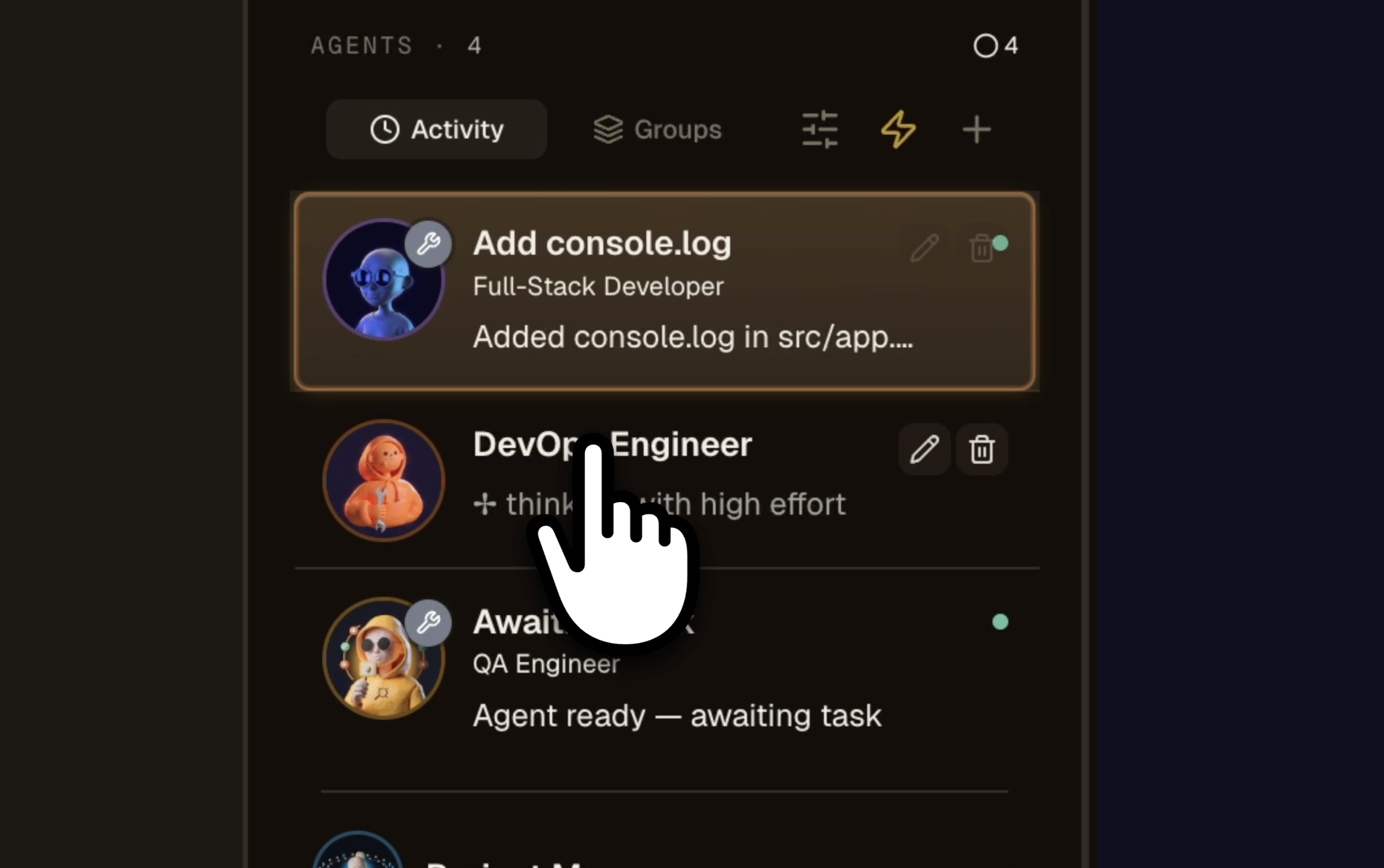
多个项目,多个 AI 代理,一个窗口
用一个可视化驾驶舱,同时在你所有项目上并行驾驭 Claude、Codex、GitHub Copilot CLI、Cursor 以及另外 10 个代理 CLI。角色按颜色编码(DevOps 橙色、Frontend 青色、QA 红色、Architect 蓝色),每张代理卡片上有动态状态点,每个项目都有进行中/已完成计数器,一旦某个代理卡住就闪烁红色标记。你一秒就知道哪个代理在做哪个项目、哪个已完成、哪个在等你回复。再也不用开 12 个终端标签页,再也不用猜自己停在哪里。这正是你的 Claude Code 会话一直应得的多项目、多代理网格。
“找不到我以前的导出文件”
客服聊天“导出功能埋在子菜单里”
公开表单“请加一个深色模式”
降级的工单替你整理用户反馈的想法看板
把客服消息、功能请求和只写了一半的笔记丢进 Radar,它们会按主题分好组、去掉重复、并按提出它们的人数计数后回到你手上。同一份语料可以用四种方式读:主题、影响 / 投入矩阵、机会解决方案树(opportunity solution tree)、语义地图。用户在公开看板上投票和评论,一个 AI 产品经理(Product Manager)代理提议下一张工单,成熟的想法晋升为 backlog 工单,而你不会做的工单则退回去重新变成想法。
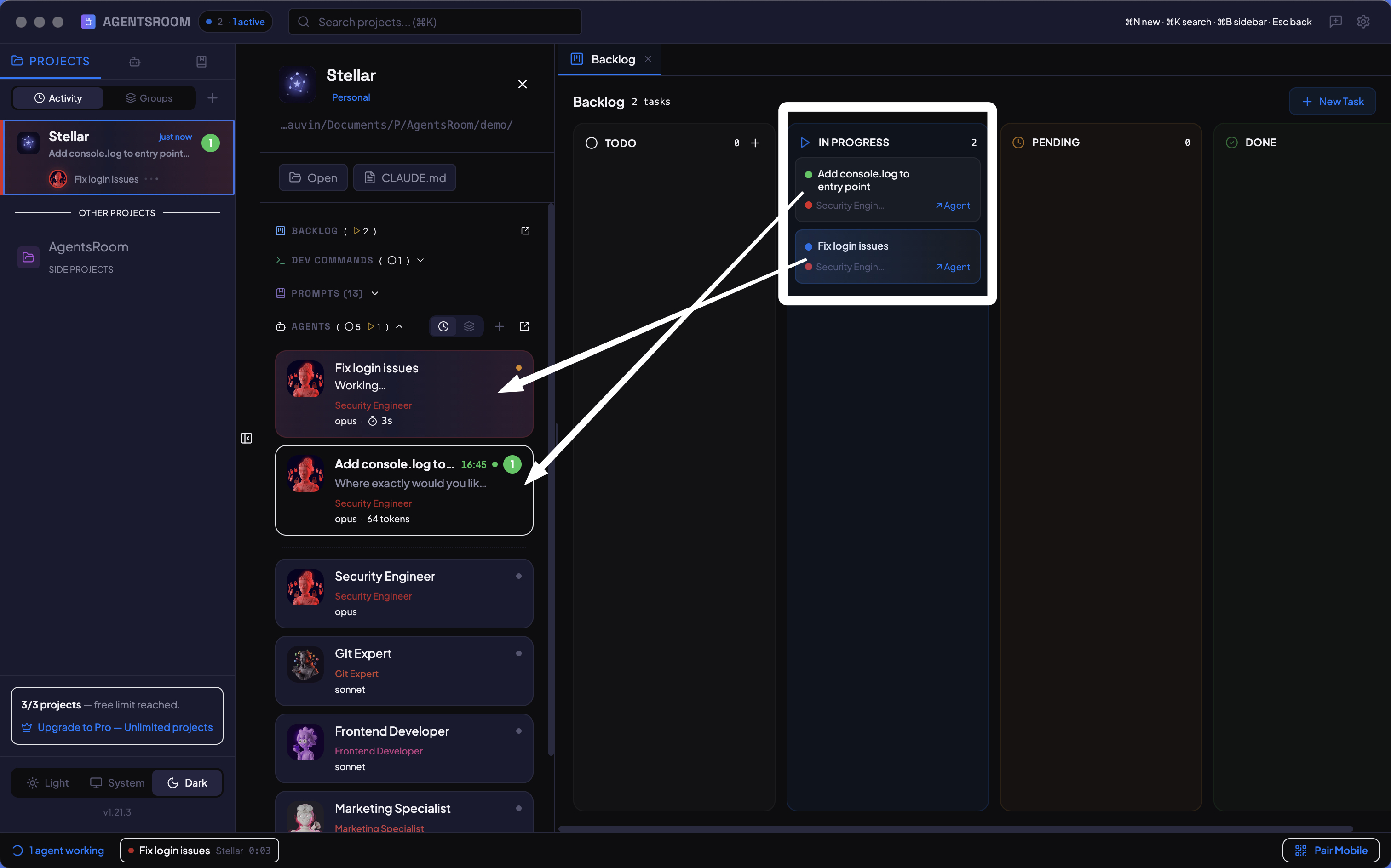
拖动任务,启动代理
AI 代理的 kanban 看板。创建任务,拖动到进行中,代理立即开始工作。可视化跟踪每个功能:谁在做什么,什么已完成,下一步是什么。
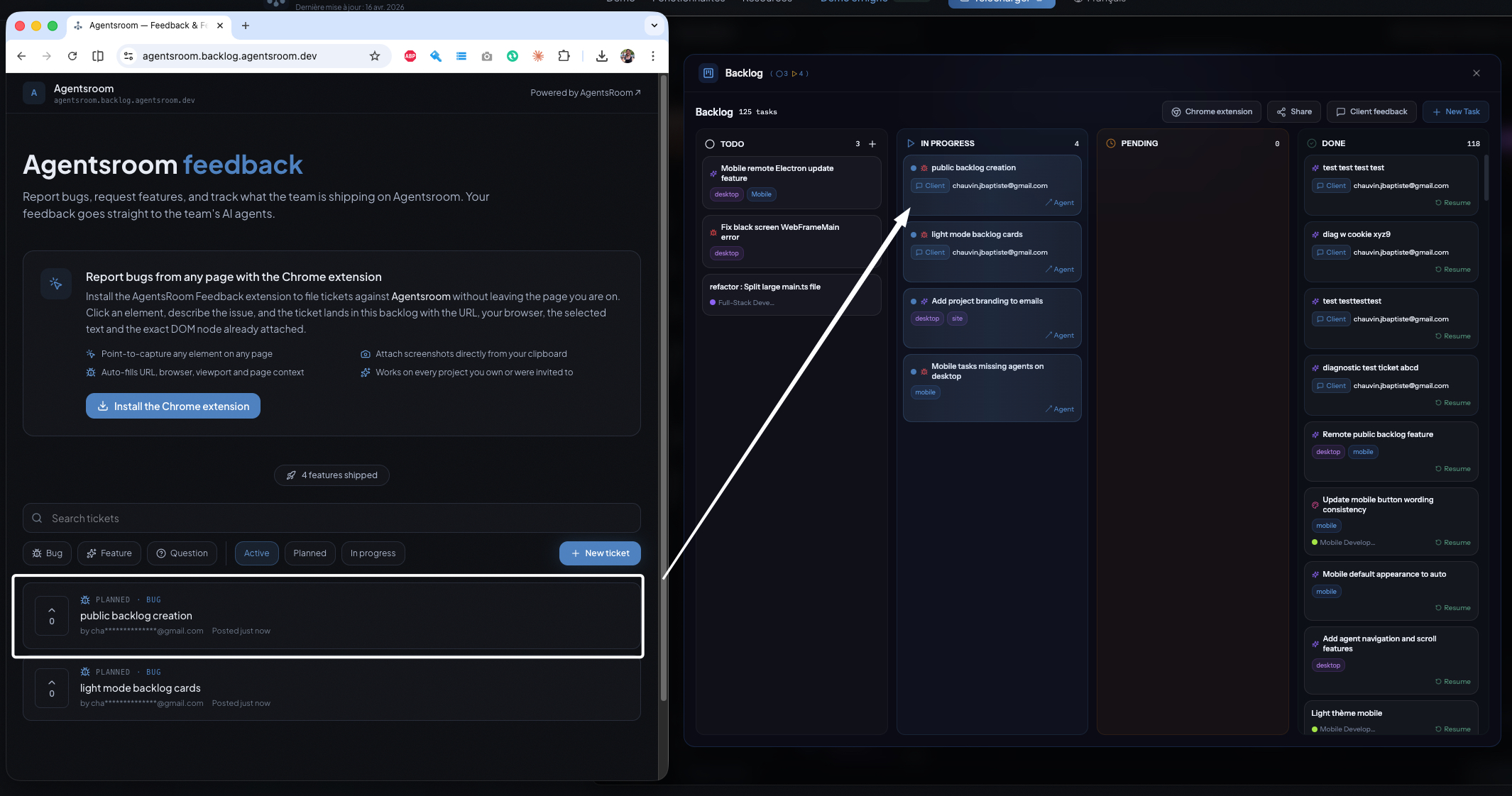
客户驱动 backlog,代理负责交付
将您的项目 backlog 作为公开或私有反馈门户发布。客户提交 bug、申请功能、为工单投票、留下评论,每一个工单都会直接进入您的 AI 代理所执行的同一个 AgentsRoom backlog。反馈驱动的 AI 开发,含嵌入式小组件和 Chrome 扩展程序。
“在个人资料页面某个位置加一个按钮”
梳理这个想法动手开发前,把模糊的反馈梳理成原型
在反馈工单上一键点击,就会派出一个 Product Manager AI 代理,它会读懂你的代码库,并构建一份忠实还原你真实产品的原型,把所要求的改动放进真实场景中。在同一张工单上通过双向对话验证并厘清想法,全部在任何开发开始之前完成。梳理从不启动任务,也从不发送通知。
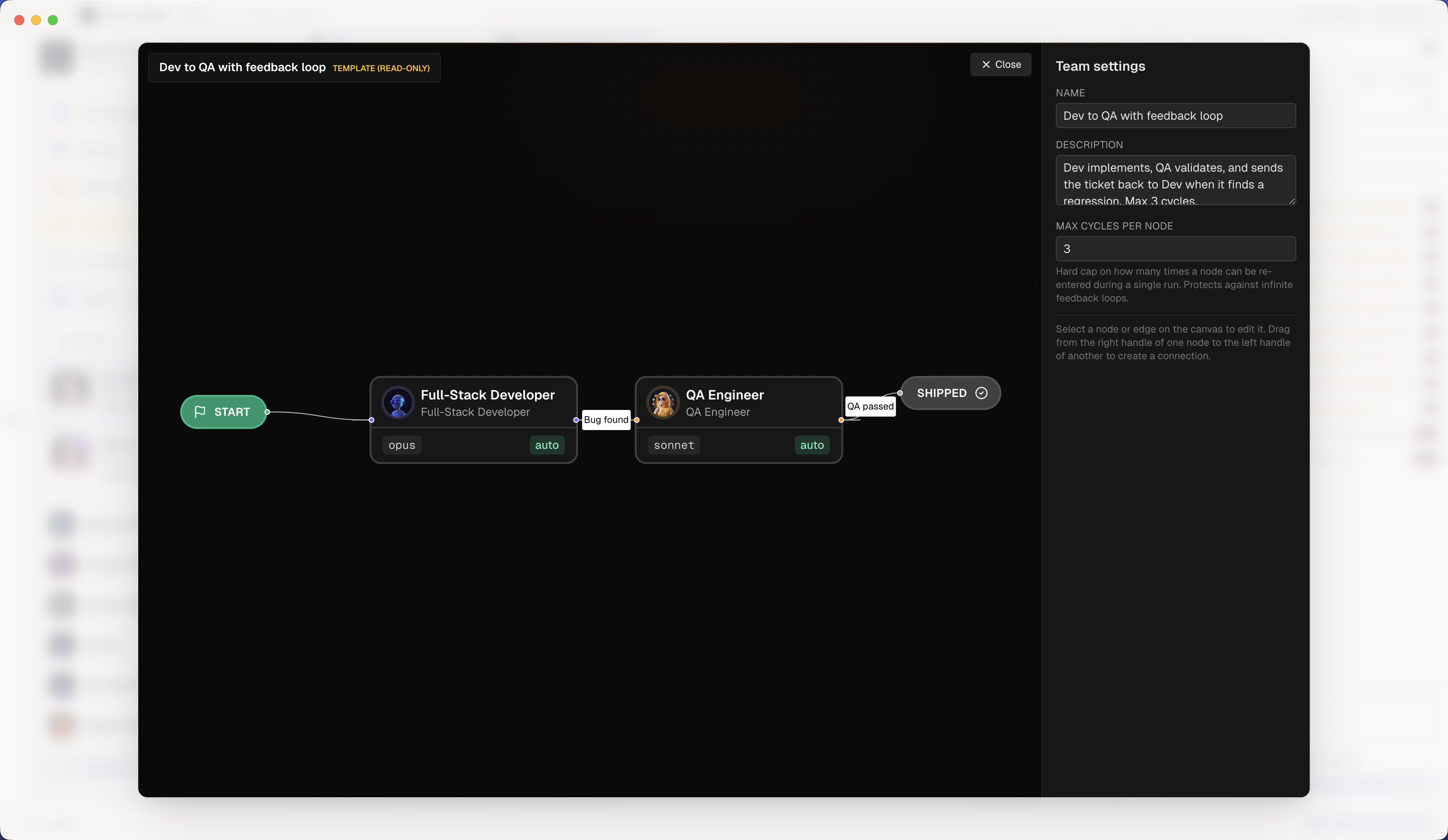
Agent Teams:真正的技术团队,可脚本化
像真实的工程团队一样把 AI 代理串起来。在可视化画布上放置节点(Dev、QA、PM、Security、DevOps),连线即可,AgentsRoom 编排整个交接流程:功能摘要、diff、风险、测试提示。挑选角色的运行方式:一个代理在角色之间变形并保留全部上下文,或者每个角色一个在线代理,边干活边互相交流,方向不限。条件边、反馈循环、最大循环数保护。这是您 AI 开发团队缺失的 n8n 风格工作流编辑器。
收件方忙碌,消息暂存
你的代理在任意 CLI 上互相写信
项目里已保存的代理成为常驻成员,拥有真实的地址和真实的收件箱。任何一个都能写给另一个,无论它跑在哪个 CLI 上,而消息在投递被尝试之前就已经落到磁盘上。离线的代理、崩溃的 CLI 或者一次应用重启都不会弄丢它:它会等待,然后抵达,并附上一份说明它确实被读过的回执。
Agent Morphing:切换角色,保留上下文
随时更改运行中代理的角色。PM 变成全栈开发者再变成 QA,同一会话,完整保留对话上下文:不重开、不用再解释。可变形为 14 个内置角色、The Agency 专家或社区代理中的任何一个,还有面向批判性审查的 fresh eyes 选项,以及记录代理经历过的每个角色的变形轨迹。一个代理,一整支团队,不管您跑的是哪个 CLI 代理。
- 读取 auth/session.ts
- 排除 Cookie 方案
- 尝试令牌刷新
分叉一个代理,保留整段对话
在正在运行的 AI 代理上点一下,就会得到一个已经拥有它整段对话的双胞胎:同样的角色、同样的 CLI、同样的模型、同样的上下文。在 Claude、Codex 和 Grok 上,用的是 CLI 自带的会话分叉;其他地方,双胞胎以新会话启动并拿到父级的转录去读,应用会在屏幕上直说。让两个控制台在各自独立的对话上并行运行,或者在输入框里打开提问气泡,向代理的一份只读副本提问,答案流式返回,而它的终端照常干活,历史也原封不动。
构建、分享和安装 AI 编码代理
AgentsRoom 不是一个助手,而是一整套代理。开始时有 14 个内置角色,从 The Agency 添加专业代理,或者构建您自己的自定义代理及其系统提示。然后通过聊天将代理与队友拖动共享,或将其发布到社区,让每个人一起提升。每个代理都可以与 Claude、Codex、GitHub Copilot CLI、Cursor 或 AgentsRoom 支持的另外 10 个代理 CLI 中的任意一个一起使用。
描述任务,获得合适的代理
不确定该用哪个代理?输入你想做的事,AgentsRoom 就会从你的房间、内置角色或 260 多位目录专家中推荐最合适的代理,每个推荐都附一行理由。一键添加、打开其终端并预填你的任务。
像 cron 一样调度 AI 代理,却无需 cron
定时任务按重复计划运行你的 AI 编程代理,无需编写任何 cron 表达式。编排一个 Claude Code 或 Codex 会话,在每天早上 8 点和傍晚 6 点评审 pull request,每晚扫描崩溃日志,每周一检查依赖,或发布每周 changelog。选择一个频率(每 N 分钟、每小时、每天一个或多个时刻、每周、每月,或跟着你 AI 订阅的配额周期)、一段提示词和一个代理角色。每次运行都会在你的项目中生成一个后台代理,向你发送通知,在下次启动时补跑错过的运行,并保留可重新打开的历史。这是为重复的 AI 开发工作流打造的 cron 替代方案,覆盖 Claude Code、Codex 和 Antigravity,与 provider 无关。
当真的有事情发生时,你的代理已经在跑了
Webhook 触发器让 AI 编程代理按外部事件启动,而不是按时钟。每个触发器都会拿到一个公开 URL 和一个签名密钥,你把它们粘贴进 GitHub、GitLab、Slack、Linear、Sentry 或任何能发 POST JSON 的服务。一个 pull request 被打开,一次构建挂掉,一个崩溃被报上来,而代理已经在读它了。签名会被校验,一个可选的过滤条件决定什么值得一次运行,一个突发上限让话多的服务没法启动二十个代理,而 payload 会变成提示词变量。应用关着时到达的事件会排队,并在下次启动时重放;有好几台机器时,只有一台会取走它。这是给开发者的事件驱动自动化,不必再让轮询循环为「没有」这个答案烧 token。
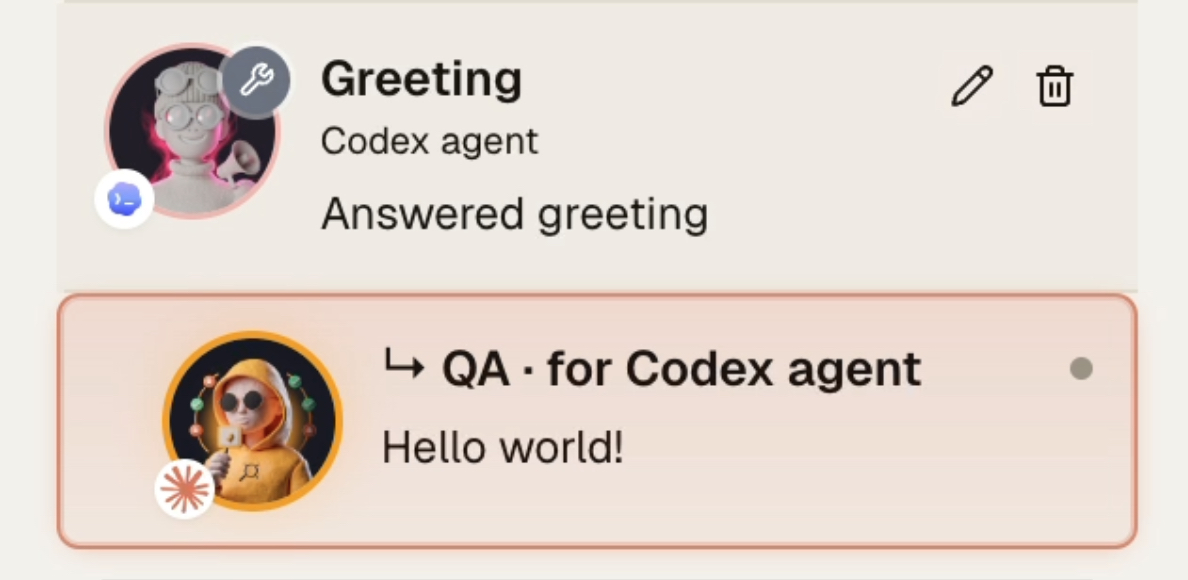
你的开发代理把测试委派给更便宜的 QA 代理
当一个功能完成时,开发代理(Claude Opus、Codex)调用一个 MCP 工具,把验证交接给一个运行在更便宜模型(Claude Haiku、Codex mini)上的临时 QA 代理。QA 代理驾驶内嵌浏览器,断言结果并报告干净的通过或失败。你不再为浏览器点击支付高价,也不再用截图和 DOM dump 撑爆开发代理的上下文。每一步都用对的价格选对的模型。
用你喜欢的方式与代理对话
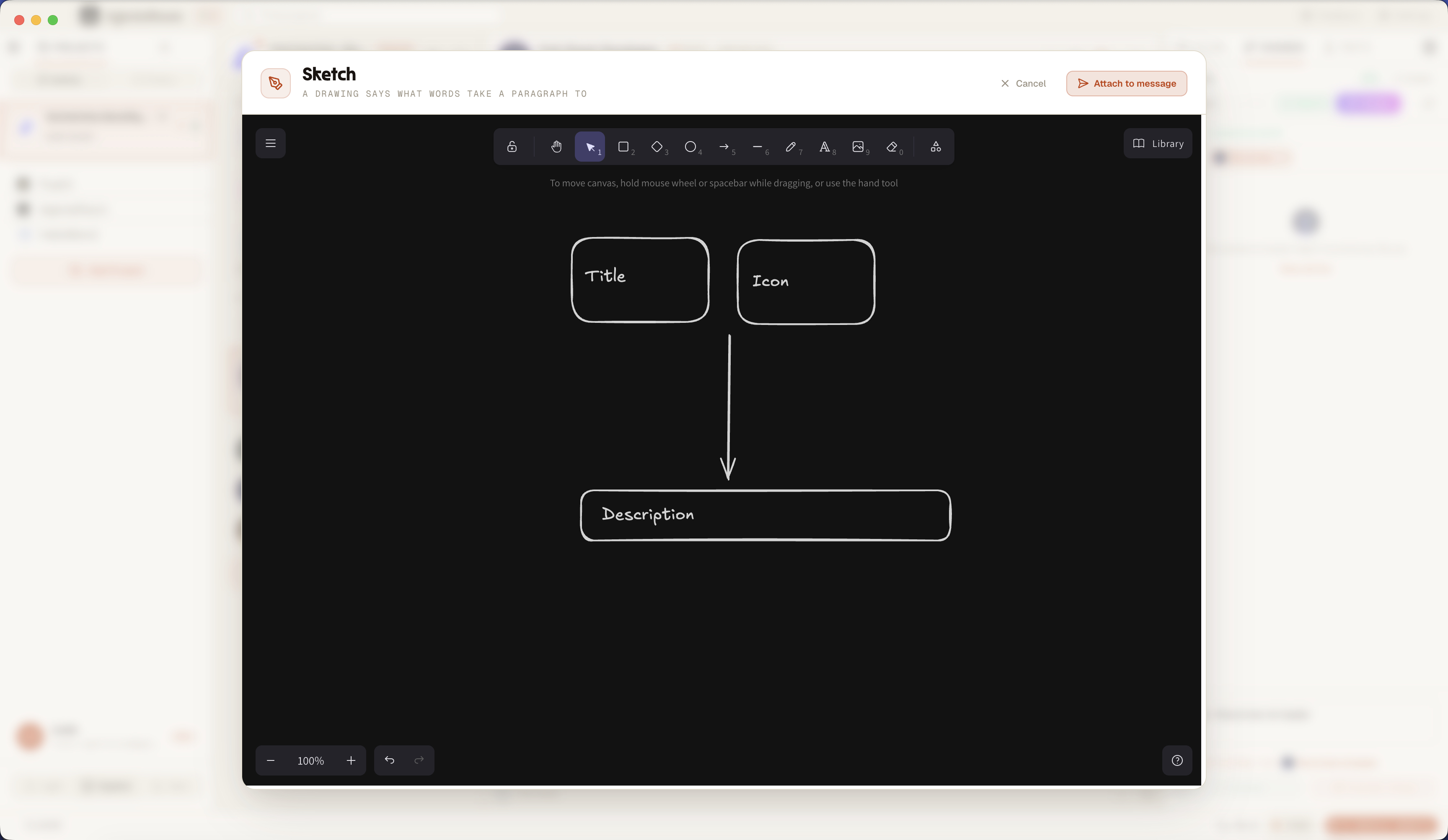
画出来,代理就明白你的意思
Sketch 是一块内置在代理输入框里的绘图画布。打开一张空白画布勾一个原型或一张图,或者打开一张截图给它加标注:圈出 bug、画一个箭头、高亮区域。画作被附加到你的消息并发给你的 AI 编码代理。一图胜千言,所以别再描述视觉 bug 了,把它画出来,全程不离开终端。
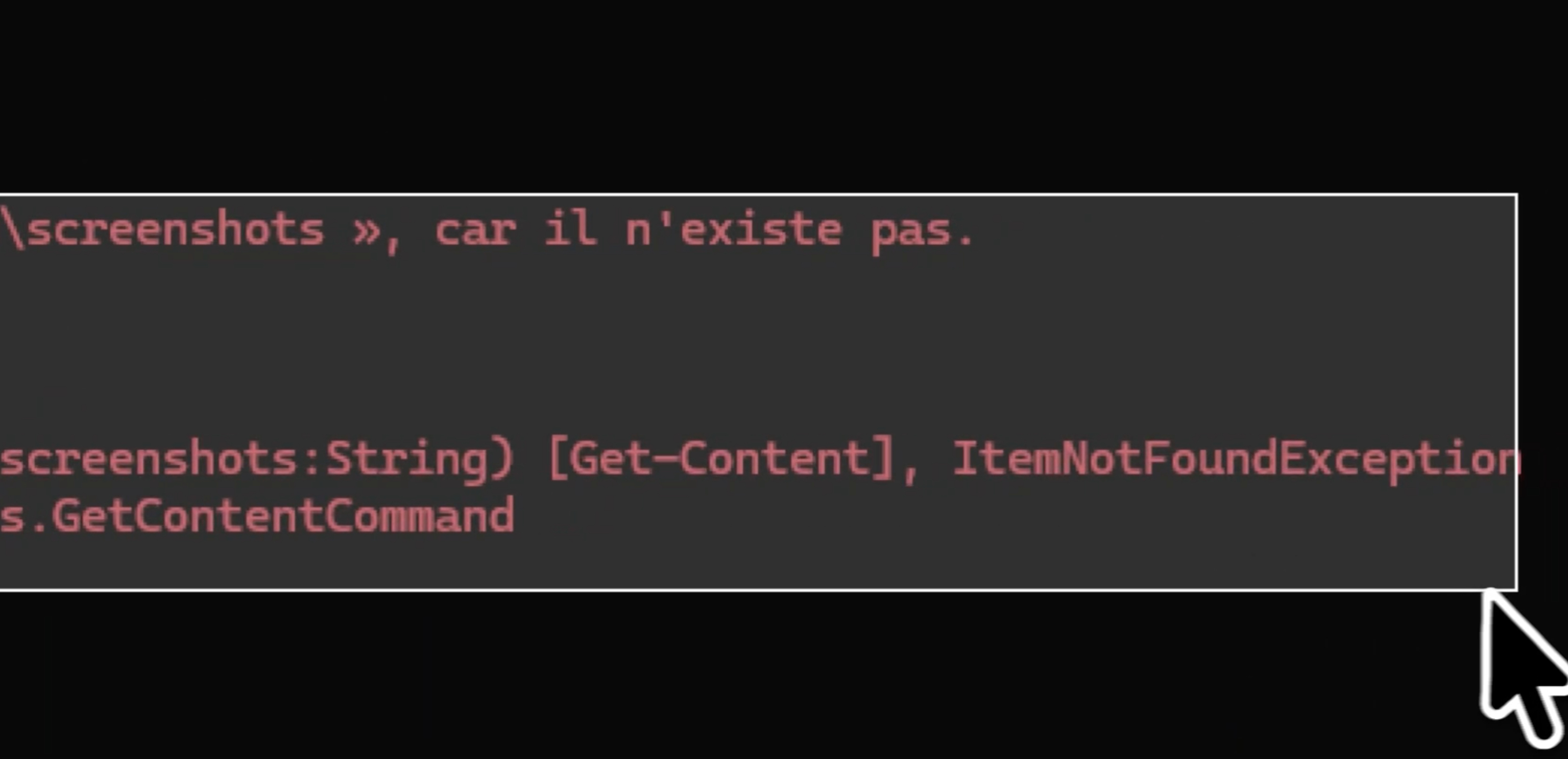
一个快捷键,截图发给代理
把截图发给你的 AI 编码代理,全程不离开键盘。按下可自定义的快捷键(默认 Cmd+Shift+2,Windows 和 Linux 上为 Ctrl+Shift+2)或输入框的截图按钮,框选 bug,截图就附加到你的消息上。无需外部截图应用,无需把文件存到磁盘,无需拖进输入框。框选屏幕区域,代理就看到了,你的节奏不被打断。
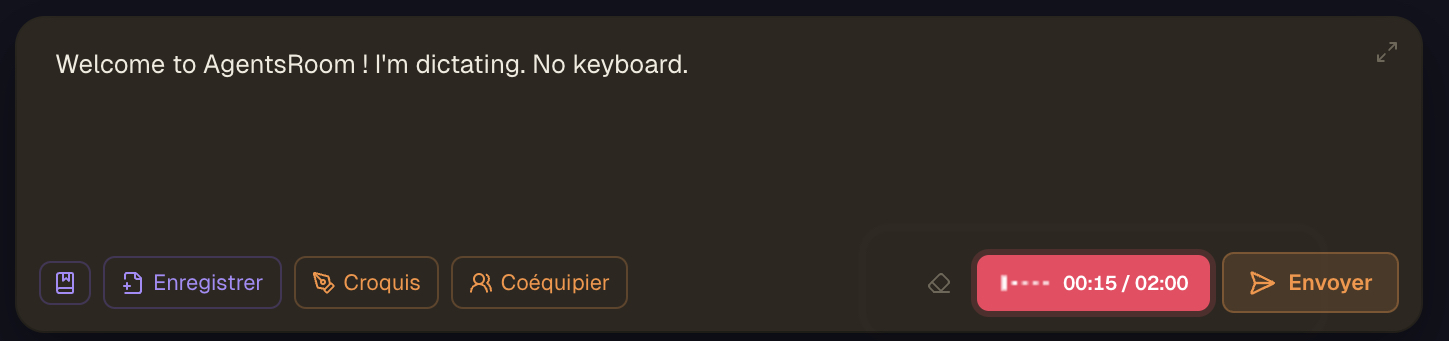
你口述 prompt,代理写代码
语音听写直接内置在代理 composer 里。点麦克风,说出你的 prompt,语音转文字的转写就落进草稿的光标处。无需单独的听写 app,不用在窗口之间复制粘贴。转写模型无需你来选,系统按录音时长自动决定,用 19 种语言之一加自动检测来口述,录音时还能看实时语音声波。在移动端,语音识别在本地运行,文字被中继到你聚焦的桌面代理。手打一段又长又精确的 prompt 要花几分钟,口述它只要几秒:给代理更多上下文,更少的澄清往返,更少被浪费的 token。什么都不会自动发送,转写落进草稿,你检查、编辑后用 Enter 发送。为 Claude、Codex、GitHub Copilot CLI、Cursor 以及另外 10 个代理 CLI 准备的语音听写,写出精确 prompt 最快的方式。
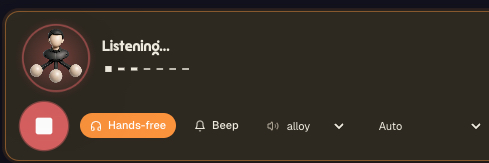
对你的代理说话,听它们回话
Voice Mode 是与你的 AI 编程代理进行的双向语音对话。点一下,开口说,代理就用自然的声音出声回答,不用打字,也不用读一墙的终端输出。打开免提,它就在你下一轮之前一直聆听,于是你可以一边踱步、一边喝咖啡、一边看构建,一边把方案讲清楚。你问重构进展到哪了,它告诉你。你说跑一下测试再汇报,它就去跑并念出结果。挑选回复声音(alloy 等),在各轮之间保留提示音,让语言自动识别,于是你用自己的话说就行。Voice Mode 跑在 AgentsRoom 后端上(语音转文字进、文字转语音出),并且在 Claude、Codex、GitHub Copilot CLI、Cursor 以及另外 10 个代理 CLI 上表现一致。它是不被拴在键盘上也能跟上一个长时间运行的代理的最自然方式。
语音额度现在由听写、Voice Mode 和朗读共用。
终端的选择面板多了一个「听」按钮,你选中什么它就念什么。
只要还在朗读,状态栏就一直留着一个控制小条。
文档别读了,听就好
Read Aloud 是内置在 AgentsRoom 里的文字转语音。在 Markdown 预览里点一下喇叭,一份 README、一份规格文档、一份三百行的 changelog,就用自然的合成语音念出来。在终端里选中任意内容,按「听」。点右键就能听代理的最后一条回复,它取自代理的对话记录,而不是从屏幕上刮下来的。代码块、Markdown 表格和只写着一个文件路径的行,在第一个字被念出来之前就被剥掉,所以你听到的是正文,不是标点。赶时间?同一个按钮还提供摘要朗读:AI 先写出摘要,你听到的就是那份摘要,长度按你选的朗读时长来定,十秒、三十秒或者一分钟。四十分钟的 changelog,十秒钟讲完。进度条、剩余时间、暂停、继续,还有状态栏里那个比你出发的窗口活得更久的控制小条。这个功能来自一位有阅读障碍的开发者,他一直把我们的 Markdown 预览复制粘贴到外部的文字转语音工具里;对疲劳的眼睛,它同样值回票价。
堆叠你的消息,按顺序发送
内置于输入框的一个消息队列。在输入框上方堆起多个提示词,按你选定的顺序逐条发送给 AI 代理,而不是发一个臃肿的巨型提示词。每条排队的消息都会获得一个由 AI 生成的简短标题,并保留各自的截图和附件。拖动即可重新排序,重新打开即可编辑,按需发送。排队的消息还可以带上一个定时,或者跟随你的订阅而不是墙上的时钟:配额一恢复就发出,或在 5 小时、每日、每周、每月的配额周期即将重置时发出,让一次漫长的代码审查跑在那些即将过期的额度上。
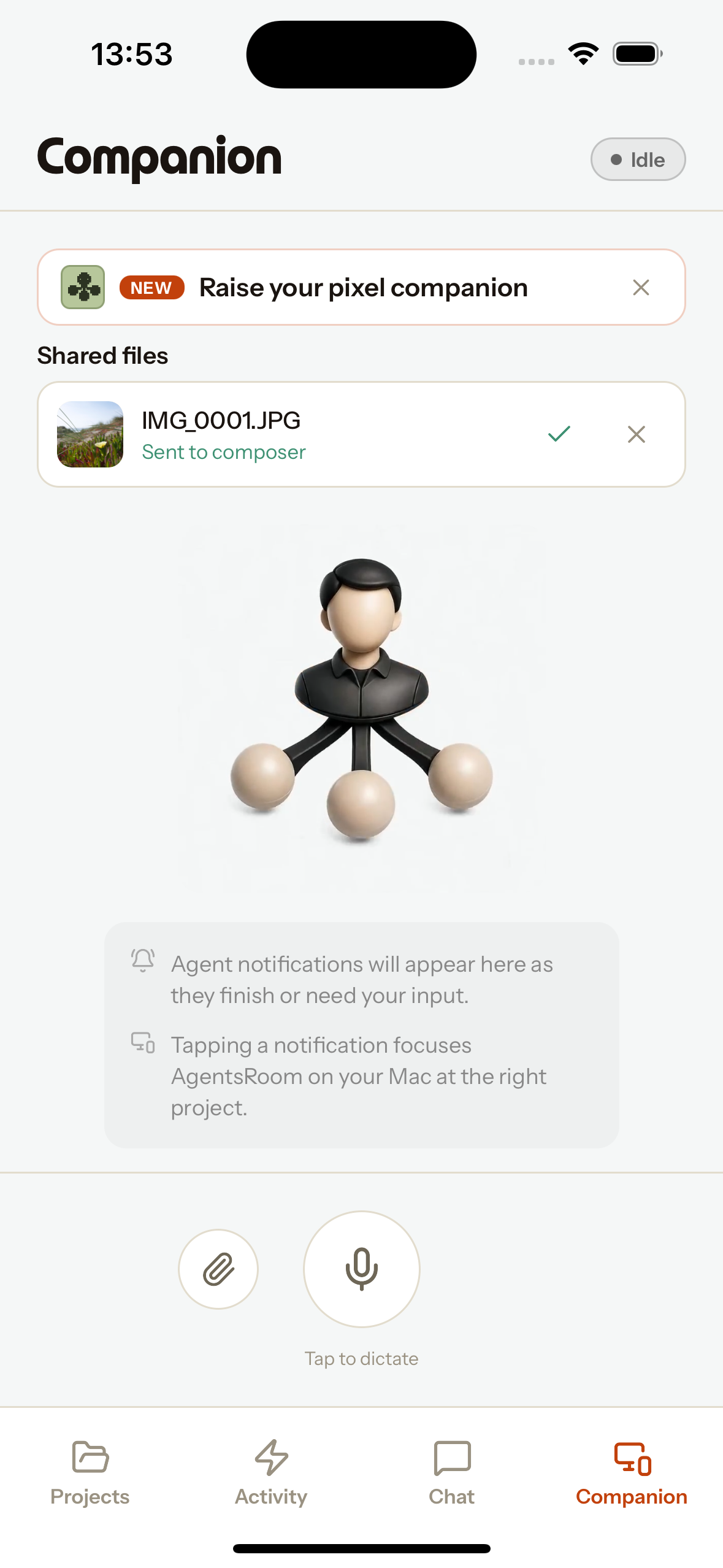
你的手机,AI 代理的遥控器
手机配套应用把你的手机变成运行在桌面上的 AI 编程代理的遥控器。用手机麦克风口述一段 prompt,转写就落进你聚焦代理的 composer。从手机附加一张照片或任意文件,它就会作为附件放进那个代理的 composer,就像一张桌面截图一样。最棒的是,原生的 iOS 和 Android 分享扩展程序把 AgentsRoom 直接放进系统分享菜单:从任意 app 分享一张截图,它就会直达你聚焦的桌面代理,进入正确的项目、正确的输入框。无论是报告移动端 bug、在路上发送上下文,还是在开发机没有麦克风时口述,都堪称完美。一切都走端到端加密中继,在移动网络下也能用,桌面端不可达时会在离线队列里等待。不绑定特定提供商:可与 Claude Code、Codex CLI 等一起使用。
你的私人助理,在手机上说一句话就够
助理是你 AgentsRoom 账户里唯一一个随时随地都能找到的代理。对 Siri 说“Talk to Bot”、按下 iPhone 操作按钮、点一下 Android 小组件或磁贴、应用的助理标签页,或者把一段文字分享给它:应用打开助理的界面,麦克风已经在听,用 AgentsRoom 的语音转文字把你说的话转写进 composer,以防某个名字听错,再通过端到端加密的中继发到你的桌面端。助理在那里通过你已经在用的代理 CLI 运行,带着你的 MCP 连接器(邮件、日历、消息)和能访问每个项目的 AgentsRoom 工具:它在任何地方读取和创建待办工单、在某张工单上启动代理、用你的口吻起草回复,并在任何别人会看到的操作前先确认。它每天开始一段新对话;如果你允许,它会用一份只属于它自己的私人记忆记住你,各项目的代理永远看不到。回复以推送形式送回,长任务结束时桌面端会叫你的名字。默认叫“私人助理”,可改名、自定义头像、两端共用一个设置页面。
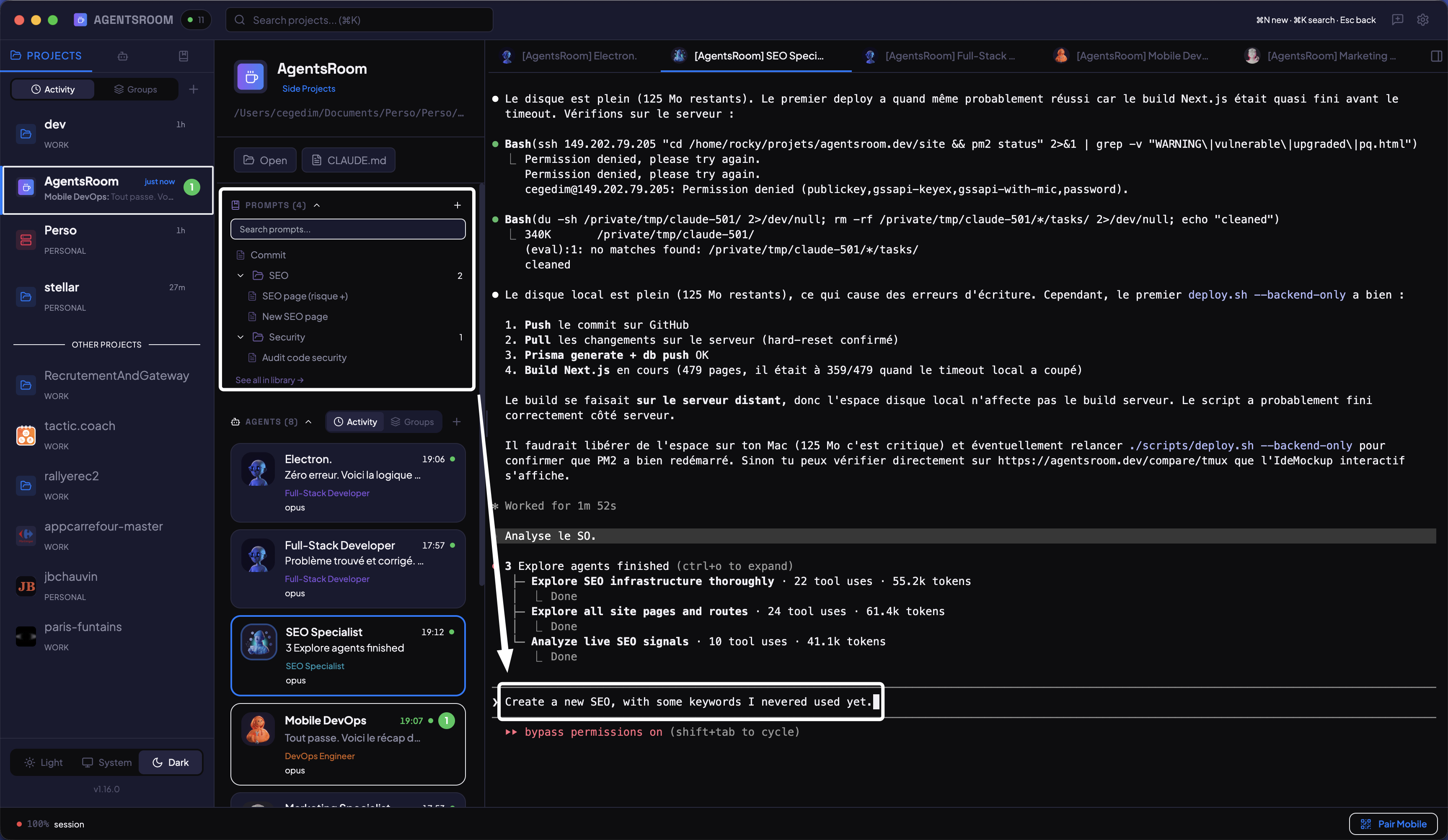
保存并复用你的最佳提示词
按项目在文件夹中整理提示词。通过 git 与团队共享。个人提示词通过自动 gitignore 保持私密。一键将任意提示词发送给代理。
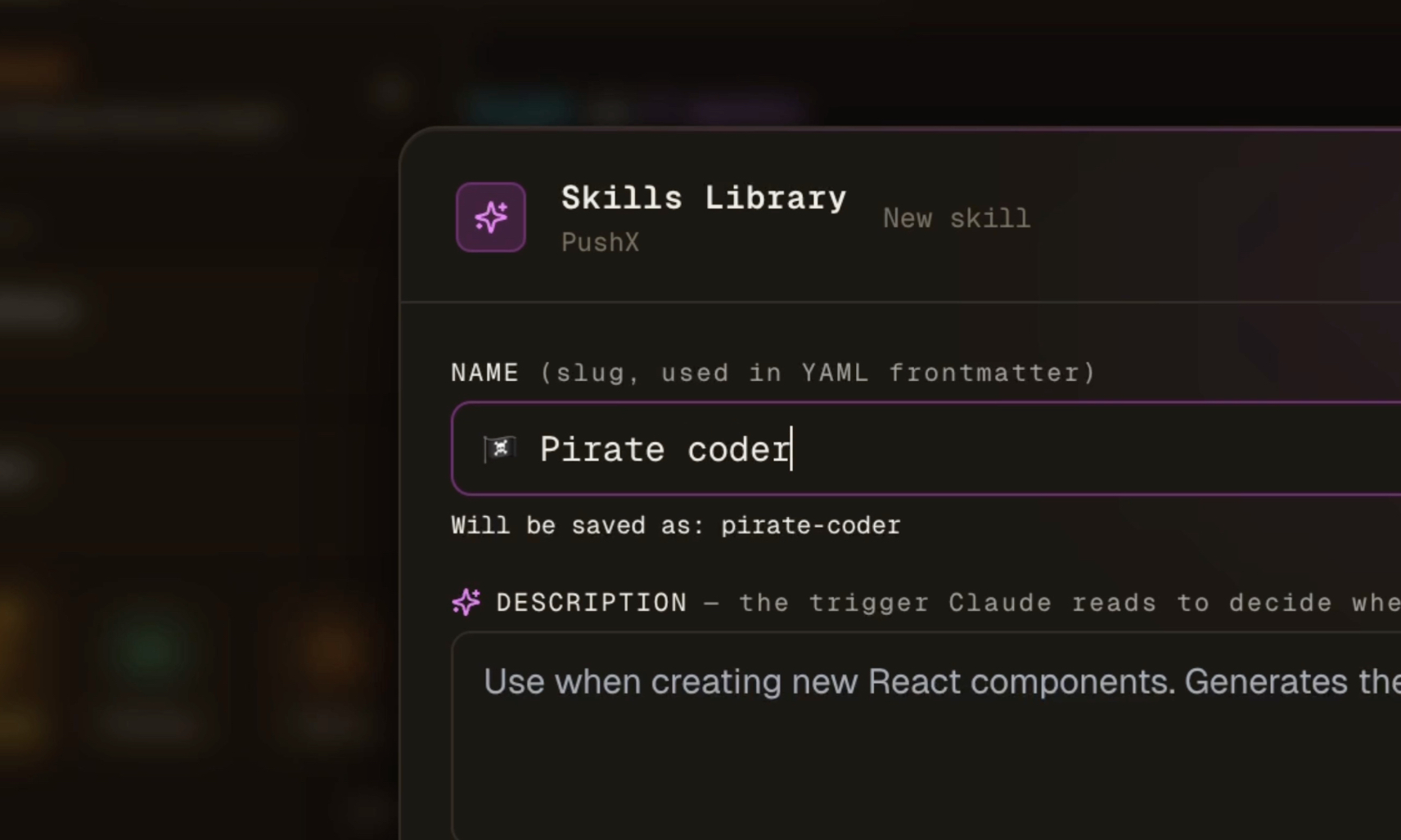
模块化流程,任意运行时
以 Claude SKILL.md 格式保存技能,将其附加到任务或代理,并一键导出到 Cursor、Codex、Windsurf 或 Aider。基于触发器的路由会自动加载合适的流程。
你代码库的共享大脑
代理会记录它们学到的东西:决策、架构、陷阱、约定。这些内容在会话结束后依然保留,项目中的每个代理和成员读到的是同一份记忆。
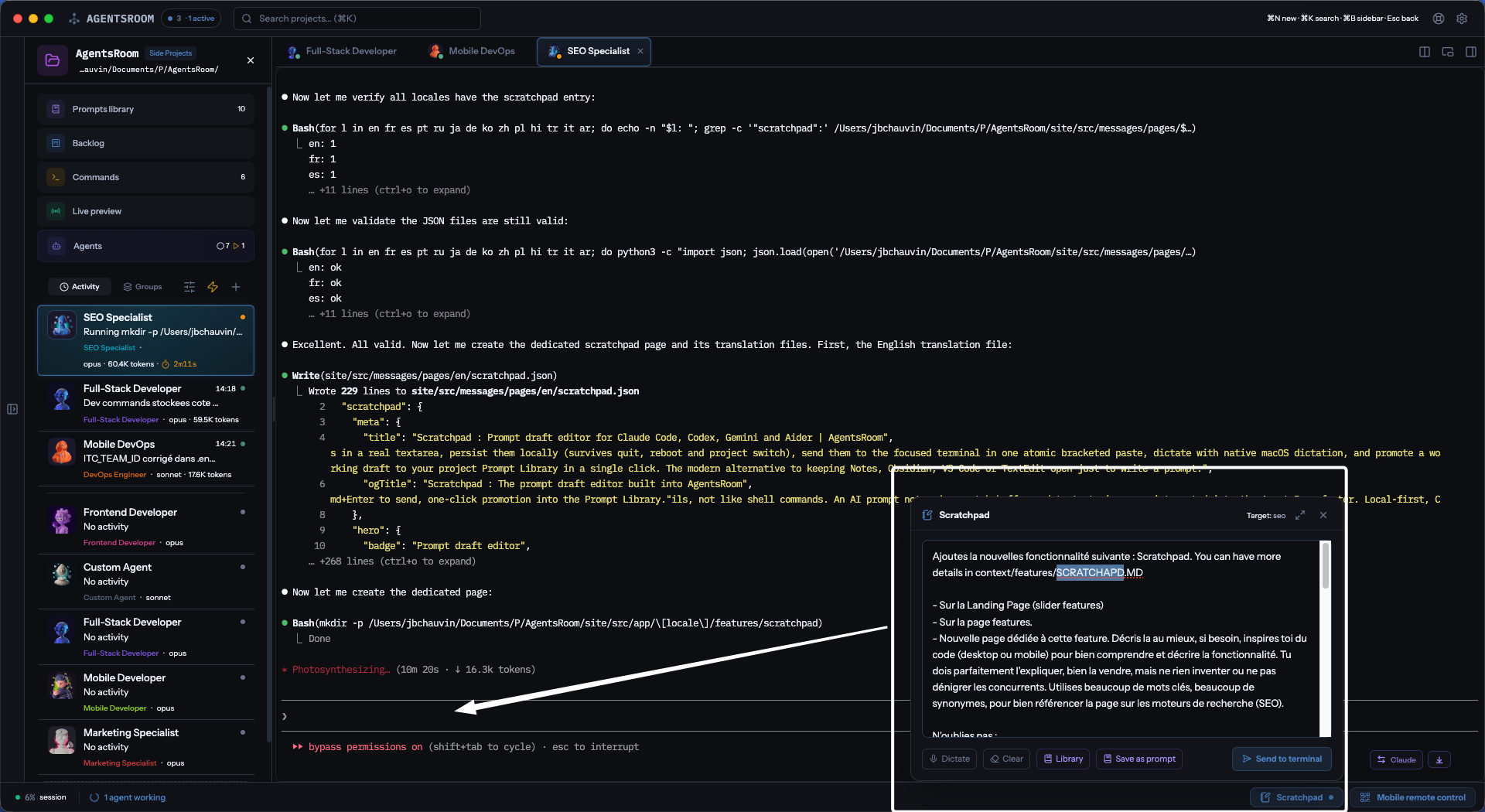
像写邮件一样写提示词
一个固定在 AgentsRoom 底栏的提示词编辑器。在真正的文本框里为你的 AI 代理撰写长而有条理的提示词。你的草稿始终都在,就算关掉应用再回来也不会丢。一次点击就能把整段发送给当前聚焦的代理,一次点击就能把优秀的草稿保存为团队可复用的提示词。
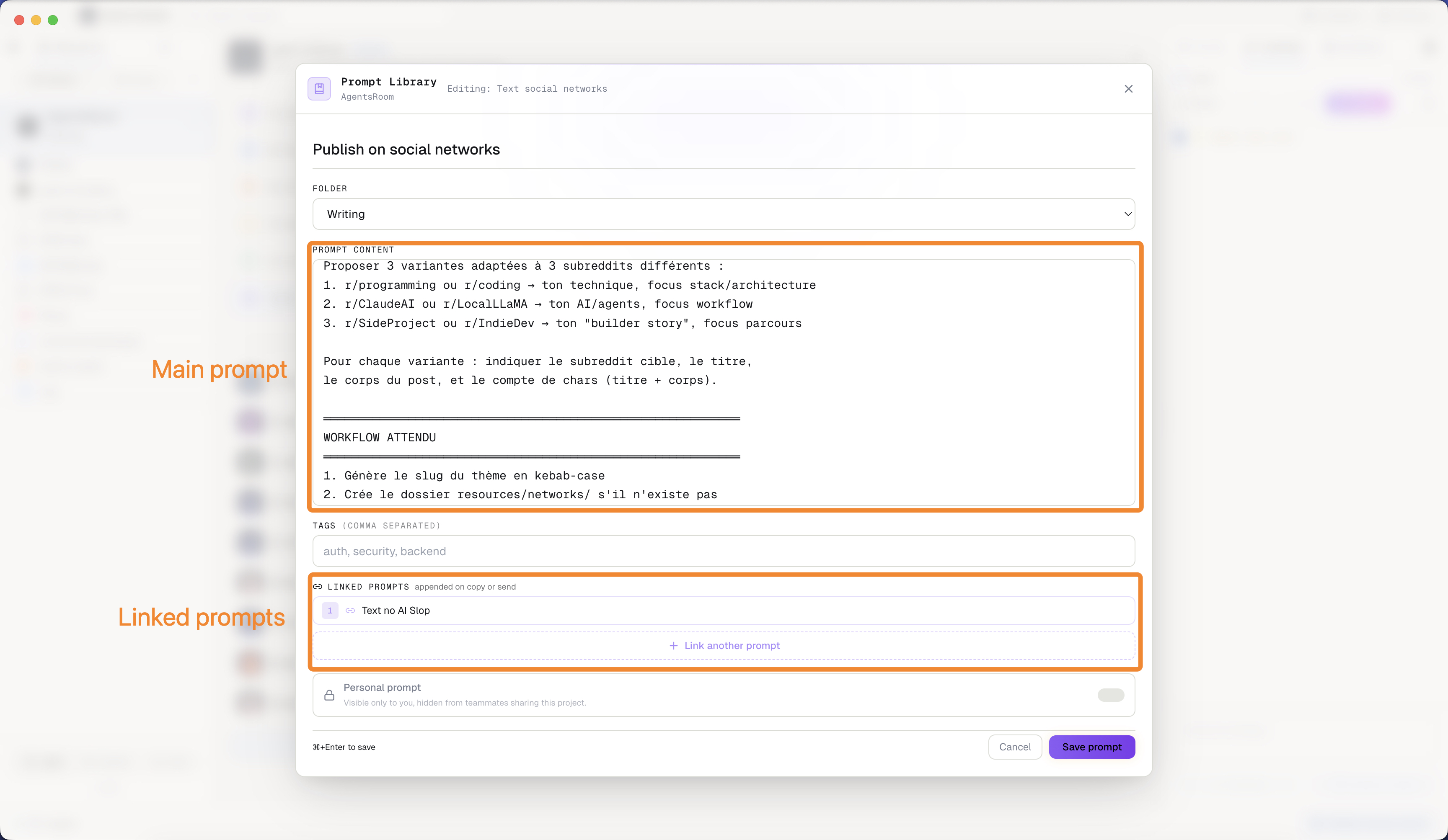
会调用其他提示词的提示词
库里的一条提示词可以关联其他提示词,并在运行时把它们的内容拉进来。共用规则只写一次:你的技术栈、你的规范、你的审查清单,然后在每条任务提示词里引用它们,不必反复复制、任其走样。关联链在发送时展开,代理收到的是一份完整的简报;改动共用块,所有继承它的提示词同步更新。
从一块 Figma 画板到上线的界面
用 AgentsRoom Chrome 扩展程序直接从 Figma 画布上截取任意画板,把它放到一张 backlog 工单或一条代理提示词上,让代理基于你真实的组件把它实现出来。设计以图片加上你写下的意图一起传递,因此不依赖某个 Figma MCP 服务器是否在线、是否已授权、是否兼容你的文件。截图会一直挂在工单上,之后接手的代理仍然能看到当初的原始要求。
实时掌控全局
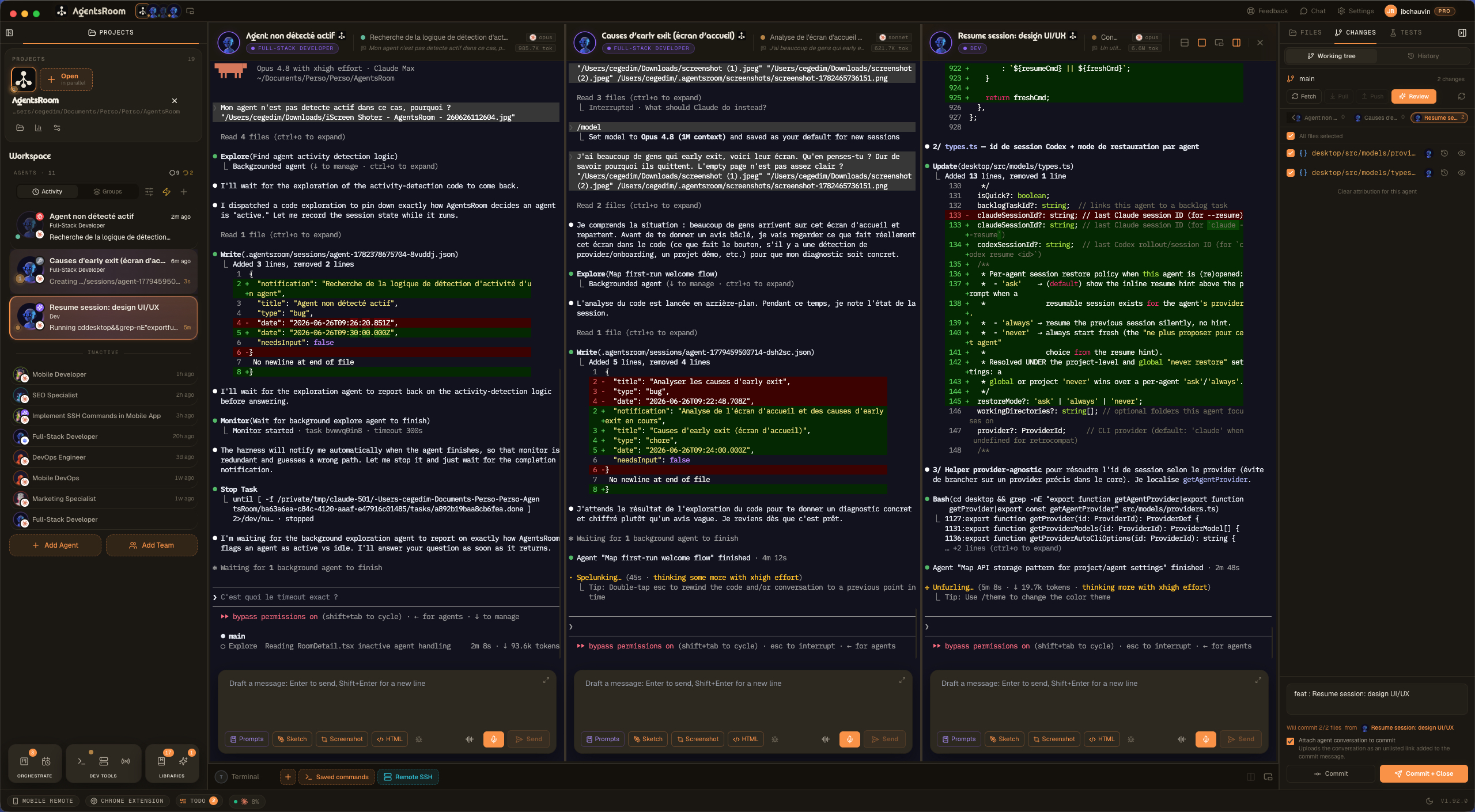
一次看到所有代理,并排呈现
把你的工作区分成多个窗格,并排同时观看多个 AI 编程代理一起干活。把一个代理的终端拖到另一个上,松手落在某条边缘:左或右分成多列,上或下堆叠成多行,操作方式与 iTerm2 一致。一键在横向与纵向之间切换整套布局。每个窗格都保留所属代理的角色配色、头像和实时状态,聚焦的窗格会获得一圈高亮光环,重开应用时你的分屏布局原样恢复。一个窗格里用 Claude Code 跑后端,另一个里用 Codex 跑前端,第三个里放一个 Antigravity QA 代理,全程盯着所有窗格,再也不用在标签页之间来回跳。这正是你的并行代理此前缺失的多窗格分屏。
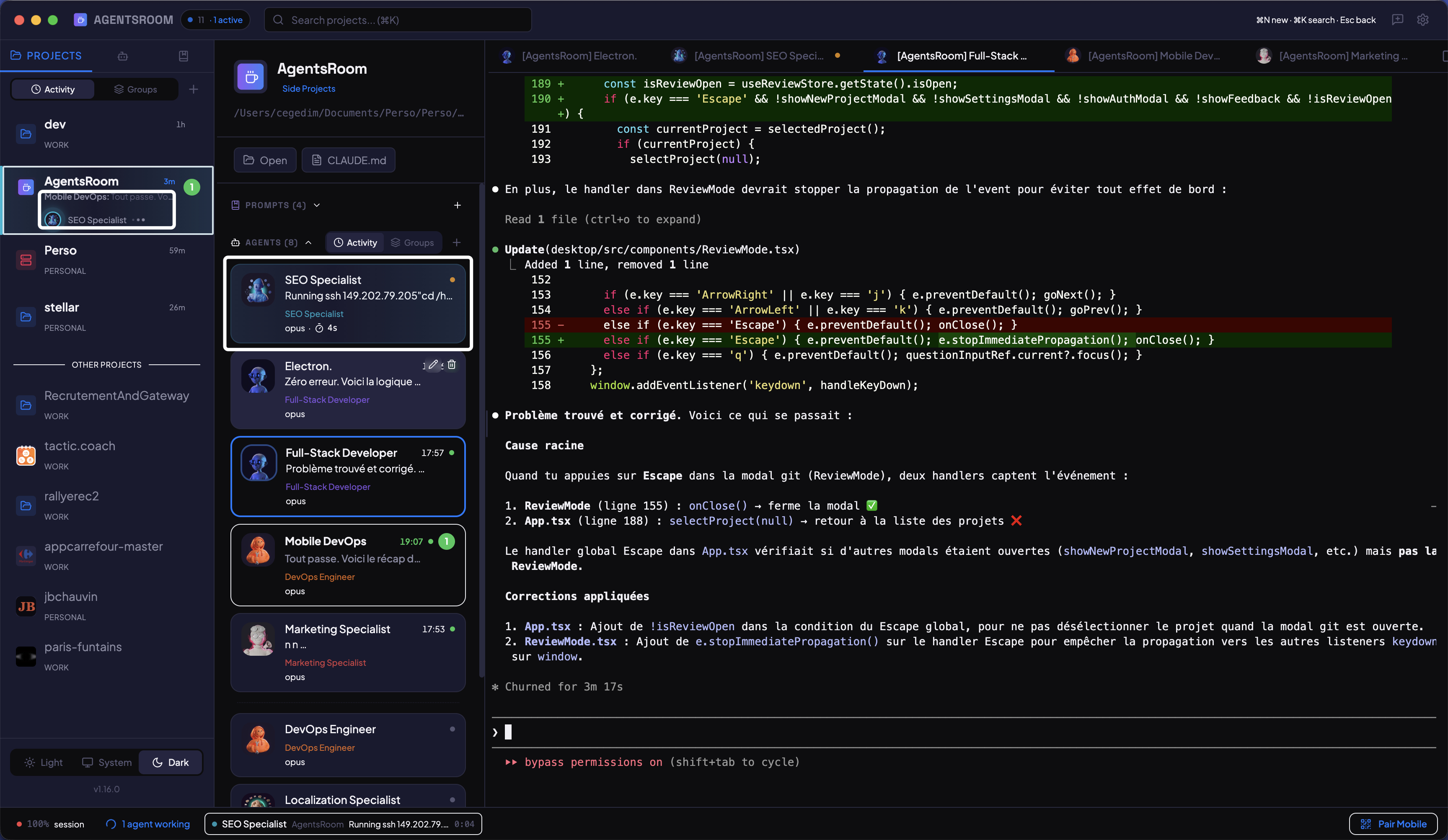
实时查看谁在工作
每个代理卡片上的彩色状态指示器。思考时黄色闪烁,完成时绿色,等待你输入时红色。已用时间和当前活动实时显示。
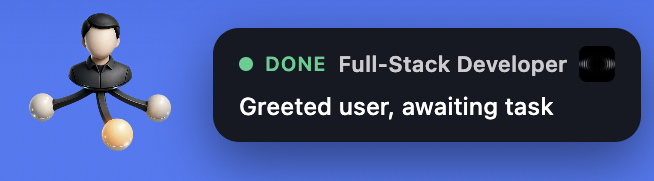
你的代理状态,始终在视线中
一个浮动的、始终置顶的小岛,显示你的 Claude Code、Codex 和 Antigravity 代理是空闲、工作中还是在等待输入,即使 AgentsRoom 处于后台也能看到。当某个代理完成时,岛旁会弹出一条通知。点击它,你就能直达正确项目中的正确代理。别再 Alt+Tab 去查看了。
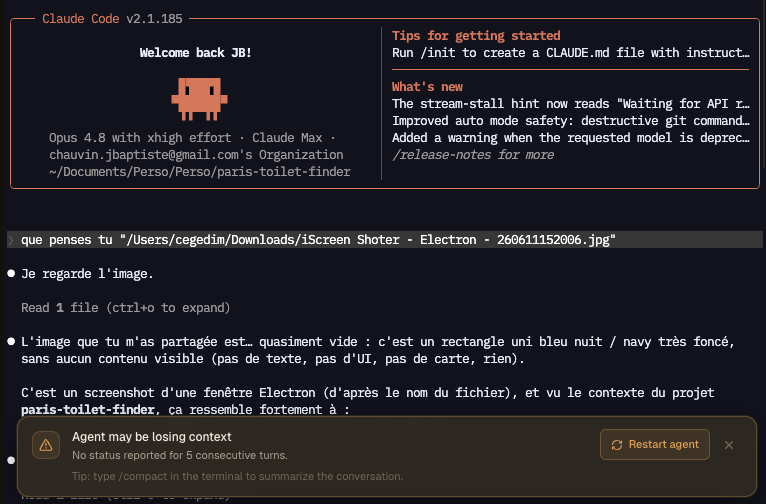
在 AI 代理开始幻觉之前抓住它
AgentsRoom 会在每个代理身上盯住一个内置的 canary:每个代理在每轮结束时写下的那一行状态。当一个代理连续两轮停止更新它时,那正是 context rot 和退化的经典早期迹象,于是 AgentsRoom 会在幻觉开始之前,在终端上方拉响一条警告。一键就能让代理在干净的上下文上重启,还有一条提示提醒你压缩会话。适用于 Claude Code、Codex 以及每一家厂商。
面向 AI 编程代理的失控进程侦测器
AI 代理每调用一次工具,就在系统里启动一个真实进程:一次搜索、一次构建、一个脚本。绝大多数几秒就结束,有些永远不会,而后者会以 CPU 0% 抱着好几个 GB 的 RAM 不放,直到机器爬得动不了。在一次实测会话里,七个卡住的进程在 16 GB 的笔记本上占了 41.8 GB,交换空间用到 95%,结束它们之后 15.5 GB 立刻回来了。进程守卫每分钟扫一遍代理的子进程,只有当一个进程又大、又久、而且处理器已经闲下来时才标记它,所以一次真正在干活的构建不会被当成卡住的进程。它测的是真实内存占用,把压缩页和换出页都算进去,因为一个卡住的进程可能抱着 8 GB 却只显示 20 MB。比自己的代理活得更久的孤儿进程同样跑不掉。你的开发命令终端、shell 以及代理 CLI 本身永远不会被碰,而且除非你开口,否则什么都不会被终止。
为每个任务自动选对的 AI 模型
Adaptive Mode 在你发出第一条消息之前读取你的 prompt,并为这项工作推荐最具性价比的模型。一次快速修复或一段翻译会路由到 Claude Haiku 这样轻量、便宜的模型;一次深度重构或一份架构设计会路由到 Claude Opus 这样的重量级模型。一键应用,可即时切换正在运行的会话,或保存到下次启动。适用于 Claude、Codex 和 Antigravity。别再为琐碎任务用旗舰模型多花钱:每个任务花得更少,同一套餐下每天跑更多任务。
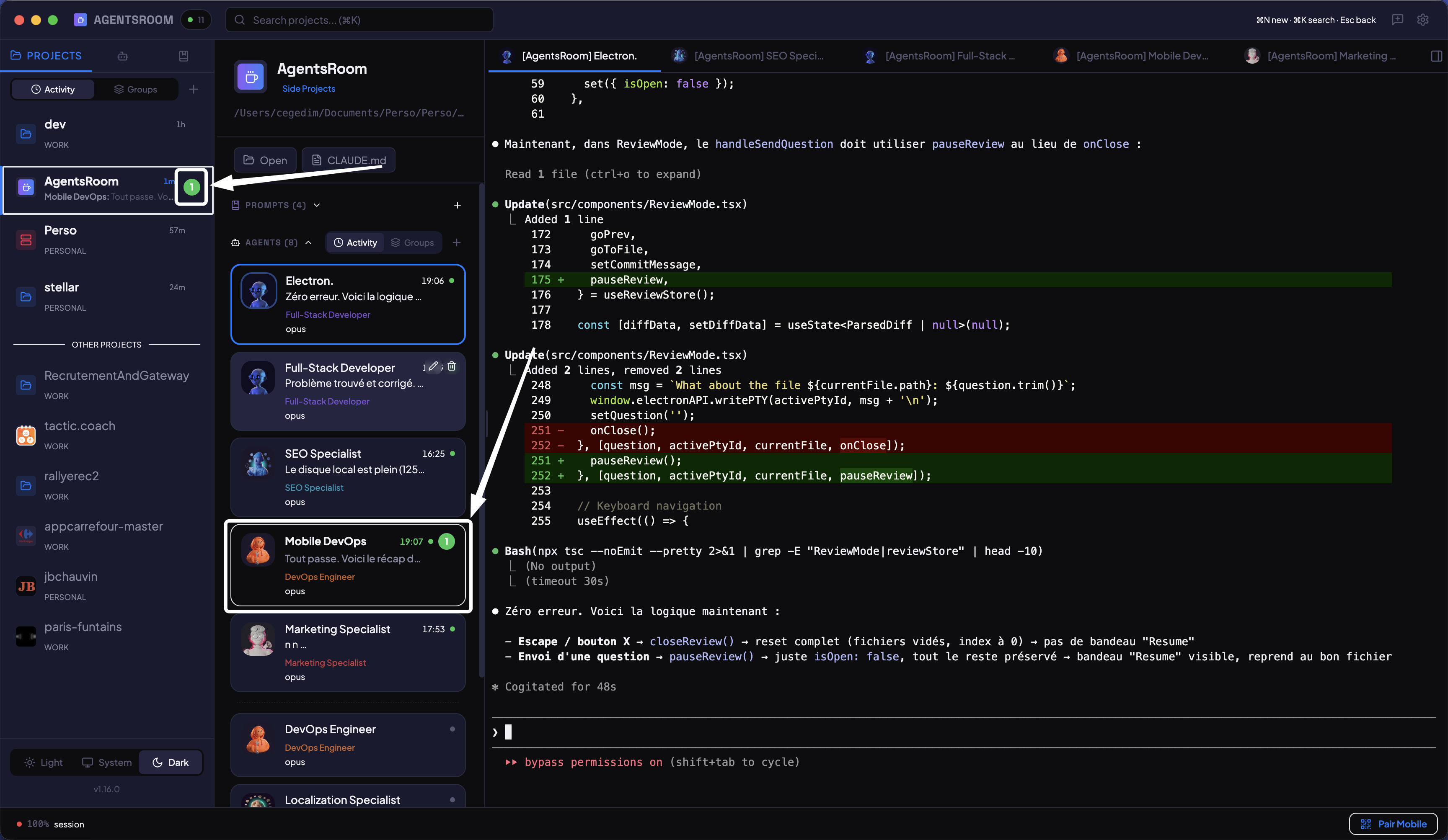
准确知道哪个代理已完成
按项目和代理显示未读指示器,类似即时通讯应用。代理完成任务或需要你的输入时,桌面和移动端会推送通知。不再需要猜测。
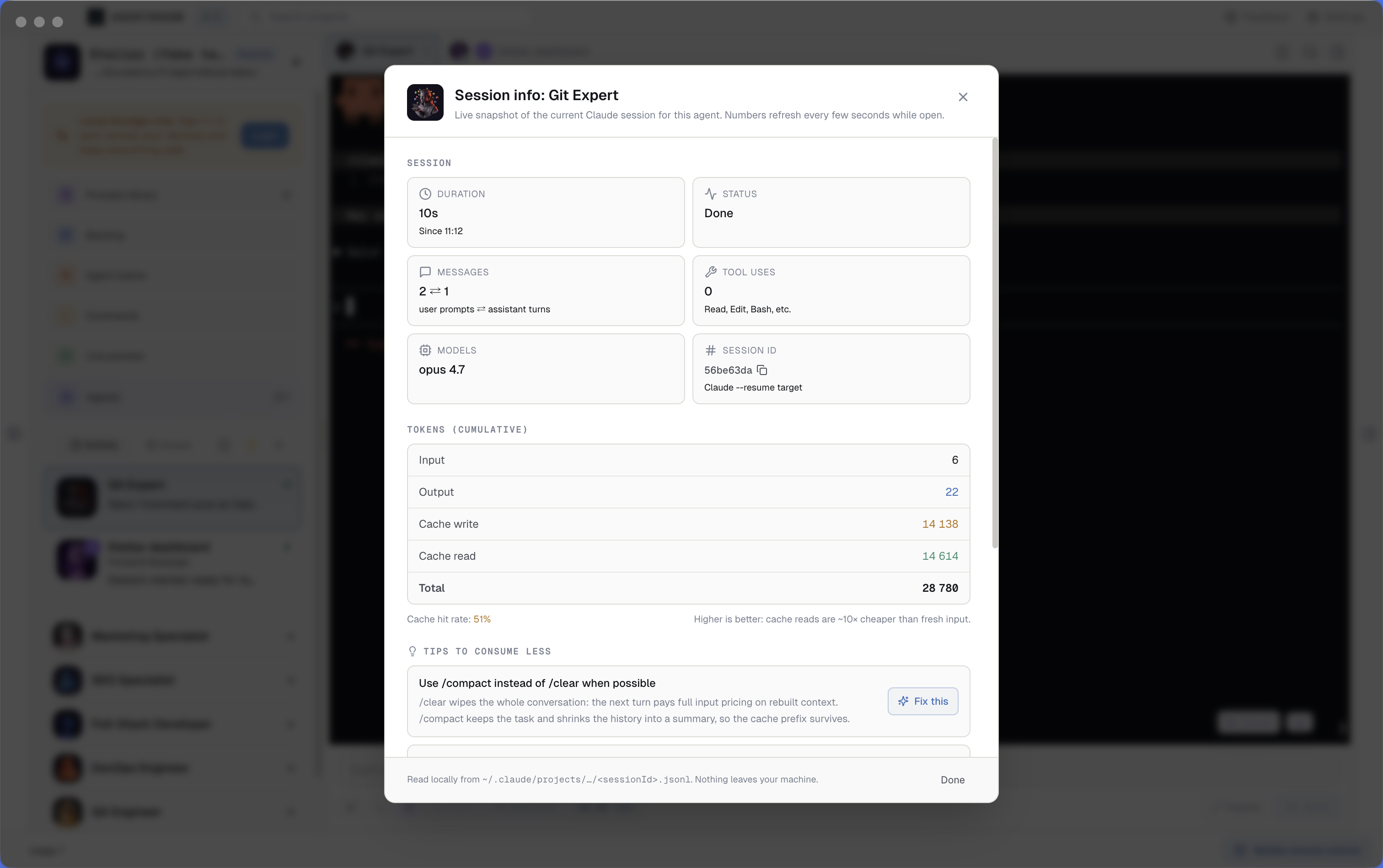
按会话的 Claude Code token 用量,实时显示,含缓存命中率
AgentsRoom 中每个 Claude 代理终端都显示一个实时的 Claude Code token 用量计量器。消耗过大时徽章变红。点击它打开会话监视器:输入 token、输出 token、缓存写入、缓存读取、缓存命中率、消息数、路由的模型、会话时长,以及降低 token 消耗的情境化提示。全部本地,直接从 ~/.claude/projects/ 的 JSONL 读取。
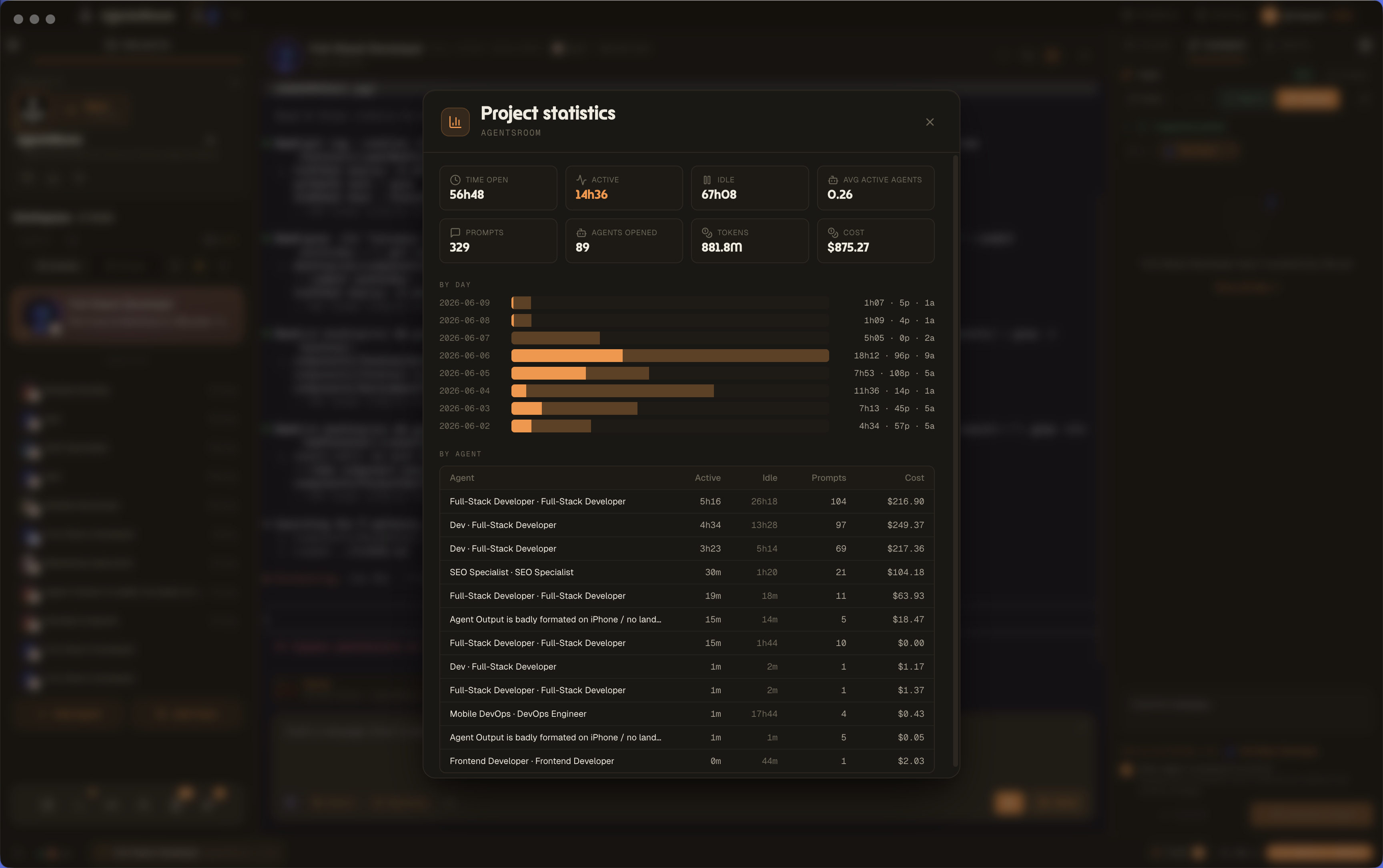
项目统计:每个项目的时间、prompts 和成本
在任意项目上打开项目统计面板,读取打开时长、活跃和空闲时间、平均活跃 agents、prompts、已开启的 agents、tokens 和成本。一张按天活动图表和一份按 agent 拆分的表格,把原始的代理工作变成用于开票、复盘和成本控制的项目分析。
本周(所有模型)已达 76%(提醒阈值为 75%)。9 月 24 日 04:00 重置
在用量上限之前发通知,而不是之后
AgentsRoom 读取 Claude Code、Codex、Grok Build、Kimi Code、Cursor、Antigravity、OpenCode Go 和 Z.ai 编程套餐公布的配额条,会话、每周、按模型或按限额组,覆盖你登录的每个账号,并在每条旁边放一个铃铛。配额条越过阈值时,默认先 50% 再 75%,你会收到原生桌面通知、AgentsRoom 移动应用的推送,或两者都有。右键点击铃铛可为那一条选阈值或将它静音。提醒每个配额时段只发一次,重置后重新待命,所以 80% 的一条只有一条横幅,而不是每次刷新一条。
审查并验证成果
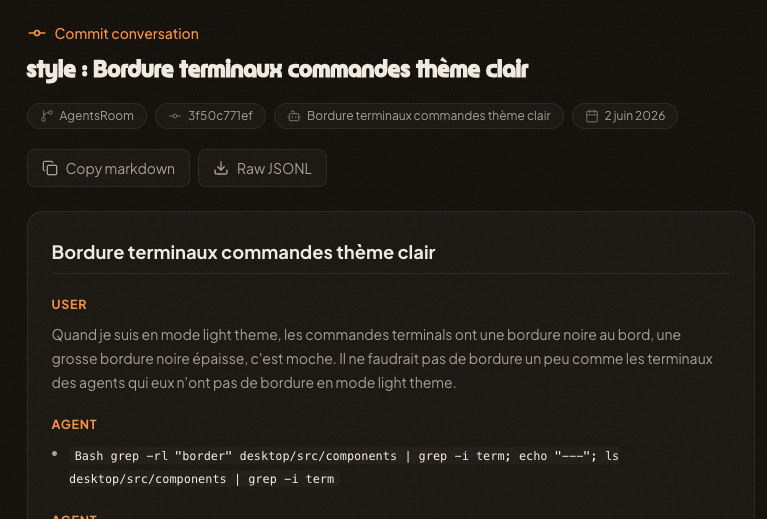
每一次提交都保留着写下它的那段对话
AI 代理在会话之间没有记忆,因此一次提交背后的推理往往随着终端关闭而消失。Commit Context 会把每次提交背后的完整代理对话保存为不公开的 gist,并在提交信息中加上 Agent-Conversation 链接。下一个代理或队友打开这个链接,就能找回改动背后的原因:提示词、决定、约束、编辑。上下文正是代理做到精准所需要的东西,所以 AgentsRoom 把它一直挂在你的 git 历史上。敏感信息会在上传前被脱敏,链接不公开,你也可以在 gist.agentsroom.dev 上手动创建 gist。支持 Claude Code、Codex、GitHub Copilot CLI、Cursor 以及另外 10 个代理 CLI。
从您的真实 diff 写出的提交信息
停止输入 "wip"。点击提交字段上的闪光按钮,AgentsRoom 读取您正在提交的文件的 git diff,然后以 Conventional Commits 格式写出一条干净的信息。输入像 "fix temp pdf" 这样的粗略草稿,得到一个合适的提交信息。您团队的格式规则在每个项目中设置一次,应用于每次生成。
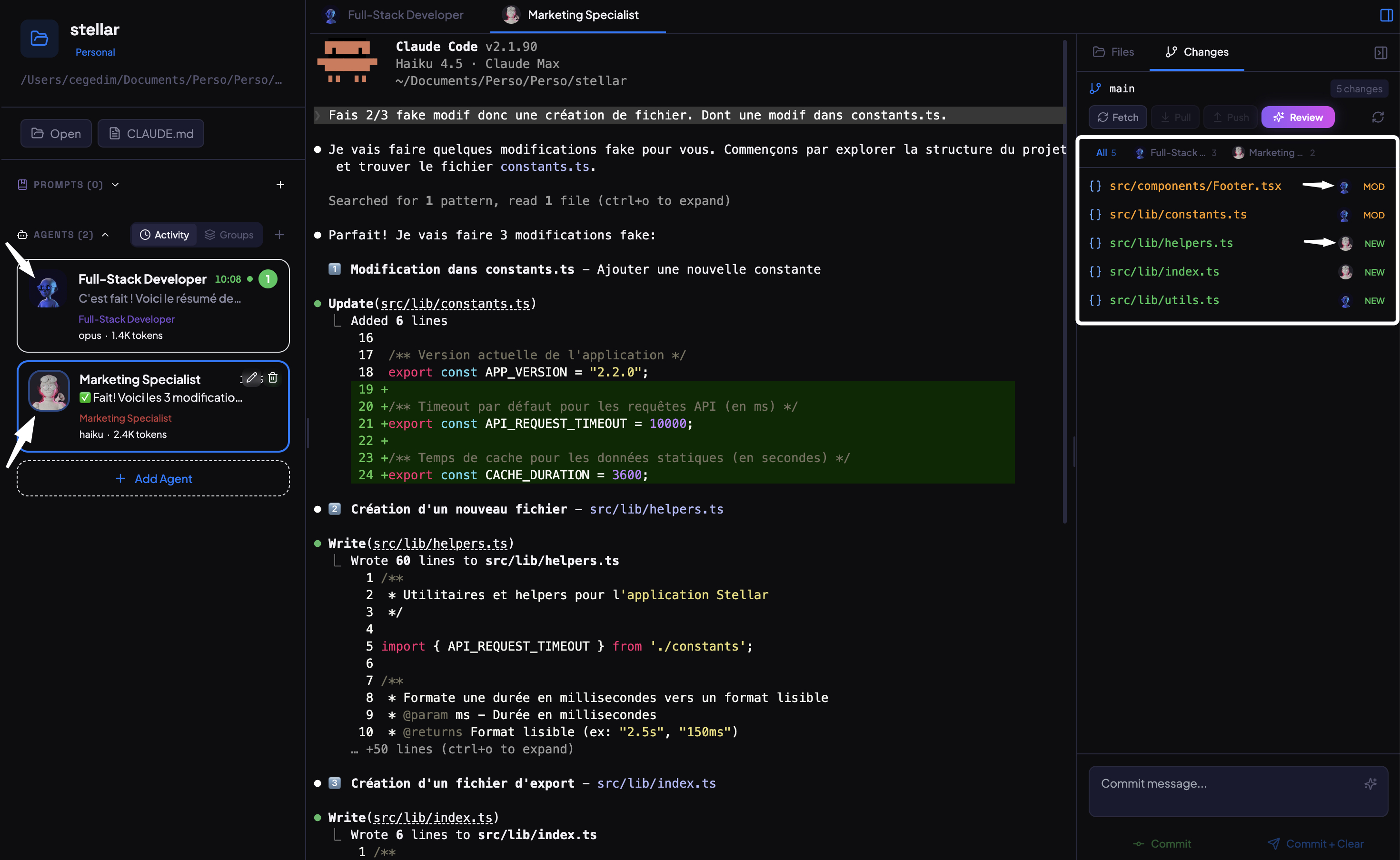
按代理和任务的Diff
当多个代理并行工作时,按代理筛选代码变更。只查看一个代理的修改,独立审查其差异,并分别提交每个贡献。干净的git历史,零混乱。
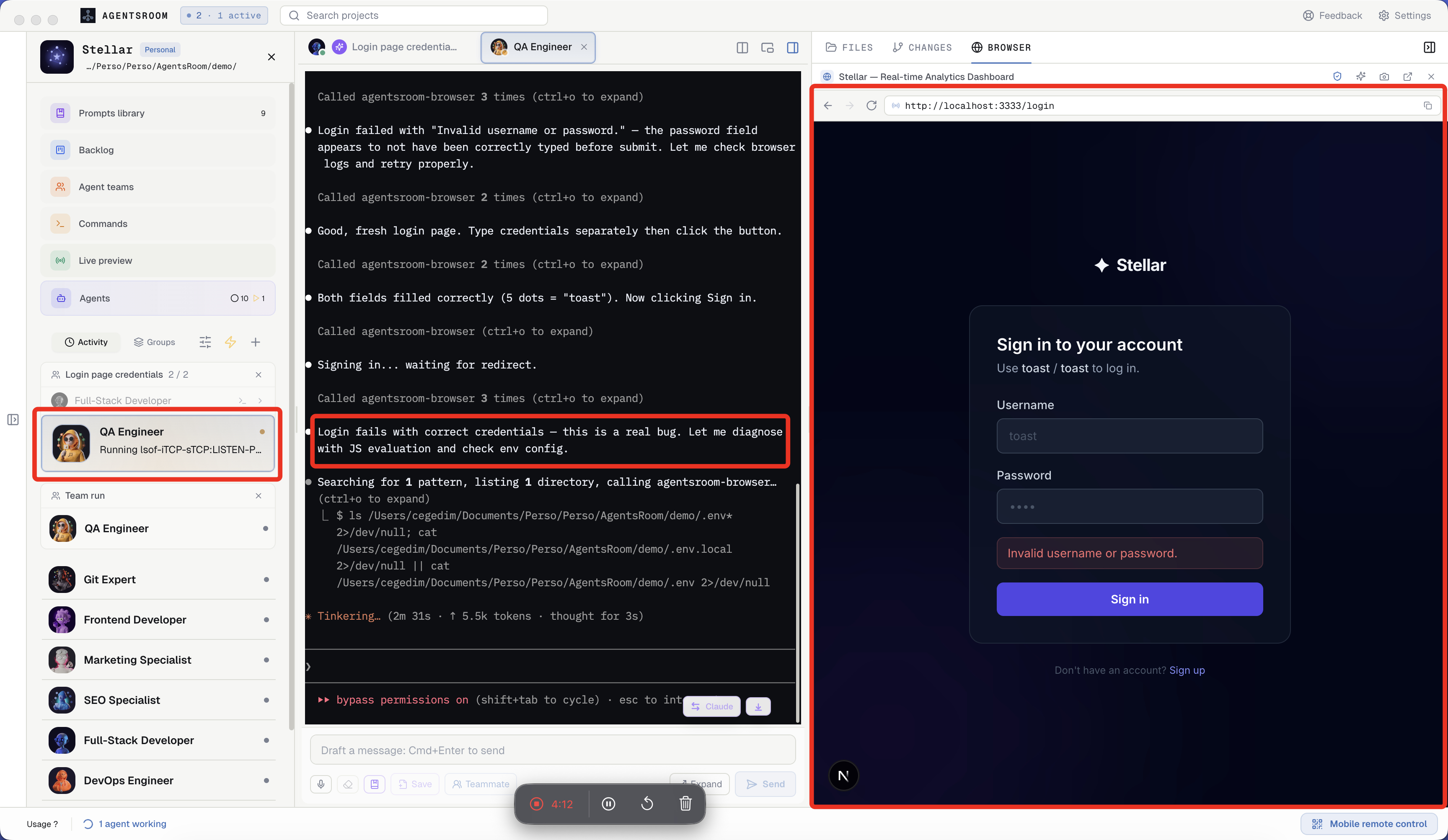
您的代理点击、输入并测试浏览器
AgentsRoom 在每个项目内置浏览器,并附带一个 AgentsRoom Browser MCP 服务器。您的 QA 代理访问 localhost 站点、点击、输入、截图、读取 console 日志,并在交接前验证功能是否真的可用。面向 Claude Code 的真实浏览器自动化,无需编写 Playwright 配置。
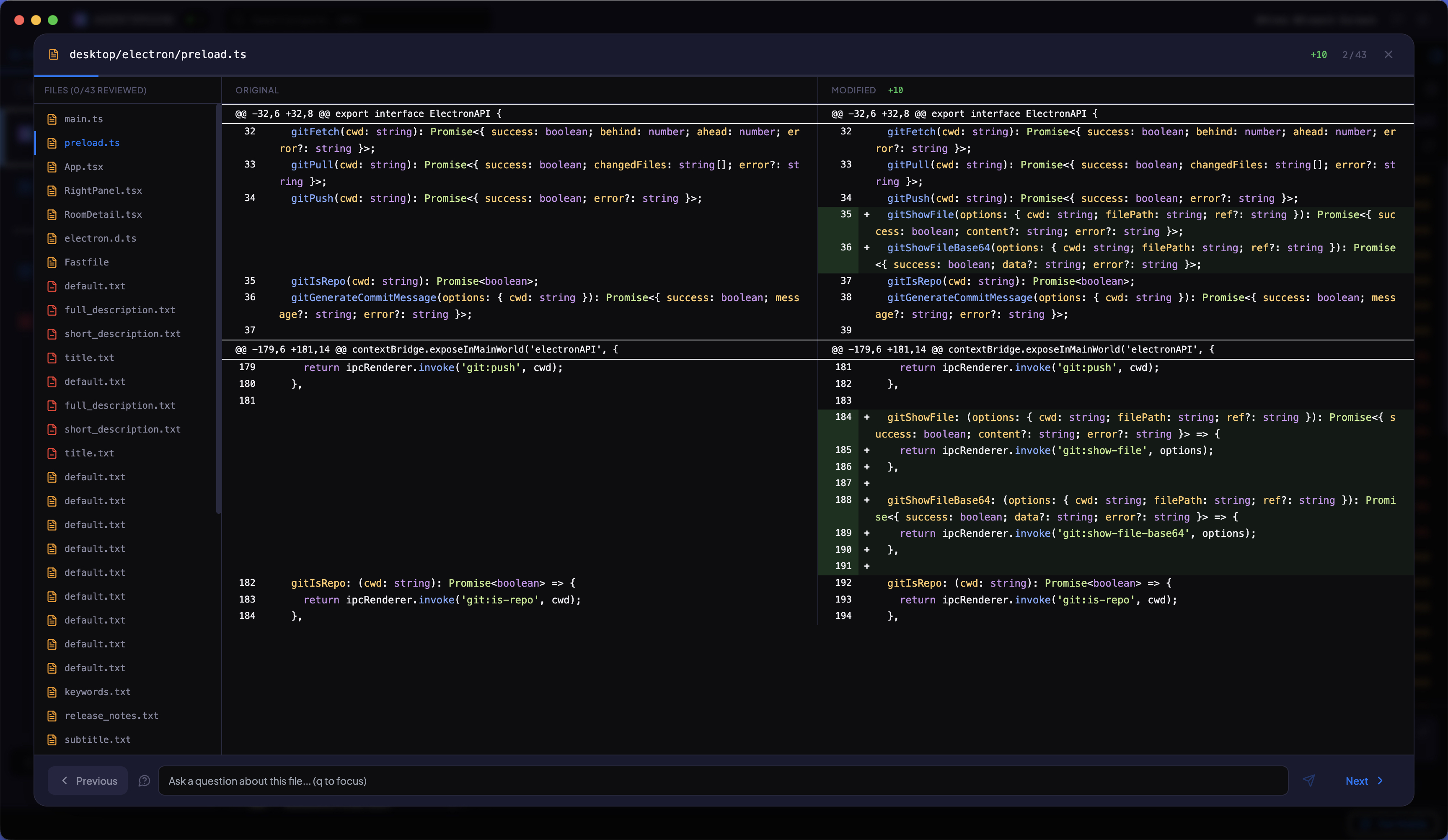
逐文件审查所有更改
使用方向键浏览 AI 代理修改的所有文件。查看带语法高亮的并排 diff。就任何更改向 Claude 提问。准备好后提交。
你的开发环境
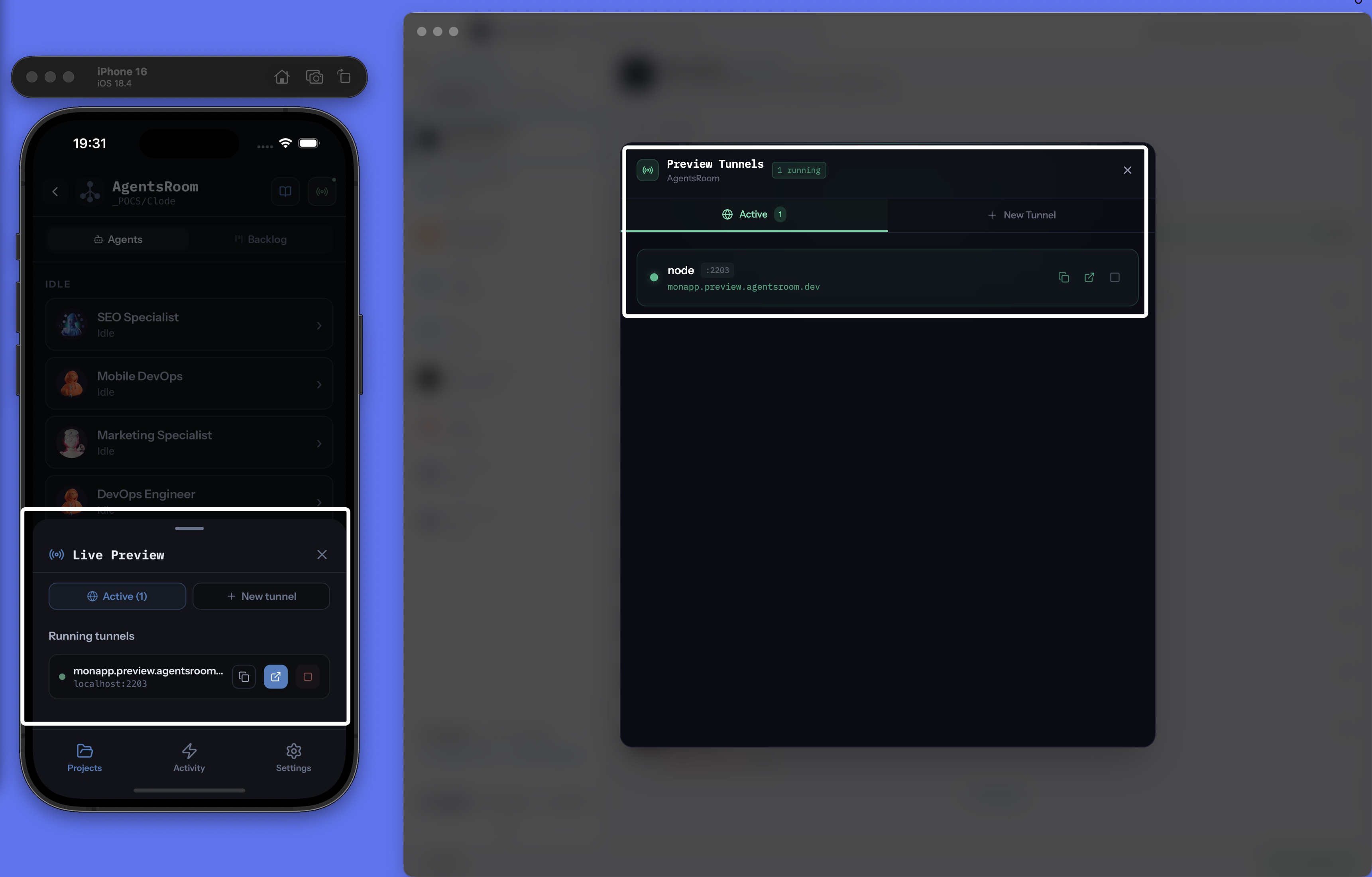
通过公共HTTPS URL分享localhost
即时将本地开发服务器暴露到互联网。选择自定义子域名,获取公共HTTPS链接,与任何人分享你的工作,无需部署。AgentsRoom内置的免费ngrok替代方案。
browser_select_target "Chrome · Pro"browser_select_target "Chrome · Personal"browser_navigatebrowser_clickbrowser_screenshot你的代理驱动你真实的 Chrome,每个账户一个目标
AgentsRoom 扩展程序把每个 Chrome 个人资料变成一个你的代理可以驱动的命名浏览器:工作、个人、客户,各自带着自己的 cookie 和已登录的账户。代理按名字挑选目标,在那里打开一个新标签页,然后点击、输入、读取 console、截图,与此同时另一个代理在另一个账户上工作。那个 Chrome 可以在你的另一台机器上:扩展程序和 AgentsRoom 中继对话,端到端加密,用的正是移动 app 那条传输通道。它是一个 MCP 服务器,所以 Claude Code、Codex、GitHub Copilot CLI、Cursor 以及另外 10 个代理 CLI 拿到同样的工具。嵌入式浏览器仍是默认目标。
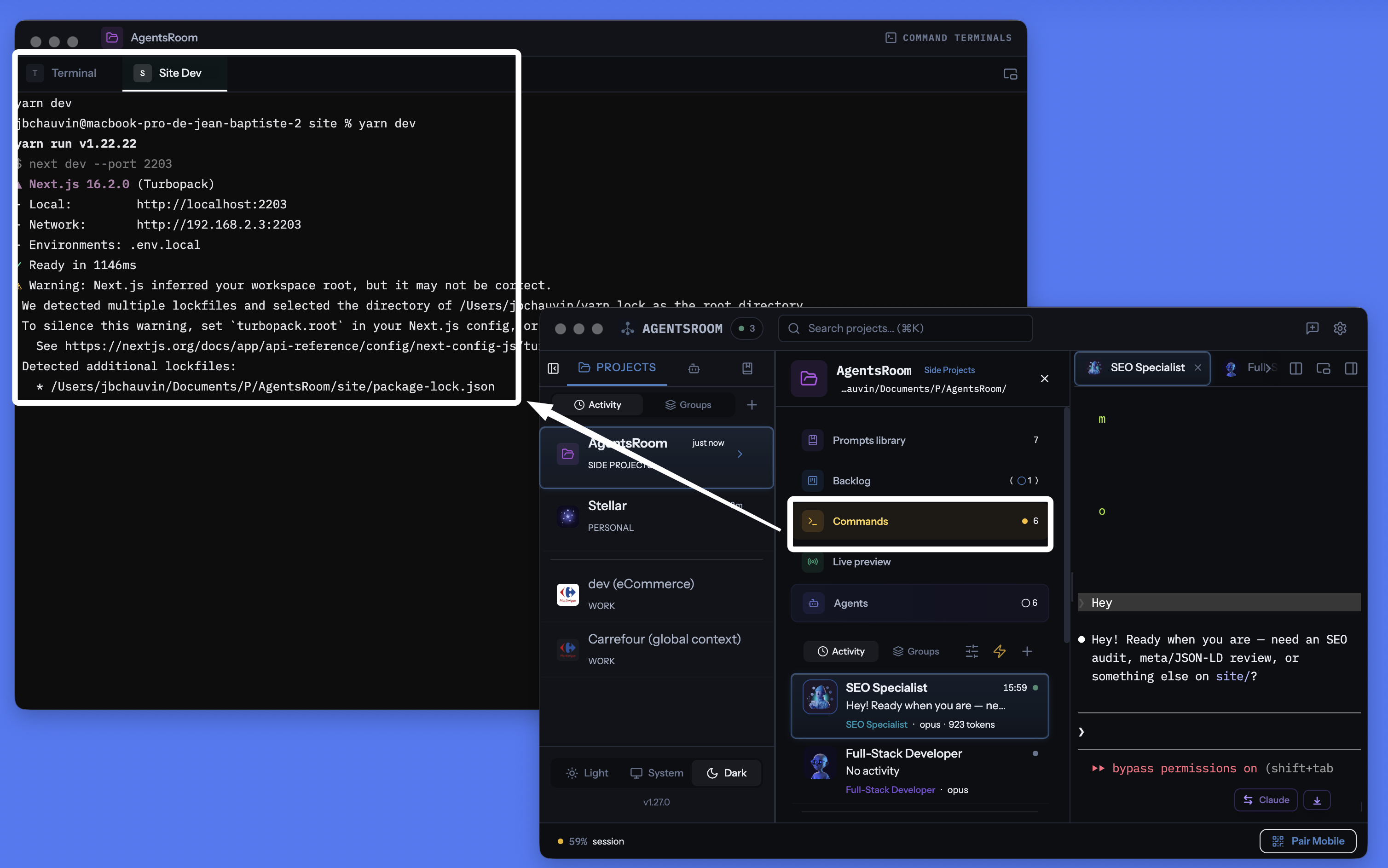
掌中可控的项目终端管理器
内建于 AgentsRoom 的真正按项目组织的终端管理器。记住每个命令(后端、前端、移动打包器、Docker、Worker、数据库),一键启动。将窗口分离到第二个显示器,或通过 4G/5G 从手机远程触发命令:你的机器变成一个可远程操控的开发服务器。iTerm2、Warp、Ghostty、Kitty、Alacritty、WezTerm、Hyper、Tabby 和 Terminal.app 的现代替代方案,专为项目工作而设计。
一个搜索框搜遍项目里的一切
AgentsRoom 里装着你的代理、你的技能、你的提示词、你的定时代理和 Webhook 触发器、你的待办、你的开发命令、你的 SSH 与数据库连接,还有仓库本身。命令面板从一个输入框搜索这一切,在 macOS 上用 Cmd K 打开,在 Windows 和 Linux 上用 Ctrl K 打开。匹配是模糊的,所以缺字母、缺重音符号也照样能找到你想要的东西,而结果按类别分组返回,而不是堆成一个平铺的长列表。一个前缀字符就能把搜索收窄到单一来源,方向键移动,Enter 打开,Escape 把你放回原处。文件遵守 .gitignore,提交来自你所在的分支,索引在你第一次打开面板时于后台构建,绝不在应用启动时进行。你输入的内容不会被发送到服务器。
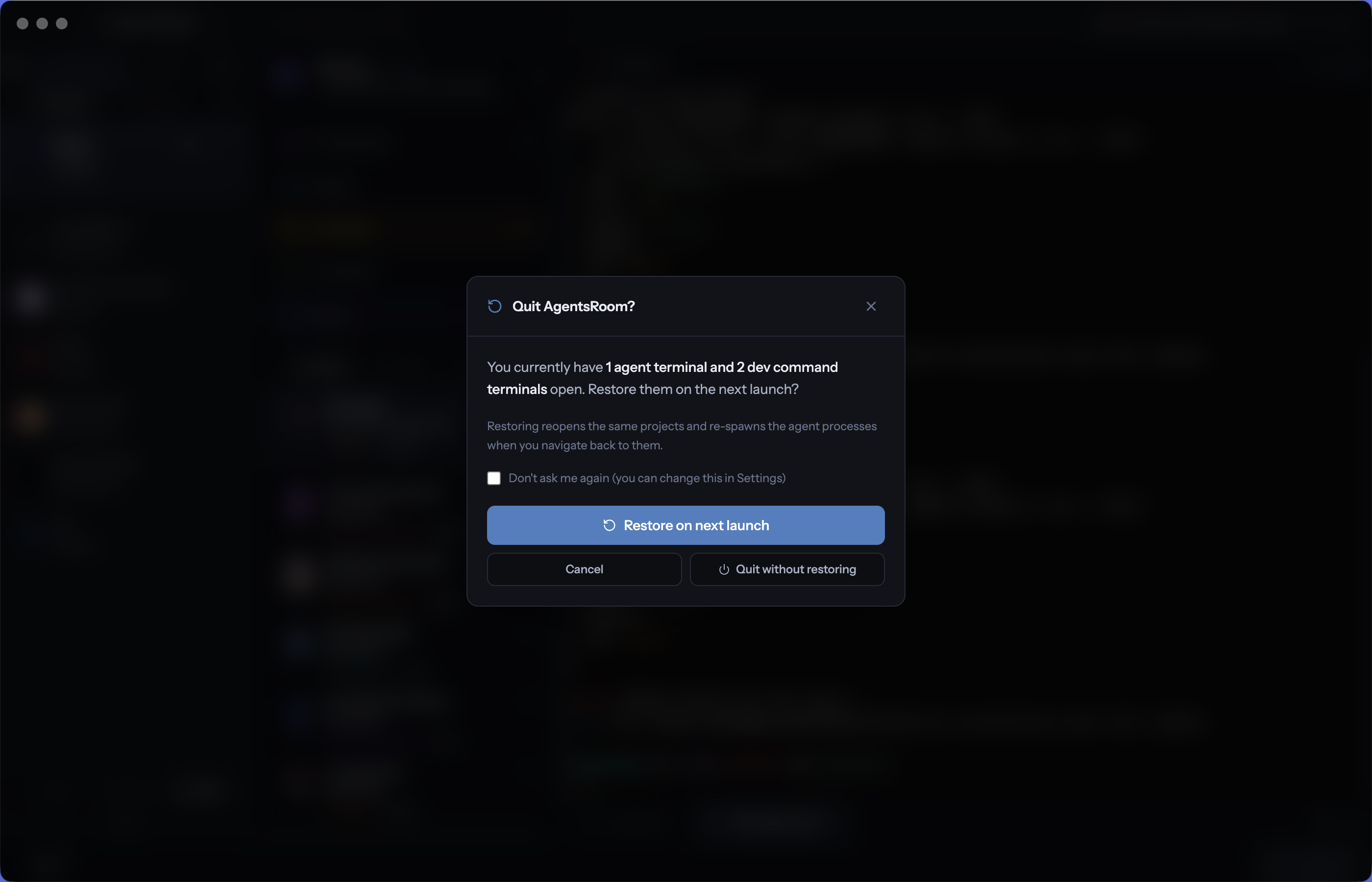
下次启动时恢复代理和终端
在一天结束时退出 AgentsRoom,选择明天恢复代理和终端,然后第二天早上重新打开应用,找到每个 AI 代理、每个开发终端、每个长时间运行的开发服务器和每个工作目录,完全在你离开它们的位置。退出时一个复选框,启动时一次点击,零摩擦。从你停下的地方继续,在几秒钟内开始写代码,而不是花一个小时重建你的环境。
AI 代理能驾驶的 IDE,不只是聊天
四个 MCP 服务器 (Backlog MCP、Terminal Commands MCP、Prompt Library MCP、Browser MCP) 把 AgentsRoom IDE 暴露给 Claude、Codex、GitHub Copilot CLI、Cursor 以及另外 10 个代理 CLI。代理读写 backlog、回复公开 backlog 工单、运行已保存 dev 命令 (并创建新的)、复用或保存 prompt、驾驶内嵌浏览器验证工作。想手动就手动,不想就自动。让 AgentsRoom 变成代理可驾驶 IDE 的独特优势。
通过 SSH 直接在远程服务器上运行你的代理
AgentsRoom 集 SSH 连接管理器与内置 SSH 终端于一身。把你的 VPS 和远程服务器保存一次,用 SSH 密钥或密码连接,然后直接在远程机器上运行 Claude Code、Codex 或 Antigravity CLI,无需另开 SSH 客户端。为每个项目固定一个连接,让位于远程机器上的项目始终通过正确的 SSH 连接打开终端。在强力服务器上运行繁重的构建、GPU 作业或长时间运行的代理,同时在你的笔记本上保留同样的驾驶舱、状态追踪和通知。
代理能用却读不到的密钥
API 密钥、令牌和密码存在一个本机密钥库里,由你的操作系统钥匙串加密,写在单个文件中,仅限属主且原子替换。你按名称引用一个密钥,AgentsRoom 会在启动时于主进程中把它解析进被启动命令的环境。代理可以列出名称并请求注入其中之一,而没有任何一条代码路径会把值返回给代理、返回给界面或经由 MCP 送出。任何内容都不会同步到服务器,一台没有可用钥匙串的机器得到的是拒绝,而不是一个明文文件。
让代理查询你的数据库,默认只读
把你的 MySQL、PostgreSQL 和 MongoDB 连接连同主机、端口、用户、数据库和 TLS 一起保存下来,再通过 SSH 隧道,或通过用你已保存连接搭起来的 AWS SSM 端口转发会话,去访问那些不对外暴露的数据库。每个连接都从只读开始:一次写入既需要一个可写的连接,也需要一次明确确认,而被标记为生产环境的连接会让这次确认更难给出。每次调用一条语句,堆叠语句一律拒绝,结果集设有上限。代理经由 MCP 指名一个连接来查询,所以密码永远到不了它们手里。你的连接会同步到你的账号上,换一台机器也照样跟着你走;一个数据库可以导出成文件、再从文件导入回来,或者直接复制到另一台服务器上,而目标数据库在被覆盖之前会先备份。
够得着私有子网里的 RDS 数据库,不用堡垒机
你的 Amazon RDS 实例没有公网端点,没有入站 SSH,安全组也只放行应用本身。AgentsRoom 经由一条 AWS Systems Manager 端口转发会话够到它:向操作系统要一个空闲的回环端口,通过一个受管的 EC2 节点、用 AWS-StartPortForwardingSessionToRemoteHost 文档执行 aws ssm start-session,并一直等到那个端口真的接受 TCP 连接,才让自己的数据库客户端连上去。没有堡垒机要打补丁,没有 VPN 要开通,也不用把端点和密码复制进一条聊天消息。授权来自你机器上早已配置好的 AWS 配置文件,所以应用不保存任何密钥,转发出来的端口也只绑定在 127.0.0.1 上。支持 MySQL、PostgreSQL 和 MongoDB,也就是 RDS MySQL、RDS PostgreSQL、Aurora 以及 DocumentDB。
搞清楚你的代理 CLI 为什么起不来
启动即挂的代理 CLI 通常什么有用信息都不给,原因藏在一条你从没亲手敲过的命令里。AgentsRoom 记录它实际执行的命令,为每个参数标出注入它的那项设置,读取 CLI 打印的内容,然后用大白话回答:哪里坏了,以及按顺序该怎么修。像二进制文件缺失或参数被拒绝这类确定性检查会即时给出结论,不发起任何 AI 调用;脱敏在你本机完成;任何命令都不会替你执行。
把你的 GitHub 和 GitLab 仓库搬进来
连接一次 GitHub 或 GitLab,就能看到你真正有权限访问的仓库,勾选需要的,一次性全部克隆。每个仓库都会直接变成一个路径已配置好的项目,随时可以派代理进去。用令牌认证,或者复用你机器上已登录的 gh 或 glab 会话;有自托管的 GitLab 就填自己的主机地址;一切都留在本地:令牌在磁盘上加密存储,克隆用的凭据绝不会写进你的 git config。
随处可用,搭配任意代理
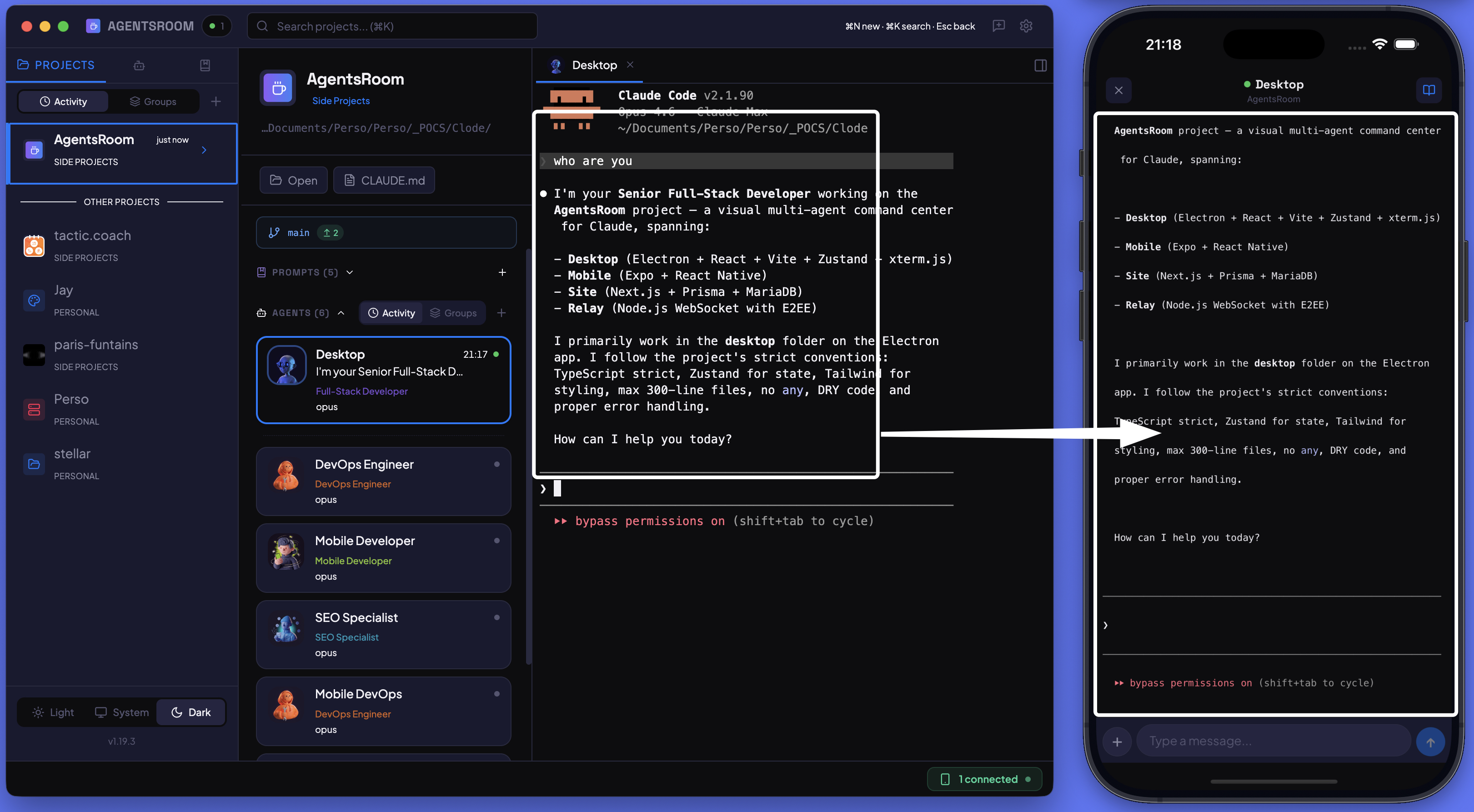
从手机控制你的代理
启动代理、在终端输入、发送提示词、从 iPhone 或 Android 监控进度。桌面端与移动端之间通过端到端加密进行实时同步。
3 个代理正在工作
- BackendAPI 限流12 分钟
- Frontend设置页的深色模式7 分钟
- QA结账流程端到端测试3 分钟
你运行的每个代理,都在锁定屏幕上
一个实时活动涵盖你的整个 AI 编程代理房间,不论 CLI、不论电脑:状态环配上每个代理、它的任务和实时计时器,显示在 iPhone 锁定屏幕、灵动岛、Apple Watch 和待机显示中。当某个代理需要你时,它的问题排在最前,在 iPhone 上这是唯一会发出声音的更新。在锁定屏幕上回复 Claude Code 的问题或权限请求,有 Face ID 保护。房间安静下来后,一张摘要卡片会显示时长、代理,以及改动的文件和行数。名称、任务和问题均经过端到端加密。主屏幕和锁定屏幕小组件、配额小组件,以及 Android 上带实时更新的实时通知。对所有人免费。
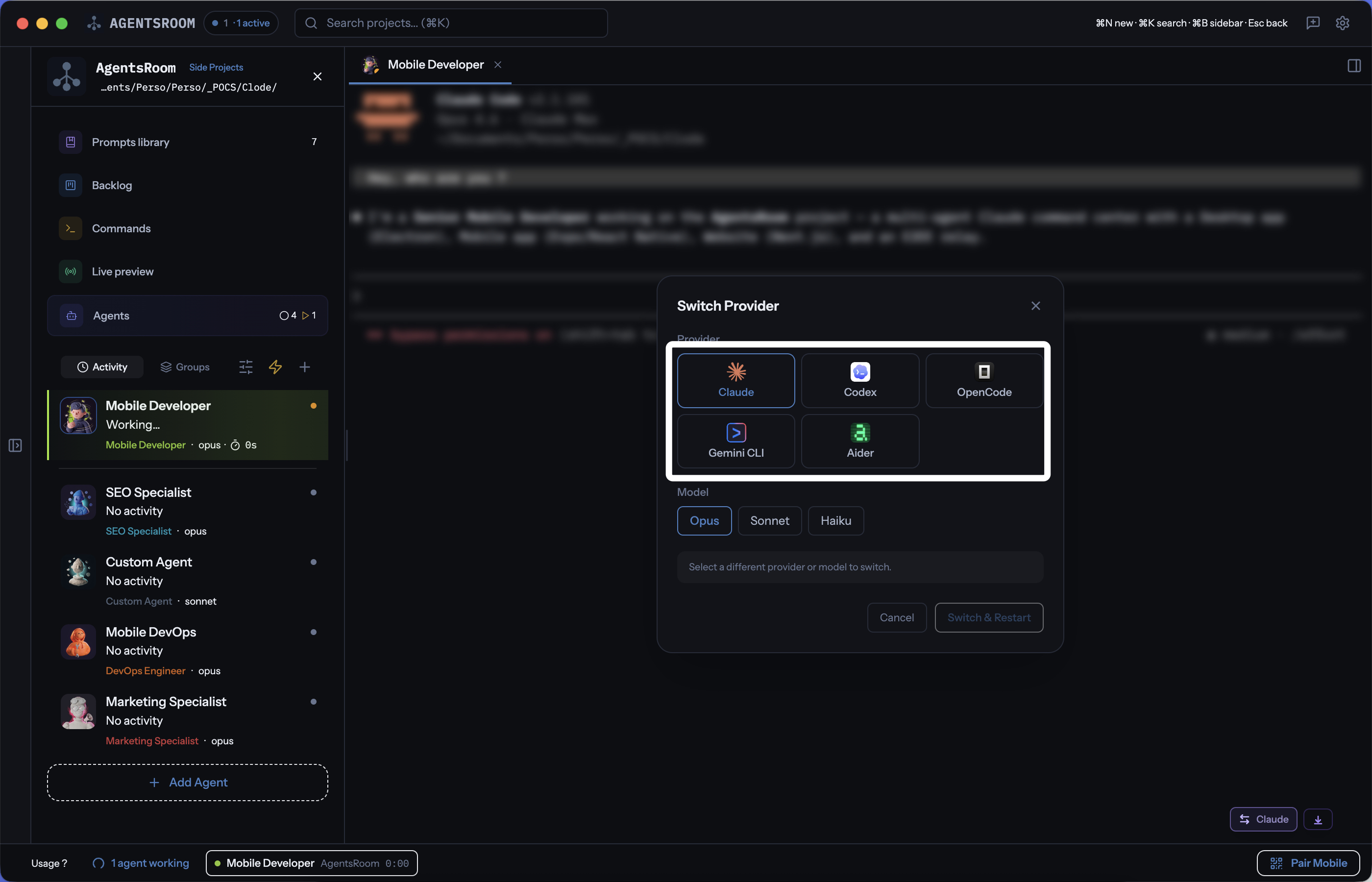
在Claude、Codex、GitHub Copilot CLI、Cursor以及另外10个代理CLI之间自由切换
在同一个项目中使用 14 个 AI 编码供应商。为每个代理选择供应商,在对话中途切换,通过自动交接保持完整上下文。Claude、Codex、GitHub Copilot CLI、OpenCode、Antigravity CLI、Aider、Grok Build、Mistral Vibe、Kimi Code、Amp、oh-my-pi、Freebuff、Devin、Cursor,全在一个应用中。
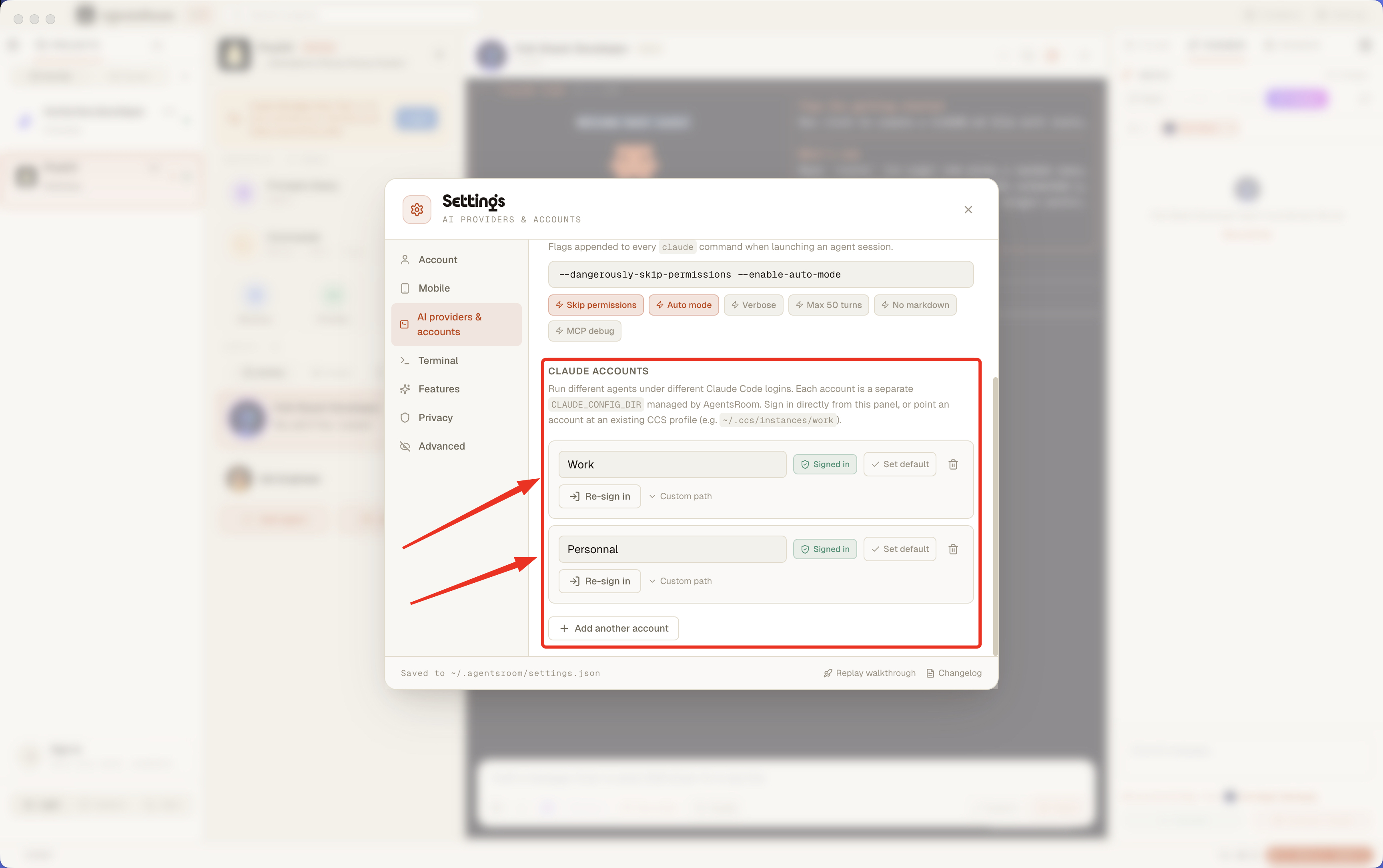
多个 Claude Code 账户,一个应用,无需折腾 shell
在 AgentsRoom 中同时使用工作 Claude 账户、个人账户和客户账户。为每个项目固定一个账户,按代理覆盖。直接在设置面板登录,无需任何终端技巧。也兼容 CCS 配置。
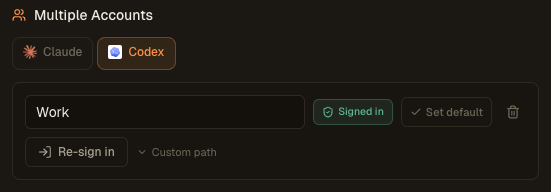
多个 Codex 账户,一个应用,无需再折腾 shell
工作用的 Codex 账户、个人账户、客户账户,可以在 AgentsRoom 里同时使用。为每个项目固定一个账户,也可以在单个代理上单独覆盖。直接在设置面板里通过 codex login 登录,不需要任何终端小技巧。
GROK_HOME~/.grok-work~/.grok多个 Grok 账户,一个应用,零登出
工作用的 Grok Build 账户、个人账户、客户账户,可以在 AgentsRoom 里同时使用。为每个项目或每个文件夹固定一个账户,也可以在单个代理上单独覆盖。直接在设置面板里通过 grok login 登录,不用手动导出 GROK_HOME。
CURSOR_CONFIG_DIR~/.cursor-work~/.cursor多个 Cursor 账户,一个应用,零登出
工作用的 Cursor 账户、个人账户、客户账户,可以在 AgentsRoom 里同时使用。为每个项目或每个文件夹固定一个账户,也可以在单个代理上单独覆盖。直接在设置面板里通过 cursor-agent login 登录,不用手动导出 CURSOR_CONFIG_DIR。
撞上用量上限,照样继续工作
当代理所在的 Claude、Codex 或 Grok Build 账号达到你设定的配额阈值时,一条配额规则会把工作交给你已经登录的另一个账号,工作继续进行:同一个会话、完整上下文,不重启,也不用等 5 小时或每周的时段重置。用完的账号会先坐冷板凳,等配额回来后自己回到池子里。几个小订阅就此变成一个大得多的套餐,无人值守的运行也活了下来:凌晨 2 点的定时任务不会再在上限处悄无声息地死掉。
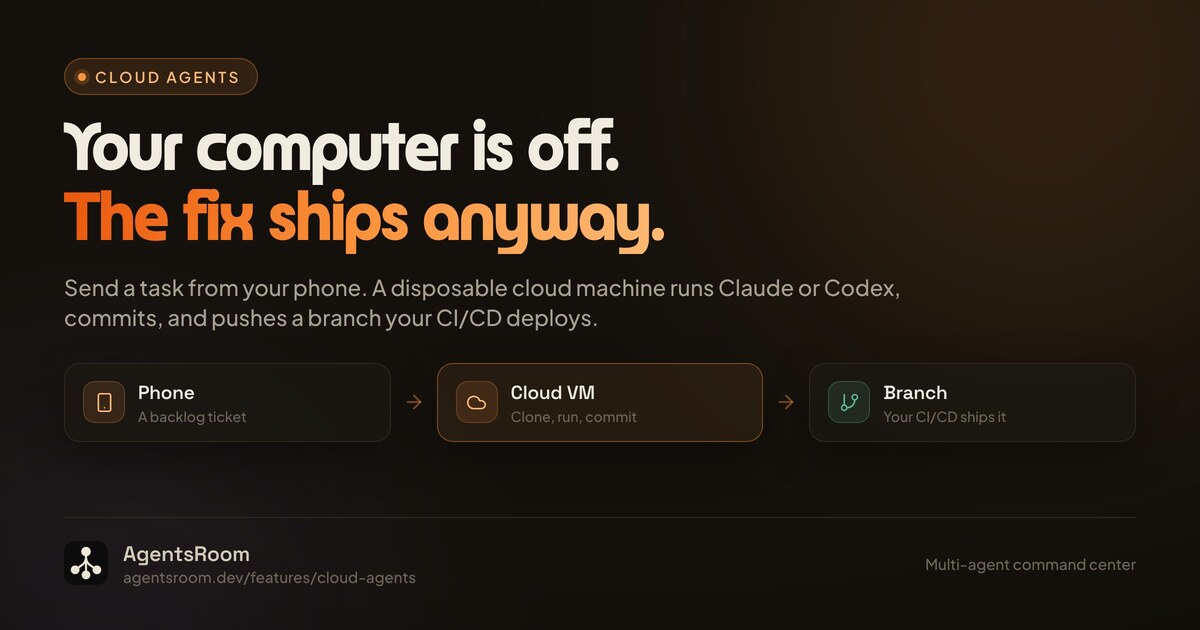
电脑关着的时候,任务照样在跑
从桌面端 App 或手机上发起一个编程任务,它会在云端一台一次性机器上执行,而不是在你的笔记本上。云端代理是一个任务,不是远程会话:机器克隆仓库,以无头模式运行 Claude 或 Codex,提交,推送一条专用分支并写下报告,然后销毁自己。既然会合点是 git,你这边就不需要有任何东西醒着,于是一条用户反馈可以落到你的公开待办上,变成在手机待办标签页里发起的一次云端运行,再经由你自己的 CI/CD 抵达生产环境,而你的电脑一台都没开过。运行结束后,你可以确认分支、送回云端重跑,或者在一个上下文已经填好的普通会话里转到本地继续。
每个项目,每台机器,一个窗口
你已经不再只在一台电脑上写代码。有办公室的台式机,有家里的笔记本,也许角落里还有一台构建服务器。Remote Fleet 把它们连进一个统一界面,让每个项目以及每个 Claude、Codex 或 Antigravity 代理都出现在同一个窗口里,无论它实际跑在哪台机器上。每台机器仍在本地运行自己的代理,而机群视图汇总它们的状态、终端和项目。跨设备编排通过一条专属的端到端加密中继传输,因此你的代码和代理输出绝不会以明文离开你的机器。
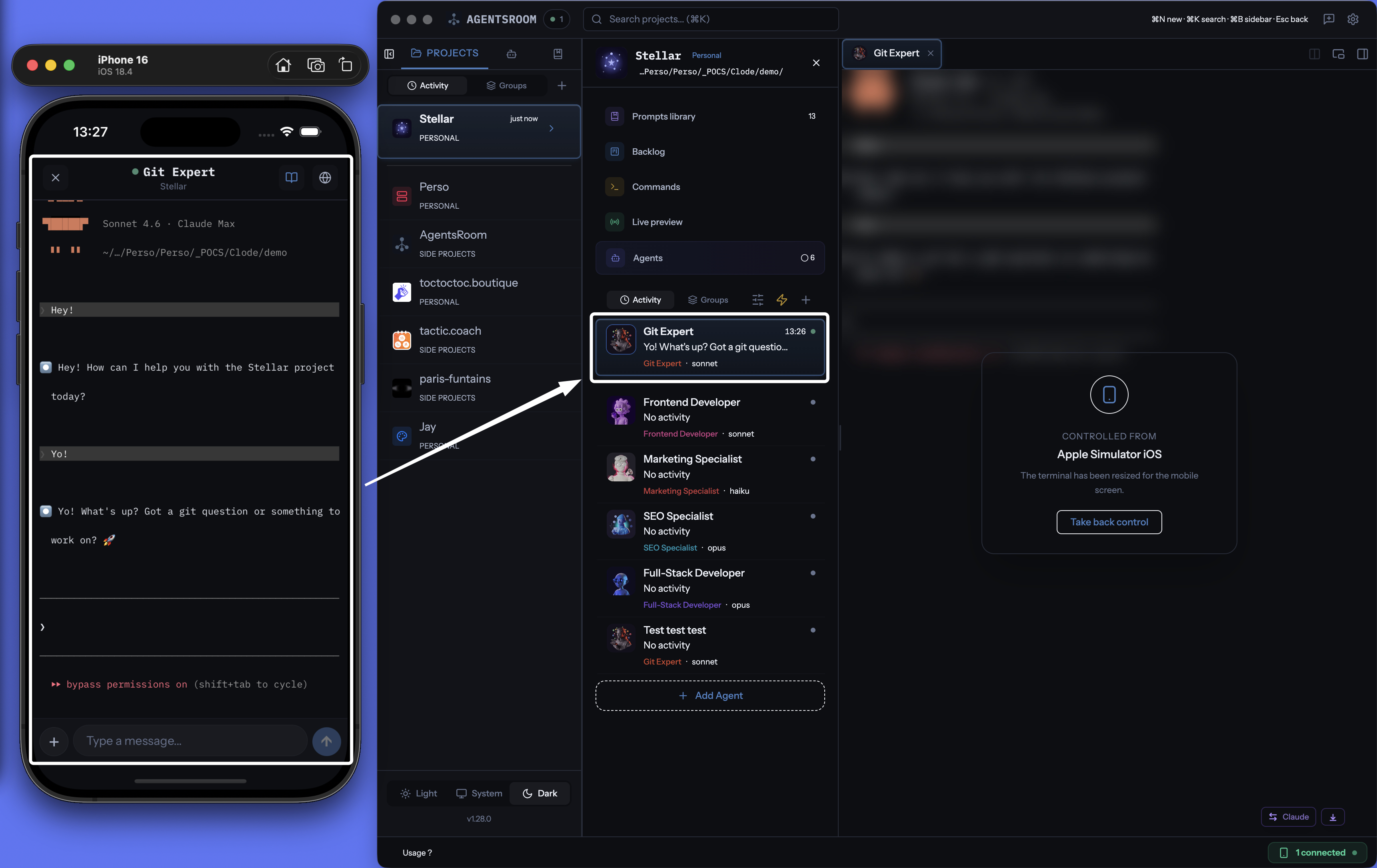
用手机接管正在运行的代理
代理始终在你的桌面上运行,走它自己的 CLI,跑在你自己的机器上。手机变成遥控器:实时读取终端输出,回应权限确认,发送下一条指令,触发一条已保存的提示词,移动一张 backlog 工单,在手机浏览器里打开经隧道暴露的开发服务器。代理完成任务或卡住等你的那一刻,推送通知会立刻告诉你,长任务不再把你钉在书桌前。所有数据都走 AgentsRoom 的端到端加密中继。