Dev Terminals
管理你的所有服务
你的项目有后端、前端、移动应用、中继服务器。以前你要打开 4 个终端标签,手动输入每个启动命令。现在你只需按一个按钮。
还有最独特的一点:通过 iOS 和 Android 移动应用,你可以在你的机器上远程触发命令。在地铁里、健身房或咖啡馆启动一个 localhost 站点,然后通过内置的实时预览隧道,在手机上用 4G/5G 打开它。
同时管理多个终端:drag-and-drop split panes、垂直与水平布局,以及可完全独立弹出的窗口,方便将其移至专用监控屏幕,用于查看 AI 代理、日志和构建输出。
Dev Terminals 远不止是一个终端模拟器。它是一个真正的按项目命令管理器,专为取代你每天早上打开的 iTerm2、Warp、Ghostty、Kitty、Alacritty 和 Terminal.app 标签丛林而设计。每个项目都有自己的命令列表:开发服务器、后端、移动端 bundler、worker、数据库、内部脚本。你只需命名一次,就能永远启动。
UX 和 UI 被刻意打磨到极致,让命令管理尽可能快速。每条命令都会记住它的名称、Shell 命令、工作目录(相对于项目根目录)、框架分类(React、Next.js、Django、Rails、Go、Rust、Docker…)以及类型(长驻进程或一次性代码片段)。活动命令会自动浮到列表顶部,彩色的框架图标让你一眼认出 React 前端、Django 后端和 Docker 服务。
在 AgentsRoom 内部集成终端的最大优势在于,命令会在你项目的确切上下文中运行:相同路径、相同环境、相同 cwd。零摩擦、零无尽的 cd、项目间零混淆。而且因为一切都与你的 Claude、Codex 和 Antigravity AI 代理在同一个地方,你不必再为了交付代码而在十五个不同工具之间来回切换。
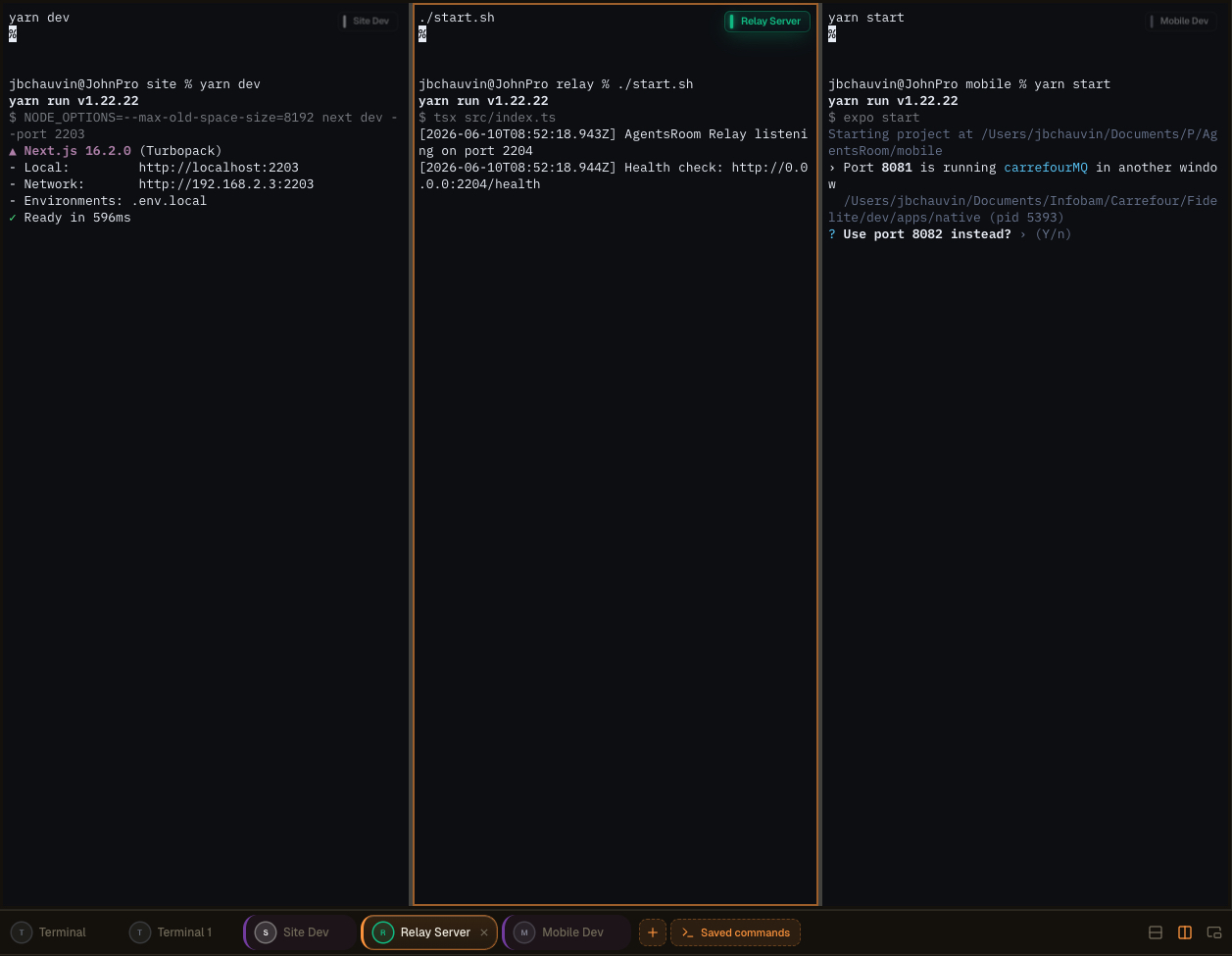
AgentsRoom 中的多窗格终端布局:拆分终端、在第二屏幕上独立弹出,并排监督 AI 代理、日志和构建输出。
真正集成的终端,而非玩具
每条命令都会打开一个完整的 xterm.js 终端,支持 ANSI 颜色、滚动缓冲、可点击链接、PTY 尺寸调整和 Unicode。这不是一个假的日志查看器:它是一个真实的伪终端,与你在 iTerm2 或 Terminal.app 中得到的完全一致,只是由它替你管理。
每个进程的状态都会实时显示:运行中、启动中、已停止、已崩溃。当开发服务器宕机时,你会立即看到。一键即可重启。而当你需要多个终端并行时(后端 + 前端 + 移动端 + relay),全局的「全部启动」按钮会一次性、并行地启动所有长驻进程,无需输入任何内容。
命令按文件夹分组,可用鼠标重新排序,并存储在项目根目录的 `.agentsroom/commands.json` 中。提交这个文件:你的整个团队都会继承相同的终端配置。个人命令(本地调试脚本、私有环境变量)会进入 `commands-personal.json`,并自动添加到 `.agentsroom` 内的 `.gitignore`。再也没有人需要在加入新仓库时凭记忆敲出 `yarn dev --port 2203`。
最后,一切都是统一的:你的 AI 代理、你的终端、你的提示词、你的 backlog 和你的实时预览都在同一个窗口里。通过消除在 AgentsRoom、终端模拟器、IDE 和浏览器之间的来回切换,你节省了大量时间。一块屏幕,一切都触手可及。
独立命令与多屏设置
Dev Commands 现在可以完全独立到一个独立窗口,与 AgentsRoom 主界面分离。将终端弹出并移至最适合您工作的地方:第二显示器、超宽屏或专用于监控、日志、构建和 AI 代理的竖屏。
侧边的竖屏变成你运行进程的实时看板。在主窗口保留编辑器和代理,在旁边的面板上实时查看每个服务器、每次构建和每条日志流。无需 alt-tab,不再丢失上下文。
更好的工作区组织
为代码和代理腾出主窗口空间。独立终端独立运行,让您的开发界面保持整洁和专注,而不是挤在一个面板中。
优化多屏布局
将独立窗口拖放到第二显示器或竖屏上。构建输出、开发服务器和代理日志获得专属屏幕,同时您继续在主屏幕上编码。
实时监控
始终保持对代理和命令的实时监控。在侧边屏幕上实时观察进程启动、运行和崩溃,并在出现问题时立即响应。
更高生产力
同时处理多个项目或环境的开发者无需再频繁切换上下文。所有需要关注的内容始终可见,让您以更少的中断更快地交付。
高级终端布局,通过拖放构建
您现在可以通过极其直观的拖放界面将多个终端合并到同一窗格中。抓取终端,将其放到您想要的位置,AgentsRoom 将为您构建布局。无需配置文件,无需记忆快捷键。
组合适合当前任务的工作区:
垂直分割
将两个终端并排放置,同时查看后端和前端。
水平分割
将终端堆叠在一起,在同一列中保留日志和运行中的服务器。
复杂组合布局
混合垂直和水平分割,构建针对您技术栈的完整终端网格。
秒级重组
将任何终端拖到新位置,布局即时重排。几秒内重构整个工作区。
同时监控所有内容
在单个窗格中同时查看多个代理、服务器、日志和命令。
无需复杂设置,无需学习 tmux 配置。体验设计为即时自然,让您将时间花在编码上,而不是整理窗口。
驾驭终端的更多方式
可分离窗口、AI 命令生成和从移动端远程启动都是同一 Dev Terminals 体验的一部分。以下是原始演示。
AgentsRoom 终端管理器:在第二屏幕上独立终端、从移动端远程触发命令、每个项目集成 xterm.js 终端。
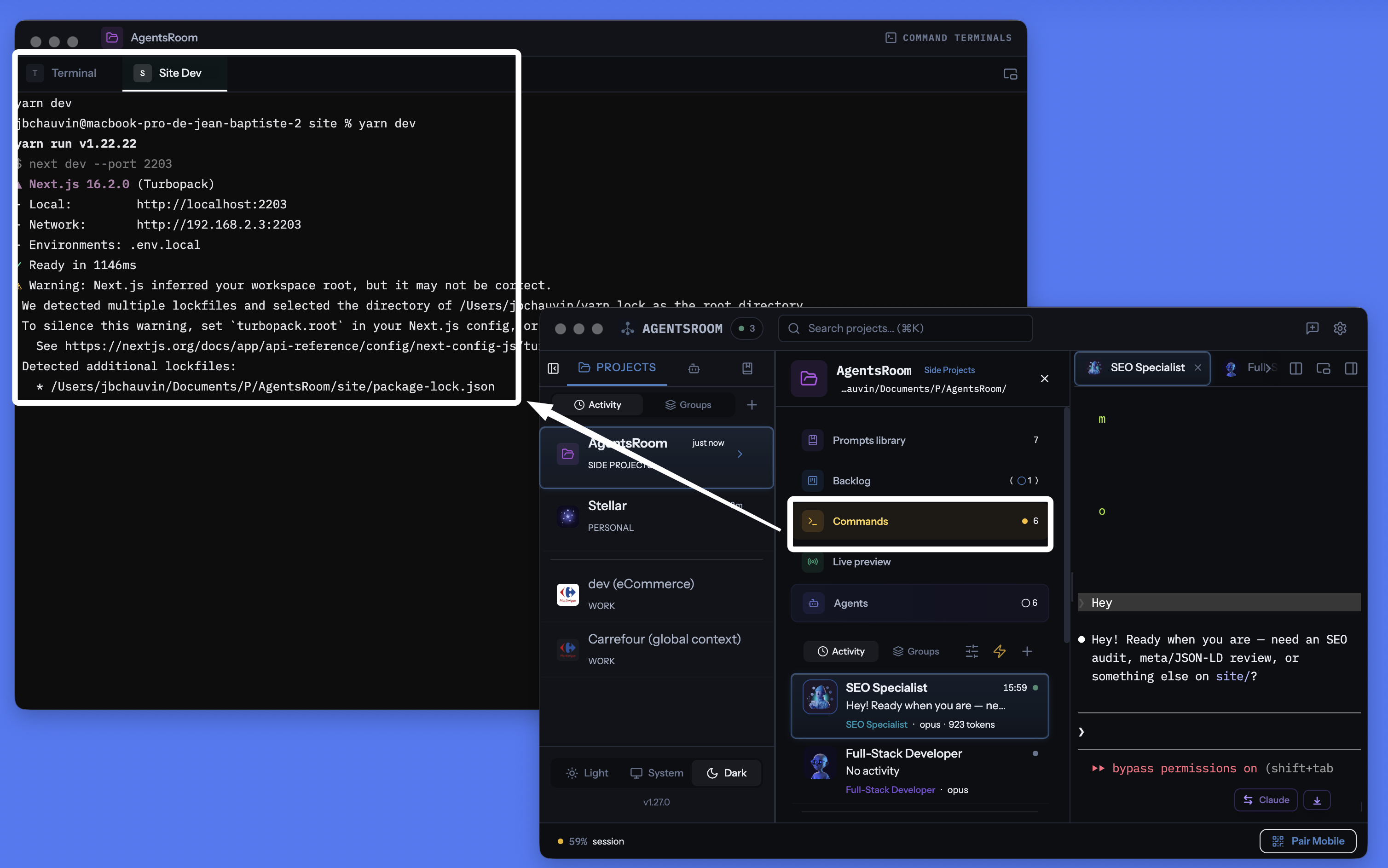
AgentsRoom 按项目终端管理器:可分离窗口、每条命令集成终端、AI 生成命令,全部与代理在同一位置。
管理每个终端、每条命令、每项服务
长驻进程、快速脚本、构建命令、开发服务器。全部按项目整理,带实时状态追踪、集成 AI 和移动端远程控制。
按项目的终端管理器
每个项目拥有自己的命令列表,存储在 .agentsroom/commands.json 中。切换项目,命令自动随之切换。仓库之间零混淆。
一键启动一切
一个播放按钮启动所有长驻进程:后端、前端、移动端 bundler、relay server、worker、数据库。不再需要手动打开五个终端标签。
从移动端远程启动
从 iOS 或 Android 应用触发命令:终端在你的机器上生成,你能通过 4G、5G 或 Wi-Fi 在手机上看到实时输出。
可分离的终端窗口
将终端区域分离成一个独立的浮动窗口。把它放到第二台显示器上,让你在主窗口编码时也能盯着服务器。
AI 命令生成
点击魔法棒:Claude 扫描你的仓库,检测 package.json、Dockerfile、Makefile,并为你生成所有启动命令、路径和分类。
实时进程状态
查看哪个服务正在运行、启动中、已停止或已崩溃。失败时显示退出码。一键重启,且不丢失终端滚动缓冲。
进程或代码片段
长驻服务器是进程。一次性的构建脚本、迁移和部署是代码片段。两者都在同一个面板中,都触手可及。
每条命令独立的 xterm.js 终端
每个进程都会打开一个真实的伪 TTY 终端,支持 ANSI 颜色、滚动缓冲、可点击链接和完整的键盘输入。与 iTerm2 或 Terminal.app 相比毫不妥协。
接入 localhost 实时预览
从 AgentsRoom 终端启动你的 localhost 站点,然后通过内置的 HTTPS 隧道从外部访问。无需部署,即可在手机上用 4G/5G 测试。
30+ 框架图标
React、Next.js、Vue、Nuxt、Angular、Svelte、Expo、Node.js、NestJS、Django、FastAPI、Rails、Laravel、Spring、Go、Rust、Docker、Redis 等众多框架,每个都有图标和颜色。
git-native 存储
公共命令存储在 .agentsroom/commands.json 中,提交到你的仓库。个人命令存储在 commands-personal.json 中,自动 gitignore。
终端与 AI 代理合二为一
你的终端、你的 Claude Code 代理、你的提示词、你的 backlog 和你的实时预览共享同一个应用。不再在十个不同工具之间迷失。
从手机启动你机器上的终端
这可能是 AgentsRoom 最独特的功能。在 iOS 或 Android 移动应用中,你浏览任意项目的命令列表,轻点一下就能启动其中任何一条。命令不会在你的手机上运行:它在你的机器上、在正确的工作目录里、在一个真实的 PTY 终端中运行。输出通过端到端加密中继实时传输到手机。
具体来说:你在地铁里、健身房,或在世界的另一端。你想启动本地站点查看一个设计稿,或者重启一个在你离开时崩溃的 worker。你打开 AgentsRoom 移动端,轻点「yarn dev」,服务器就在家里的机器上启动了。你甚至可以从手机用键盘与终端交互。
结合集成的 localhost 预览隧道,你甚至可以在手机浏览器中通过 4G 或 5G 打开你的本地站点,无需任何部署。你编码、启动、测试、验证,全部在口袋里完成。AgentsRoom 真正把你的机器变成了一台可远程驱动的开发服务器。
当长命令完成时通知我
构建、测试套件或Docker镜像可能需要几分钟才能完成。你切换到其他任务,而终端在完成后静静地待了十分钟才被你注意到。为终端标签开启铃声,AgentsRoom会在命令完成的那一刻告诉你,包括命令名称和运行时长。
铃声位于每个终端窗格右上角的小浮动标签中。点击一次开启,点击一次关闭,它会保持在该终端处于开启状态,因此同一构建的每次运行都会反馈。点击通知会打开该特定终端标签。
每个终端一个铃声
仅在需要的地方开启。没有全局配置,也没有你从未询问过的终端提醒。
仅限长命令
任何少于一分钟的命令都视为交互使用并保持静音,因此cd、ls和git status不会打扰你。在命令已经运行时开启铃声,该命令无论多长都会反馈。
你在观看时绝不打扰
如果该终端已经在屏幕上且应用程序获得焦点,则不会弹出任何内容。提醒存在于你走开时,而不是你正在阅读输出时。
macOS、Windows和Linux
检测读取终端的前台进程,因此无需添加任何内容到你的zsh、bash、fish或PowerShell配置中,并且它与您已经使用的shell兼容。当你离开机器时,提醒也会发送到iOS和Android应用。
你的AI代理也会得到同样的待遇: AI代理通知.
分离模式:把终端放到第二台显示器上
终端面板可以分离成一个独立的浮动窗口。把它拖到第二个屏幕上,在你于 AgentsRoom 主窗口编码时,后端、前端和移动端 bundler 的日志始终保持可见。这正是认真的开发者用 tmux 或平铺模式的 iTerm2 所做的,只是在 AgentsRoom 里无需任何配置。
分离的窗口保留全部功能:启动、停止、重启、AI、分类、多项目。当 Claude 代理在主窗口工作时,你可以继续在副屏的终端里打字。零 alt-tab、零上下文丢失、零晦涩配置。
你用过的每一款终端的现代替代方案
在处理自己的项目时,AgentsRoom Dev Terminals 比传统终端模拟器是更好的选择。以下是我们的用户已经用它替换掉的工具:
iTerm2 多年来一直是 macOS 的黄金标准,Terminal.app 预装在每台 Mac 上。Warp 普及了命令块和集成 AI。Ghostty 快速且原生。Kitty 是 GPU 加速的。Alacritty 极简主义。WezTerm 支持 Lua 脚本。Hyper 基于 Web 技术构建。Tabby 是跨平台的。Wave Terminal 和 Windows Terminal 都推进了现代多窗格工作流。它们都是优秀的产品。AgentsRoom 不试图在原始渲染速度上竞争:它带来不同的价值主张,一个集成到开发环境中、按项目划分、与 AI 代理同步并可从手机驱动的终端。
现代终端所需的一切,尽在一个窗口
AgentsRoom 不只是另一个终端模拟器。它汇集了现代编码工作流所需的一切,并将其置于单一界面之后:
如果你已经在用名为「backend」「frontend」「mobile」「relay」的多个终端标签管理项目,Dev Terminals 会帮你省时间。如果你用 tmux 或 zellij 来组织会话,你会发现同样的理念,却无需编写任何配置文件。
工作流程
打开你的项目
在项目视图中,Dev Terminals 与代理和提示词并排显示。如果还没有命令,系统会自动在项目根目录创建一个默认终端。
添加命令
点击 + 添加命令。设置名称、Shell 命令、工作目录(相对于项目根目录),选择分类。选择它是长驻进程还是一次性代码片段。
.agentsroom/commands.json或者让 AI 来做
点击魔法棒图标。Claude 分析你的项目结构(package.json 文件、Dockerfile、Makefile),生成所有命令及正确的路径和分类。审查、按需调整,然后保存。
启动一切
按下全局播放按钮,一次启动所有进程。也可以单独启动。每个进程会打开一个真实终端,你可以查看日志并与服务交互。
监控与响应
状态指示器显示哪些服务在运行、哪些已崩溃。点击任何服务查看终端输出。一键重启崩溃的服务。使用代码片段执行构建、部署或运行测试等常见任务。
从手机驾驭它
在 iOS 或 Android 上打开 AgentsRoom,选择你的项目,轻点一条命令:它会在你的机器上远程启动,你可以通过 4G、5G 或 Wi-Fi,借助端到端加密中继,在手机上实时查看它的输出。
适配每种技术栈的图标
每条命令显示其框架的图标和颜色。一眼识别你的 React 前端、Django 后端和 Docker 服务。
AI 命令配置
开始一个新项目?不必手动配置每条命令。点击魔法棒,Claude 会扫描你的仓库结构,检测每个服务、每个构建脚本和每条启动命令。它会生成包含正确路径、分类和图标的完整命令列表。你审查结果,按需调整,然后保存。整个配置只需几秒,不再需要几分钟。
默认提示词
"分析我的项目结构,为每个服务、每个子项目和每个构建步骤生成所有启动命令。为每条命令设置正确的工作目录、Shell 命令和对应的框架分类。"
想让代理自己启动 dev 服务吗 ?
AgentsRoom MCP 把你在这里保存的同样的 Terminal Commands 作为 MCP 工具暴露。AI 代理可以通过 Terminal Commands MCP 服务器调用 commands_list、commands_run、commands_create,自己启动 dev 服务、API 或 worker。
这只是四个 AgentsRoom MCP 服务器之一。Backlog MCP、Prompt Library MCP 和 Browser MCP 把 AgentsRoom IDE 其余部分变成代理可驾驶的空间。想手动就手动,不想就自动。
了解 AgentsRoom MCPFAQ
这和直接用 iTerm2 或 tmux 有什么区别?
使用 iTerm2 或 tmux 时,你需要手动打开标签、cd 到每个目录、输入每条命令。如果某个服务崩溃了,只有你恰好看到那个标签才能发现。Dev Terminals 按项目永久保存命令,为每个服务显示实时状态,并支持一键启动所有服务。命令保存在你的仓库中,团队成员都能获得相同的配置。
进程和代码片段有什么区别?
进程是长驻服务,比如开发服务器、后端或文件监听器。它会一直运行,直到你停止它或它崩溃。代码片段是一次性命令,比如构建脚本、数据库迁移或部署步骤。两者都保存在同一个面板中,但只有进程会通过「全部启动」按钮启动。
AI 命令生成是怎么工作的?
点击魔法棒时,AgentsRoom 会启动一个 Claude 实例来读取你的项目结构。它检测 package.json 文件、Dockerfile、Makefile 和其他配置文件,识别每个服务及其启动命令。结果是一个包含路径、分类和建议名称的结构化命令列表。你在保存前进行审查。
命令可以与团队共享吗?
可以。公共命令保存在项目目录中的 .agentsroom/commands.json 文件里。提交这个文件,拉取仓库的人都能获得相同的命令。个人命令(比如本地调试脚本)保存在 commands-personal.json 中,该文件会自动添加到 .agentsroom/.gitignore。
如果不需要,可以关闭 Dev Terminals 吗?
可以。打开设置,进入 Feature Flags 部分。关闭 Dev Terminals,该功能会从所有项目视图中消失。随时可以重新启用,已保存的命令不会丢失。
命令会与我的团队共享吗?
会。公共命令存储在项目目录中的 .agentsroom/commands.json 里。提交这个文件:任何拉取仓库的人都会获得相同的配置。个人命令(本地调试脚本)会进入 commands-personal.json,并自动添加到 .agentsroom/.gitignore。
AI 命令生成是怎么工作的?
当你点击魔法棒时,AgentsRoom 会启动一个 Claude 实例,读取你的项目结构(package.json、Dockerfile、Makefile、pyproject.toml、Cargo.toml…),以识别每个长驻服务及其启动命令。结果是一个结构化的命令列表,包含路径、分类、文件夹和建议名称。你在保存前审查该列表。
AgentsRoom可以在终端命令完成时通知我吗?
可以。每个终端标签都有一个铃声在其浮动标签中。开启它后,AgentsRoom会在运行的命令返回到提示符的那一刻发送桌面通知,包括命令名称和持续时间,以及当你离开机器时推送到iOS和Android应用。点击通知会打开该终端标签。
如果终端保持打开状态,AgentsRoom如何知道命令已完成?
一个终端标签是一个长时间存在的shell,因此当命令结束时没有任何退出。AgentsRoom监视终端的前台进程组:当它返回到shell本身时,提示符回来了,命令完成了。没有任何内容被写入你的shell配置,这就是为什么它在zsh、bash、fish或PowerShell中表现相同,并且适用于你手动输入的命令以及保存的命令。
我会收到我输入的每个命令的通知吗?
不会。只有运行超过一分钟的命令才会引发提醒,因此常规交互使用保持静音。一个例外是:如果你在命令已经运行时开启铃声,该命令无论多长都会反馈。当终端已经在屏幕上且应用程序获得焦点时,也不会触发任何提醒。
一条命令可以在我所有项目里都可用吗?
可以。保存时你选择它归属何处:仅当前项目,或全局。全局命令属于你的账号,在你打开的每个项目里都会出现,非常适合隧道、共用的 Docker 栈或到处都要起的数据库守护进程。命令弹窗带搜索框和范围筛选(全部 / 本项目 / 全局),列表再长也看得清。
我的 AI 代理能自己启动这些命令吗?
可以,通过 AgentsRoom MCP。代理调用 commands_list 查看这里可用的一切(项目命令与全局命令,各自标注范围),用 commands_run 在真实终端标签页里启动一条,你能看见也能随时停止,再用 commands_create 保存新命令。它们被禁止用原始 shell 启动长时间进程:正在运行的东西始终出现在你可控的标签页里。已结束的命令会在原有的标签页里重新运行,而不是新开一个;commands_stop 让代理可以停止自己启动的东西,要么关闭标签页,要么发送 Ctrl-C 并保留标签页以便重启服务器,这样它会自己收拾干净,而不是留下一堆标签页等你去关。而当代理自己的沙箱拒绝执行某条命令时,它不再需要打印出这行命令让你粘贴到另一个终端里:它会调用 commands_propose,该命令会在这个代理的面板中显示为一张「运行这条命令?」卡片,并附上无法运行的原因,点击一下「运行」就会在终端标签页里执行,代理随后自己读取结果。在你做出决定之前什么都不会运行,没有「始终允许」这个选项,命令也既不会被保存也不会被重放。
延伸阅读
告别终端标签混乱
下载 AgentsRoom,从一个面板启动所有服务。最多 2 个项目免费使用。
配套应用:随时随地监控你的 Agent
使用 Claude、Codex、Antigravity CLI 或其他 AI 提供商。
把 Bug 和需求直接发送到您的公开待办清单。