Dev Terminalleri
tüm servisleriniz için
Projenizde bir backend, bir frontend, bir mobil uygulama, bir relay sunucusu var. Eskiden 4 terminal sekmesi açıp her başlama komutunu elle yazardınız. Şimdi tek bir düğmeye basıyorsunuz.
Ve eşsiz kısım: iOS ve Android mobil uygulamasıyla komutları bilgisayarınızda uzaktan tetiklersiniz. Metroda, spor salonunda veya bir kafede localhost sitenizi ayağa kaldırın, ardından yerleşik canlı önizleme tüneli üzerinden telefonunuzda 4G/5G ile açın.
Birden fazla terminali aynı anda yönetin: sürükle-bırak bölünmüş paneller, dikey ve yatay düzenler ve ajanlarınız, günlükleriniz ve buildleriniz için özel bir izleme ekranına taşıyabileceğiniz tamamen bağımsız bir pencere.
Dev Terminalleri, bir terminal öykünücüsünden çok daha fazlasıdır. Her sabah açtığınız iTerm2, Warp, Ghostty, Kitty, Alacritty ve Terminal.app sekmelerinden oluşan ormanı değiştirmek için tasarlanmış, proje başına gerçek bir komut yöneticisidir. Her projenin kendi komut listesi vardır: dev sunucusu, backend, mobile bundler, worker, veritabanı, dahili betikler. Onları bir kez adlandırır, sonsuza dek başlatırsınız.
UX ve UI, komut yönetimini mümkün olduğunca hızlı kılmak için bilinçli olarak zorlanmıştır. Her komut adını, kabuk komutunu, çalışma dizinini (proje köküne göre), framework kategorisini (React, Next.js, Django, Rails, Go, Rust, Docker…) ve türünü (uzun süreli süreç veya tek seferlik snippet) hatırlar. Aktif komutlar listenin başına yükselir ve renkli framework ikonları React frontend'inizi, Django backend'inizi ve Docker servislerinizi bir bakışta tanımanızı sağlar.
AgentsRoom içine doğrudan entegre edilmiş bir terminalin büyük avantajı, komutların projenizin tam bağlamında çalışmasıdır: aynı yol, aynı ortam, aynı cwd. Sıfır sürtünme, sıfır bitmeyen cd, projeler arası sıfır karışıklık. Ve her şey Claude, Codex ve Antigravity AI ajanlarınızın yanında yaşadığı için, yalnızca kod göndermek uğruna on beş farklı araç arasında dolaşmayı bırakırsınız.
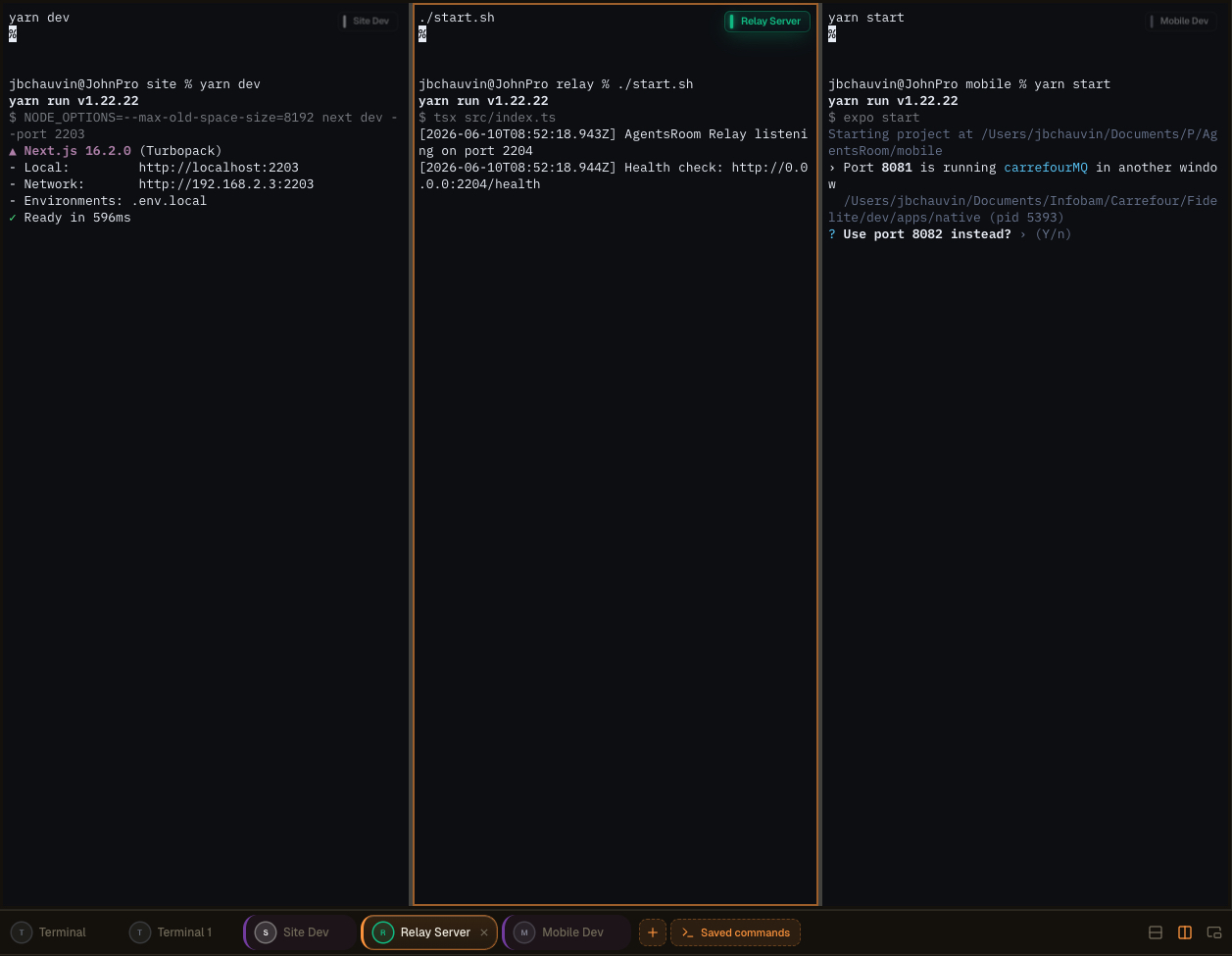
AgentsRoom çok panelli terminal düzeni: terminallerinizi bölün, ikinci ekrana ayırın ve ajanları, günlükleri ve buildleri yan yana izleyin.
Oyuncak değil, gerçek bir entegre terminal
Her komut, ANSI renkleri, geri kayma, tıklanabilir bağlantılar, PTY yeniden boyutlandırma ve Unicode desteğiyle eksiksiz bir xterm.js terminali açar. Bu sahte bir günlük görüntüleyici değildir: iTerm2 veya Terminal.app'te elde ettiğinizle aynı, gerçek bir sözde terminaldir, ama sizin yerinize yönetilir.
Her süreç durumu canlı olarak gösterilir: çalışıyor, başlıyor, durdu, çöktü. Bir dev sunucusu çöktüğünde hemen görürsünüz. Yeniden başlatmak için tek tık. Ve paralel olarak birkaç terminale ihtiyaç duyduğunuzda (backend + frontend + mobil + relay), global 'Hepsini Başlat' düğmesi tüm uzun süreli süreçleri tek seferde, paralel olarak, hiçbir şey yazmadan başlatır.
Komutlar klasörler halinde gruplanır, fareyle yeniden sıralanabilir ve projenizin kökündeki `.agentsroom/commands.json` dosyasında saklanır. Bu dosyayı commitleyin: tüm ekibiniz aynı terminal kurulumunu devralır. Kişisel komutlar (yerel hata ayıklama betikleri, özel ortam değişkenleri) `commands-personal.json` dosyasına gider ve `.agentsroom` içindeki `.gitignore` dosyasına otomatik olarak eklenir. Artık kimsenin yeni bir repoya katılırken `yarn dev --port 2203` komutunu ezberden yazması gerekmez.
Son olarak, her şey birleştirilmiştir: AI ajanlarınız, terminalleriniz, promptlarınız, backlog'unuz ve canlı önizlemeniz aynı pencerede yaşar. AgentsRoom, terminal öykünücünüz, IDE'niz ve tarayıcınız arasındaki gidiş gelişi ortadan kaldırarak muazzam zaman kazanırsınız. Tek ekran, her şey bir tık uzakta.
Bağımsız Komutlar ve çok ekranlı kurulum
Dev Komutları artık ana AgentsRoom arayüzünden bağımsız, ayrı bir pencerede tamamen ayırılabilir. Terminallerinizi dışarı çıkarın ve en iyi çalıştığınız yere taşıyın: ikinci ekran, ultra geniş veya izleme, günlükler, buildler ve AI ajanları için ayrılmış dikey bir monitör.
Yanda dikey bir ekran, çalışan süreçleriniz için canlı bir duvar haline gelir. Ana pencerede editörünüzü ve ajanlarınızı tutun, yanındaki panelde her sunucuyu, her buildi ve her günlük akışını gerçek zamanlı olarak izleyin. Alt-Tab yok, kaybolmuş bağlam yok.
Daha iyi çalışma alanı düzenlemesi
Ana pencerenizi kod ve ajanlar için serbest bırakın. Bağımsız terminaller kendi başlarına yaşar, böylece geliştirme yüzeyiniz tek bir panele sıkıştırmak yerine temiz ve odaklanmış kalır.
Optimize edilmiş çok ekranlı düzen
Bağımsız pencereyi ikinci ekrana veya dikey monitöre bırakın. Build çıktılarınız, dev sunucularınız ve ajan günlükleriniz özel bir ekran alırken ana ekranda kodlamaya devam edersiniz.
Gerçek zamanlı izleme
Ajanlarınızı ve komutlarınızı her zaman açık izleyin. Süreçlerin başladığını, aktığını ve çöktüğünü yan ekranda canlı olarak izleyin ve bir şeyler ters gittiğinde hemen tepki verin.
Daha yüksek verimlilik
Birden fazla proje veya ortamla uğraşan geliştiriciler bağlam değiştirmeyi bırakır. İzlenmesi gereken her şey görünür kalır, böylece daha az kesinti ile daha hızlı geliştirirsiniz.
Sürükle-bırak ile oluşturulmuş gelişmiş terminal düzenleri
Artık son derece sezgisel bir sürükle-bırak arayüzü aracılığıyla birden fazla terminali aynı panelde birleştirebilirsiniz. Bir terminali tutun, istediğiniz yere bırakın ve AgentsRoom düzeni sizin için oluşturur. Yapılandırma dosyası yok, ezberlenecek kısayol yok.
Önünüzdeki göreve uyan çalışma alanını oluşturun:
Dikey bölmeler
Backend ve frontendi aynı anda izlemek için iki terminali yan yana yerleştirin.
Yatay bölmeler
Günlükleri ve çalışan bir sunucuyu aynı sütunda tutmak için terminalleri üst üste yığın.
Karmaşık birleşik düzenler
Yığınınıza göre özelleştirilmiş eksiksiz bir terminal ızgarası oluşturmak için dikey ve yatay bölmeleri karıştırın.
Saniyeler içinde yeniden düzenleyin
Herhangi bir terminali yeni bir konuma sürükleyin ve düzen anında yeniden düzenlenir. Tüm kurulumunuzu birkaç saniyede yeniden yapılandırın.
Her şeyi aynı anda izleyin
Birden fazla ajan, sunucu, günlük ve komutu eş zamanlı olarak tek bir panel içinde görünümde tutun.
Karmaşık kurulum yok, öğrenilecek tmux yapılandırması yok. Deneyim anlık ve doğal hissettirecek şekilde tasarlanmıştır, böylece pencere düzenlemek yerine zamanınızı kodlamaya harcarsınız.
Terminallerinizi yönetmenin daha fazla yolu
Ayrılabilir pencere, AI komut oluşturma ve mobilden uzak başlatma, Dev Terminalleri deneyiminin parçasıdır. İşte orijinal tanıtım.
AgentsRoom terminal yöneticisi: ikinci ekranda bağımsız terminal, mobilden uzaktan tetiklenen komutlar, proje başına entegre xterm.js terminali.
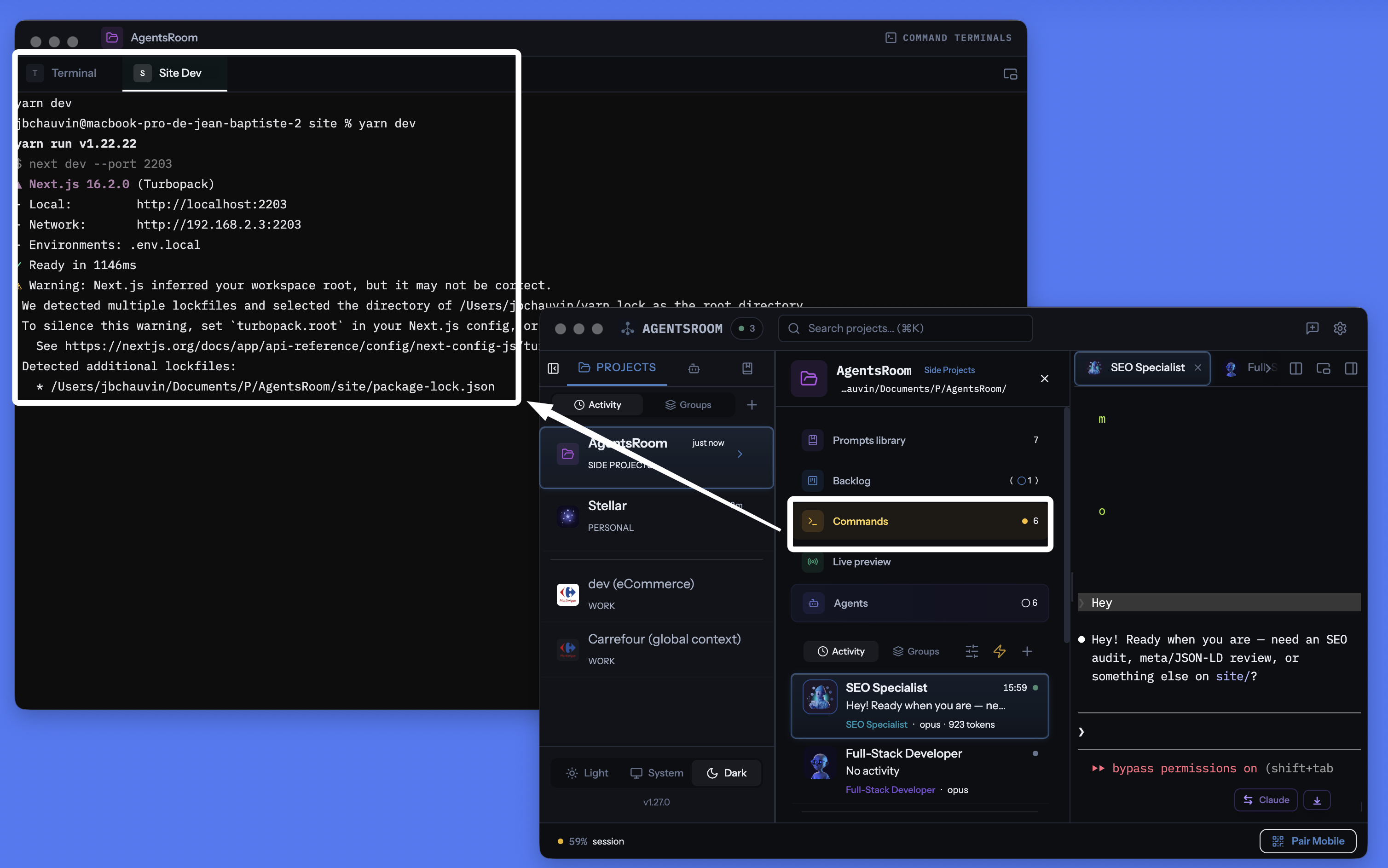
AgentsRoom proje başına terminal yöneticisi: ayrılabilir pencere, komut başına entegre terminal, AI tarafından oluşturulan komutlar, hepsi ajanlarınızla aynı yerde.
Her terminali, her komutu, her servisi yönetin
Uzun süreli süreçler, hızlı betikler, build komutları, dev sunucuları. Hepsi proje başına düzenlenmiş, gerçek zamanlı durum takibi, entegre AI ve mobilden uzaktan kontrol ile.
Proje başına terminal yöneticisi
.agentsroom/commands.json içinde saklanan, her projenin kendi komut listesi vardır. Proje değiştirin, komutlarınız otomatik olarak değişsin. Repolar arası sıfır karışıklık.
Her şeyi tek tıkla başlatın
Tek bir Oynat düğmesi tüm uzun süreli süreçleri başlatır: backend, frontend, mobile bundler, relay server, worker, veritabanı. Artık elle açılan beş terminal sekmesi yok.
Mobilden uzaktan başlatma
Komutları iOS veya Android uygulamasından tetikleyin: terminaller bilgisayarınızda oluşur ve çıktıyı telefonunuza 4G, 5G veya Wi-Fi üzerinden canlı olarak akarken görürsünüz.
Ayrılabilir terminal penceresi
Terminaller bölümünü bağımsız, yüzen bir pencereye ayırın. Ana pencerede kod yazarken sunucularınıza göz kulak olmak için ikinci bir monitöre koyun.
AI komut oluşturma
Sihirli değneğe tıklayın: Claude reponuzu tarar, package.json, Dockerfile'ları, Makefile'ları algılar ve tüm başlatma komutlarını, yolları ve kategorileri sizin için oluşturur.
Canlı süreç durumu
Hangi servisin çalıştığını, başladığını, durduğunu veya çöktüğünü görün. Başarısızlık durumunda çıkış kodları gösterilir. Terminal geri kaymasını kaybetmeden tek tıkla yeniden başlatın.
Süreç veya snippet
Uzun süreli sunucular süreçlerdir. Tek seferlik build betikleri, migrasyonlar ve dağıtımlar snippet'lardır. İkisi de aynı panoda yaşar, ikisi de bir tık uzakta.
Komut başına gerçek xterm.js terminali
Her süreç, ANSI renkleri, geri kayma, tıklanabilir bağlantılar ve tam klavye girişiyle gerçek bir sözde TTY terminali açar. iTerm2 veya Terminal.app'e kıyasla hiçbir ödün yok.
localhost canlı önizlemesine bağlı
localhost sitenizi bir AgentsRoom terminalinden başlatın, ardından yerleşik HTTPS tüneli üzerinden dışarıdan erişin. Dağıtım yapmadan telefonunuzda 4G/5G ile test edin.
30'dan fazla framework ikonu
React, Next.js, Vue, Nuxt, Angular, Svelte, Expo, Node.js, NestJS, Django, FastAPI, Rails, Laravel, Spring, Go, Rust, Docker, Redis ve çok daha fazlası, her biri kendi ikonu ve rengiyle.
Git-native depolama
Genel komutlar .agentsroom/commands.json içinde, reponuza commitlenmiş olarak yaşar. Kişisel komutlar commands-personal.json içinde yaşar, otomatik olarak gitignore'lanır.
Terminaller ve AI ajanları bir arada
Terminalleriniz, Claude Code ajanlarınız, promptlarınız, backlog'unuz ve canlı önizlemeniz aynı uygulamayı paylaşır. On farklı araç arasında kaybolmayı bırakın.
Bilgisayarınızdaki terminalleri telefonunuzdan başlatın
Bu muhtemelen AgentsRoom'un en eşsiz özelliğidir. iOS veya Android mobil uygulamasından herhangi bir projenin komut listesine göz atar ve istediğinizi tek dokunuşla başlatırsınız. Komut telefonunuzda çalışmaz: doğru çalışma dizininde, gerçek bir PTY terminalinde bilgisayarınızda çalışır. Çıktı, uçtan uca şifreli relay üzerinden mobile canlı olarak akar.
Somut olarak: metrodasınız, spor salonundasınız veya dünyanın öbür ucundasınız. Bir tasarımı kontrol etmek için yerel sitenizi ayağa kaldırmak ya da siz yokken çöken bir worker'ı yeniden başlatmak istiyorsunuz. AgentsRoom mobile açar, 'yarn dev'e dokunursunuz, sunucu evdeki bilgisayarınızda başlar. Telefondan terminal klavyesiyle etkileşim bile kurabilirsiniz.
Entegre localhost önizleme tüneliyle birleştiğinde, yerel sitenizi mobil tarayıcıda, 4G veya 5G üzerinden, hiç dağıtım yapmadan bile açabilirsiniz. Kod yazar, başlatır, test eder ve doğrularsınız, hepsi cebinizden. AgentsRoom bilgisayarınızı tam anlamıyla uzaktan yönetilen bir dev sunucusuna dönüştürür.
Uzun bir komut tamamlandığında bildirim alın
Bir derleme, bir test paketi veya bir Docker imajı birkaç dakika sürebilir. Başka bir şeye geçersiniz ve terminal orada on dakika boyunca bitmiş halde kalır, ta ki siz fark edene kadar. Bir terminal sekmesinde çanı etkinleştirin ve AgentsRoom, komutun tamamlandığı anı, komut adını ve ne kadar sürdüğünü size bildirir.
Çan, her terminal panelinin sağ üst köşesindeki küçük yüzen etiketin içinde bulunur. Bir tıklama ile etkinleştirilir, bir tıklama ile devre dışı bırakılır ve o terminal için etkin kalır, böylece aynı derlemenin her çalışması geri bildirimde bulunur. Bildirime tıkladığınızda o tam terminal sekmesi açılır.
Her terminal için bir çan
Sadece ihtiyaç duyduğunuz yerlerde etkinleştirin. Yapılandırılacak global bir şey yoktur ve hiç sormadığınız terminaller için bir uyarı yoktur.
Sadece uzun komutlar
Bir dakikanın altındaki her şey etkileşimli kullanım olarak sayılır ve sessiz kalır, bu nedenle cd, ls ve git status asla sizi rahatsız etmez. Bir komut zaten çalışırken çanı etkinleştirirseniz, o komut her zaman geri bildirimde bulunur, ne kadar uzun olursa olsun.
Sizi izlerken asla değil
Eğer o terminal zaten ekranda ve uygulama odaklanmışsa, hiçbir şey açılmaz. Uyarı, uzaklaştığınız an için vardır, çıktıyı okuduğunuz an için değil.
macOS, Windows ve Linux
Algılama, terminalin ön plandaki sürecini okur, bu nedenle zsh, bash, fish veya PowerShell yapılandırmanıza hiçbir şey eklenmez ve zaten kullandığınız shell ile çalışır. Uyarılar, makinenizden uzak olduğunuzda iOS ve Android uygulamasına da ulaşır.
AI ajanlarınız aynı muameleyi alır: AI ajan bildirimleri.
Ayrık mod: ikinci bir monitördeki terminalleriniz
Terminal paneli bağımsız, yüzen bir pencereye ayrılabilir. Onu ikinci bir ekrana sürükleyin; AgentsRoom ana penceresinde kod yazarken backend, frontend ve mobile bundler günlükleriniz her zaman görünür kalır. Bu, ciddi geliştiricilerin tmux veya döşeme modunda iTerm2 ile yaptığının tam olarak aynısıdır, sadece AgentsRoom'da yapılandıracak hiçbir şey yoktur.
Ayrılan pencere tüm özellikleri korur: başlatma, durdurma, yeniden başlatma, AI, kategoriler, çoklu proje. Ana pencerede bir Claude ajanı çalışırken ikincil ekrandaki terminale yazmaya devam edebilirsiniz. Sıfır alt-tab, sıfır bağlam kaybı, sıfır anlaşılmaz yapılandırma.
iTerm2, Warp, Ghostty, Kitty, Alacritty, WezTerm, Hyper, Tabby, Wave Terminal ve Windows Terminal'e alternatif
AgentsRoom Dev Terminalleri, proje çalışmaları için klasik terminal öykünücülerine kıyasla daha iyi bir seçenektir. Kullanıcılarımızın onunla çoktan değiştirdiği araçlar şunlar:
iTerm2, macOS için yıllarca altın standart olmuştur ve Terminal.app her Mac'e önceden yüklenmiş olarak gelir. Warp, komut bloklarını ve entegre AI'ı popülerleştirdi. Ghostty hızlı ve yereldir. Kitty GPU hızlandırmalıdır. Alacritty minimalisttir. WezTerm Lua ile komut dosyası yazılabilirdir. Hyper web teknolojisi üzerine kurulmuştur. Tabby çapraz platformdur. Wave Terminal ve Windows Terminal her ikisi de modern, çok panelli iş akışlarını öne çıkarır. Hepsi mükemmel ürünlerdir. AgentsRoom, ham render hızında rekabet etmeye çalışmaz: farklı bir değer önerisi sunar, geliştirme ortamınıza entegre, her projeye kapsamlı, AI ajanlarınızla senkronize ve telefonunuzdan yönetilebilir bir terminal.
Modern bir terminalin ihtiyaç duyduğu her şey, tek pencerede
AgentsRoom sadece başka bir terminal öykünücüsü değildir. Modern bir kodlama iş akışının ihtiyaç duyduğu her şeyi bir araya getirir ve tek bir arayüzün arkasına koyar:
Projelerinizi zaten 'backend', 'frontend', 'mobile', 'relay' adlı birkaç terminal sekmesiyle yönetiyorsanız, Dev Terminalleri ile zaman kazanırsınız. Oturumları düzenlemek için tmux veya zellij kullanıyorsanız, yazılacak hiçbir yapılandırma dosyası olmadan aynı fikri bulursunuz.
Nasıl çalışır
Projenizi açın
Proje görünümünde, Dev Terminalleri ajanlarınız ve promptlarınızla birlikte görülür. Henüz komut yoksa, proje kökündeki varsayılan bir terminal otomatik oluşturulur.
Komutlarınızı ekleyin
Komut eklemek için + düğmesine tıklayın. Adını, kabuk komutunu, çalışma dizinini (proje köküne göre) ayarlayın ve bir kategori seçin. Uzun süreli süreç mi yoksa tek seferlik snippet mi olduğunu belirleyin.
.agentsroom/commands.jsonVeya yapay zekanın yapmasını sağlayın
Sihirli değnek ikonuna tıklayın. Claude proje yapınızı (package.json dosyaları, Dockerfile'lar, Makefile'lar) analiz eder ve doğru yollar ve kategorilerle tüm komutları oluşturur. İnceleyin, gerekirse ayarlayın ve kaydedin.
Her şeyi başlatın
Tüm süreçleri bir anda başlatmak için genel Oynat düğmesine basın. Veya tek tek başlatın. Her süreç, günlükleri görebileceğiniz ve servisle etkileşim kurabileceğiniz gerçek bir terminal oluşturur.
İzleyin ve harekete geçin
Durum göstergeleri hangi servislerin çalıştığını ve hangilerinin çökmüş olduğunu gösterir. Terminal çıktısını görmek için herhangi bir servise tıklayın. Çökmüş bir servisi tek tıkla yeniden başlatın. Sık yapılan işler için build, dağıtım veya test çalıştırma gibi snippet'ları kullanın.
Telefonunuzdan yönetin
AgentsRoom'u iOS veya Android'de açın, projenizi seçin, bir komuta dokunun: bilgisayarınızda uzaktan başlar ve çıktısını telefonunuzdan 4G, 5G veya Wi-Fi üzerinden, uçtan uca şifreli relay aracılığıyla canlı olarak görürsünüz.
Her yığın için ikonlar
Her komut framework'ünün ikonunu ve rengini görüntüler. React frontend'inizi, Django backend'inizi ve Docker servislerinizi bir bakışta ayırt edin.
Yapay zeka destekli komut kurulumu
Yeni bir projeye mi başlıyorsunuz? Her komutu manuel yapılandırmayın. Sihirli değneğe tıklayın ve Claude her servisi, her build betiği ve her başlama komutunu tespit etmek için depo yapınızı tarar. Doğru yollar, kategoriler ve ikonlarla tam komut listesini oluşturur. Sonucu inceleyip gerekirse ayarların ve kaydedin. Dakikalar yerine tüm kurulum saniyeler sürer.
Varsayılan prompt
"Proje yapımı analiz et ve her servis, her alt proje ve her build adımı için tüm başlama komutlarını oluştur. Her girdi için doğru çalışma dizini, kabuk komutu ve uygun framework kategorisini dahil et."
Ajanlarınız dev sunucusunu kendileri başlatsın mı ?
AgentsRoom MCP burada kaydettiğiniz aynı Terminal Commands'ı MCP araçları olarak açar. AI ajanlarınız Terminal Commands MCP sunucusu üzerinden commands_list, commands_run ve commands_create çağırarak dev sunucusunu, API'yi veya worker'ı kendileri başlatabilir.
Bu, dört AgentsRoom MCP sunucusundan sadece biri. Backlog MCP, Prompt Library MCP ve Browser MCP, AgentsRoom IDE'nin geri kalanını ajan tarafından yönlendirilebilir bir alana çevirir. İstediğinizde manuel, istemediğinizde otomatik.
AgentsRoom MCP'yi keşfedinFAQ
Bu, iTerm2 veya tmux kullanmaktan ne farkı var?
iTerm2 veya tmux ile sekmeleri manuel açıp her dizine cd yapıp her komutu yazarsınız. Bir servis çökerse yalnızca o sekmeye baktığınızda fark edersiniz. Dev Terminalleri komutlarınızı proje bazında kalıcı olarak saklar, her servis için canlı durum gösterir ve her şeyi tek tıkla başlatmanızı sağlar. Komutlar reponuzda saklanır, böylece her ekip üyesi aynı kurulumu alır.
Süreç ve snippet arasındaki fark nedir?
Süreç, geliştirme sunucusu, backend veya dosya izleyicisi gibi uzun süreli bir servistir. Siz durdurana kadar veya çökene kadar canlı kalır. Snippet, build betiği, veritabanı göçü veya dağıtım adımı gibi tek seferlik bir komuttur. Her ikisi de aynı panoda saklanır, ancak yalnızca süreçler 'Hepsini Başlat' düğmesiyle başlatılır.
Yapay zeka komut oluşturma nasıl çalışır?
Sihirli değneğe tıkladığınızda AgentsRoom, proje yapınızı okuyan bir Claude örneği oluşturur. package.json dosyalarını, Dockerfile'ları, Makefile'ları ve diğer yapılandırma dosyalarını tespit ederek her servisi ve başlama komutunu belirler. Sonuç, yollar, kategoriler ve önerilen adlarla yapılandırılmış bir komut listesidir. Kaydetmeden önce listeyi incelersiniz.
Komutlar ekibimle paylaşılıyor mu?
Evet. Genel komutlar proje dizininizdeki .agentsroom/commands.json'da saklanır. Bu dosyayı commitlerseniz, repoyu çeken herkes aynı komutları alır. Kişisel komutlar (yerel hata ayıklama betikleri gibi) commands-personal.json'a gider ve otomatik olarak .agentsroom/.gitignore'a eklenir.
İhtiyacım yoksa Dev Terminalleri'ni devre dışı bırakabilir miyim?
Evet. Ayarları açın ve Özellik Bayrakları bölümüne gidin. Dev Terminalleri'ni kapattığınızda özellik tüm proje görünümlerinden kaybolur. Kayıtlı komutlarınızı kaybetmeden istediğiniz zaman yeniden etkinleştirebilirsiniz.
Komutlar ekibimle paylaşılıyor mu?
Evet. Genel komutlar proje dizininizdeki .agentsroom/commands.json içinde saklanır. Bu dosyayı commitleyin: repoyu çeken herkes aynı kurulumu alır. Kişisel komutlar (yerel hata ayıklama betikleri) commands-personal.json dosyasına gider ve otomatik olarak .agentsroom/.gitignore'a eklenir.
AI komut oluşturma nasıl çalışır?
Sihirli değneğe tıkladığınızda, AgentsRoom projenizin yapısını (package.json, Dockerfile'lar, Makefile'lar, pyproject.toml, Cargo.toml…) okuyan bir Claude örneği başlatır ve her uzun süreli servisi ve başlatma komutunu belirler. Sonuç, yollar, kategoriler, klasörler ve önerilen adlarla yapılandırılmış bir komut listesidir. Kaydetmeden önce listeyi incelersiniz.
AgentsRoom, bir terminal komutu tamamlandığında bana bildirim yapabilir mi?
Evet. Her terminal sekmesi, yüzen etiketinde bir çan taşır. Onu etkinleştirin ve AgentsRoom, çalışan komutun isteme geri döndüğü anda masaüstü bildirimi gönderir, komut adı ve süresi ile birlikte, makinenizden uzak olduğunuzda iOS ve Android uygulamasına da bir bildirim gönderir. Bildirime tıkladığınızda o terminal sekmesi açılır.
Eğer terminal açık kalırsa, AgentsRoom bir komutun tamamlandığını nasıl bilir?
Bir terminal sekmesi, uzun ömürlü bir shell'dir, bu nedenle bir komut sona erdiğinde hiçbir şey çıkmaz. AgentsRoom, terminalin ön plandaki süreç grubunu izler: shell'e geri döndüğünde, istem geri gelir ve komut tamamlanır. Shell yapılandırmanıza hiçbir şey yazılmaz, bu nedenle zsh, bash, fish veya PowerShell ile aynı şekilde davranır ve el ile yazdığınız komutlar ile kaydedilmiş olanlar için de çalışır.
Yazdığım her komut için bildirim alacak mıyım?
Hayır. Sadece bir dakikadan uzun süren komutlar bir uyarı oluşturur, bu nedenle rutin etkileşimli kullanım sessiz kalır. Tek bir kasıtlı istisna: Eğer bir komut zaten çalışırken çanı etkinleştirirseniz, o komut ne kadar sürerse sürsün her zaman geri bildirimde bulunur. Terminal zaten ekranda ve uygulama odaklanmışken de hiçbir şey tetiklenmez.
Bir komut tüm projelerimde kullanılabilir mi?
Evet. Kaydederken nerede yaşayacağını seçersin: yalnızca bu proje ya da genel. Genel komut hesabına aittir ve açtığın her projede görünür; bir tünel, paylaşılan bir Docker yığını ya da her yerde çalıştırdığın bir veritabanı servisi için tam istediğin şey. Komutlar penceresinde arama çubuğu ve kapsam filtresi (Tümü / Bu proje / Genel) vardır, böylece uzun liste bile okunur kalır.
Yapay zekâ ajanlarım bu komutları kendileri başlatabilir mi?
Evet, AgentsRoom MCP ile. Ajanlar burada mevcut olan her şeyi görmek için commands_list (proje komutları ve genel komutlar, her biri kapsamıyla), birini görebildiğin ve durdurabildiğin gerçek bir terminal sekmesinde başlatmak için commands_run, yenisini kaydetmek için commands_create çağırır. Uzun süren bir süreci ham kabuktan başlatmaları yasaktır: çalışan şey daima senin kontrol ettiğin bir sekmede biter. Ve bir ajanın kendi sandbox'ı bir komutu reddettiğinde, artık başka bir terminale yapıştırman için o satırı yazdırmasına gerek kalmıyor: commands_propose çağırıyor, komut onun panelinde neden çalıştıramadığının nedeniyle birlikte "Bu komut çalıştırılsın mı?" kartı olarak beliriyor, ve "Çalıştır"a tek tıklama onu ajanın sonra kendisinin okuduğu bir terminal sekmesinde çalıştırıyor. Sen karar vermeden hiçbir şey çalışmaz, "her zaman izin ver" seçeneği yok, ve komut ne kaydedilir ne de tekrar oynatılır.
Konuyla ilgili yazılar
Çok fazla terminal, çok fazla yapay zeka ajanı: seni yavaşlatan bilişsel borç (ve nasıl kurtulacağın)
On ajan terminali arasında gidip gelmek, zaman ve token kaybettiren bilişsel, dokümantasyon ve finansal bir borç yaratır. İşte kontrolü geri alma yolu.
2026'da agentic coding için en iyi terminal: cmux, Warp, tmux ve gerçekte kazanan kim
cmux, Warp, tmux, WezTerm, AgentsRoom: AI ajanlarını paralel çalıştırırken agentic coding ve vibe coding için en iyi terminalin dürüst bir karşılaştırması.
Terminal sekmeleriyle jonglör yapmayı bırakın
AgentsRoom'u indirin ve tüm servislerinizi tek panelden başlatın. 2 projeye kadar ücretsiz.
Yardımcı uygulama: hareket halindeyken ajanlarınızı izleyin
Claude, Codex, Antigravity CLI veya başka bir AI sağlayıcı kullan.
Hataları ve istekleri doğrudan genel backlogunuza gönderin.