Właściwy model AI do każdego zadania,
wybrany automatycznie, jeszcze przed wysłaniem
Adaptive Mode czyta prompt, który masz zamiar wysłać, i podpowiada najbardziej opłacalny model do tego zadania. Poprawka literówki albo tłumaczenie trafiają do lekkiego, taniego modelu. Duża refaktoryzacja albo projekt architektury trafiają do flagowca. Płacisz tylko za moc, której naprawdę potrzebujesz.
Mniejsze modele kosztują ułamek tego, co flagowiec. Dopasowanie modelu do każdego zadania oznacza, że na jedno zadanie zużywasz znacznie mniej budżetu z planu, więc wykonujesz ich więcej dziennie, nie uderzając w ścianę limitu. Jedno kliknięcie stosuje sugestię i pracujesz dalej.
Adaptive Mode dopasowuje każde zadanie do najtańszego modelu, który zrobi je dobrze: Haiku do lekkiej pracy, Sonnet do zrównoważonej, Opus do ciężkiej. Mniejszy koszt na zadanie, więcej zadań dziennie.
Oto problem finansowy przy korzystaniu z agentów kodujących AI. Każdy model ma swoją cenę, a różnica między tanim a flagowym jest spora. Claude Opus to najzdolniejszy i najdroższy model. Claude Haiku jest najtańszy. Claude Sonnet plasuje się pośrodku. Większość ludzi wybiera jeden model i go nie rusza, więc albo podają zbyt słaby do trudnych zadań, albo, znacznie częściej, przepłacają za łatwe.
Pomyśl, o co naprawdę prosisz agenta w ciągu dnia. Poprawienie literówki. Zmiana nazwy zmiennej. Tłumaczenie ciągu interfejsu. Krótki test jednostkowy. Streszczenie dokumentu. Nic z tego nie wymaga flagowca. Jeśli puścisz to wszystko na Opusie, palisz budżet z planu wielokrotnie szybciej, niż trzeba, dla identycznego rezultatu. Ta strata jest niewidoczna i właśnie dlatego się kumuluje.
Adaptive Mode zamyka tę lukę. Zanim wyślesz pierwszą wiadomość, czyta Twój szkic, ocenia, jak trudne jest naprawdę zadanie, i podpowiada najtańszy model z oferty Twojego providera, który wciąż dobrze sobie poradzi. Najcięższe modele zostają zarezerwowane dla pracy, która na nie zasługuje: architektury, audytów bezpieczeństwa, dużych refaktoryzacji. Cała reszta trafia do modelu kosztującego ułamek tej kwoty.
Dlaczego warto dopasowywać model do zadania
Przestań przepłacać za łatwe zadania. Flagowiec przy poprawce literówki to pieniądze puszczone z dymem. Adaptive Mode kieruje lekką pracę do lekkiego modelu, więc każde błahe zadanie kosztuje ułamek tego, co kosztowałoby w najwyższym poziomie.
Zachowaj potężny model do trudnych problemów. Dopasowanie nie polega na ciągłym wybieraniu taniości. Gdy zadaniem jest projekt systemu albo audyt bezpieczeństwa, Adaptive Mode mówi, że trzeba wejść wyżej, by praca wymagająca głębi naprawdę ją dostała.
Więcej zadań dziennie w ramach tego samego planu. Mniejszy budżet na zadanie oznacza, że limit zużycia uderza później. W skali całego dnia i floty agentów działających równolegle oszczędności składają się w realnie większą przepustowość.
Zero tarcia w pracy. Sugestia pojawia się jako mały chip nad polem wpisywania, zanim wyślesz. Jedno kliknięcie ją stosuje. Żadnego przeszukiwania menu, żadnego ręcznego zgadywania, który model pasuje, żadnego spowolnienia.
Ekonomia: zużywaj mniej, rób więcej
Ci sami agenci, ten sam plan. Różnicą jest to, ile budżetu pochłania każde zadanie.
Jeden model do wszystkiego
- : Każde zadanie działa na modelu, który akurat zostawiłeś zaznaczony.
- : Flagowiec przy literówce albo tłumaczeniu kosztuje wielokrotnie więcej, niż powinien.
- : Budżet zużycia z Twojego planu drenuje się szybko na pracy, która nigdy nie potrzebowała tej mocy.
- : Uderzasz w ścianę limitu wcześniej w ciągu dnia i agenci stają.
- : Ręczna zmiana modelu jest upierdliwa, więc nikt się za to nie bierze.
Adaptive Mode włączony
- : Każde zadanie jest dopasowane do najtańszego modelu, który zrobi je dobrze.
- : Lekka praca trafia do lekkiego modelu i kosztuje ułamek tej kwoty.
- : Flagowiec jest oszczędzany na refaktoryzacje, audyty i architekturę.
- : Mniej budżetu na zadanie oznacza więcej zadań przed jakimkolwiek limitem.
- : Jedno kliknięcie stosuje właściwy model, więc dopasowanie naprawdę się dzieje.
Sam routing jest niemal darmowy: mały, szybki model wykonuje analizę za grubo poniżej jednego centa, a potem schodzi z drogi.
Powiedz, co jest do zrobienia.
Agent otworzy się na właściwym modelu.
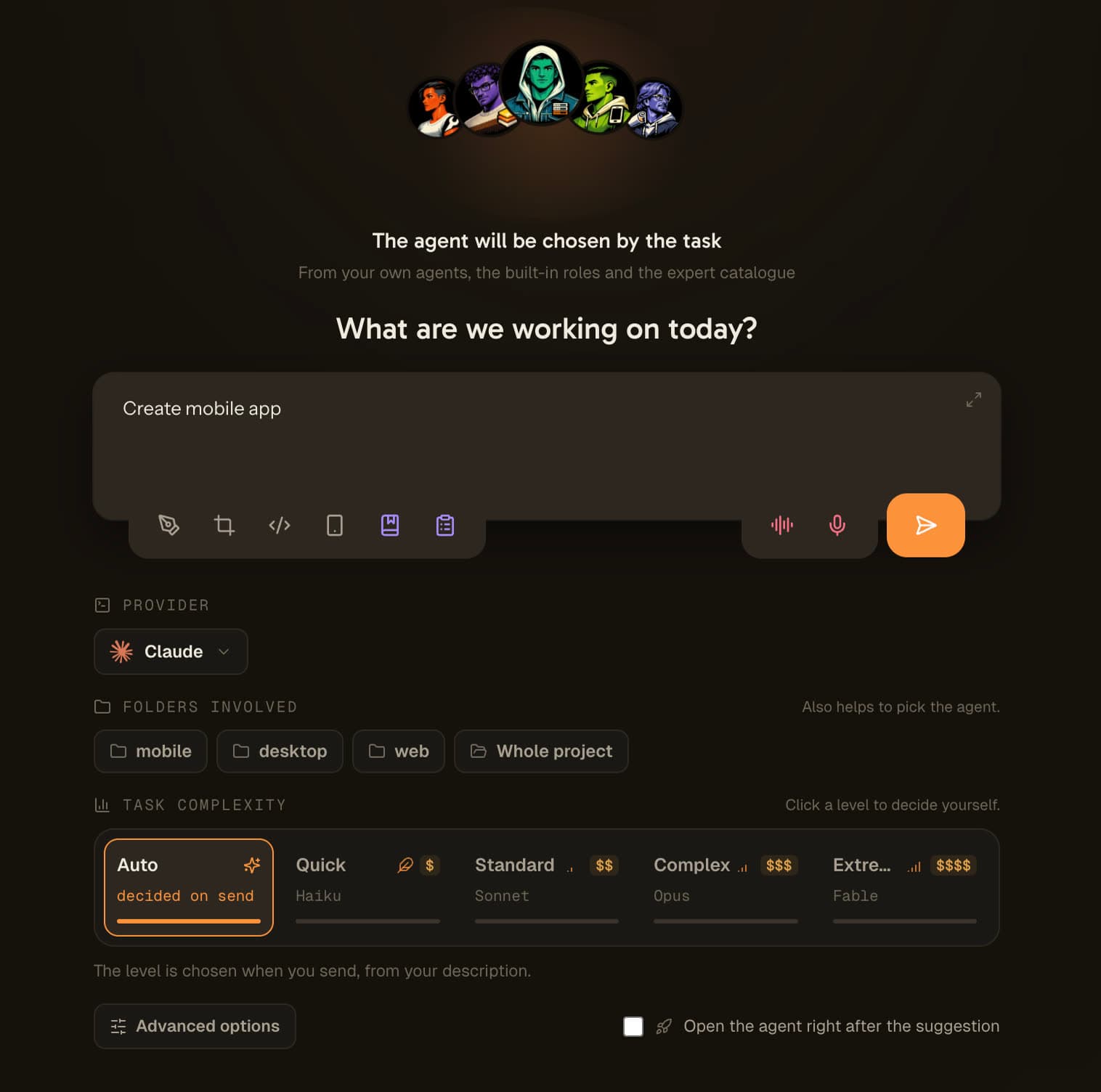
AI Suggestion przesuwa tę samą decyzję wcześniej, do jedynego momentu, w którym nic nie kosztuje: zanim sesja zacznie istnieć. Otwierasz agenta i zamiast terminala dostajesz jedno pole z pytaniem, co ten agent ma zaraz zrobić. Odpowiadasz jednym zdaniem. Jedno wywołanie je czyta i zwraca model, nazwę sesji oraz, jeśli nie wybrałeś agenta, tego, który powinien wziąć zadanie.
Potem sesja się otwiera, już ustawiona, z twoim zdaniem jako pierwszą wiadomością. Nic nie wklejałeś, nie czekałeś na start CLI, żeby to poprawić, i nie zapłaciłeś flagowej stawki za literówkę.
Wchodzi jedno zdanie. Zapala się jeden poziom złożoności. Agent otwiera się na modelu, któremu ten poziom odpowiada, z sesją już nazwaną.
Prawdziwa sesja, od pustego pola do działającego agenta: jedno zdanie opisuje zadanie, pasek złożoności zatrzymuje się na Sonnet, agent i nazwa sesji przychodzą razem z nim, a sesja otwiera się z tym zdaniem już wysłanym.
Dlaczego decyzja musi zapaść przed otwarciem sesji
Ta sama sugestia, ten sam model, dwa zupełnie różne finały. Jedyną zmienną jest moment, w którym padnie pytanie.
Pytanie zadane po otwarciu terminala
- : CLI już wystartowało na tym modelu, który był skonfigurowany.
- : Twój prompt jest napisany i dzieli cię jeden klawisz od wysłania.
- : Zmiana modelu teraz oznacza wyrzucenie sesji, którą właśnie odpaliłeś.
- : Sugestia jest odbierana jako przerwanie, więc zostaje zamknięta.
- : Flagowiec i tak wykonuje trywialne zadanie, i nic z tego nie wynika.
Pytanie zadane, zanim sesja zacznie istnieć
- : Nic jeszcze nie ruszyło, więc nie ma czego cofać.
- : Właśnie opisujesz zadanie, czyli dokładnie to, czego ta decyzja potrzebuje.
- : Model, nazwa sesji i agent są ustalone w jednym wywołaniu.
- : Sesja otwiera się skonfigurowana, z twoim opisem jako pierwszą wiadomością.
- : Wybór tańszego modelu nic cię nie kosztuje, więc naprawdę się zdarza.
Na tym polega cały pomysł. Nie na mądrzejszej sugestii: na tej samej sugestii, zadanej w momencie, w którym powiedzenie tak jest darmowe.
Cztery poziomy, podpięte pod prawdziwe modele twojego providera
Pasek złożoności to widoczna część decyzji. Zostaw go na Auto, a analiza zapali jeden poziom. Kliknij poziom samodzielnie, a stanie się on twoją decyzją: nic nie zostaje wysłane, a sesja otwiera się natychmiast.
Szybkie
01Zmiany w tekście albo w konfiguracji, bez żadnej logiki za nimi. Literówka, etykieta, ciąg tłumaczenia, podbicie wersji. To poziom, którego flagowy model nie powinien nigdy oglądać, i ten, który dostaje najczęściej.
Standardowe
02Mała zmiana, w której rozwiązanie jest już znane. Dodać przyciskowi stan, podpiąć istniejący komponent, napisać krótki test. Nie ma czego badać, jest tylko robota do wykonania.
Złożone
03Funkcja do zbudowania, błąd do zbadania, refaktoryzacja do przeprowadzenia. Droga nie jest oczywista na starcie, więc model potrzebuje miejsca na eksplorację, zanim zdecyduje się na podejście.
Ekstremalne
04Architektura, audyt, problem bez znanej przyczyny. Po to istnieje flagowy model, a to, że rezerwujesz go do takich zadań, sprawia, że stać cię na używanie go tutaj.
W kodzie tej funkcji nie ma zapisanego żadnego identyfikatora modelu. Cztery poziomy są rozwiązywane z katalogu tego providera, na którym działa agent, posortowanego od najmocniejszego do najsłabszego. Jeśli ten provider oferuje mniej niż cztery modele, tabela zwija się w górę: przy trzech modelach Złożone i Ekstremalne trafiają oba na flagowca, nigdy odwrotnie. Zaniżenie rozmiaru marnuje cały przebieg; zawyżenie kosztuje różnicę w cenie jednego wywołania.
AI Suggestion krok po kroku
Sześć kroków, cztery z nich opcjonalne, i jedno wywołanie w sumie.
Otwierasz agenta
Zamiast terminala dostajesz ekran intencji: twarz agenta na animowanym tle, strzałkę wskazującą jedno pole i link w prawym górnym rogu, żeby otworzyć sesję od razu, jeśli nie masz nastroju.
Opisujesz zadanie jednym zdaniem
Zwykłym językiem, w twoim języku. Nie prompt, nie specyfikacja: to, co ten agent ma zaraz zrobić. To zdanie jest jedyną wymaganą daną wejściową i staje się pierwszą wiadomością sesji.
Opcjonalnie: wskaż foldery, których to dotyczy
Foldery projektu pokazują się jako małe pastylki w kształcie folderu. Kliknięcie jednego daje agentowi jego zakres i wyostrza szacunek trudności, bo ten sam błąd w aplikacji mobilnej i na stronie internetowej to nie jest to samo zadanie.
Opcjonalnie: otwórz opcje zaawansowane
Zwinięte pod polem: charakter pracy, dla kogo ona jest, oczekiwany rezultat, bariery w rodzaju żadnych commitów albo obowiązkowych testów, oraz swobodny kontekst, na przykład wklejony błąd czy numer zgłoszenia. Jadą w tym samym wywołaniu i są doklejane na początek pierwszego promptu agenta.
Jedno wywołanie decyduje, albo żadne
Zostawione na Auto, wysłanie odpala jedno zapytanie, które zwraca poziom, model, nazwę sesji i, gdy żaden agent nie jest ustawiony, agenta. Kliknij zamiast tego poziom samodzielnie, a zapytania nie ma wcale: sesja otwiera się od razu na modelu, któremu ten poziom odpowiada.
Sesja otwiera się już ustawiona
Agent startuje na wybranym modelu, pod wygenerowaną nazwą sesji, z twoim opisem dostarczonym jako pierwsza wiadomość przez własny argument startowy CLI, a nie wklejonym do terminala po uruchomieniu.
Nie musisz nawet wybierać agenta
Jeśli otworzysz ekran, nie wskazując agenta, pytanie się poszerza. Kula pokazuje znak zapytania otoczony trzema twarzami, a zdanie, które piszesz, decyduje, kto weźmie zadanie: jeden z agentów już obecnych w twoim pokoju, jedna z czternastu wbudowanych ról albo jeden z około 260 ekspertów z katalogu.
To także jest teraz to, co daje zupełnie nowy projekt. Nie tworzy już po cichu agenta full-stack tylko dlatego, że coś trzeba było stworzyć. Pyta, nad czym pracujesz, a potem wybiera agenta, którego ta odpowiedź wymaga.
Agent, model i nazwa sesji wracają z tego samego jednego wywołania, bo złączenie trzech zapytań potroiłoby opóźnienie ekranu, którego cała wartość polega na tym, że jest szybszy niż otwarcie terminala i poprawianie modelu po fakcie.
Jedno pytanie po otwarciu sesji
Kiedy agent już działa, cienki pasek pyta jeden raz: czy zaproponowany model był właściwy? Trzy odpowiedzi: pomógł, za lekki, za ciężki.
Trzy, a nie dwie, bo „to było źle” nie nadaje się do niczego. Kierunek pomyłki już tak. Za lekki i za ciężki to przeciwne korekty, i tylko kierunek mówi polityce doboru rozmiaru, w którą stronę się ruszyć.
Pasek nigdy niczego nie blokuje, pytanie pada raz na sesję, a odpowiedź wychodzi tylko wtedy, gdy masz włączone udostępnianie danych o użyciu.
Zignoruj go, pomiń go albo wyłącz tam, gdzie ci przeszkadza
Ekran, który staje między tobą a twoim terminalem, musi być trywialny do usunięcia. Wyjścia są cztery i żadne nie jest zakopane w menu.
Otwórz bezpośrednio
Link w prawym górnym rogu ekranu otwiera sesję dokładnie tak, jak otwierałaby się przed powstaniem tej funkcji. Żadnego wywołania, żadnej analizy, żadnego opóźnienia.
Zdecyduj o poziomie samodzielnie
Kliknięcie poziomu na pasku zamienia go w twoją decyzję. Żadne zapytanie nie wychodzi, a sesja otwiera się natychmiast na odpowiadającym modelu.
Wyłączony dla tego agenta, tego projektu albo wszędzie
Ustawienie rozstrzyga się najpierw na poziomie agenta, potem projektu, potem aplikacji, więc możesz zachować ekran tam, gdzie się opłaca, i zdjąć go z tych agentów, których zawsze otwierasz tak samo.
Wyłączony stamtąd, gdzie właśnie jesteś
Trzy wyłączniki są też w dymku „Dlaczego ten ekran?”, na samym ekranie. Wyłączasz go w chwili, w której ci przeszkadza, a nie trzy menu później.
Zautomatyzowani agenci nie widzą tego ekranu w ogóle: boty QA, zgłoszenia z backlogu, zadania zaplanowane, makiety, kroki zespołu i agenci tymczasowi mają już swój brief, a przed nimi nikt nie siedzi.
Jak działa Adaptive Mode, krok po kroku
Uruchamia się raz, przed pierwszą wiadomością, i nigdy nie wchodzi w drogę.
Zaczynasz pisać prompt
Otwórz świeżą rozmowę z dowolnym agentem i napisz, co ma zostać zrobione. Adaptive Mode patrzy tylko na zupełnie nowe rozmowy, więc nigdy nie przerywa sesji, która już trwa.
Czyta zadanie i je analizuje
Gdy Twój szkic jest wystarczająco treściwy i na chwilę robisz pauzę, Adaptive Mode wysyła pierwszą część szkicu do małego, szybkiego modelu routingu, który ustala, jak wymagające jest zadanie.
Pojawia się sugestia modelu
Nad polem wpisywania wyskakuje chip: 'Przełącz na Haiku', 'Przełącz na Sonnet' albo 'Przełącz na Opus', zależnie od tego, co jest najbardziej opłacalne. Jeśli Twój obecny model jest już najlepszym wyborem, dostajesz taką informację.
Stosujesz go jednym kliknięciem
Kliknij chip, a model zostanie zastosowany. Jeśli sesja już trwa, Adaptive Mode przełącza ją na żywo. Wybór zapisuje się też do agenta, więc następne uruchomienie startuje na właściwym modelu.
Albo przelicz, albo odrzuć
Przeredagowałeś prompt? Naciśnij odświeżenie, by przeliczyć rekomendację dla nowego szkicu. Zadowolony z obecnego modelu? Odrzuć chip i wyślij. Pełna kontrola nad każdą decyzją zostaje przy Tobie.
Potem pozostaje cicho
Adaptive Mode podpowiada raz na rozmowę, więc nigdy Cię nie męczy ani po cichu nie wydaje Twojego miesięcznego limitu, gdy nadal edytujesz. Robi swoje, a potem znika.
Routing modeli niezależny od providera
Adaptive Mode czyta ofertę modeli providera, którego używasz, i rekomenduje z tego katalogu. Nie jest przywiązany do jednego dostawcy.
Claude
Kieruje między Haiku, Sonnet i Opus. Haiku do szybkich poprawek, zmian nazw, tłumaczeń, krótkich testów i streszczeń. Sonnet do recenzji pull requestów, nowych endpointów, złożonego debugowania i refaktoryzacji. Opus do architektury systemu, audytów bezpieczeństwa, dużych refaktoryzacji starego kodu i głębokiej pracy nad wydajnością.
Codex
Kieruje w obrębie oferty Codex, od szybkiego, taniego modelu mini do drobnych błędów i szybkich pytań, przez zrównoważony model domyślny do funkcji end-to-end i testów, aż po flagowy model rozumujący do złożonego projektowania systemów i pogłębionej recenzji kodu.
Antigravity
Kieruje między szybkim modelem Antigravity do drobnych poprawek, tłumaczeń i streszczeń a zdolnym modelem Antigravity do wdrażania funkcji, debugowania i głębszej analizy.
Inni providerzy
Dla dowolnego providera Adaptive Mode opiera się na prostej zasadzie: najtańszy model do lekkiej pracy, zrównoważony do normalnej, najzdolniejszy do trudnej. Dodaj providera, a routing zadziała w obrębie jego własnych modeli.
FAQ
Czym jest Adaptive Mode w AgentsRoom?
Adaptive Mode to inteligentny routing modeli dla Twoich agentów kodujących AI. Zanim wyślesz pierwszą wiadomość, czyta Twój prompt i podpowiada najbardziej opłacalny model z oferty Twojego providera, który wciąż dobrze wykona zadanie. Lekkie zadanie dostaje lekki, tani model; ciężkie dostaje flagowca. Cel jest prosty: przestać przepłacać potężnym modelem za pracę, która tego nie wymaga.
Jak Adaptive Mode wybiera model?
Wysyła pierwszą część Twojego szkicu do małego, szybkiego modelu routingu, który dostał przykłady tego, które rodzaje zadań pasują do którego poziomu modelu. Następnie zwraca najtańszy model pasujący do zadania, zweryfikowany względem modeli faktycznie oferowanych przez Twojego obecnego providera. Jeśli Twój obecny model jest już najlepszym wyborem, informuje, że model jest optymalny, zamiast forsować zmianę.
Jak to faktycznie oszczędza mi pieniądze?
Tańsze modele kosztują ułamek tego, co flagowiec, za to samo proste zadanie. Jeśli puszczasz poprawki literówek, zmiany nazw, tłumaczenia i krótkie testy na najwyższym modelu, palisz budżet z planu wielokrotnie szybciej, niż trzeba. Adaptive Mode kieruje tę lekką pracę do lekkiego modelu, więc każde zadanie kosztuje mniej i możesz wykonać ich więcej, zanim uderzysz w limit. W skali dnia i wielu równoległych agentów te oszczędności się kumulują.
Jakie modele może zasugerować?
Te, które oferuje Twój provider. Na Claude to Haiku, Sonnet i Opus. Na Codex obejmuje szybki model mini, zrównoważony domyślny i flagowy model rozumujący. Na Antigravity obejmuje model szybki i zdolny. Dla innych providerów opiera się na najtańszym, zrównoważonym i najzdolniejszym. Adaptive Mode czyta aktualną listę modeli, więc zawsze rekomenduje model, który faktycznie możesz uruchomić.
Czy zmienia model automatycznie?
Nie. Adaptive Mode tylko podpowiada. Zmianę stosujesz jednym kliknięciem chipa. Jeśli sesja już trwa, przełącza model na żywo; w każdym przypadku wybór jest zapisywany do agenta, by następne uruchomienie startowało na właściwym modelu. Możesz też odrzucić sugestię i zostać przy obecnym modelu.
Kiedy pojawia się sugestia?
W zupełnie nowej rozmowie, po tym jak wpiszesz treściwy prompt i na chwilę zrobisz pauzę. Uruchamia się raz na rozmowę, więc nigdy nie przerywa trwającej sesji ani po cichu nie wydaje Twojego miesięcznego limitu, gdy nadal edytujesz.
Czy mogę przeliczyć sugestię?
Tak. Jeśli przepiszesz prompt, naciśnij przycisk odświeżenia na chipie, by przeliczyć rekomendację dla nowego szkicu. Ręczne przeliczenie zużywa jedną z Twoich miesięcznych sugestii, więc jest pod ręką, gdy go potrzebujesz, bez uruchamiania przy każdym naciśnięciu klawisza.
Czy mój prompt jest prywatny?
Aby obliczyć sugestię, na serwery AgentsRoom wysyłana jest tylko pierwsza część Twojego szkicu, raz na rozmowę i tylko gdy Adaptive Mode jest włączony. Możesz całkowicie wyłączyć tę funkcję w ustawieniach, jeśli wolisz sam wybierać modele.
Czy Adaptive Mode działa z Codex i Antigravity, nie tylko Claude?
Tak. Adaptive Mode jest niezależny od providera. Czyta katalog modeli providera, którego używa agent, i rekomenduje z tego katalogu, czy to Claude, Codex, Antigravity, czy inny obsługiwany provider. Polecenie zmiany modelu jest zbudowane pod providera, na którym jesteś.
Jak włączyć lub wyłączyć Adaptive Mode?
Jest wyłączony domyślnie. Otwórz ustawienia AgentsRoom, przejdź do opcji pola wpisywania i zaznacz Adaptive Mode, aby go włączyć: ten sam checkbox go wyłącza. Dopóki jest wyłączony, nic nie analizuje Twojego szkicu i nic z niego nie opuszcza Twojej maszyny.
Czym jest AI Suggestion w AgentsRoom?
AI Suggestion to krótki ekran pokazywany przed startem sesji agenta. Opisujesz zadanie jednym zdaniem, a jedno wywołanie zwraca najtańszy model z katalogu twojego providera, który udźwignie tę robotę, nazwę sesji i, jeśli nie wybrałeś agenta, tego, który powinien ją wziąć. Sesja otwiera się potem już skonfigurowana, z twoim zdaniem jako pierwszą wiadomością.
A jeśli już wiem, jak trudne jest zadanie?
Kliknij poziom na pasku. Zamienia się w twoją decyzję, pomija wywołanie w całości i otwiera sesję natychmiast na modelu, któremu ten poziom odpowiada. Ekran jest najszybszy wtedy, gdy odpowiedź już znasz.
Co się stanie, jeśli wywołanie się nie powiedzie albo będę offline?
Agent i tak się otworzy, na modelu, którego użyłby bez tej funkcji. Martwa sieć, wyczerpany limit i nieużywalna odpowiedź kończą się tak samo, bo ekran zdolny powstrzymać cię przed otwarciem agenta byłby gorszy niż brak ekranu. Kiedy maszyna jest na pewno offline, ekran w ogóle się nie pokazuje.
Czy potrafi wybrać agenta, a nie tylko model?
Tak, kiedy otworzysz ekran, nie wskazując agenta. Zadanie jest zestawiane z agentami już obecnymi w twoim pokoju, z czternastoma wbudowanymi rolami i z katalogiem ekspertów. To także robi teraz zupełnie nowy projekt, zamiast po cichu tworzyć agenta full-stack dlatego, że coś trzeba było stworzyć.
Dobrze łączy się z
CLI Doctor
Gdy Claude Code, Codex albo dowolne CLI agenta pada przy starcie, AgentsRoom czyta błąd, dokładną komendę, którą uruchomił, i to, skąd wzięła się każda flaga uruchomieniowa, a potem wyjaśnia, co się zepsuło i jak to naprawić.
Sugestie Agentów
Nie wiesz, którego agenta AI użyć? Opisz swoje zadanie w prostych słowach, a AgentsRoom zasugeruje odpowiedniego agenta: z twojego pokoju, 14 wbudowanych ról lub 260+ ekspertów z katalogu, z jedną linią uzasadnienia. Jedno kliknięcie przypisuje zadanie.
Zużycie tokenów Claude Code
Zobacz zużycie tokenów i koszt na sesję w czasie rzeczywistym. Idzie w parze z Adaptive Mode: kieruj sprytnie, a potem patrz, jak oszczędności lądują.
Delegowanie agentów
Agent dev przekazuje test tańszemu agentowi QA przez MCP. Ta sama idea co Adaptive Mode, zastosowana do całych agentów.
Multi-provider
Uruchamiaj Claude, Codex i Antigravity obok siebie. Adaptive Mode kieruje w obrębie providera, na którym jest dany agent.
Statystyki projektu
Czas, prompty, tokeny i koszt na projekt i na agenta. Widok pulpitu budżetu, którego pilnować pomaga Adaptive Mode.
Śledzenie statusu agentów
Status na żywo każdego agenta we wszystkich projektach, więc zawsze wiesz, kto pracuje, a kto Cię potrzebuje.
Przywróć sesję
Zamknij i wróć z każdym agentem, terminalem i wyborem modelu dokładnie tam, gdzie je zostawiłeś.
Warto przeczytać
Jak obniżyć koszty tokenów Claude Code bez spowalniania
Claude Code nalicza opłaty za każdy token, a większość wydatków jest niewidoczna: nadmiarowy kontekst, niewłaściwy model, surowe PDF-y, agenci ponownie przeglądający te same pliki. Oto, gdzie naprawdę trafiają pieniądze i jak je obciąć, z nawykami i narzędziami, które utrzymują twoje rachunki niskie bez spowalniania.
Jak sprawdzić użycie tokenów Claude Code: 4 sposoby na zobaczenie, ile wydają twoje agenty
Cztery sposoby na sprawdzenie użycia tokenów Claude Code: polecenie /cost, transkrypty sesji, CLI ccusage oraz na żywo miernik na sesję. Zobacz dokładnie, ile wydaje każdy agent.
Którego agenta AI wybrać do swoich projektów?
Agent frontendowy piszący Twoje teksty marketingowe to cicha porażka. Jak dopasować każde zadanie do odpowiedniego agenta AI: role, katalog ekspertów, niestandardowi agenci i co zrobić, gdy nie masz pojęcia, kto powinien wykonać zadanie.
Przestań przepłacać za moc modeli AI, której nie potrzebujesz
Pobierz AgentsRoom i pozwól Adaptive Mode wybrać najbardziej opłacalny model do każdego zadania. Lekkie modele do lekkiej pracy, flagowce do trudnych problemów, mniej budżetu spalonego na zadanie, więcej zadań dostarczonych dziennie.
Aplikacja towarzysząca: monitoruj agentów w podróży
Użyj Claude, Codex, Antigravity CLI lub innego dostawcy AI.
Wysyłaj bugi i prośby bezpośrednio do swojego publicznego backlogu.