Dev Terminals
dla wszystkich Twoich serwisów
Twój projekt ma backend, frontend, aplikację mobilną, relay server. Wcześniej otwierałeś 4 zakładki terminala i wpisywałeś każdą komendę ręcznie. Teraz naciskasz jeden przycisk.
I wyjątkowa rzecz: dzięki aplikacji mobilnej na iOS i Android wyzwalasz komendy zdalnie na swoim komputerze. Postaw stronę na localhost z metra, siłowni albo kawiarni, a potem otwórz ją na telefonie przez 4G/5G dzięki wbudowanemu tunelowi live preview.
Zarządzaj wieloma terminalami jednocześnie: podział paneli metodą przeciągnij i upuść, układy pionowe i poziome oraz w pełni odłączone okno, które możesz przenieść na dedykowany ekran monitorowania dla agentów, logów i buildów.
Dev Terminals to znacznie więcej niż emulator terminala. To prawdziwy menedżer komend per projekt, zaprojektowany, by zastąpić dżunglę zakładek iTerm2, Warp, Ghostty, Kitty, Alacritty i Terminal.app, które otwierasz każdego ranka. Każdy projekt ma własną listę komend: serwer deweloperski, backend, mobile bundler, worker, baza danych, skrypty wewnętrzne. Nazywasz je raz, uruchamiasz na zawsze.
UX i UI zostały celowo dopracowane do granic, żeby zarządzanie komendami było jak najszybsze. Każda komenda zapamiętuje swoją nazwę, komendę powłoki, katalog roboczy (względem katalogu głównego projektu), kategorię frameworka (React, Next.js, Django, Rails, Go, Rust, Docker…) i rodzaj (długo działający proces lub jednorazowy snippet). Aktywne komendy wędrują na górę listy, a kolorowe ikony frameworków pozwalają rozpoznać frontend React, backend Django i serwisy Docker na pierwszy rzut oka.
Wielka zaleta terminala zintegrowanego bezpośrednio w AgentsRoom polega na tym, że komendy wykonują się w dokładnym kontekście Twojego projektu: ta sama ścieżka, to samo środowisko, ten sam cwd. Zero tarcia, zero niekończącego się cd, zero pomyłek między projektami. A ponieważ wszystko żyje obok Twoich agentów AI Claude, Codex i Antigravity, przestajesz żonglować piętnastoma różnymi narzędziami tylko po to, żeby dostarczyć kod.
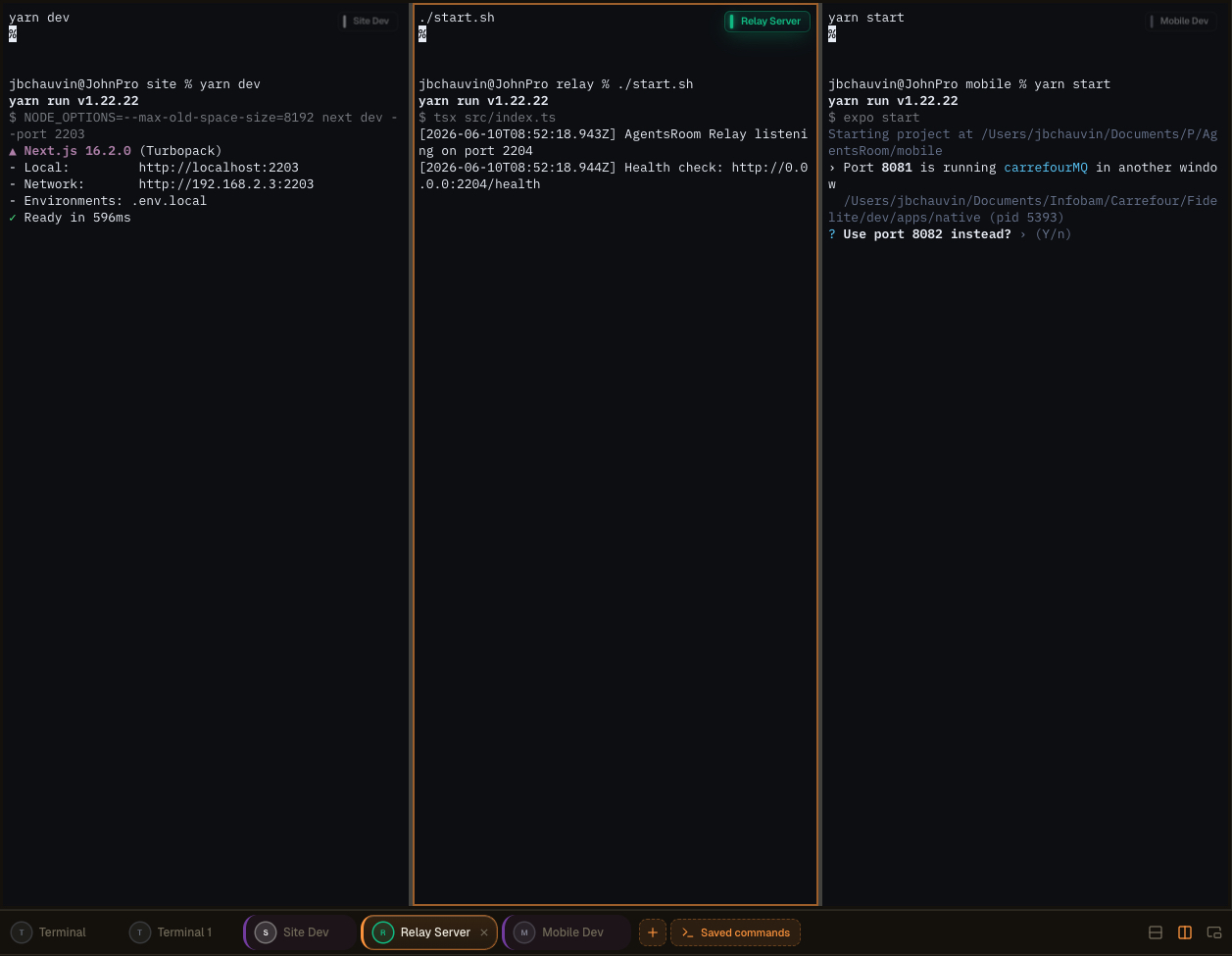
Wielopanelowy układ terminali w AgentsRoom: podziel terminale, odłącz je na drugi ekran i nadzoruj agentów, logi i buildy obok siebie.
Prawdziwy zintegrowany terminal, a nie zabawka
Każda komenda otwiera pełny terminal xterm.js z kolorami ANSI, historią przewijania, klikalnymi linkami, zmianą rozmiaru PTY i obsługą Unicode. To nie jest fałszywy podgląd logów: to prawdziwy pseudoterminal, identyczny z tym, co dostajesz w iTerm2 lub Terminal.app, ale zarządzany za Ciebie.
Status każdego procesu jest wyświetlany na żywo: działa, uruchamia się, zatrzymany, uległ awarii. Gdy serwer deweloperski pada, widzisz to natychmiast. Jedno kliknięcie, by zrestartować. A gdy potrzebujesz kilku terminali równolegle (backend + frontend + mobile + relay), globalny przycisk „Uruchom wszystko” startuje wszystkie długo działające procesy naraz, równolegle, bez wpisywania czegokolwiek.
Komendy są pogrupowane w foldery, można je przestawiać myszą i są przechowywane w `.agentsroom/commands.json` w katalogu głównym projektu. Zacommituj ten plik: cały Twój zespół dziedziczy tę samą konfigurację terminali. Komendy osobiste (lokalne skrypty debugowania, prywatne zmienne środowiskowe) trafiają do `commands-personal.json`, automatycznie dodawanego do `.gitignore` wewnątrz `.agentsroom`. Nikt już nigdy nie musi wpisywać `yarn dev --port 2203` z pamięci, dołączając do nowego repo.
Wreszcie, wszystko jest ujednolicone: Twoi agenci AI, Twoje terminale, Twoje prompty, Twój backlog i Twój live preview żyją w tym samym oknie. Oszczędzasz mnóstwo czasu, eliminując przeskakiwanie między AgentsRoom, emulatorem terminala, IDE i przeglądarką. Jeden ekran, wszystko o jedno kliknięcie.
Odłączone komendy i konfiguracja z wieloma ekranami
Dev Commands można teraz w pełni odłączyć do niezależnego okna, osobnego od głównego interfejsu AgentsRoom. Wyprowadź terminale i przenieś je tam, gdzie pracujesz najlepiej: drugi wyświetlacz, ultraszeroki monitor lub pionowy ekran dedykowany monitorowaniu, logom, buildom i agentom AI.
Pionowy ekran z boku staje się żywą ścianą Twoich uruchomionych procesów. Trzymaj edytor i agentów w głównym oknie, a każdy serwer, każdy build i każdy strumień logów obserwuj w czasie rzeczywistym na sąsiednim panelu. Bez alt-tab, bez utraty kontekstu.
Lepsza organizacja przestrzeni roboczej
Uwolnij główne okno dla kodu i agentów. Odłączone terminale żyją oddzielnie, więc powierzchnia deweloperska pozostaje czysta i skupiona zamiast upchanej w jednym panelu.
Zoptymalizowany układ wieloekranowy
Upuść odłączone okno na drugi wyświetlacz lub pionowy monitor. Twoje wyniki buildów, serwery deweloperskie i logi agentów dostają dedykowany ekran, a Ty kontynuujesz kodowanie na głównym.
Monitorowanie w czasie rzeczywistym
Miej ciągły podgląd agentów i komend. Obserwuj, jak procesy startują, streamują i crashują na bocznym ekranie, i reaguj natychmiast, gdy coś pójdzie nie tak.
Wyższa produktywność
Deweloperzy żonglujący kilkoma projektami lub środowiskami przestają przełączać konteksty. Wszystko, co wymaga obserwacji, pozostaje widoczne, więc dostarczasz szybciej z mniejszą liczbą przerw.
Zaawansowane układy terminali, zbudowane metodą przeciągnij i upuść
Możesz teraz łączyć kilka terminali w tym samym panelu przez niezwykle intuicyjny interfejs przeciągnij i upuść. Chwyć terminal, upuść go tam, gdzie chcesz, a AgentsRoom zbuduje układ za Ciebie. Żadnych plików konfiguracyjnych, żadnych skrótów klawiaturowych do zapamiętania.
Skomponuj przestrzeń roboczą dopasowaną do bieżącego zadania:
Podziały pionowe
Umieść dwa terminale obok siebie, aby jednocześnie obserwować backend i frontend.
Podziały poziome
Ustaw terminale jeden nad drugim, żeby trzymać logi i uruchomiony serwer w tej samej kolumnie.
Złożone kombinowane układy
Łącz podziały pionowe i poziome, by zbudować pełną siatkę terminali dopasowaną do Twojego stacku.
Reorganizacja w sekundy
Przeciągnij dowolny terminal na nową pozycję, a układ natychmiast się przestawi. Przestrukturyzuj całą konfigurację w kilka sekund.
Nadzoruj wszystko jednocześnie
Trzymaj wielu agentów, serwery, logi i komendy w widoku jednocześnie, wszystko w jednym panelu.
Żadnej złożonej konfiguracji, żadnego tmux do nauczenia. Doświadczenie jest zaprojektowane tak, by było natychmiastowe i naturalne, więc spędzasz czas na kodowaniu zamiast na układaniu okien.
Więcej sposobów sterowania terminalami
Odłączalne okno, generowanie komend przez AI i zdalne uruchamianie z telefonu to elementy tego samego doświadczenia Dev Terminals. Oto oryginalny przewodnik.
Menedżer terminali AgentsRoom: odłączony terminal na drugim ekranie, komendy uruchamiane zdalnie z telefonu, zintegrowany terminal xterm.js na projekt.
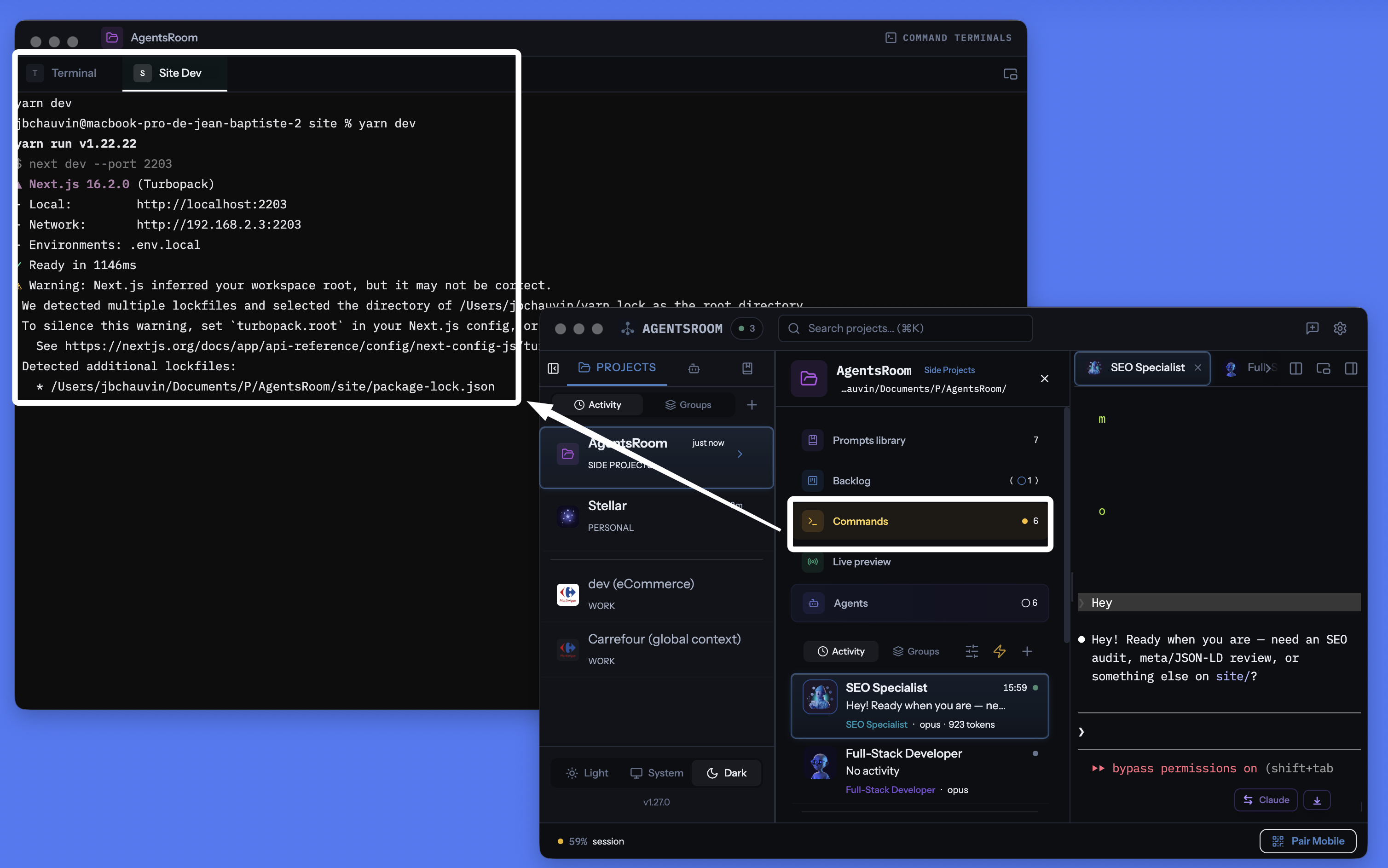
Menedżer terminali AgentsRoom per projekt: odłączalne okno, zintegrowany terminal na komendę, komendy generowane przez AI, wszystko w jednym miejscu co agenci.
Zarządzaj każdym terminalem, każdą komendą, każdym serwisem
Długo działające procesy, szybkie skrypty, komendy budowania, serwery deweloperskie. Wszystko zorganizowane per projekt, ze śledzeniem statusu w czasie rzeczywistym, zintegrowanym AI i zdalnym sterowaniem z telefonu.
Menedżer terminali per projekt
Każdy projekt ma własną listę komend, przechowywaną w .agentsroom/commands.json. Zmień projekt, a komendy zmienią się automatycznie. Zero pomyłek między repozytoriami.
Uruchom wszystko jednym kliknięciem
Jeden przycisk Play startuje wszystkie długo działające procesy: backend, frontend, mobile bundler, relay server, worker, bazę danych. Koniec z pięcioma zakładkami terminala otwieranymi ręcznie.
Zdalne uruchamianie z telefonu
Wyzwalaj komendy z aplikacji iOS lub Android: terminale powstają na Twoim komputerze, a Ty widzisz wyjście na żywo streamowane na telefon przez 4G, 5G lub Wi-Fi.
Odłączalne okno terminala
Odłącz sekcję terminali do niezależnego, pływającego okna. Połóż je na drugim monitorze, żeby mieć oko na serwery, podczas gdy kodujesz w głównym oknie.
Generowanie komend przez AI
Kliknij różdżkę: Claude skanuje Twoje repo, wykrywa package.json, Dockerfile'e, Makefile'e i generuje wszystkie komendy startowe, ścieżki i kategorie za Ciebie.
Status procesów na żywo
Zobacz, który serwis działa, uruchamia się, jest zatrzymany lub uległ awarii. Kody wyjścia pojawiają się przy niepowodzeniu. Restart jednym kliknięciem, bez utraty historii przewijania terminala.
Proces albo snippet
Długo działające serwery to procesy. Jednorazowe skrypty budowania, migracje i wdrożenia to snippety. Oba żyją w tym samym dashboardzie, oba o jedno kliknięcie.
Prawdziwy terminal xterm.js na komendę
Każdy proces otwiera prawdziwy terminal pseudo-TTY z kolorami ANSI, historią przewijania, klikalnymi linkami i pełną obsługą klawiatury. Żadnego kompromisu wobec iTerm2 czy Terminal.app.
Połączone z live preview localhost
Uruchom swoją stronę na localhost z terminala AgentsRoom, a potem dotrzyj do niej z zewnątrz przez wbudowany tunel HTTPS. Testuj na telefonie przez 4G/5G bez wdrażania.
Ponad 30 ikon frameworków
React, Next.js, Vue, Nuxt, Angular, Svelte, Expo, Node.js, NestJS, Django, FastAPI, Rails, Laravel, Spring, Go, Rust, Docker, Redis i wiele innych, każdy z ikoną i kolorem.
Przechowywanie git-native
Komendy publiczne są w .agentsroom/commands.json, commitowane do Twojego repo. Komendy osobiste są w commands-personal.json, automatycznie dodawane do gitignore.
Terminale i agenci AI razem
Twoje terminale, Twoi agenci Claude Code, Twoje prompty, Twój backlog i Twój live preview dzielą tę samą aplikację. Przestań gubić się między dziesięcioma różnymi narzędziami.
Uruchamiaj terminale na swoim komputerze z telefonu
To prawdopodobnie najbardziej wyjątkowa funkcja AgentsRoom. Z aplikacji mobilnej na iOS lub Android przeglądasz listę komend dowolnego projektu i uruchamiasz dowolną z nich jednym dotknięciem. Komenda nie działa na telefonie: działa na Twoim komputerze, w odpowiednim katalogu roboczym, w prawdziwym terminalu PTY. Wyjście jest streamowane na żywo na telefon przez relay szyfrowany end-to-end.
Konkretnie: jesteś w metrze, na siłowni albo na drugim końcu świata. Chcesz postawić lokalną stronę, żeby sprawdzić makietę, albo zrestartować workera, który padł, gdy Cię nie było. Otwierasz AgentsRoom mobile, dotykasz „yarn dev”, a serwer startuje na Twoim komputerze w domu. Możesz nawet wchodzić w interakcję z klawiaturą terminala z telefonu.
W połączeniu z wbudowanym tunelem podglądu localhost możesz nawet otworzyć swoją lokalną stronę w przeglądarce mobilnej, przez 4G lub 5G, bez żadnego wdrożenia. Kodujesz, startujesz, testujesz i weryfikujesz, wszystko z kieszeni. AgentsRoom dosłownie zamienia Twój komputer w zdalnie sterowany serwer deweloperski.
Bądź powiadamiany, gdy długie polecenie się zakończy
Budowa, zestaw testów lub obraz Docker może trwać kilka minut. Przełączasz się na coś innego, a terminal czeka przez dziesięć minut, zanim to zauważysz. Uzbrój dzwonek na karcie terminala, a AgentsRoom powie ci w sekundę po zakończeniu polecenia, podając nazwę polecenia i czas jego trwania.
Dzwonek znajduje się w małej pływającej etykiecie w prawym górnym rogu każdego okna terminala. Jedno kliknięcie uzbraja go, jedno kliknięcie rozbraja, a on pozostaje uzbrojony dla tego terminala, więc każde uruchomienie tego samego zadania zgłasza się z powrotem. Kliknięcie powiadomienia otwiera dokładnie tę kartę terminala.
Jeden dzwonek na terminal
Uzbrój go tylko tam, gdzie jest to potrzebne. Nie ma nic globalnego do skonfigurowania i żadnych powiadomień dla terminali, o które nigdy nie pytałeś.
Tylko długie polecenia
Wszystko poniżej minuty liczy się jako interaktywne użycie i pozostaje ciche, więc cd, ls i git status nigdy cię nie zbudzą. Uzbrój dzwonek, gdy polecenie już działa, a to zawsze zgłasza się z powrotem, niezależnie od jego długości.
Nigdy, gdy patrzysz
Jeśli ten terminal jest już na ekranie i aplikacja ma fokus, nic się nie pojawia. Powiadomienie istnieje na moment, gdy się oddalisz, a nie w momencie, gdy czytasz wynik.
macOS, Windows i Linux
Wykrywanie odczytuje proces w pierwszym planie terminala, więc nic nie jest dodawane do twojej konfiguracji zsh, bash, fish lub PowerShell i działa z powłoką, której już używasz. Powiadomienia docierają również do aplikacji na iOS i Android, gdy jesteś z dala od swojego komputera.
Twoje AI agenci mają takie same traktowanie: Powiadomienia o agentach AI.
Tryb odłączony: Twoje terminale na drugim monitorze
Panel terminali można odłączyć do niezależnego, pływającego okna. Przeciągnij je na drugi ekran, a logi Twojego backendu, frontendu i mobile bundlera pozostają widoczne przez cały czas, podczas gdy kodujesz w głównym oknie AgentsRoom. Dokładnie to robią poważni deweloperzy z tmux lub iTerm2 w trybie kafelkowym, tyle że w AgentsRoom nie ma nic do konfigurowania.
Odłączone okno zachowuje wszystkie funkcje: uruchamianie, zatrzymywanie, restart, AI, kategorie, multiprojekt. Możesz dalej pisać w terminalu na drugim ekranie, podczas gdy agent Claude pracuje w głównym oknie. Zero alt-tab, zero utraty kontekstu, zero niejasnej konfiguracji.
Alternatywa dla iTerm2, Warp i WezTerm zintegrowana z Twoimi agentami AI
AgentsRoom Dev Terminals to lepszy wybór do pracy nad projektami w porównaniu z klasycznymi emulatorami terminala. Oto narzędzia, które nasi użytkownicy już nimi zastąpili:
iTerm2 przez lata był złotym standardem macOS, a Terminal.app jest preinstalowany na każdym Macu. Warp spopularyzował bloki komend i zintegrowane AI. Ghostty jest szybki i natywny. Kitty jest akcelerowany przez GPU. Alacritty jest minimalistyczny. WezTerm jest skryptowalny przez Lua. Hyper zbudowany jest na technologiach webowych. Tabby jest wieloplatformowy. Wave Terminal i Windows Terminal rozwijają nowoczesne, wielopanelowe przepływy pracy. To wszystko znakomite produkty. AgentsRoom nie próbuje konkurować prędkością renderowania: oferuje inną propozycję wartości, terminal zintegrowany ze środowiskiem deweloperskim, ograniczony do każdego projektu, zsynchronizowany z agentami AI i sterowały z telefonu.
Wszystko, czego potrzebuje nowoczesny terminal, w jednym oknie
AgentsRoom to nie tylko kolejny emulator terminala. Łączy wszystko, czego potrzebuje nowoczesny przepływ pracy przy kodowaniu, i umieszcza to za jednym interfejsem:
Jeśli już zarządzasz projektami za pomocą kilku zakładek terminala nazwanych „backend”, „frontend”, „mobile”, „relay”, zyskasz czas dzięki Dev Terminals. Jeśli używasz tmux lub zellij do organizowania sesji, odnajdziesz tę samą ideę, bez żadnego pliku konfiguracyjnego do napisania.
Jak to działa
Otwórz projekt
W widoku projektu Dev Terminals pojawiają się obok agentów i promptów. Jeśli nie ma jeszcze żadnych komend, automatycznie tworzony jest domyślny terminal w katalogu głównym projektu.
Dodaj komendy
Kliknij +, żeby dodać komendę. Ustaw nazwę, komendę powłoki, katalog roboczy (względem katalogu głównego projektu) i wybierz kategorie. Zdecyduj, czy to długo działający proces, czy jednorazowy snippet.
.agentsroom/commands.jsonLub pozwól AI to zrobić
Kliknij ikonę różdżki. Claude analizuje strukturę projektu (pliki package.json, Dockerfile, Makefile) i generuje wszystkie komendy z poprawnymi ścieżkami i kategoriami. Przejrzyj, dostosuj w razie potrzeby i zapisz.
Uruchom wszystko
Naciśnij globalny przycisk Play, żeby uruchomić wszystkie procesy naraz. Lub uruchamiaj je pojedynczo. Każdy proces tworzy prawdziwy terminal, w którym widzisz logi i możesz wchodzić w interakcje z serwisem.
Monitoruj i reaguj
Wskaźniki statusu pokazują, które serwisy działają, a które uległy awarii. Kliknij dowolny serwis, żeby zobaczyć output terminala. Zrestartuj uszkodzony serwis jednym kliknięciem. Używaj snippetów do częstych zadań, takich jak budowanie, wdrażanie czy uruchamianie testów.
Steruj z telefonu
Otwórz AgentsRoom na iOS lub Android, wybierz projekt, dotknij komendy: uruchomi się zdalnie na Twoim komputerze, a Ty zobaczysz jej wyjście na żywo na telefonie przez 4G, 5G lub Wi-Fi, przez relay szyfrowany end-to-end.
Ikony dla każdego stacka
Każda komenda wyświetla ikonę i kolor swojego frameworka. Na pierwszy rzut oka rozpoznasz frontend React, backend Django i serwisy Docker.
Konfiguracja komend przez AI
Zaczynasz nowy projekt? Nie konfiguruj każdej komendy ręcznie. Kliknij różdżkę, a Claude przeanalizuje strukturę repozytorium, żeby wykryć każdy serwis, każdy skrypt budowania i każdą komendę startową. Generuje pełną listę komend z poprawnymi ścieżkami, kategoriami i ikonami. Przeglądas wynik, dostosowujesz w razie potrzeby i zapisujesz. Cała konfiguracja zajmuje sekundy zamiast minut.
Domyślny prompt
"Przeanalizuj strukturę mojego projektu i wygeneruj wszystkie komendy startowe dla każdego serwisu, każdego podprojektu i każdego kroku budowania. Uwzględnij poprawny katalog roboczy, komendę powłoki i odpowiednia kategorie frameworka dla każdego wpisu."
Chcesz, by twoi agenci sami uruchamiali dev server ?
AgentsRoom MCP udostępnia te same Terminal Commands, które tu zapisujesz, jako narzędzia MCP. Twoi agenci AI wołają commands_list, commands_run i commands_create przez serwer Terminal Commands MCP i sami uruchamiają dev server, API lub worker.
To tylko jeden z czterech serwerów AgentsRoom MCP. Backlog MCP, Prompt Library MCP i Browser MCP zamieniają resztę IDE AgentsRoom w przestrzeń sterowaną przez agentów. Ręcznie gdy chcesz, automatycznie gdy nie.
Poznaj AgentsRoom MCPFAQ
Czym to się różni od zwykłego iTerm2 lub tmux?
W iTerm2 lub tmux otwierasz zakładki ręcznie, wchodzisz cd do każdego katalogu i wpisujesz każdą komendę. Jeśli serwis ulegnie awarii, zauwayzysz to dopiero, gdy akurat spojrzysz na ta zakładkę. Dev Terminals przechowują komendy na stałe per projekt, pokazują status na żywo dla każdego serwisu i pozwalają uruchomić wszystko jednym kliknięciem. Komendy są zapisane w repozytorium, więc każdy członek zespołu dostaje ta sama konfigurację.
Jaka jest różnica między procesem a snippetem?
Proces to długo działający serwis, np. serwer deweloperski, backend lub file watcher. Działa aż go zatrzymasz lub ulegnie awarii. Snippet to jednorazowa komenda, np. skrypt budowania, migracja bazy danych lub krok wdrożeniowy. Oba są przechowywane w tym samym dashboardzie, ale tylko procesy są uruchamiane przyciskiem 'Uruchom wszystko'.
Jak działa generowanie komend przez AI?
Gdy klikniesz różdżkę, AgentsRoom uruchamia instancję Claude, która odczytuje strukturę projektu. Wykrywa pliki package.json, Dockerfile, Makefile i inne pliki konfiguracyjne, żeby zidentyfikować każdy serwis i jego komendę startowa. Wynikiem jest ustrukturyzowana lista komend ze ścieżkami, kategoriami i sugerowanymi nazwami. Przeglądas listę przed zapisaniem.
Czy komendy są współdzielone z zespołem?
Tak. Publiczne komendy są przechowywane w .agentsroom/commands.json w katalogu projektu. Commituj ten plik, a każdy, kto pobierze repozytorium, dostanie te same komendy. Osobiste komendy (np. lokalne skrypty debugowania) trafiają do commands-personal.json, który jest automatycznie dodawany do .agentsroom/.gitignore.
Czy mogę wyłączyć Dev Terminals, jeśli ich nie potrzebuje?
Tak. Otwórz Ustawienia i przejdź do sekcji Feature Flags. Wyłącz Dev Terminals, a funkcja zniknie ze wszystkich widoków projektów. Możesz ją ponownie włączyć w dowolnym momencie bez utraty zapisanych komend.
Czy komendy są współdzielone z moim zespołem?
Tak. Komendy publiczne są przechowywane w .agentsroom/commands.json w katalogu projektu. Zacommituj ten plik: każdy, kto zrobi pull repo, dostaje tę samą konfigurację. Komendy osobiste (lokalne skrypty debugowania) trafiają do commands-personal.json, automatycznie dodawanego do .agentsroom/.gitignore.
Jak działa generowanie komend przez AI?
Gdy klikniesz różdżkę, AgentsRoom uruchamia instancję Claude, która czyta strukturę Twojego projektu (package.json, Dockerfile'e, Makefile'e, pyproject.toml, Cargo.toml…), żeby zidentyfikować każdy długo działający serwis i jego komendę startową. Wynikiem jest ustrukturyzowana lista komend ze ścieżkami, kategoriami, folderami i sugerowanymi nazwami. Przeglądasz listę przed zapisaniem.
Czy AgentsRoom może powiadomić mnie, gdy polecenie terminala się zakończy?
Tak. Każda karta terminala ma dzwonek w swojej pływającej etykiecie. Uzbrój go, a AgentsRoom wyśle powiadomienie na pulpit w momencie, gdy działające polecenie wróci do monitu, podając nazwę polecenia i jego czas trwania, plus powiadomienie do aplikacji na iOS i Android, gdy jesteś z dala od swojego komputera. Kliknięcie powiadomienia otwiera tę kartę terminala.
Jak AgentsRoom wie, że polecenie się zakończyło, jeśli terminal pozostaje otwarty?
Karta terminala to jedna długo żyjąca powłoka, więc nic nie wychodzi, gdy polecenie się kończy. AgentsRoom obserwuje grupę procesów w pierwszym planie terminala: gdy wraca do samej powłoki, monit wraca, a polecenie jest zakończone. Nic nie jest zapisywane w twojej konfiguracji powłoki, dlatego zachowuje się tak samo z zsh, bash, fish lub PowerShell i działa dla poleceń, które wpisałeś ręcznie, jak i dla zapisanych.
Czy dostanę powiadomienie dla każdego polecenia, które wpiszę?
Nie. Tylko polecenia, które trwały dłużej niż minutę, wywołują powiadomienie, więc rutynowe interaktywne użycie pozostaje ciche. Jedyny celowy wyjątek: jeśli uzbroisz dzwonek, gdy polecenie już działa, to polecenie zawsze zgłasza się z powrotem, niezależnie od tego, jak długo to trwa. Nic się nie uruchamia, gdy terminal jest już na ekranie, a aplikacja ma fokus.
Czy polecenie może być dostępne we wszystkich moich projektach?
Tak. Przy zapisie wybierasz, gdzie żyje: tylko ten projekt albo globalnie. Polecenie globalne należy do twojego konta i pojawia się w każdym otwieranym projekcie, co jest idealne dla tunelu, wspólnego stosu Docker czy demona bazy danych uruchamianego wszędzie. Okno Poleceń ma pasek wyszukiwania i filtr zakresu (Wszystko / Ten projekt / Globalne), więc długa lista pozostaje czytelna.
Czy moi agenci AI mogą sami uruchamiać te polecenia?
Tak, przez AgentsRoom MCP. Agenci wywołują commands_list, aby zobaczyć wszystko, co tu dostępne (polecenia projektu i globalne, każde z zakresem), commands_run, aby uruchomić jedno w prawdziwej karcie terminala, którą widzisz i możesz zatrzymać, oraz commands_create, aby zapisać nowe. Nie wolno im uruchamiać długiego procesu przez surową powłokę: to, co działa, zawsze trafia do karty, którą kontrolujesz. A gdy własny sandbox agenta odrzuca polecenie, nie musi już wypisywać linijki, żebyś wkleił ją w innym terminalu: wywołuje commands_propose, polecenie pojawia się jako karta "Uruchomić to polecenie?" w panelu tego agenta wraz z powodem, dla którego nie może go wykonać, a jedno kliknięcie w Uruchom uruchamia je w karcie terminala, którą agent potem sam odczytuje. Nic się nie uruchamia, dopóki nie zdecydujesz, nie ma opcji "zawsze zezwalaj", a polecenie nie jest ani zapisywane, ani odtwarzane ponownie.
Warto przeczytać
Za dużo terminali, za dużo agentów AI: dług poznawczy, który cię spowalnia (i jak z niego wyjść)
Żonglowanie dziesięcioma terminalami agentów AI generuje dług poznawczy, dokumentacyjny i finansowy, który kosztuje cię czas i tokeny. Oto jak odzyskać kontrolę.
Najlepszy terminal do agentic coding w 2026: cmux, Warp, tmux i co naprawdę wygrywa
cmux, Warp, tmux, WezTerm, AgentsRoom: szczere porównanie najlepszego terminala do agentic coding i vibe coding, gdy uruchamiasz agentów AI równolegle.
Koniec z żonglerką zakładkami terminala
Pobierz AgentsRoom i uruchamiaj wszystkie serwisy z jednego dashboardu. Za darmo dla maksymalnie 2 projektów.
Aplikacja towarzysząca: monitoruj agentów w podróży
Użyj Claude, Codex, Antigravity CLI lub innego dostawcy AI.
Wysyłaj bugi i prośby bezpośrednio do swojego publicznego backlogu.