From Figma to AI agents,
in one drag
Stop rebuilding your Figma mockups by hand. Point the AgentsRoom Chrome extension at any frame, drop a ticket in your backlog, and a Claude, Codex, Cursor, Gemini CLI or Aider agent ships the UI: pixel-perfect, every time, with none of the Figma MCP crashes getting in the way.
Demo video
Figma frame captured from Chrome, dropped in the backlog, shipped by a Claude Code agent in under 60 seconds.
Everything you need to turn designs into shipped UI
The fastest path from a Figma frame to a running AI agent. No plugins to buy, no handoff docs to write, no Figma MCP crashes to debug in the middle of a sprint.
Capture any Figma frame
Point the AgentsRoom Chrome extension at a Figma frame, a section of your live app, or a raw screenshot. The extension grabs the HTML structure, the CSS, the tokens and the visual context, then packs everything into a ticket ready for an AI agent.
One-click ticket from the browser
No more copy-pasting Figma links into Linear. Click the extension in the toolbar, pick the project, add a two-line brief, submit. The ticket lands in your AgentsRoom backlog in under five seconds, with the design attached.
Public backlog, zero triage
The ticket goes straight into the same backlog your agents already watch. Designers, product managers, clients and end users can file Figma tickets themselves from a public portal or the Chrome extension, without ever opening your IDE.
Claude, Codex, Cursor, Gemini CLI, Aider
Every major AI coding agent is supported. Pick the one that matches the stack of the current Figma ticket: React, Next.js, Vue, Svelte, Astro, Tailwind, CSS modules, shadcn. The agent runs the implementation in a dedicated terminal you can review live.
Pixel-perfect, not approximate
The agent works from the real Figma structure: real spacing, real design tokens, real typography, real responsive breakpoints. You review the diff in AgentsRoom before merging, with the screenshot compared side by side against the original frame.
No Figma MCP crashes in the way
The official Figma MCP server is powerful on paper but brittle in practice: timeouts on long files, missing tokens, agent sessions hanging halfway through. AgentsRoom packs the Figma context into the ticket itself, so your agent always has what it needs.
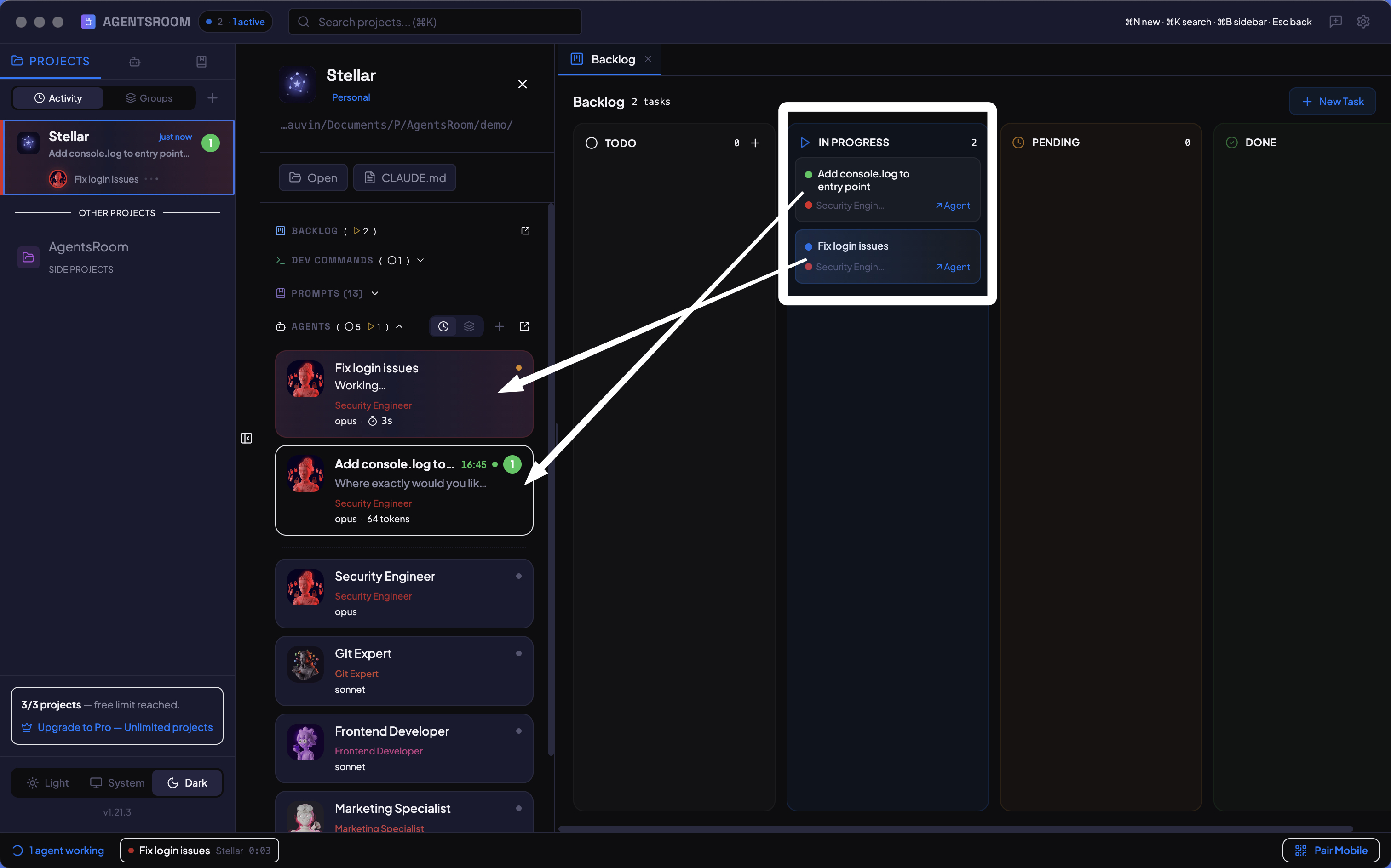
From Figma frame to shipped component, via the Chrome extension and a backlog ticket.
Three moves from frame to shipped UI
Capture the Figma frame with the Chrome extension
Open the Figma file in your browser, click the AgentsRoom extension in the toolbar, and point it at the frame you want to ship. The extension grabs the HTML, the CSS, the design tokens, the URL and a crisp screenshot, then pre-fills a ticket for you in two seconds.
Drop a ticket in your backlog
Give the ticket a one-line title, pick the agent role (frontend engineer, design system integrator, mobile dev), choose the target project, and submit. The ticket lands in your AgentsRoom backlog, visible from the desktop app and from the public backlog portal.
An AI agent ships the UI, you review
Drag the ticket to In Progress and a Claude, Codex, Cursor, Gemini CLI or Aider agent starts implementing the frame immediately. You watch it work in a dedicated terminal, review the diff, check the side-by-side screenshot comparison, then move the ticket to Done.
Your one-click bridge from Figma to an AI agent
The AgentsRoom Chrome extension is the shortest path between a Figma frame and a running agent. Point at any frame, capture the HTML, the CSS and the visual context, submit the ticket, watch the agent ship the implementation. Works with your own private backlogs and with any public backlog slug your clients or designers can write to.
- Capture Figma frames, web pages or plain screenshots in one click
- Send to your own project or to any public backlog slug
- Auto-attach URL, CSS selector, DOM context and an optional screenshot
- Works with Claude Code, Codex, Cursor, Gemini CLI, Aider and OpenCode
Because raw MCP breaks under real load
Figma MCP is powerful on paper: your agent calls the Figma API, reads the frame, rebuilds it. In practice, it hangs, times out on long files, misses tokens, or crashes the agent halfway through the task. AgentsRoom sidesteps the problem. The Chrome extension captures the frame into the ticket itself, and the agent reads that ticket, not a flaky live server. Pair it with the public backlog and you get the full pipeline: designers file tickets, agents ship the UI, you review before merge.
FAQ
Do I need the Figma MCP server to use this?
No. The AgentsRoom Chrome extension captures the Figma frame directly from the browser and packs it into the ticket. The AI agent reads the ticket, not a live MCP connection, so there is no hanging, no timeout, no crashed session in the middle of a sprint.
Which frameworks and stacks are supported?
Whatever your agent can write. AgentsRoom does not enforce a target stack: the agent follows the conventions of your repo. React, Next.js, Vue, Svelte, Astro, Tailwind, CSS modules, styled-components, Chakra, shadcn: all fine as long as your project already uses them.
Can designers create Figma tickets without touching the IDE?
Yes. Designers install the Chrome extension, sign in with their AgentsRoom account or point it at your public backlog slug, and file tickets from any Figma file. They never touch your terminal, your git branches, or your desktop app.
How does it compare to Anima, Locofy or Builder.io Visual Copilot?
Those tools try to be one-shot converters: Figma in, code out. AgentsRoom is a workflow: Figma in, ticket, agent, review, ship. You get human-in-the-loop review before merging, multi-agent choice, and the same backlog for Figma tickets, bugs and feature requests. And it is free to start.
Does this work with Cursor, Codex or Gemini CLI, or only Claude?
All of them. AgentsRoom is multi-provider by design. Pick Claude Code for the best general coding, Codex for raw speed, Cursor for editor workflows, Gemini CLI for long context, Aider for git-native iteration. Every Figma ticket can run on any agent you choose.
Is the Chrome extension free?
Yes. The extension is free to install and works with the AgentsRoom free plan, which includes one remote backlog and up to 50 tickets per month. Pro unlocks unlimited projects, multiple domains and team features.
You may also like
Public Remote Backlog for AI agents
Expose your backlog as a public or private portal so designers, clients and users can file Figma tickets without touching your terminal.
Backlog Task Board for Claude Code
A kanban board where dragging a card to In Progress literally launches a Claude, Codex or Cursor agent. The shipping surface for every Figma ticket.
Per-agent diff review, before you merge
See exactly what the agent changed for every Figma ticket, side by side with the original design, before anything touches main.
One backlog, five AI coding agents
Run Claude, Codex, Cursor, Gemini CLI and Aider on the same Figma tickets and compare the results in parallel.
Turn your next Figma frame into shipped code
Download AgentsRoom, install the Chrome extension, and let an AI agent do the integration work you used to dread.
Companion app: monitor your agents on the go
Works with Claude, Codex, OpenCode, Gemini CLI, and Aider
Also on Chrome: install the AgentsRoom extension to push bugs and requests straight to your public backlog.