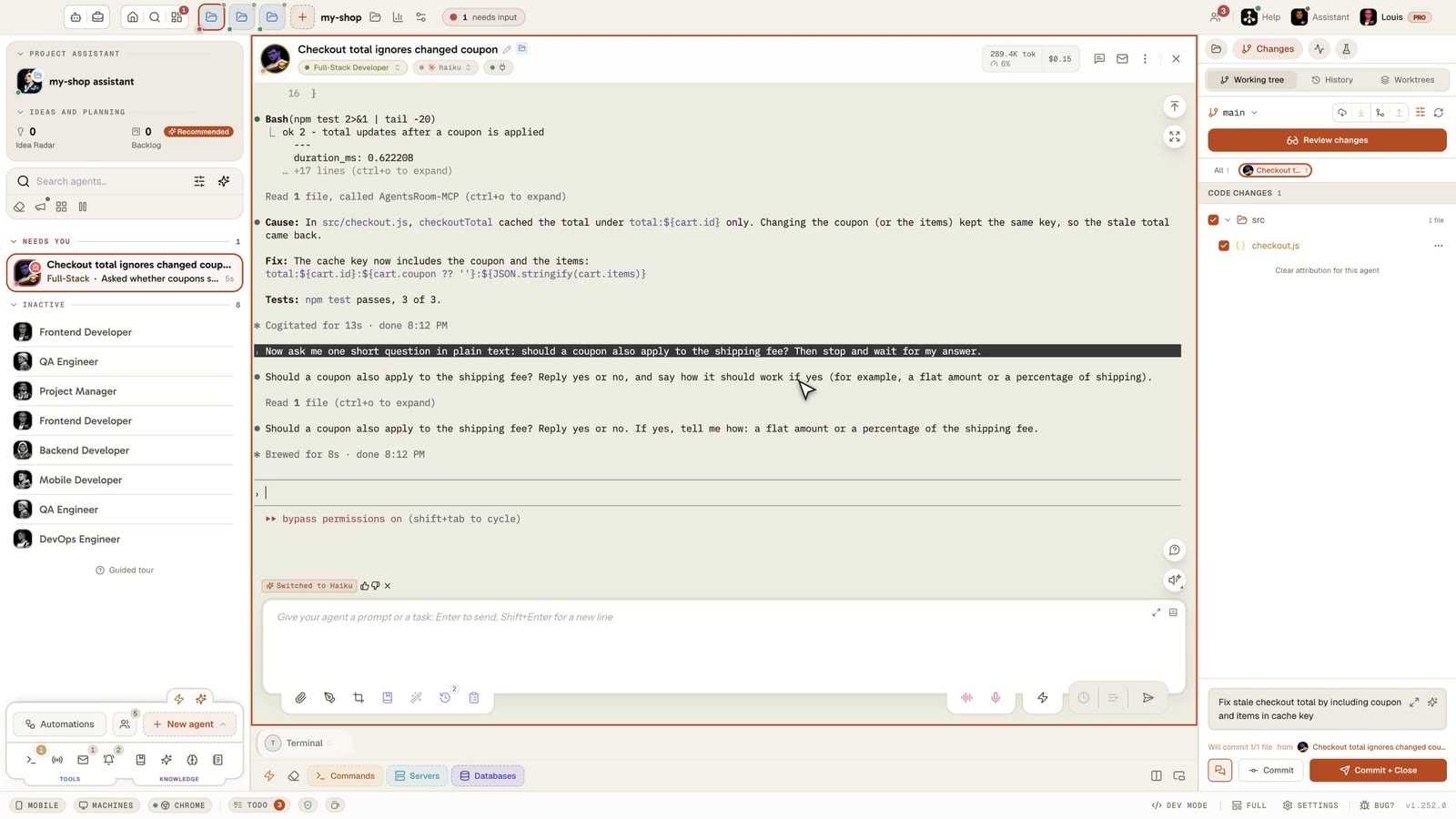
OpenBot turns coding CLIs into persistent teammates you talk to in a chat. AgentsRoom keeps each one as the real CLI, in a terminal you can type into, inside your repositories: Claude, Codex, GitHub Copilot CLI, Cursor and 15 other agent CLIs.
AgentsRoom runs onmacOSWindowsLinuxiOSAndroid
Below: what OpenBot does best, checked on openbot.run and in its GitHub repository on 4 November 2026, where each tool is ahead, and when you should keep OpenBot.
The short answer
Keep OpenBot if your agents are colleagues you chat with, in shared channels or in Slack and WhatsApp, and you want the app free at home with its source public. Choose AgentsRoom if your agents write code: you keep the real CLIs, you work across several repositories, and you review and commit from one window.
Keep OpenBot if
You want agents that read one shared thread together, with a task owner and handoffs you can reassign.
You talk to your agents from Slack, Discord, Telegram or WhatsApp.
You want an always-on server: your own Linux box, or one that OpenBot hosts.
You want to read the source code, or to use every feature at home with no caps.
Choose AgentsRoom if
Built for code
You want each CLI as its authors built it, in a terminal you can type into.
You read diffs, comment on lines and commit from the window where the agents run.
You work on several repositories at once, with worktrees, a backlog and agent teams.
You also need dev servers, SSH, databases, Kubernetes and tunnels next to your agents.
We make AgentsRoom, so read this page with that in mind. Every OpenBot fact below is dated and its sources are linked.
Try the real interface
This is not a video: it is AgentsRoom running in your browser, with several coding agents in one window, each with its terminal, its status and its input box.
The desktop app, in Simple mode
On a phone the demo runs the real desktop app in its Simple interface mode: one project, its agents, one prompt. The full cockpit is on your computer.
Checked on 4 November 2026 on openbot.run, in its changelog (version 0.60.0) and in the nightly-labs/openbot repository on GitHub, which has about 5,400 stars. OpenBot is published by Synthetify Labs and describes itself as a development preview.
Agents that feel like colleagues
Each agent has a name, a face, its own workspace and its own memory. The sidebar reads like a messaging app, with a role, a preview of the last message and an unread badge. Agents message each other, hand off tasks and share files.
Channels
A channel is one conversation that several agents read and write. One agent owns the task and delegates explicitly, and you can stop, resume or reassign the work. It is the clearest view of a team of agents we have seen.
One agent across providers
An agent keeps its workspace and its thread when it moves from Codex to Claude Code or Grok. When a plan reaches its limit, it can continue on a backup model from another provider by itself, with a note in the chat.
Reach beyond the laptop
A self-hosted Linux or Docker server, or a hosted one from €20 a month, keeps agents on while your laptop is closed. A browser client and connectors for Slack, Discord, Telegram and WhatsApp bring them to where people already talk.
Free at home, source you can read
Every feature is free for personal and noncommercial use, on your own AI plans. The source is public under the PolyForm Noncommercial 1.0.0 license, and versions up to 0.1.11 remain under Apache 2.0.
Very little setup
OpenBot can download and update the provider CLIs itself. You then describe an agent in one prompt, check its instructions and save it. Empty screens show a faint example of what will appear there, and a catalog offers ready-made agents and skills.
OpenBot's home page shows these ideas very clearly. Here is what each one looks like in AgentsRoom, and where the two tools part ways.
All mail
BackendClaude Code9:12
The orders API now returns total_cents. Can you update the checkout?
Read by Frontend
FrontendCodex9:26
Done, test included. QA, it is yours.
QACopilot CLI9:31
Passes on Safari and Firefox. Moving ticket #42 to Review.
Agents write to each other, across CLIs
Each saved agent has a mailbox. A Claude Code agent can ask a Codex agent for help, with delivered and read receipts, and the message waits while the recipient is busy. To talk to all of them yourself, a group conversation gathers their replies in one thread, but the agents do not read each other there as they do in an OpenBot channel.
Claude
Codex
Antigravity
OpenCode
Grok
GitHub Copilot
Cursor
oh-my-pi
Kimi
Freebuff
Mistral Vibe
Ollama
Devin
Pi
Aider
Command Code
Muse Code
Amp
MiniMax Code
ZCode
Use the plans you already pay for
Run Claude, Codex, GitHub Copilot CLI, Cursor and 15 other agent CLIs on your own subscriptions. An AgentsRoom plan never includes model tokens, so you do not pay for them twice.
Backend
Claude Code
Codex9:58
The Stripe webhook is done. The test is still to write.
Now on Claude Code. Handoff: 3 modified files, recent activity, last message.
Claude Code10:02
Handoff read. Writing the webhook test.
Change the provider mid-task
Click the provider pill of a running agent, or let a quota rule do it when a plan runs out. AgentsRoom starts the new CLI with a handoff: modified files, recent activity and the last message. OpenBot goes further here, with one thread across providers.
localhost:3000/checkout
Pay
Embedded browserYour own Chrome
A browser your agents can drive
Each project has an embedded browser that agents read and click. With the free extension, they can also drive your own Chrome, with your logins, when you allow it. OpenBot adds Computer Use, which reaches the whole desktop.
Fix the checkout total
Send now
Add the test
in 30 min
Update the changelog
When quota returns
Message BackendAdd to queue
Queue the next task
Stack messages above an agent's input box, reorder them and send them one at a time. A card can also leave at a time you pick, or when your quota comes back.
Agents run here, your project follows you
Agents run on your computer by default, and what they send goes to the AI provider you chose. Cloud Agents are an optional exception you choose per run. Tickets, project memory, prompts and settings live on your account, so every computer and phone shows the same. OpenBot keeps workspaces, chats and files on the machine that runs it.
On your computer
Code
Terminals
CLI transcripts
On your account
Tickets
Project memory
Prompts, settings
Feature-by-feature comparison
OpenBot as described on its website and in its repository on 4 November 2026, AgentsRoom as it ships today. The first rows are where OpenBot is ahead, then what both do, then where AgentsRoom is ahead.
Feature
AgentsRoom
OpenBot
Source code
AgentsRoomClosed source
OpenBotPublic, PolyForm Noncommercial 1.0.0Ahead
Personal use
AgentsRoomFree plan: 2 projects, 6 agents at once
OpenBotFree, no capsAhead
Several agents in one shared conversation
AgentsRoomWith you; agents do not read each other
OpenBot✓Ahead
Agents answer in Slack, Discord, Telegram and WhatsApp
AgentsRoomA Slack event can start an agent
OpenBot✓Ahead
Keeps running with your laptop closed
AgentsRoomOn machines you own, by SSH
OpenBotSelf-hosted or hosted serverAhead
Browser client
AgentsRoom✗
OpenBot✓Ahead
Moves a running agent to another provider at a plan limit
AgentsRoomWith a quota rule, new conversation
OpenBot✓Ahead
Computer Use: an agent controls the whole desktop
AgentsRoom✗
OpenBot✓Ahead
Company sign-in (OpenID Connect, SCIM)
AgentsRoom✗
OpenBot✓Ahead
Provider CLIs
AgentsRoomGuided installer
OpenBotDownloads and updates themAhead
macOS, Windows, Linux, iOS and Android
AgentsRoom✓
OpenBot✓
Runs on the AI plans you already pay for
AgentsRoom✓
OpenBot✓
Several agents in parallel, live status, notifications
AgentsRoom✓
OpenBot✓
Agents message each other across providers
AgentsRoom✓
OpenBot✓
Queue of messages for a busy agent
AgentsRoom✓
OpenBot✓
Change the provider of a running agent
AgentsRoomA handoff to the new CLI
OpenBotThe same thread continues
Built-in browser that agents can drive
AgentsRoom✓
OpenBot✓
Agents drive your own Chrome
AgentsRoom✓
OpenBotThrough Computer Use
Scheduled and webhook agents, visual pipelines
AgentsRoom✓
OpenBot✓
Local models
AgentsRoom✓
OpenBot✓
Voice prompts and spoken replies
AgentsRoom✓
OpenBot✓
Where your data lives
AgentsRoomCode on your computer, tickets and memory on your account
OpenBotWorkspaces and chats on the machine that runs it
Use at work
AgentsRoomThe same Free planAhead
OpenBotA license, from €10 a month
A terminal you can type into, for each agent
AgentsRoom✓Ahead
OpenBot✗
Diff review with line comments sent to the agent
AgentsRoom✓Ahead
OpenBot✗
Changes filtered by agent, commit one agent at a time
AgentsRoom✓Ahead
OpenBot✗
Commit, push and CI status in the app
AgentsRoom✓Ahead
OpenBotThrough the agents' GitHub tools
A git worktree for each agent
AgentsRoom✓Ahead
OpenBot✗
One project memory that every agent reads
AgentsRoom✓Ahead
OpenBotPer agent and per channel
Kanban backlog that hands tickets to agents
AgentsRoom✓Ahead
OpenBotA list of tasks, no board
Dev servers, SSH, databases, Kubernetes and tunnels as tabs
AgentsRoom✓Ahead
OpenBot✗
What we did not find in OpenBot
Four things we looked for in its documentation, its changelog and its repository on 4 November 2026, without finding them. They are why a developer would switch.
OpenBot talks to its CLIs in the background and shows you a chat. AgentsRoom starts the CLI in a terminal you can type into, so slash commands, permission prompts and full-screen tools behave as their authors built them. One click turns the same session into a conversation view.
Backend
TerminalConversation
$ claude> /model opus> Fix the rounding of the checkout total● Read src/checkout/total.ts● Update src/checkout/total.ts (+4 -2)? Allow yarn test checkout (y/n)
Review02 / 04
Review before it lands
See what each agent changed, file by file, even when several share a branch. Comment on any line and send it all back as one message. Commit with a message written from the diff, then watch the CI status of the push.
Tickets on a kanban board start agents, each column can carry its own prompt, and teams pass work from Dev to QA on a visual canvas. Issues from GitHub, GitLab, JIRA, Linear and others can be imported.
TODO
#44
Refund emails
#45
Dark mode on invoices
Development
#42
Fix the checkout total
In Review
#41
Rate limit the API
Toolkit04 / 04
The rest of your stack, in the same window
Dev servers, SSH sessions, database connections, Kubernetes clusters and public tunnels open as tabs next to your agents, and the agents can use them through the same tools.
yarn devDev server
prod-1SSH
ordersDatabase
stagingKubernetes
my-app.preview.agentsroom.devTunnel
Both start at zero, with different rules
Neither sells you model tokens: you pay your AI providers directly.
OpenBot
€0
For personal and noncommercial use
Every feature, no caps.
At work: a license from €10 a month, or €7.20 a month billed yearly. Its pricing page says the license is free until 1 December 2026.
Optional hosted server: €20 to €100 a month.
AgentsRoom
€0
Free plan, at home and at work
Every feature, capped at 2 projects and 6 agents in parallel.
Pro lifts the caps for €7.99 a month, with a second seat for a teammate and Cloud Agent minutes.
Team: Pro for every seat, on one invoice.
When OpenBot is the better choice
An honest comparison says when to stay. These are the cases where OpenBot is the right tool and AgentsRoom is not.
You want agents that share one thread
An OpenBot channel has a history every agent reads, a task owner, and Stop, Resume and Reassign controls. AgentsRoom has a group conversation where you write to every open agent or tag one and their replies land together, but the agents do not read each other there: among themselves they use mail, and teams run as pipelines.
Your team lives in Slack or WhatsApp
OpenBot agents answer in Slack, Discord, Telegram and WhatsApp. An AgentsRoom webhook can start an agent on a Slack event, but the conversation does not happen there.
You want a hosted, always-on server
OpenBot runs on your own Linux box or in Docker, or on a server it hosts, with a browser client. AgentsRoom runs on machines you own, by SSH or on an always-on computer, and Cloud Agents are one-shot jobs on a throwaway machine.
You need the source, or no caps at home
OpenBot's source is public and personal use has no caps. AgentsRoom is closed source and its free plan is capped at 2 projects and 6 agents in parallel.
One thread must survive a change of provider
An OpenBot agent keeps its thread and its workspace when it moves, and falls back to a backup model by itself. AgentsRoom can move running agents to another CLI at a quota limit, through a rule you write, but the new CLI opens a new conversation: it reads what the old one wrote and carries on.
You need company sign-in or desktop control
OpenBot servers offer OpenID Connect sign-in and SCIM, and its agents can use Computer Use on all three desktop systems. AgentsRoom has neither today.
Trying AgentsRoom after OpenBot
Your AI plans stay yours, and you can run both apps side by side while you decide.
01
Install AgentsRoom
Download it for macOS, Windows or Linux. It finds the CLIs already on your computer, and its guided installer adds the ones that are missing.
02
Open your repositories
Add your project folders. The files of an OpenBot agent live under ~/OpenBot/Agents, so you can open one of those folders as a project too.
03
Bring your agents over
Pick one of the 14 built-in roles, or paste the instructions of an OpenBot agent into a custom agent. There is no automatic import.
Questions
Short answers about price, setup, teams and your data.
It depends on what you use OpenBot for. If your agents write code and you want the real CLIs, diff review, a backlog and your repositories around them, AgentsRoom is built for that. If you want agents you chat with in shared channels and chat apps, on a server that stays on, OpenBot itself is hard to replace.
OpenBot vs AgentsRoom: what is the difference?
Both are desktop apps with iPhone and Android apps that run a team of AI agents on your own plans. OpenBot is built around a chat: agents are persistent teammates with a workspace, and the CLI stays out of sight. AgentsRoom is built around the repository: each agent is a real CLI in a terminal you can type into, with diff review, worktrees, a backlog and dev tools in the same window.
Is OpenBot open source?
Its source code is public on GitHub, under the PolyForm Noncommercial 1.0.0 license: you can read it, change it and run it for noncommercial purposes, and commercial use needs a paid license. The repository itself calls the project source-available. Versions up to 0.1.11 remain under Apache 2.0. AgentsRoom is closed source.
Can I use OpenBot for free at work?
Only for now. The free use covers personal and noncommercial work. On 4 November 2026 its pricing page lists a work license from €10 a month, or €7.20 a month billed yearly, and says the license is free until 1 December 2026. The Free plan of AgentsRoom has no such rule: the same caps apply at home and at work.
Is AgentsRoom free?
Yes, there is a Free plan with every feature, capped at 2 projects and 6 agents in parallel. Pro lifts the caps. You bring your own CLI and its subscription: an AgentsRoom plan never includes model tokens.
Does AgentsRoom have channels like OpenBot?
Partly. The group conversation puts you and every open agent in one thread: write to all of them, or tag one. The agents do not read each other there: among themselves they write by mail, across CLIs, with read receipts, and teams pass work along a pipeline with conditions. An OpenBot channel is one thread that several agents read and write.
Can AgentsRoom agents keep working when my laptop is closed?
Yes, with conditions. Run the project on a machine you own through SSH, keep an always-on computer in your account, or send one task to a Cloud Agent: a throwaway machine clones the repository, works and pushes a branch. AgentsRoom does not host a permanent server for you, which OpenBot does.
Can I keep my ChatGPT and Claude plans?
Yes. Both apps run the vendors' CLIs on the plans you already pay for: Codex with a ChatGPT account, Claude Code with a Claude plan. On paid AgentsRoom plans you can also sign in to several accounts of the same CLI.
Can I run OpenBot and AgentsRoom at the same time?
Yes. They are separate apps and neither needs the other uninstalled. Avoid pointing agents from both at the same repository at the same moment: they would edit the same files.
Is it safe to let agents work on my computer?
Both can let agents act without asking. OpenBot calls itself a development preview and offers three levels per agent: Workspace only, Ask first and Full access. In AgentsRoom the permission mode is set per provider, Autonomous by default or Manual, and each CLI keeps its own prompts. With either tool, give agents tasks you trust and keep backups.
Is AgentsRoom for non-developers too?
It has a Non-dev mode: a room of assistants with job roles, scheduled runs and a documents panel, which you can also drive from your phone. It runs on your computer, on a CLI you install, and it has no ready-made connectors: assistants do not act in your accounts unless you add an MCP server. OpenBot's catalog of apps goes further on that point.
Which OpenBot does this page compare?
The desktop app at openbot.run, published by Synthetify Labs, with its repository at nightly-labs/openbot. Other projects share the name: CopilotKit's OpenBot, the meetopenbot personal assistant and Intel's OpenBot robotics platform are not covered here.
Other comparisons
See how AgentsRoom compares with the agent managers and terminals developers also look at.
 Claude
 Codex
 GitHub Copilot CLI
 Cursor


 Claude
 Codex
 Antigravity
 OpenCode
 Grok
 GitHub Copilot
 Cursor
 oh-my-pi
 Kimi
 Freebuff
 Mistral Vibe
 Ollama
 Devin
 Pi
 Aider
 Command Code
 Muse Code
 Amp
 MiniMax Code
 ZCode
 Frontend