Remote Control Your AI Agents
Straight From Your Phone
AgentsRoom turns your iPhone or Android into a remote control for every Claude, Codex and Gemini agent running on your Mac. Pilot terminals, drive coding sessions, fire saved prompts and preview tunneled dev servers, all from the couch, the train or the coffee shop.
An exclusive, fully encrypted mobile remote control for the whole AgentsRoom cockpit : projects, agents, terminals, tunnels, prompt library and backlog.
Remote control session : a Mac running multiple AI coding agents, driven live from an iPhone.
Remote control for AI coding agents used to mean SSH on a 6-inch screen, tmux panes the size of a postage stamp and a Bluetooth keyboard you forgot at home. AgentsRoom replaces all of that with a purpose-built mobile remote control for Claude, Codex, Gemini CLI, OpenCode and Aider. Your agents stay on your Mac where they belong. You get a proper mobile remote control in your pocket.
The remote control is not a stripped-down viewer. It is a full cockpit : projects, agents, terminals, dev server tunnels, prompt library and backlog board, all at your thumb. Every button you can press on the desktop UI is exposed through the mobile remote control, with native iOS and Android gestures instead of a miniature keyboard.
And it is exclusive. Nobody else ships a mobile remote control of this caliber for Claude, Codex and Gemini agents. AgentsRoom can do it because it ships its own ultra-secure relay, custom built for end-to-end encrypted remote control between a desktop app and a phone.
Full Remote Control, Not Just a Viewer
Every surface of the desktop app is wired into the phone remote control.
Remote Control Every Project
See every project from your phone : the codebase folder, the agents inside, the running dev servers, the backlog and the prompt library. Tap a project to take remote control of it as if you were sitting at your Mac.
Pilot Claude, Codex and Gemini Agents
Start a new Claude, Codex or Gemini agent straight from your phone. Pick the role, the provider and the model. The remote control sends the order across the encrypted relay and the agent boots on your Mac instantly.
Drive the Terminal From Mobile
Open any xterm.js terminal your agents are streaming into. Scroll through colored output, type commands with the native mobile keyboard, paste snippets. The phone becomes a real terminal remote control, not a half-broken SSH screen.
Remote Control the Localhost Tunnel
Launch the AgentsRoom built-in secure tunnel from mobile and open your local dev server inside the phone browser. Preview the site your agents are coding on a real device, from the same remote control app.
Fire Prompts From Your Library
Your per-project and global prompt library rides with you. Browse folders, pick a saved prompt, and send it to any running agent in one tap. The remote control turns your phone into a prompt launcher you can trigger from anywhere.
Operate the Backlog From Mobile
Drag tasks from TODO to In Progress on the backlog kanban directly from your phone. The remote control automatically spawns the right agent on your Mac. Close a task during lunch, from the same mobile interface.
An Exclusive Encrypted Relay, Not a Generic SSH Bridge
This remote control experience works because AgentsRoom ships its own secure relay. No third-party tunnel, no custom DNS, no cloud account. Just a purpose-built WebSocket relay designed from day one for end-to-end encrypted remote control between a Mac and a phone.
When your desktop pairs with your mobile, both sides run an X25519 key exchange. From that point on, every byte of the remote control traffic (terminal input, prompts, backlog updates, tunnel packets) is sealed with XSalsa20-Poly1305 before it leaves your devices. The relay only sees opaque encrypted blobs : it cannot read your code, your prompts or your terminal output even if it wanted to.
That is what makes this remote control experience exclusive to AgentsRoom. Most tools give you a raw SSH session or a web viewer. AgentsRoom gives you a fully native mobile remote control, wrapped in its own encrypted infrastructure, with zero configuration.
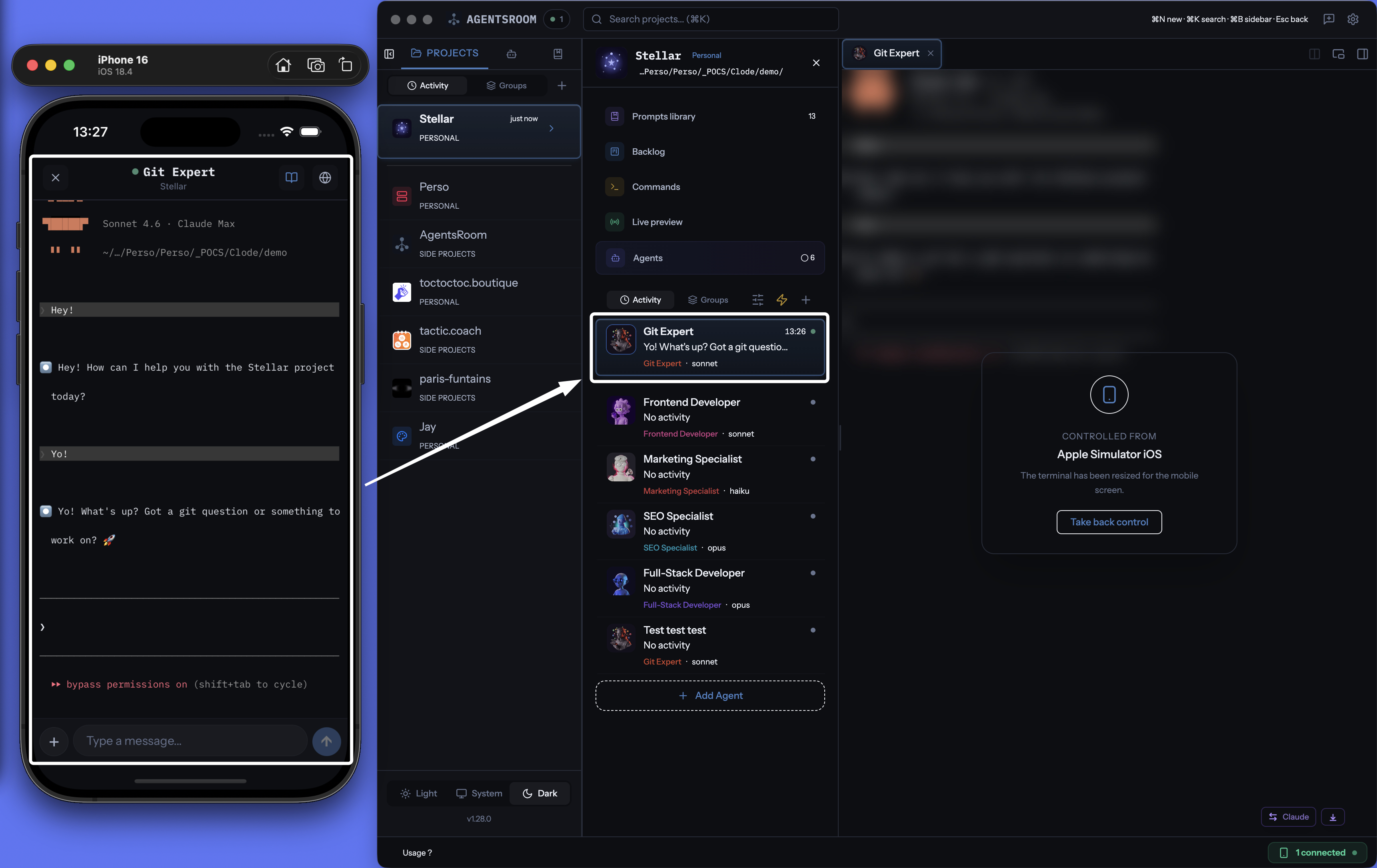
Mobile remote control in action : a phone driving a desktop running several AI coding agents in parallel.
Remote Control In Three Steps
Pair once, remote control forever.
Scan the pairing QR code
Open AgentsRoom on your Mac, show the pairing QR, scan it with the mobile app. X25519 key exchange happens in under a second. The remote control channel is live.
Your fleet appears on the phone
Every project, agent, terminal, dev server, prompt and backlog task syncs to your phone in real time. You are now looking at the exact same session as on your Mac, ready to remote control.
Pilot from anywhere on 4G, 5G or Wi-Fi
Tap to start an agent, swipe to switch project, type to drive the terminal, long-press to send a saved prompt. The remote control feels instant thanks to the relay. Your Mac does the heavy lifting, your phone drives it.
Why a Phone Remote Control Changes Your Day
Coding sessions no longer end the moment you close the laptop lid.
On the commute
The Claude agent you launched on a refactor is still running. Pull out the phone, take remote control, check the diff, answer the one confirmation prompt, ship.
From the couch
A long test suite is crunching on your Mac. You stay on the sofa, remote control the terminal from your Android and watch the Codex agent patch the last failure.
At the airport
Gate change, 30 minutes to kill. You open the phone, pilot a Gemini agent through a quick prompt library run, and review the summary before boarding.
During standup
Your teammate needs the staging URL. You flick the localhost tunnel on from the phone remote control, send the link in the group chat, and never touch your Mac.
FAQ
What exactly can I remote control from the mobile app?
Everything the desktop app exposes : projects, AI agents (Claude, Codex, Gemini CLI, OpenCode, Aider), xterm.js terminals, localhost tunnels, the per-project prompt library, the backlog kanban, agent status and token usage. The remote control is a complete cockpit, not a read-only dashboard.
Is this just SSH dressed up with a nicer UI?
No. SSH gives you a raw terminal. The AgentsRoom remote control is a fully native iOS and Android interface with project views, chat-style agent messages, typed terminal input, tunnel controls and push notifications. It travels through a custom encrypted relay, not SSH.
Does my code leave my Mac when I remote control it?
No. Agents still run 100% locally on your machine. The remote control only forwards encrypted commands and output through the relay. The server never sees plaintext. Your source code, diffs and prompts stay on your disk.
Which AI providers can I remote control?
Claude (Anthropic), Codex (OpenAI), Gemini CLI (Google), OpenCode and Aider. The remote control is provider-agnostic : you can pilot a Claude agent, a Codex agent and a Gemini agent side by side from the same phone session.
Is the mobile remote control on iOS and Android?
Yes. AgentsRoom ships a native iOS app on the App Store and an Android app on Google Play. Both are free and both speak to the same encrypted relay to remote control your Mac.
Does the remote control work over cellular?
Yes. The remote control runs over a WebSocket relay and is happy on 4G, 5G and any Wi-Fi. Bandwidth is minimal because only text-level data and small tunnel packets are exchanged.
Do I need to configure a VPN or port forwarding?
No. AgentsRoom ships its own secure relay. There is no port to open on your router, no VPN to set up, no external account to create. Pair once with a QR code and remote control from anywhere.
You may also like
Mobile-Desktop Sync
The main AgentsRoom feature page on real-time encrypted sync between the desktop app and the mobile companion.
Localhost Tunnel (Live Preview)
Built-in secure tunnel that exposes any local dev server as a public HTTPS URL. Open your work in progress on the phone.
Dev Terminals
Per-project terminal manager and process launcher. Start backend, frontend and workers in one click, and remote control them from mobile.
Prompt Library
Per-project and global prompt collections with folders and tags, ready to fire at agents from the phone.
Take the Remote Control With You
Download AgentsRoom on your Mac, get the iOS or Android app, pair in 10 seconds and pilot your AI coding agents from anywhere.
Companion app: monitor your agents on the go
Works with Claude, Codex, OpenCode, Gemini CLI, and Aider