กำลังมองหาตัวเลือกแทน AMUX อยู่หรือเปล่า? พบกับ AgentsRoom
ตัวจัดการเอเจนต์เนทีฟบนเดสก์ท็อปพร้อมการซิงก์มือถือ เทียบกับตัวห่อหุ้ม tmux ที่ทำงานบนเบราว์เซอร์
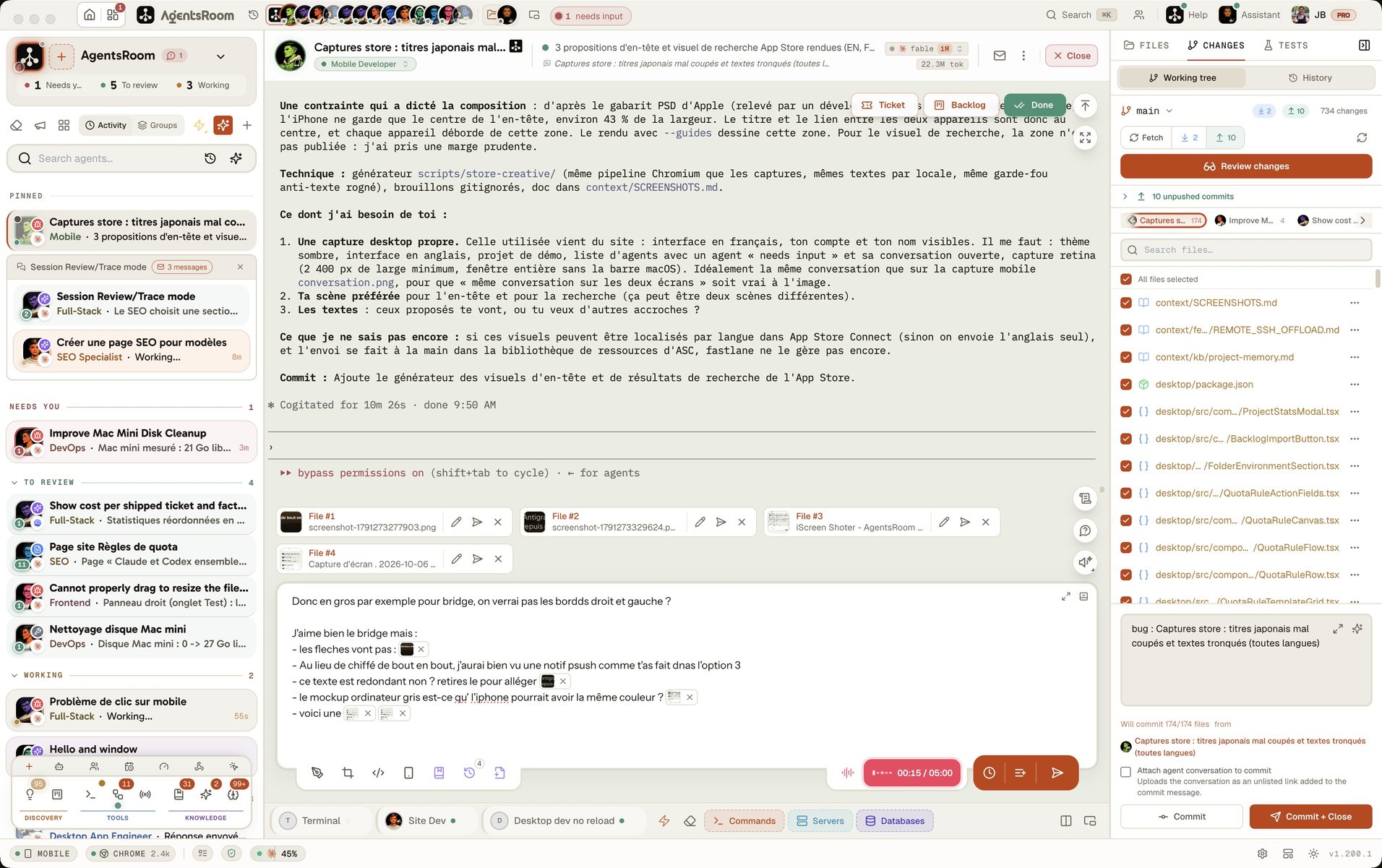
เครื่องมือทั้งสองช่วยให้คุณรันเอเจนต์ Claude Code หลายตัวพร้อมกันได้ AgentsRoom เป็นแอปเดสก์ท็อปเนทีฟสำหรับ macOS, Windows และ Linux ที่มี 14 บทบาท สถานะแบบเรียลไทม์ และการแจ้งเตือนบนมือถือ ส่วน AMUX ให้อินเทอร์เฟซเว็บวางทับบน tmux เพื่อเข้าถึงผ่านเบราว์เซอร์
เทียบเคียงข้างกัน
AMUX
- -อินเทอร์เฟซบนเบราว์เซอร์ที่สร้างทับบน tmux
- -สถานะเอเจนต์แบบพื้นฐาน ไม่มีการอัปเดตแบบเรียลไทม์
- -ไม่มีการแจ้งเตือนทั้งบนเดสก์ท็อปและมือถือ
- -ทำได้ครั้งละหนึ่งโปรเจกต์
- -ไม่มีระบบบทบาทหรือความเชี่ยวชาญเฉพาะทางของเอเจนต์
- -ตั้งค่าด้วยมือ ไม่มีตัวแก้ไขแบบเห็นภาพ
AgentsRoom
- +แอปเนทีฟสำหรับ macOS, Windows และ Linux พร้อมเทอร์มินัลในตัว
- +สถานะเอเจนต์แบบเรียลไทม์พร้อมตัวบ่งชี้ที่มีรหัสสี
- +การแจ้งเตือนแบบพุชบนเดสก์ท็อป, iOS และ Android
- +จัดการหลายโปรเจกต์ด้วยการลากและวาง
- +บทบาทเอเจนต์เฉพาะทาง 14 บทบาท (สถาปนิก ผู้ทดสอบ ผู้ตรวจโค้ด...)
- +ตั้งค่าโมเดลแยกตามเอเจนต์ พร้อมตัวแก้ไขการตั้งค่า
เปรียบเทียบฟีเจอร์
ดูกันตรง ๆ ว่าเครื่องมือแต่ละตัวให้อะไรบ้างสำหรับการจัดการเอเจนต์ Claude Code
| ฟีเจอร์ | AgentsRoom | AMUX |
|---|---|---|
| อินเทอร์เฟซแบบภาพ | ✓ | อินเทอร์เฟซเว็บ |
| สถานะเอเจนต์แบบเรียลไทม์ | ✓ | พื้นฐาน |
| การแจ้งเตือน | ✓ | ✗ |
| หลายโปรเจกต์ | ✓ | ✗ |
| เทอร์มินัลในตัว | ✓ | ✓ |
| ตัวแก้ไขการตั้งค่า | ✓ | ✗ |
| ลากและวาง | ✓ | ✗ |
| บทบาทเฉพาะทาง | ✓ | ✗ |
| โมเดลต่อแต่ละเอเจนต์ | ✓ | ✗ |
| เวลาตั้งค่า | 30 วินาที | 10 นาที |
ดูการทำงานจริง
ดู AgentsRoom จัดการเอเจนต์ Claude Code หลายตัวจากอินเทอร์เฟซเดียว
แอปเดสก์ท็อปในโหมดเรียบง่าย
บนโทรศัพท์ เดโมจะรันแอปเดสก์ท็อปตัวจริงในโหมดอินเทอร์เฟซเรียบง่าย: หนึ่งโปรเจกต์ เอเจนต์ของมัน หนึ่งพรอมต์ ห้องควบคุมแบบเต็มอยู่บนคอมพิวเตอร์ของคุณ
เมื่อไหร่ควรเลือก AMUX
AMUX เหมาะกับบางสถานการณ์โดยเฉพาะ นี่คือตอนที่มันสมเหตุสมผล
คุณชอบอินเทอร์เฟซที่ทำงานบนเว็บ
AMUX รันในเบราว์เซอร์ตัวไหนก็ได้ ถ้าคุณทำงานข้ามหลายระบบปฏิบัติการและอยากได้หน้าจอเหมือนกันทุกที่โดยไม่ต้องติดตั้งแอปเนทีฟ AMUX ก็ตอบโจทย์นั้นพอดี
คุณรันเอเจนต์บนเซิร์ฟเวอร์ระยะไกล
AMUX สามารถติดตั้งบนเซิร์ฟเวอร์ระยะไกลแล้วเข้าถึงผ่านอุโมงค์ SSH หรือผ่านเบราว์เซอร์ได้ ซึ่งมีประโยชน์กับทีมที่มีเครื่องบิลด์ส่วนกลาง
ทีมของคุณใช้เซิร์ฟเวอร์เครื่องเดียวร่วมกัน
นักพัฒนาหลายคนเชื่อมต่อเข้าอินสแตนซ์ AMUX ตัวเดียวกันที่รันบนเซิร์ฟเวอร์ส่วนกลางได้ ส่วน AgentsRoom เน้นการทำงานของนักพัฒนาแต่ละคน พร้อมการซิงก์มือถือแบบเข้ารหัสตลอดเส้นทาง
ย้ายจาก AMUX
การย้ายมาที่ AgentsRoom ใช้เวลาไม่ถึงหนึ่งนาที ไฟล์ตั้งค่า Claude Code ของคุณย้ายตามมาได้เลย
ดาวน์โหลด AgentsRoom
ติดตั้งแอปเดสก์ท็อปจาก agentsroom.dev เปิดขึ้นมาแล้วชี้ไปที่ไดเรกทอรีโปรเจกต์ของคุณ
ตั้งค่าเอเจนต์ของคุณ
กำหนดบทบาท เลือกโมเดล และจัดระเบียบเอเจนต์ด้วยการลากและวาง ไฟล์ตั้งค่า Claude Code เดิมของคุณจะถูกตรวจพบโดยอัตโนมัติ
เริ่มลงมือทำงาน
เปิดเอเจนต์ได้จากในแอปโดยตรง การอัปเดตสถานะ การแจ้งเตือน และการซิงก์มือถือใช้ได้ทันทีตั้งแต่แกะกล่อง
คำถามที่พบบ่อย
AMUX คืออะไร?+
AgentsRoom ทำงานบน Linux และ Windows ได้ไหม?+
AMUX รองรับบทบาทของเอเจนต์ไหม?+
เวลาตั้งค่าของสองตัวต่างกันแค่ไหน?+
ฉันได้รับการแจ้งเตือนกับ AMUX ไหม?+
พร้อมจัดการเอเจนต์ Claude ของคุณแล้วหรือยัง?
ดาวน์โหลด AgentsRoom แล้วเริ่มรันเอเจนต์หลายตัวใน 30 วินาที
แอปคู่หู: ตรวจสอบเอเจนต์ของคุณได้ทุกที่
นำของคุณเอง: Claude, Codex, Antigravity CLI, หรือผู้ให้บริการ AI อื่น ๆ
ส่งข้อบกพร่องและคำขอไปยังแบ็คล็อกสาธารณะของคุณโดยตรง