Dev Terminals
आपकी सभी सर्विसेज़ के लिए
प्रोजेक्ट में बैकएंड, फ़्रंटएंड, मोबाइल ऐप, रिले सर्वर। पहले 4 टर्मिनल टैब खोलकर हर स्टार्ट कमांड हाथ से टाइप करते थे। अब एक बटन दबाएं।
और सबसे ख़ास बात: iOS और Android मोबाइल ऐप से आप अपने कंप्यूटर पर कमांड रिमोट ट्रिगर करते हैं। मेट्रो, जिम या किसी कैफ़े से अपनी localhost साइट शुरू करें, फिर उसे बिल्ट-इन लाइव प्रीव्यू टनल के ज़रिए 4G/5G पर अपने फ़ोन पर खोलें।
एक साथ कई टर्मिनल मैनेज करें: drag-and-drop split panes, वर्टिकल और होरिज़ॉन्टल लेआउट, और एक पूरी तरह detached विंडो जिसे आप एजेंट्स, लॉग और बिल्ड की निगरानी के लिए समर्पित स्क्रीन पर ले जा सकते हैं।
Dev Terminals एक टर्मिनल एमुलेटर से कहीं ज़्यादा है। यह एक असली प्रति-प्रोजेक्ट कमांड मैनेजर है, जो हर सुबह खोले जाने वाले iTerm2, Warp, Ghostty, Kitty, Alacritty और Terminal.app के टैब के जंगल को बदलने के लिए बनाया गया है। हर प्रोजेक्ट की अपनी कमांड लिस्ट होती है: डेव सर्वर, बैकएंड, मोबाइल बंडलर, worker, डेटाबेस, इंटरनल स्क्रिप्ट। इन्हें एक बार नाम दें, हमेशा के लिए लॉन्च करें।
कमांड मैनेजमेंट को जितना संभव हो उतना तेज़ बनाने के लिए UX और UI को जानबूझकर बहुत आगे तक पुश किया गया है। हर कमांड अपना नाम, शेल कमांड, वर्किंग डायरेक्टरी (प्रोजेक्ट रूट के सापेक्ष), फ़्रेमवर्क कैटेगरी (React, Next.js, Django, Rails, Go, Rust, Docker…) और प्रकार (लंबे समय चलने वाली प्रोसेस या वन-शॉट स्निपेट) याद रखता है। सक्रिय कमांड लिस्ट में सबसे ऊपर आ जाते हैं, और रंगीन फ़्रेमवर्क आइकन आपको एक नज़र में अपना React फ़्रंटएंड, Django बैकएंड और Docker सर्विसेज़ पहचानने देते हैं।
AgentsRoom के अंदर रहने वाले एकीकृत टर्मिनल का बड़ा फ़ायदा यह है कि कमांड आपके प्रोजेक्ट के सटीक संदर्भ में चलते हैं: वही पाथ, वही एनवायरनमेंट, वही cwd। ज़ीरो फ़्रिक्शन, ज़ीरो अंतहीन cd, ज़ीरो प्रोजेक्ट कन्फ़्यूज़न। और चूंकि सब कुछ आपके Claude, Codex और Antigravity AI एजेंट्स के साथ रहता है, आप कोड शिप करने के लिए पंद्रह अलग-अलग टूल्स के बीच जगलिंग करना बंद कर देते हैं।
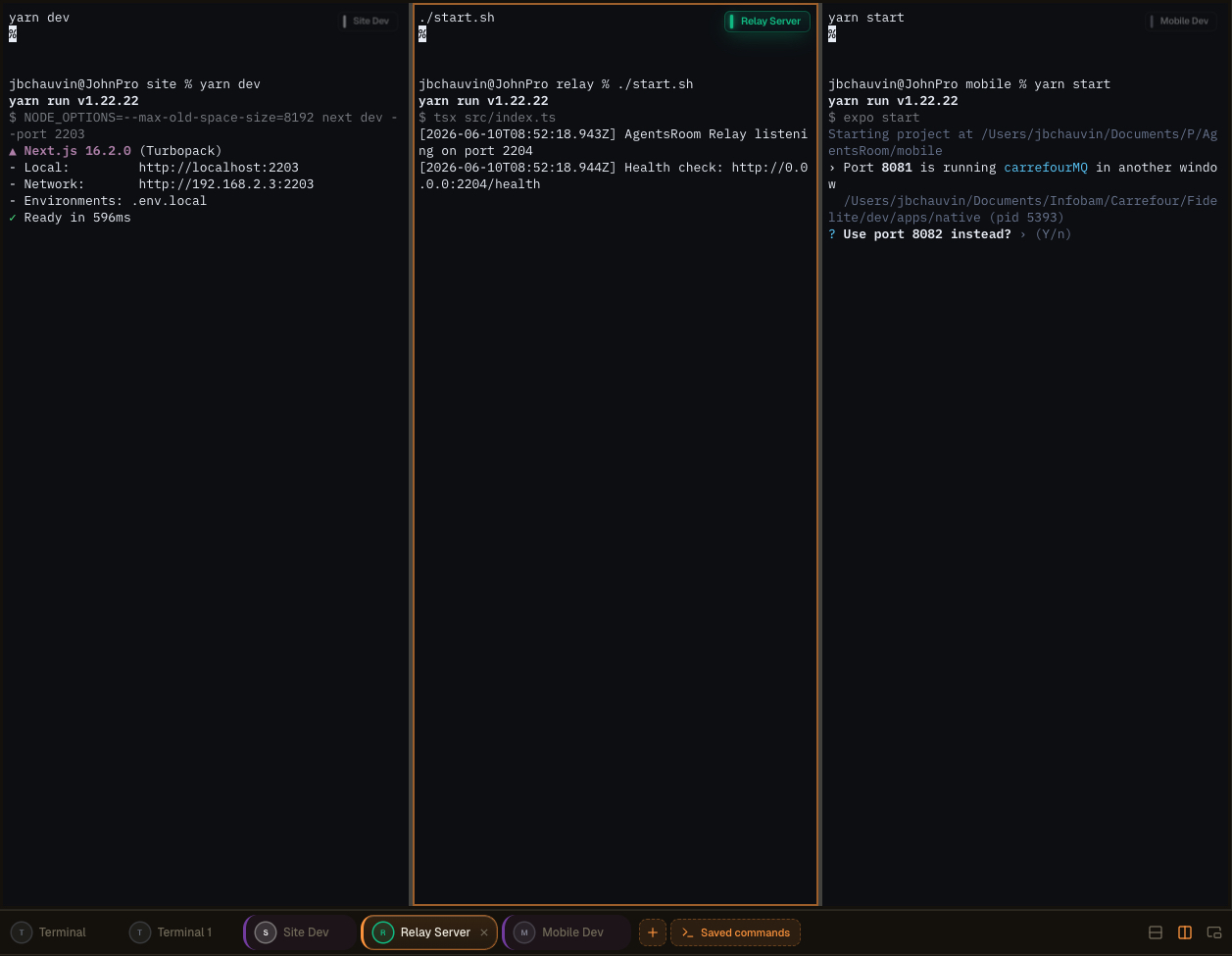
AgentsRoom में मल्टी-पेन टर्मिनल लेआउट: अपने टर्मिनल्स को split करें, उन्हें दूसरी स्क्रीन पर detach करें, और एजेंट्स, लॉग और बिल्ड को side by side देखें।
एक असली एकीकृत टर्मिनल, कोई खिलौना नहीं
हर कमांड ANSI रंगों, scrollback, क्लिक करने योग्य लिंक, PTY रीसाइज़ और Unicode सपोर्ट वाला पूरा xterm.js टर्मिनल खोलता है। यह कोई नकली लॉग व्यूअर नहीं है: यह एक असली pseudo-terminal है, बिल्कुल वैसा जैसा आपको iTerm2 या Terminal.app में मिलता है, लेकिन आपके लिए मैनेज किया हुआ।
हर प्रोसेस का स्टेटस लाइव दिखता है: चल रही, शुरू हो रही, रुकी, क्रैश हुई। जब कोई डेव सर्वर गिरता है, आप उसे तुरंत देख लेते हैं। रीस्टार्ट के लिए एक क्लिक। और जब आपको समानांतर में कई टर्मिनल चाहिए (बैकएंड + फ़्रंटएंड + मोबाइल + रिले), ग्लोबल 'Start all' बटन हर लंबे समय चलने वाली प्रोसेस को एक साथ, समानांतर में, बिना कुछ टाइप किए लॉन्च कर देता है।
कमांड फ़ोल्डर में समूहित होते हैं, माउस से पुनर्व्यवस्थित किए जा सकते हैं, और आपके प्रोजेक्ट की रूट पर `.agentsroom/commands.json` में स्टोर होते हैं। इस फ़ाइल को कमिट करें: आपकी पूरी टीम को वही टर्मिनल सेटअप मिलता है। पर्सनल कमांड (लोकल डीबग स्क्रिप्ट, प्राइवेट env vars) `commands-personal.json` में जाते हैं, जो अपने आप `.agentsroom` के अंदर `.gitignore` में जुड़ जाता है। नया रिपो जॉइन करते समय अब किसी को कभी भी `yarn dev --port 2203` याद से टाइप नहीं करना पड़ता।
आख़िर में, सब कुछ एकीकृत है: आपके AI एजेंट्स, आपके टर्मिनल, आपके प्रॉम्प्ट, आपका backlog और आपका लाइव प्रीव्यू सभी एक ही विंडो में रहते हैं। AgentsRoom, आपके टर्मिनल एमुलेटर, आपके IDE और आपके ब्राउज़र के बीच की भागदौड़ ख़त्म करके आप बहुत सारा समय बचाते हैं। एक स्क्रीन, सब कुछ एक क्लिक की दूरी पर।
Detached Commands और मल्टी-स्क्रीन सेटअप
Dev Commands को अब AgentsRoom के मुख्य इंटरफ़ेस से अलग, एक स्वतंत्र विंडो में पूरी तरह detach किया जा सकता है। अपने टर्मिनल्स को बाहर निकालें और जहां आप सबसे अच्छा काम करते हैं वहां ले जाएं: दूसरी डिसप्ले, एक ultrawide, या monitoring, logs, builds और AI agents को समर्पित vertical monitor।
साइड में एक vertical screen आपकी चल रही प्रोसेस के लिए एक लाइव वॉल बन जाती है। मुख्य विंडो में अपना एडिटर और एजेंट्स रखें, और बगल के पैनल पर हर सर्वर, हर बिल्ड और हर लॉग स्ट्रीम रियल टाइम में देखें। कोई alt-tab नहीं, कोई खोया हुआ context नहीं।
बेहतर वर्कस्पेस ऑर्गेनाइज़ेशन
कोड और एजेंट्स के लिए अपनी मुख्य विंडो खाली करें। Detached terminals अपने आप रहते हैं, इसलिए आपकी डेवलपमेंट सर्फ़ेस एक ही पैनल में सिकुड़ने के बजाय साफ़ और फ़ोकस्ड रहती है।
ऑप्टिमाइज़्ड मल्टी-स्क्रीन लेआउट
Detached विंडो को दूसरी डिसप्ले या vertical monitor पर रखें। आपके बिल्ड आउटपुट, dev servers और agent logs को एक समर्पित स्क्रीन मिलती है जबकि आप मुख्य विंडो पर कोडिंग जारी रखते हैं।
रियल-टाइम मॉनिटरिंग
अपने एजेंट्स और commands का हमेशा-चालू व्यू रखें। साइड स्क्रीन पर प्रोसेस को शुरू होते, स्ट्रीम होते और क्रैश होते लाइव देखें, और कुछ गलत होते ही तुरंत रिएक्ट करें।
अधिक प्रोडक्टिविटी
कई प्रोजेक्ट या एनवायरनमेंट मैनेज करने वाले डेवलपर्स context switching बंद कर देते हैं। जो कुछ भी देखना ज़रूरी है वह हमेशा दिखता रहता है, इसलिए आप कम रुकावटों के साथ तेज़ी से शिप करते हैं।
एडवांस्ड टर्मिनल लेआउट, drag-and-drop से बने
अब आप एक बेहद सहज drag-and-drop इंटरफ़ेस के ज़रिए कई टर्मिनल्स को एक ही पेन में मर्ज कर सकते हैं। एक टर्मिनल उठाएं, जहां चाहें वहां छोड़ें, और AgentsRoom आपके लिए लेआउट बना देता है। कोई config फ़ाइल नहीं, कोई keybindings याद नहीं करनी।
वह वर्कस्पेस बनाएं जो आपके सामने के काम के अनुकूल हो:
Vertical splits
दो टर्मिनल्स को side by side रखें और एक साथ बैकएंड और फ़्रंटएंड देखें।
Horizontal splits
टर्मिनल्स को एक के ऊपर एक स्टैक करें ताकि logs और एक चलता हुआ सर्वर एक ही कॉलम में रहें।
जटिल combined लेआउट
अपने स्टैक के हिसाब से टर्मिनल्स की पूरी ग्रिड बनाने के लिए vertical और horizontal splits मिलाएं।
सेकंड में पुनर्व्यवस्थित करें
किसी भी टर्मिनल को नई पोज़ीशन पर drag करें और लेआउट तुरंत पुनर्व्यवस्थित हो जाता है। कुछ ही सेकंड में पूरा सेटअप बदलें।
सब कुछ एक साथ देखें
एक ही पेन के अंदर कई एजेंट्स, सर्वर, logs और commands एक साथ नज़र में रखें।
कोई जटिल सेटअप नहीं, कोई tmux कॉन्फ़िगरेशन नहीं सीखनी। अनुभव तत्काल और स्वाभाविक लगने के लिए डिज़ाइन किया गया है, ताकि आप विंडो व्यवस्थित करने के बजाय कोडिंग में समय लगाएं।
टर्मिनल चलाने के और तरीके
Detachable विंडो, AI कमांड जेनरेशन और मोबाइल से रिमोट लॉन्च सभी एक ही Dev Terminals अनुभव का हिस्सा हैं। यहां मूल वॉकथ्रू है।
AgentsRoom टर्मिनल मैनेजर: दूसरी स्क्रीन पर detached टर्मिनल, मोबाइल से रिमोट ट्रिगर किए गए कमांड, प्रति प्रोजेक्ट इंटीग्रेटेड xterm.js टर्मिनल।
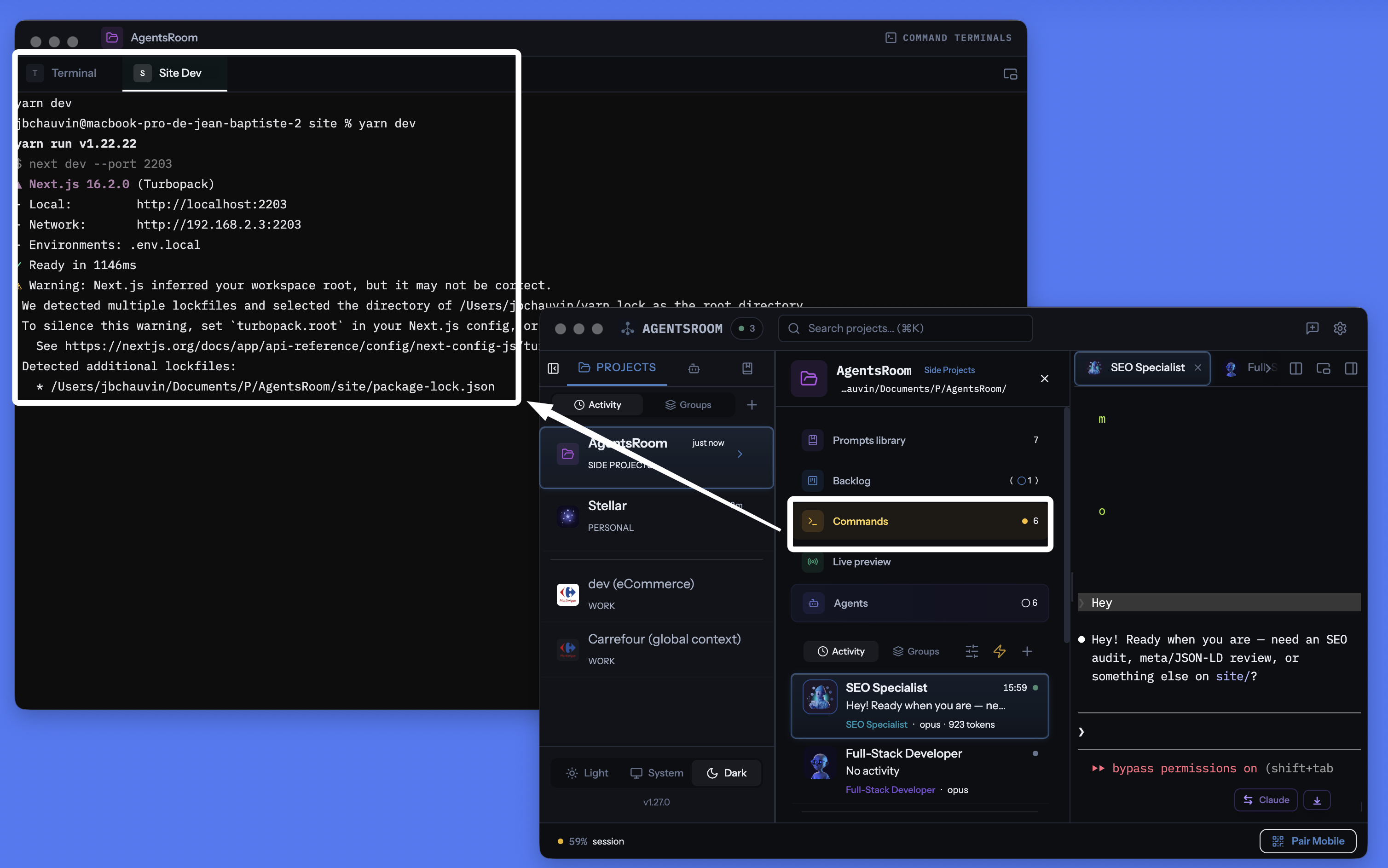
AgentsRoom प्रति-प्रोजेक्ट टर्मिनल मैनेजर: detachable विंडो, प्रति कमांड इंटीग्रेटेड टर्मिनल, AI-जेनरेटेड कमांड, सब आपके एजेंट्स के साथ एक ही जगह।
हर सर्विस, हर कमांड मैनेज करें
लंबे समय चलने वाली प्रोसेस, क्विक स्क्रिप्ट, बिल्ड कमांड। सब प्रति प्रोजेक्ट व्यवस्थित, स्टेटस ट्रैकिंग और AI सहायता के साथ।
प्रति प्रोजेक्ट स्कोप्ड
हर प्रोजेक्ट अपने कमांड .agentsroom/commands.json में स्टोर करता है। प्रोजेक्ट स्विच करें, अलग कमांड मिलें। कोई कन्फ़्यूज़न नहीं।
सब एक साथ शुरू करें
एक बटन प्रोजेक्ट की हर प्रोसेस लॉन्च करता है। बैकएंड, फ़्रंटएंड, मोबाइल, रिले: सब समानांतर शुरू।
मोबाइल से रिमोट लॉन्च
iOS या Android ऐप से कमांड ट्रिगर करें: टर्मिनल आपके कंप्यूटर पर स्पॉन होते हैं, और आप लाइव आउटपुट 4G, 5G या Wi-Fi पर अपने फ़ोन पर स्ट्रीम होते देखते हैं।
अलग की जा सकने वाली टर्मिनल विंडो
टर्मिनल सेक्शन को एक स्वतंत्र फ़्लोटिंग विंडो में detach करें। इसे दूसरे मॉनिटर पर रखें ताकि मुख्य विंडो में कोडिंग करते हुए अपने सर्वरों पर नज़र रख सकें।
AI कमांड जेनरेशन
मैजिक वैंड क्लिक करें। Claude प्रोजेक्ट संरचना स्कैन करता है और सभी स्टार्ट कमांड, पाथ, और कैटेगरी जेनरेट करता है।
लाइव प्रोसेस स्टेटस
देखें कौन सी सर्विस चल रही, शुरू हो रही, रुकी, या क्रैश हुई। प्रोसेस फ़ेल होने पर एग्ज़िट कोड दिखते हैं। एक क्लिक में रीस्टार्ट।
प्रोसेस और स्निपेट
लंबे समय चलने वाली सर्विसेज़ प्रोसेस हैं। वन-शॉट बिल्ड स्क्रिप्ट और डिप्लॉय कमांड स्निपेट हैं। दोनों एक ही डैशबोर्ड में।
प्रति प्रोसेस पूरा टर्मिनल
हर प्रोसेस रंग, स्क्रॉलबैक, और क्लिक करने योग्य लिंक वाला असली xterm.js टर्मिनल खोलता है। प्रोसेस आउटपुट से सीधे इंटरैक्ट करें।
localhost लाइव प्रीव्यू से जुड़ा
AgentsRoom टर्मिनल से अपनी localhost साइट लॉन्च करें, फिर बिल्ट-इन HTTPS टनल के ज़रिए उसे बाहर से एक्सेस करें। बिना डिप्लॉय किए 4G/5G पर अपने फ़ोन पर टेस्ट करें।
30+ फ़्रेमवर्क आइकन
React, Next.js, Vue, Nuxt, Angular, Svelte, Expo, Node.js, NestJS, Django, FastAPI, Rails, Laravel, Spring, Go, Rust, Docker, Redis और भी बहुत कुछ, हर एक अपने आइकन और रंग के साथ।
Git में स्टोर
कमांड .agentsroom/commands.json में रहते हैं, रिपो में कमिट होते हैं। पर्सनल कमांड commands-personal.json में जाते हैं, ऑटोमैटिक gitignore।
टर्मिनल और AI एजेंट्स एक साथ
आपके टर्मिनल, आपके Claude Code एजेंट्स, आपके प्रॉम्प्ट, आपका backlog और आपका लाइव प्रीव्यू एक ही ऐप में रहते हैं। दस अलग-अलग टूल्स के बीच खो जाना बंद करें।
अपने फ़ोन से अपने कंप्यूटर पर टर्मिनल लॉन्च करें
यह शायद AgentsRoom का सबसे अनोखा फ़ीचर है। iOS या Android मोबाइल ऐप से, आप किसी भी प्रोजेक्ट की कमांड लिस्ट ब्राउज़ करते हैं और किसी भी कमांड को एक टैप से लॉन्च करते हैं। कमांड आपके फ़ोन पर नहीं चलता: यह आपके कंप्यूटर पर, सही वर्किंग डायरेक्टरी में, एक असली PTY टर्मिनल में चलता है। आउटपुट एंड-टू-एंड एन्क्रिप्टेड रिले के ज़रिए मोबाइल पर लाइव स्ट्रीम होता है।
साफ़ शब्दों में: आप मेट्रो में, जिम में या दुनिया के दूसरे छोर पर हैं। आप किसी डिज़ाइन को जांचने के लिए अपनी लोकल साइट शुरू करना चाहते हैं, या एक worker को रीस्टार्ट करना चाहते हैं जो आपकी अनुपस्थिति में क्रैश हो गया। आप AgentsRoom मोबाइल खोलते हैं, 'yarn dev' पर टैप करते हैं, सर्वर आपके घर के कंप्यूटर पर बूट हो जाता है। आप फ़ोन से टर्मिनल कीबोर्ड के साथ इंटरैक्ट भी कर सकते हैं।
एकीकृत localhost प्रीव्यू टनल के साथ मिलाकर, आप अपनी लोकल साइट को मोबाइल ब्राउज़र में, 4G या 5G पर, ज़ीरो डिप्लॉय के साथ खोल भी सकते हैं। आप कोड करते हैं, शुरू करते हैं, टेस्ट करते हैं और वैलिडेट करते हैं, सब अपनी जेब से। AgentsRoom सचमुच आपके कंप्यूटर को रिमोट से चलने वाले डेव सर्वर में बदल देता है।
जब एक लंबा कमांड समाप्त होता है तो सूचित करें
एक बिल्ड, एक परीक्षण सूट या एक Docker इमेज कई मिनटों तक चल सकती है। आप कुछ और पर स्विच करते हैं, और टर्मिनल वहाँ दस मिनट तक समाप्त रहता है जब तक आप इसे नहीं देखते। एक टर्मिनल टैब पर घंटी को सक्रिय करें और AgentsRoom आपको बताता है कि कमांड कब समाप्त हुआ, कमांड का नाम और यह कितनी देर चला।
घंटी हर टर्मिनल पैन के शीर्ष दाएं कोने में छोटे तैरते लेबल में रहती है। एक क्लिक इसे सक्रिय करता है, एक क्लिक इसे निष्क्रिय करता है, और यह उस टर्मिनल के लिए सक्रिय रहती है, इसलिए उसी बिल्ड का हर रन रिपोर्ट करता है। सूचना पर क्लिक करने से वही टर्मिनल टैब खुलता है।
प्रत्येक टर्मिनल के लिए एक घंटी
इसे केवल वहीं सक्रिय करें जहाँ आपको इसकी आवश्यकता है। कॉन्फ़िगर करने के लिए कुछ भी वैश्विक नहीं है और उन टर्मिनलों के लिए कोई अलर्ट नहीं है जिनके बारे में आपने कभी नहीं पूछा।
केवल लंबे कमांड
एक मिनट के तहत कुछ भी इंटरैक्टिव उपयोग के रूप में गिना जाता है और चुप रहता है, इसलिए cd, ls और git status आपको कभी भी परेशान नहीं करते। जब एक कमांड पहले से चल रहा हो तो घंटी को सक्रिय करें और वह हमेशा रिपोर्ट करता है, चाहे उसकी लंबाई कुछ भी हो।
जब आप देख रहे हों तब कभी नहीं
यदि वह टर्मिनल पहले से स्क्रीन पर है और ऐप पर ध्यान केंद्रित है, तो कुछ भी पॉप अप नहीं होता। अलर्ट उस क्षण के लिए है जब आप दूर चले गए, न कि उस क्षण के लिए जब आप आउटपुट पढ़ रहे हैं।
macOS, Windows और Linux
डिटेक्शन टर्मिनल की अग्रभूमि प्रक्रिया को पढ़ता है, इसलिए आपके zsh, bash, fish या PowerShell कॉन्फ़िगरेशन में कुछ भी जोड़ा नहीं गया है और यह उस शेल के साथ काम करता है जिसका आप पहले से उपयोग कर रहे हैं। अलर्ट भी iOS और Android ऐप तक पहुँचते हैं जब आप अपने मशीन से दूर होते हैं।
आपके AI एजेंटों को भी यही उपचार मिलता है: AI एजेंट सूचनाएँ.
Detach मोड: आपके टर्मिनल दूसरे मॉनिटर पर
टर्मिनल पैनल को एक स्वतंत्र फ़्लोटिंग विंडो में detach किया जा सकता है। इसे दूसरी स्क्रीन पर खींचें और आपके बैकएंड, फ़्रंटएंड और मोबाइल बंडलर के logs हर समय दिखते रहते हैं जबकि आप मुख्य AgentsRoom विंडो में कोडिंग करते हैं। गंभीर डेवलपर्स tmux या iTerm2 में टाइलिंग मोड के साथ बिल्कुल यही करते हैं, बस AgentsRoom में कॉन्फ़िगर करने के लिए कुछ नहीं है।
Detached विंडो हर फ़ीचर बरकरार रखती है: लॉन्च, स्टॉप, रीस्टार्ट, AI, कैटेगरी, मल्टी-प्रोजेक्ट। आप सेकेंडरी स्क्रीन के टर्मिनल में टाइप करते रह सकते हैं जबकि कोई Claude एजेंट मुख्य विंडो में काम कर रहा हो। ज़ीरो alt-tab, ज़ीरो context loss, ज़ीरो उलझाने वाली कॉन्फ़िगरेशन।
एक आधुनिक टर्मिनल विकल्प, डेवलपमेंट वर्कफ़्लो में बना
प्रोजेक्ट के काम के लिए AgentsRoom Dev Terminals क्लासिक टर्मिनल एमुलेटर की तुलना में बेहतर विकल्प है। यहां वे टूल्स हैं जिन्हें हमारे यूज़र्स इससे पहले ही बदल चुके हैं:
iTerm2 सालों से macOS का गोल्ड स्टैंडर्ड रहा है और Terminal.app हर Mac पर प्रीइंस्टॉल्ड है। Warp ने कमांड ब्लॉक और इंटीग्रेटेड AI को लोकप्रिय बनाया। Ghostty तेज़ और नेटिव है। Kitty GPU-एक्सेलेरेटेड है। Alacritty मिनिमलिस्ट है। WezTerm Lua-स्क्रिप्टेबल है। Hyper वेब टेक पर बना है। Tabby क्रॉस-प्लेटफ़ॉर्म है। Wave Terminal और Windows Terminal दोनों आधुनिक, मल्टी-पेन वर्कफ़्लो आगे बढ़ाते हैं। ये सभी बेहतरीन प्रोडक्ट हैं। AgentsRoom रॉ रेंडरिंग स्पीड पर प्रतिस्पर्धा करने की कोशिश नहीं करता: यह एक अलग वैल्यू प्रोपोज़िशन लाता है, एक टर्मिनल जो आपके डेवलपमेंट एनवायरनमेंट में इंटीग्रेटेड है, हर प्रोजेक्ट के लिए स्कोप्ड, आपके AI एजेंट्स के साथ सिंक, और आपके फ़ोन से ड्राइव करने योग्य।
एक आधुनिक टर्मिनल को जो चाहिए वह सब, एक विंडो में
AgentsRoom सिर्फ़ एक और टर्मिनल एमुलेटर नहीं है। यह एक आधुनिक कोडिंग वर्कफ़्लो के लिए जो कुछ भी ज़रूरी है वह सब एक साथ लाता है और एक ही इंटरफ़ेस के पीछे रखता है:
अगर आप पहले से ही अपने प्रोजेक्ट्स को 'backend', 'frontend', 'mobile', 'relay' नाम के कई टर्मिनल टैब से मैनेज करते हैं, तो Dev Terminals से आप समय बचाएंगे। अगर आप सेशन व्यवस्थित करने के लिए tmux या zellij इस्तेमाल करते हैं, तो आपको वही विचार मिलेगा, बिना कोई config फ़ाइल लिखे।
कैसे काम करता है
प्रोजेक्ट खोलें
प्रोजेक्ट व्यू में, Dev Terminals एजेंट्स और प्रॉम्प्ट के साथ दिखते हैं। कोई कमांड नहीं हैं तो प्रोजेक्ट रूट पर डिफ़ॉल्ट टर्मिनल ऑटोमैटिक बनता है।
कमांड जोड़ें
कमांड जोड़ने के लिए + क्लिक करें। नाम, शेल कमांड, वर्किंग डायरेक्टरी (प्रोजेक्ट रूट के सापेक्ष), और कैटेगरी सेट करें। चुनें लंबे समय चलने वाली प्रोसेस है या वन-शॉट स्निपेट।
.agentsroom/commands.jsonया AI से कराएं
मैजिक वैंड आइकन क्लिक करें। Claude प्रोजेक्ट संरचना (package.json, Dockerfiles, Makefiles) विश्लेषित करता है और सही पाथ और कैटेगरी वाले सभी कमांड जेनरेट करता है। रिव्यू करें, ज़रूरत हो तो एडजस्ट करें, और सेव करें।
सब कुछ शुरू करें
सभी प्रोसेस एक साथ लॉन्च करने के लिए ग्लोबल Play बटन दबाएं। या अलग-अलग शुरू करें। हर प्रोसेस असली टर्मिनल स्पॉन करती है जहां लॉग देखें और सर्विस से इंटरैक्ट करें।
पैनल detach करें
detach आइकन क्लिक करें: टर्मिनल सेक्शन एक स्वतंत्र फ़्लोटिंग विंडो में खुलता है जिसे आप दूसरे मॉनिटर पर रख सकते हैं। मुख्य विंडो में कोडिंग करते हुए आपके सर्वर दिखते रहते हैं।
अपने फ़ोन से चलाएं
iOS या Android पर AgentsRoom खोलें, अपना प्रोजेक्ट चुनें, किसी कमांड पर टैप करें: यह आपके कंप्यूटर पर रिमोट लॉन्च होता है और आप एंड-टू-एंड एन्क्रिप्टेड रिले के ज़रिए अपने फ़ोन से उसका आउटपुट 4G, 5G या Wi-Fi पर लाइव देखते हैं।
हर स्टैक के लिए आइकन
हर कमांड अपने फ़्रेमवर्क का आइकन और रंग दिखाता है। एक नज़र में React फ़्रंटएंड, Django बैकएंड, और Docker सर्विसेज़ पहचानें।
AI-संचालित कमांड सेटअप
नया प्रोजेक्ट शुरू कर रहे हैं? हर कमांड मैनुअली कॉन्फ़िगर न करें। मैजिक वैंड क्लिक करें, Claude रिपॉज़िटरी स्कैन करके हर सर्विस, बिल्ड स्क्रिप्ट, और स्टार्ट कमांड डिटेक्ट करता है। सही पाथ, कैटेगरी, और आइकन वाली पूरी सूची जेनरेट करता है। नतीजा रिव्यू करें, ज़रूरत हो तो एडजस्ट करें, और सेव करें। पूरा सेटअप मिनटों की बजाय सेकंड में।
डिफ़ॉल्ट प्रॉम्प्ट
"मेरी प्रोजेक्ट संरचना विश्लेषित करें और हर सर्विस, हर सब-प्रोजेक्ट, और हर बिल्ड स्टेप के लिए सभी स्टार्ट कमांड जेनरेट करें। हर एंट्री के लिए सही वर्किंग डायरेक्टरी, शेल कमांड, और उचित फ़्रेमवर्क कैटेगरी शामिल करें।"
क्या चाहते हैं कि आपके एजेंट खुद dev सर्वर शुरू करें ?
AgentsRoom MCP वही Terminal Commands जो आप यहाँ सहेजते हैं, MCP टूल के रूप में खोलता है। आपके AI एजेंट Terminal Commands MCP सर्वर से commands_list, commands_run और commands_create कॉल करके dev सर्वर, API या worker खुद शुरू कर सकते हैं।
यह सिर्फ़ चार AgentsRoom MCP सर्वरों में से एक है। Backlog MCP, Prompt Library MCP और Browser MCP बाक़ी AgentsRoom IDE को एजेंट-संचालित स्पेस में बदल देते हैं।
AgentsRoom MCP देखेंFAQ
यह iTerm2, Warp, Ghostty या Terminal.app से कैसे अलग है?
iTerm2, Warp, Ghostty, Kitty, Alacritty, WezTerm, Hyper और Terminal.app सभी बेहतरीन टर्मिनल एमुलेटर हैं। AgentsRoom Dev Terminals इन्हें सामान्य सिस्टम काम के लिए बदलने की कोशिश नहीं करता: यह एक प्रोजेक्ट-स्कोप्ड टर्मिनल मैनेजर है। कमांड प्रति प्रोजेक्ट सेव होते हैं, एक क्लिक में लॉन्च होते हैं, मोबाइल से चलाए जा सकते हैं, और आपके AI एजेंट्स के साथ रहते हैं। अगर आप ज़्यादातर अपने प्रोजेक्ट्स पर काम करते हैं, तो आप अपने टर्मिनल समय का 90% AgentsRoom के अंदर बिताएंगे, बिना iTerm2 खोले।
क्या AgentsRoom टर्मिनल सचमुच xterm.js इस्तेमाल करते हैं?
हां। हर कमांड Electron की तरफ़ pseudo-TTY से समर्थित एक असली xterm.js टर्मिनल खोलता है। आपको ANSI रंग, scrollback, क्लिक करने योग्य लिंक, कीबोर्ड इनपुट, डायनेमिक रीसाइज़ और Unicode सपोर्ट मिलता है, बिल्कुल किसी नेटिव टर्मिनल एमुलेटर की तरह।
मोबाइल से रिमोट कमांड लॉन्च कैसे काम करता है?
iOS या Android ऐप से, आप एक प्रोजेक्ट और एक कमांड चुनते हैं। मोबाइल ऐप WebSocket रिले के ज़रिए एक एंड-टू-एंड एन्क्रिप्टेड संदेश भेजता है। डेस्कटॉप ऐप कमांड प्राप्त करता है, आपके कंप्यूटर पर सही वर्किंग डायरेक्टरी में एक असली PTY स्पॉन करता है और आउटपुट रियल टाइम में मोबाइल पर वापस स्ट्रीम करता है। कमांड भौतिक रूप से आपके कंप्यूटर पर चलता है, आपके फ़ोन पर नहीं। चलते-फिरते किसी सर्वर या worker को रीस्टार्ट करने के लिए एकदम सही।
क्या detach मोड कई स्क्रीन पर काम करता है?
हां। detach आइकन क्लिक करें: Dev Terminals सेक्शन एक स्वतंत्र फ़्लोटिंग विंडो में खुलता है जिसे आप दूसरे मॉनिटर पर खींच सकते हैं। मुख्य AgentsRoom विंडो में कोडिंग करते हुए आपके logs और सर्वर हमेशा दिखते रहते हैं।
प्रोसेस और स्निपेट में क्या अंतर है?
प्रोसेस लंबे समय चलने वाली सर्विस है जैसे डेव सर्वर, बैकएंड, या फ़ाइल वॉचर। रुकती या क्रैश होने तक चलती रहती है। स्निपेट वन-शॉट कमांड है जैसे बिल्ड स्क्रिप्ट, डेटाबेस माइग्रेशन, या डिप्लॉय स्टेप। दोनों एक ही डैशबोर्ड में स्टोर होते हैं, लेकिन सिर्फ़ प्रोसेस 'Start All' बटन से शुरू होती हैं।
क्या कमांड टीम के साथ शेयर होते हैं?
हां। पब्लिक कमांड प्रोजेक्ट डायरेक्टरी में .agentsroom/commands.json में स्टोर होते हैं। यह फ़ाइल कमिट करें, रिपो पुल करने वाले सबको वही कमांड मिलते हैं। पर्सनल कमांड (जैसे लोकल डीबग स्क्रिप्ट) commands-personal.json में जाते हैं, जो ऑटोमैटिक .agentsroom/.gitignore में जुड़ता है।
AI कमांड जेनरेशन कैसे काम करता है?
मैजिक वैंड क्लिक करने पर AgentsRoom Claude इंस्टेंस स्पॉन करता है जो प्रोजेक्ट संरचना पढ़ता है। package.json, Dockerfiles, Makefiles, और अन्य कॉन्फ़िगरेशन फ़ाइलें डिटेक्ट करके हर सर्विस और स्टार्ट कमांड पहचानता है। पाथ, कैटेगरी, और सुझाए नामों वाली संरचित सूची मिलती है। सेव से पहले रिव्यू करें।
क्या AgentsRoom मुझे सूचित कर सकता है जब एक टर्मिनल कमांड समाप्त होता है?
हाँ। प्रत्येक टर्मिनल टैब में इसके तैरते लेबल में एक घंटी होती है। इसे सक्रिय करें और AgentsRoom उस क्षण डेस्कटॉप सूचना भेजता है जब चल रहा कमांड प्रॉम्प्ट को वापस करता है, कमांड का नाम और इसकी अवधि के साथ, जब आप अपने मशीन से दूर होते हैं तो iOS और Android ऐप को भी पुश करता है। सूचना पर क्लिक करने से वह टर्मिनल टैब खुलता है।
अगर टर्मिनल खुला रहता है तो AgentsRoom को कैसे पता चलता है कि एक कमांड समाप्त हो गया है?
एक टर्मिनल टैब एक लंबे समय तक चलने वाला शेल होता है, इसलिए जब एक कमांड समाप्त होता है तो कुछ भी बाहर नहीं निकलता। AgentsRoom टर्मिनल की अग्रभूमि प्रक्रिया समूह पर नज़र रखता है: जब यह शेल में वापस आता है, तो प्रॉम्प्ट वापस आता है और कमांड समाप्त हो जाता है। आपके शेल कॉन्फ़िगरेशन में कुछ भी नहीं लिखा जाता है, यही कारण है कि यह zsh, bash, fish या PowerShell के साथ समान व्यवहार करता है, और उन कमांड के लिए भी काम करता है जो आपने हाथ से टाइप की हैं और साथ ही जिनको आपने सहेजा है।
क्या मुझे हर कमांड के लिए एक सूचना मिलेगी जो मैं टाइप करता हूँ?
नहीं। केवल वे कमांड जो एक मिनट से अधिक समय तक चलती हैं, अलर्ट उठाती हैं, इसलिए नियमित इंटरैक्टिव उपयोग चुप रहता है। एक जानबूझकर अपवाद: यदि आप एक कमांड पहले से चल रहा है तो घंटी को सक्रिय करते हैं, तो वह कमांड हमेशा रिपोर्ट करता है चाहे इसे कितना भी समय लगे। जब टर्मिनल पहले से स्क्रीन पर हो और ऐप पर ध्यान केंद्रित हो तब भी कुछ नहीं होता।
क्या कोई कमांड मेरे सभी प्रोजेक्ट में उपलब्ध हो सकती है?
हाँ। सहेजते समय आप चुनते हैं कि वह कहाँ रहेगी: केवल यह प्रोजेक्ट, या ग्लोबल। ग्लोबल कमांड आपके खाते की होती है और हर प्रोजेक्ट में दिखती है, जो टनल, साझा Docker स्टैक या हर जगह चलने वाले डेटाबेस डेमन के लिए उपयुक्त है। कमांड मोडल में सर्च बार और दायरा फ़िल्टर (सभी / यह प्रोजेक्ट / ग्लोबल) है, ताकि लंबी सूची भी पढ़ने लायक रहे।
क्या मेरे AI एजेंट ये कमांड खुद चला सकते हैं?
हाँ, AgentsRoom MCP के ज़रिए। एजेंट commands_list से यहाँ उपलब्ध सब कुछ देखते हैं (प्रोजेक्ट और ग्लोबल कमांड, हर एक अपने दायरे के साथ), commands_run से किसी एक को असली टर्मिनल टैब में शुरू करते हैं जिसे आप देख और रोक सकते हैं, और commands_create से नई कमांड सहेजते हैं। उन्हें सीधे शेल से लंबी प्रक्रिया चलाने की अनुमति नहीं है: जो चलता है वह हमेशा आपके नियंत्रण वाले टैब में होता है। और जब किसी एजेंट का अपना सैंडबॉक्स किसी कमांड को चलाने से मना कर देता है, तो उसे अब वह लाइन आपके लिए प्रिंट करने की ज़रूरत नहीं ताकि आप उसे किसी दूसरे टर्मिनल में पेस्ट करें: वह commands_propose को कॉल करता है, कमांड उस एजेंट के पैनल में "यह कमांड चलाएँ?" कार्ड के रूप में दिखती है, साथ में वह कारण जिसकी वजह से वह इसे नहीं चला सकता, और "चलाएँ" पर एक क्लिक इसे एक टर्मिनल टैब में चला देता है जिसे एजेंट फिर खुद पढ़ता है। जब तक आप तय नहीं करते तब तक कुछ नहीं चलता, कोई "हमेशा अनुमति दें" विकल्प नहीं है, और कमांड न तो सहेजी जाती है और न ही दोबारा चलाई जाती है।
और जानें
बहुत सारे टर्मिनल, बहुत सारे AI एजेंट: वो संज्ञानात्मक कर्ज़ जो आपको धीमा कर देता है (और इससे बाहर कैसे निकलें)
दस AI-एजेंट टर्मिनल के बीच जूझते रहना एक संज्ञानात्मक, दस्तावेज़ी और आर्थिक कर्ज़ खड़ा कर देता है जो आपका समय और token दोनों खा जाता है। कंट्रोल वापस पाने का तरीका यहां है।
2026 में agentic coding के लिए सबसे अच्छा terminal: cmux, Warp, tmux, और असल में कौन जीतता है
cmux, Warp, tmux, WezTerm, AgentsRoom: जब आप AI agents को parallel में चलाते हैं तो agentic coding और vibe coding के लिए सबसे अच्छे terminal की एक ईमानदार तुलना।
टर्मिनल टैब जगल करना बंद करें
AgentsRoom डाउनलोड करें और एक डैशबोर्ड से सभी सर्विसेज़ लॉन्च करें। 2 प्रोजेक्ट तक मुफ़्त।
कंपेनियन ऐप: चलते-फिरते अपने एजेंट्स मॉनिटर करें
Claude, Codex, Antigravity CLI या किसी अन्य AI प्रदाता का उपयोग करें।
बग और अनुरोध सीधे अपने सार्वजनिक बैकलॉग में भेजें।