Review Each Agent's Work Separately
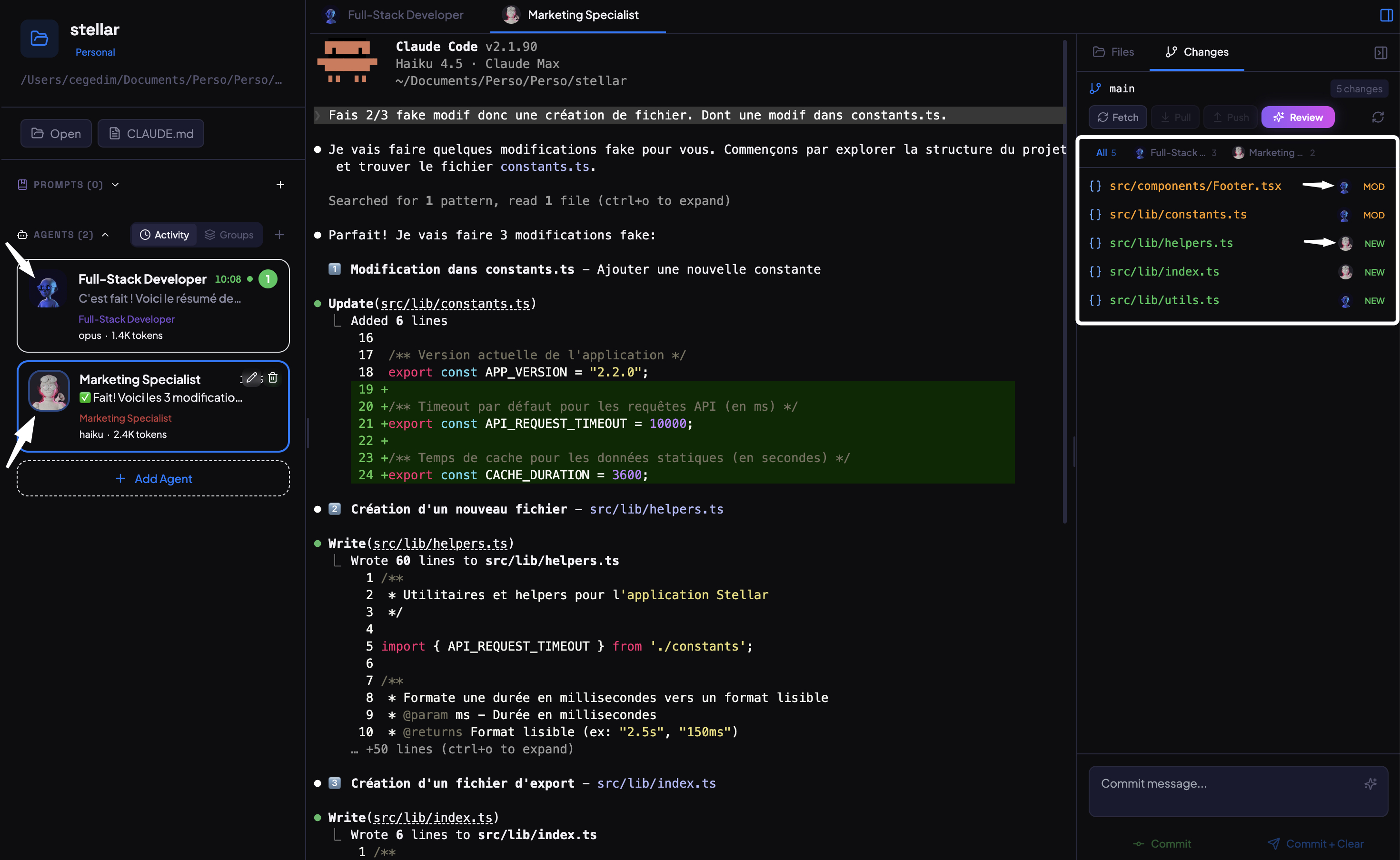
When five agents modify fifty files, reviewing everything at once is overwhelming. AgentsRoom tracks which agent changed which files. Filter by agent, review their work in isolation, and commit each contribution separately.
How Per-Agent Review Works
Every tool you need to review multi-agent code changes without losing track of who did what.
Agent Filter Tabs
When two or more agents have modified files, tabs appear at the top of the review panel. Each tab shows the agent's avatar, name, and file count. Click a tab to see only that agent's changes.
Automatic File Attribution
AgentsRoom uses two tracking methods in parallel. Terminal output parsing catches every Edit, Write, and NotebookEdit call. Git snapshot diffing catches changes made through Bash commands. Together, they attribute every modified file to the right agent.
Scoped Commits Per Agent
When an agent filter is active, the commit action only stages that agent's files. Each agent's work gets its own commit with a clear message. Your git history stays organized by contributor, even when agents work in parallel.
Filtered Keyboard Navigation
Navigate through the filtered file list with arrow keys or j/k shortcuts. The progress bar updates to reflect only the files in the current filter. Mark files as reviewed one by one until the filtered set is complete.
Auto-Follow Active Agent
Switch to an agent's terminal and the file list auto-filters to show that agent's recent changes. No need to manually select the filter. Override at any time by clicking a different tab.
File-Level Attribution
Every file in the changes panel shows which agent modified it. When multiple agents touch the same file, both are listed. You always know who changed what, with no ambiguity.
From Parallel Work to Clean Commits
Four steps from multi-agent chaos to an organized git history.
Agents work in parallel
Multiple Claude Code agents run simultaneously on your project. Each agent focuses on its assigned task and modifies the files it needs.
AgentsRoom tracks every change
As each agent works, AgentsRoom records which files it touches. Terminal parsing and git snapshot diffing capture every modification, including changes made through shell commands.
Filter by agent in review mode
Open review mode and click an agent's tab. The file list narrows to show only that agent's modifications. Review their diffs, ask questions about specific changes, and mark files as reviewed.
Commit per agent
Once you have reviewed an agent's files, commit only their changes. The commit stages just those files. Repeat for each agent to build a clean, well-attributed git history.
FAQ
How does AgentsRoom know which agent modified which file?+
Can I review all changes at once, without filtering?+
What happens if two agents modify the same file?+
Does this work with any number of agents?+
Can I commit all agents' changes together instead of separately?+
Review Multi-Agent Code With Clarity
Download AgentsRoom and see exactly what each AI agent changed in your codebase. Free for up to 3 projects.
Companion app: monitor your agents on the go
Compatible with any Claude plan (Free, Pro, Max, Team, Enterprise)