Agen AI Mana yang Harus Anda Pilih untuk Proyek Anda?
Agen frontend yang menulis salinan pemasaran Anda adalah kegagalan yang diam. Cara mencocokkan setiap tugas dengan agen AI yang tepat: peran, ahli katalog, agen kustom, dan apa yang harus dilakukan ketika Anda tidak tahu siapa yang harus mengambil pekerjaan itu.
Minggu lalu saya melihat seseorang meminta agen frontend mereka untuk "membuat prompt yang hebat untuk menghasilkan gambar". Agen tersebut melakukannya. Dengan buruk. Itu menghasilkan sesuatu yang akan ditulis oleh seorang pengembang frontend: berbentuk komponen, samar-samar visual, kehilangan semua yang diketahui oleh seorang insinyur prompt tentang istilah pencahayaan, kosakata kamera, dan prompt negatif.
Tidak ada yang menyadari, karena kegagalan itu diam. Agen tidak mengatakan "ini bukan pekerjaan saya". Ia hanya melakukan versi medioker dari pekerjaan orang lain.
Itulah biaya nyata dari memilih agen yang salah. Bukan kesalahan. Mediokritas yang terlihat seperti output.
Persona adalah produk
Agen AI adalah model ditambah prompt sistem. Model yang sama, prompt sistem yang berbeda, hasil yang berbeda. Itulah seluruh triknya, dan itu bukan hal kecil.
Agen QA tidak "berusaha lebih keras untuk menemukan bug". Persona-nya memberitahunya untuk tidak mempercayai jalur yang mulus, menghitung kasus tepi, dan menulis reproduksi sebelum perbaikan. Agen keamanan membaca kode otentikasi yang sama dengan agen fullstack Anda dan melihat pemfiksasian sesi di mana fullstack melihat login yang berfungsi. 14 peran bawaan di AgentsRoom ada karena framing ini benar-benar mengubah apa yang dihasilkan dari model yang sama.
Jadi "agen mana yang harus saya gunakan" bukanlah kosmetik. Itu menentukan naluri mana yang diaktifkan saat tugas Anda diselesaikan.
Sesuaikan tugas, bukan kebiasaan
Kebiasaan: kirim semuanya ke agen yang sudah terbuka. Biasanya seorang pengembang fullstack, karena itulah yang Anda buka pada hari Senin.
Kesesuaian: baca tugas Anda dan sebutkan spesialisasi yang dimilikinya.
Beberapa contoh nyata, dengan siapa yang seharusnya mengambilnya:
- "Tulis posting blog peluncuran": seorang Ahli Pemasaran, bukan pengembang fullstack Anda. Penempatan dan salinan adalah spesialisasi, dan itu terlihat dalam dua paragraf.
- "Tes ini gagal satu kali dari lima": agen QA. Tes yang tidak stabil adalah disiplin: isolasi, waktu, fixture. Agen pengembang sering kali hanya akan menjalankan ulang hingga hijau.
- "Perketat alur login": agen Keamanan. Ia akan memeriksa rotasi token, invalidasi sesi, dan pembatasan laju tanpa diberitahu.
- "Buat prompt untuk generasi gambar": seorang Insinyur Prompt dari katalog. Ini adalah pekerjaan yang tepat dari pengantar, dan agen yang tepat untuk itu.
- "Dasbor lambat": agen Backend untuk kueri, agen Frontend untuk kinerja render. Jika Anda belum bisa menentukan sisi mana yang bersalah, itu adalah tugas pemprofilan terlebih dahulu.
Jika tugas menyebutkan hasil yang akan dimiliki oleh seorang spesialis dunia nyata, berikan kepada spesialis itu. Anda memiliki lebih dari 260 dari mereka di katalog, ditambah agen kustom Anda sendiri. Menggunakan seorang generalis untuk segalanya sama dengan membayar untuk bangku dan bermain satu pemain.
Ketika Anda tidak tahu: katakan begitu
Inilah bagian yang mengubah cara saya bekerja. Anda tidak perlu tahu.
AgentsRoom memiliki Saran Agen penasihat untuk momen ini. Klik bintang di samping pencarian agen, ketik tugas dengan cara yang Anda katakan secara lisan ("tulis posting blog peluncuran", "audit alur login"), dan ia akan menjawab dengan agen yang paling cocok untuk pekerjaan itu, alasan satu baris, dan dua alternatif. Agen yang sudah tersedia di ruangan Anda akan ditandai, sehingga penasihat memberi tahu Anda untuk menggunakan kembali sebelum memberi tahu Anda untuk menambah.
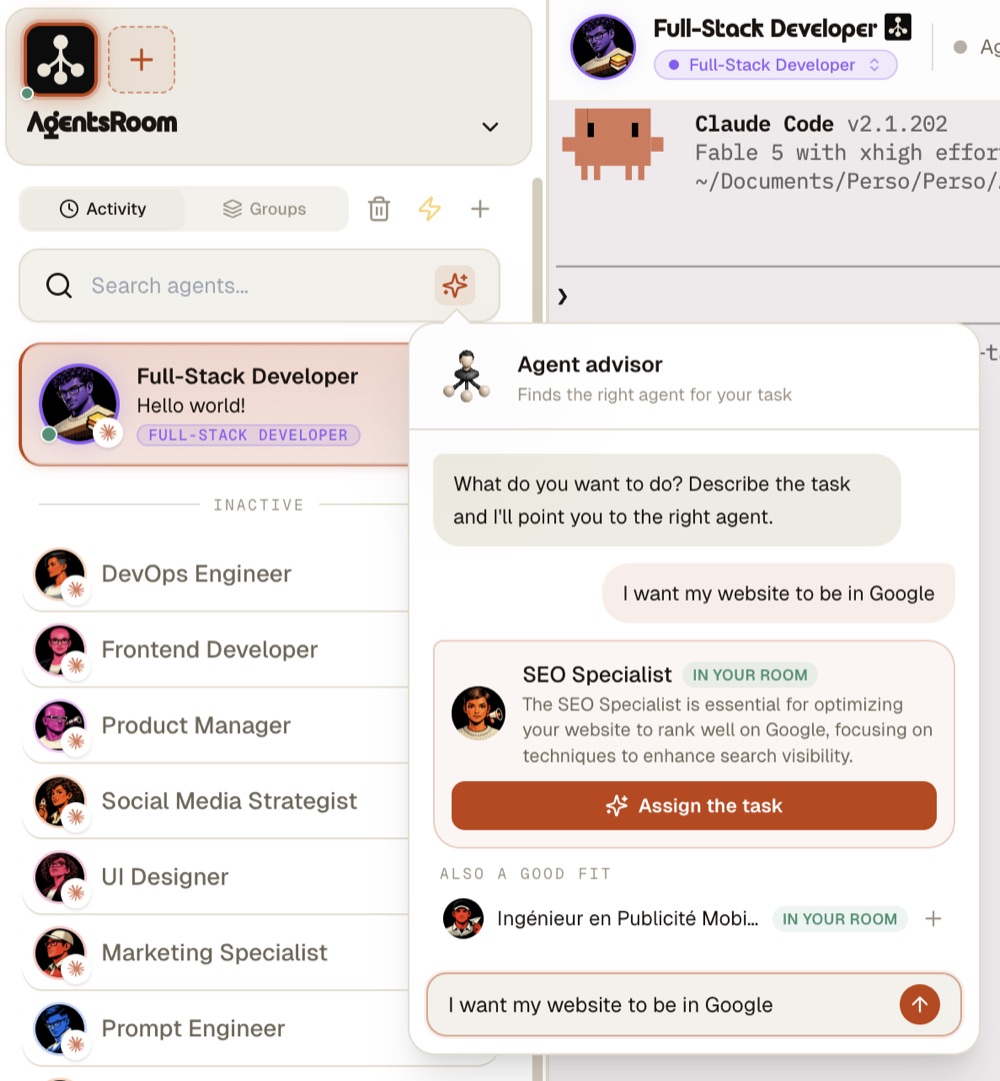
Kemudian satu klik menetapkan tugas: agen ditambahkan jika diperlukan, terminalnya terbuka, dan teks persis yang Anda ketik mendarat di komposer sebagai draf. Anda sudah mendeskripsikan tugas sekali. Deskripsi itu menjadi prompt pertama.
Aturan peringkat penting: kesesuaian pertama, kenyamanan kedua. Penasihat tidak akan memberikan pekerjaan prompt gambar Anda kepada pengembang frontend hanya karena pengembang frontend itu tersedia. Kami menyetel itu berdasarkan kesalahan nyata.
Gunakan kembali sebelum Anda menambah
Sebuah ruangan dengan dua belas agen yang setengah digunakan adalah mode kegagalan itu sendiri. Dua aturan menjaga agar tetap sehat.
Agen gratis yang sesuai: gunakan kembali. Agen tanpa tugas yang sedang berlangsung dan spesialisasi yang tepat adalah pilihan terbaik, setiap saat. Penasihat menerapkan aturan ini secara otomatis.
Spesialisasi yang tepat tetapi sibuk: tambahkan yang baru alih-alih mengantri. Agen adalah kursi murah. Menunggu satu agen QA Anda selesai sementara tiga bug menumpuk adalah bottleneck yang Anda ciptakan.
Dan ketika tugas berubah sifat di tengah sesi ("sebenarnya, sekarang tulis dokumen untuk apa yang Anda bangun"), Anda tidak memerlukan agen baru sama sekali: Morfisme Agen mengubah agen yang sedang berjalan menjadi spesialis lain dengan konteksnya tetap utuh.
Satu tugas, beberapa spesialis
Beberapa tugas bukan satu spesialisasi. "Kirim fitur pembayaran" adalah pekerjaan backend, kemudian pekerjaan QA, kemudian mungkin tinjauan keamanan. Memilih satu agen untuk itu berarti dua spesialisasi lainnya diam-diam tidak terjadi.
Itulah fungsi Tim: menghubungkan agen sehingga pekerjaan mengalir dari pengembang ke QA hingga tinjauan, setiap kursi dipegang oleh persona yang tepat. Pertanyaan pemilihan menjadi "siapa yang ada dalam jalur" alih-alih "siapa yang mendapatkan semuanya".
Versi lima detik
Sebutkan spesialisasi yang dimiliki tugas. Jika agen gratis di ruangan Anda memilikinya, gunakan mereka. Jika tidak, tambahkan peran atau ahli katalog yang melakukannya. Jika Anda tidak bisa menyebutkan spesialisasi, deskripsikan tugas dan biarkan penasihat menamakannya.
Dan setelah agen yang tepat memiliki pekerjaan itu, pastikan ia tidak belajar ulang basis kode Anda dari nol setiap sesi: itu adalah masalah memori, dan itu adalah hal berikutnya yang layak diperbaiki.
Unduh AgentsRoom
Jalankan semua agen AI Anda, di semua proyek Anda, dari satu jendela.
Aplikasi pendamping: pantau agen Anda saat bepergian
Gunakan Claude, Codex, Antigravity CLI, atau penyedia AI lainnya.
Kirim bug dan permintaan langsung ke backlog publik Anda.
Lanjutkan membaca
Haruskah Anda Masih Meninjau Kode Agen AI Anda?
Agen Anda menulis kode yang lebih baik daripada setengah permintaan tarik yang biasa Anda gabungkan. Jadi, apakah Anda masih membaca setiap baris? Kasus jujur untuk kedua sisi, 10 sinyal yang memberi tahu Anda bahwa agen melakukan kesalahan, dan seberapa banyak tinjauan yang sebenarnya layak untuk setiap perubahan.
Baca artikelSepuluh agen menjalankan type check yang sama sekaligus. Solusinya sebuah folder.
Tujuh belas agen coding dalam satu checkout, sepuluh proses tsc bersamaan, load average 37 dan sisa RAM 87 MB. Type check yang biasanya sembilan puluh detik memakan 7 menit 36 detik. Ini hasil pengukurannya, alasan mesin sebenarnya tidak sedang menghitung, dan kunci bersama kecil yang menyelesaikannya. Bisa disalin ke repositori mana pun.
Baca artikelAgentsRoom kini mendukung Kimi Code
Kimi Code, agen coding berbasis terminal dari Moonshot AI, kini menjadi provider penuh di AgentsRoom. Jalankan berdampingan dengan Claude, Codex, Antigravity CLI, OpenCode, Aider, Grok Build, dan Mistral Vibe, lalu berpindah di tengah percakapan.
Baca artikel