Dev Terminals
모든 서비스를 위한
프로젝트에 백엔드, 프론트엔드, 모바일 앱, 릴레이 서버가 있습니다. 예전에는 터미널 탭 4개를 열고 각 시작 명령어를 직접 입력했습니다. 이제 버튼 하나만 누르면 됩니다.
그리고 가장 독특한 점: iOS 및 Android 모바일 앱으로 컴퓨터에서 명령어를 원격으로 실행합니다. 지하철, 헬스장, 카페에서 localhost 사이트를 띄우고, 내장된 라이브 프리뷰 터널을 통해 4G/5G로 휴대폰에서 바로 열어보세요.
여러 터미널을 동시에 관리: 드래그 앤 드롭 분할 창, 세로 및 가로 레이아웃, 에이전트, 로그, 빌드를 위한 전용 모니터링 화면으로 이동할 수 있는 완전히 분리된 창.
Dev Terminals는 단순한 터미널 에뮬레이터를 훨씬 뛰어넘습니다. 매일 아침 여는 iTerm2, Warp, Ghostty, Kitty, Alacritty, Terminal.app 탭의 정글을 대체하도록 설계된 진정한 프로젝트별 명령어 관리자입니다. 각 프로젝트는 고유한 명령어 목록을 가집니다: 개발 서버, 백엔드, 모바일 번들러, worker, 데이터베이스, 내부 스크립트. 한 번 이름을 지정하면 영원히 실행할 수 있습니다.
UX와 UI는 명령어 관리를 최대한 빠르게 만들기 위해 의도적으로 강하게 다듬어졌습니다. 각 명령어는 이름, 셸 명령어, 작업 디렉토리(프로젝트 루트 기준), 프레임워크 카테고리(React, Next.js, Django, Rails, Go, Rust, Docker…), 종류(장기 실행 프로세스 또는 일회성 스니펫)를 기억합니다. 활성 명령어는 목록 상단으로 올라오고, 다채로운 프레임워크 아이콘으로 React 프론트엔드, Django 백엔드, Docker 서비스를 한눈에 구분할 수 있습니다.
AgentsRoom 안에 통합된 터미널의 큰 장점은 명령어가 프로젝트의 정확한 컨텍스트에서 실행된다는 것입니다: 동일한 경로, 동일한 환경, 동일한 cwd. 마찰 제로, 끝없는 cd 제로, 프로젝트 혼동 제로. 그리고 모든 것이 Claude, Codex, Antigravity AI 에이전트와 같은 곳에 있기 때문에, 코드를 배포하려고 열다섯 개의 서로 다른 도구를 오가는 일이 없어집니다.
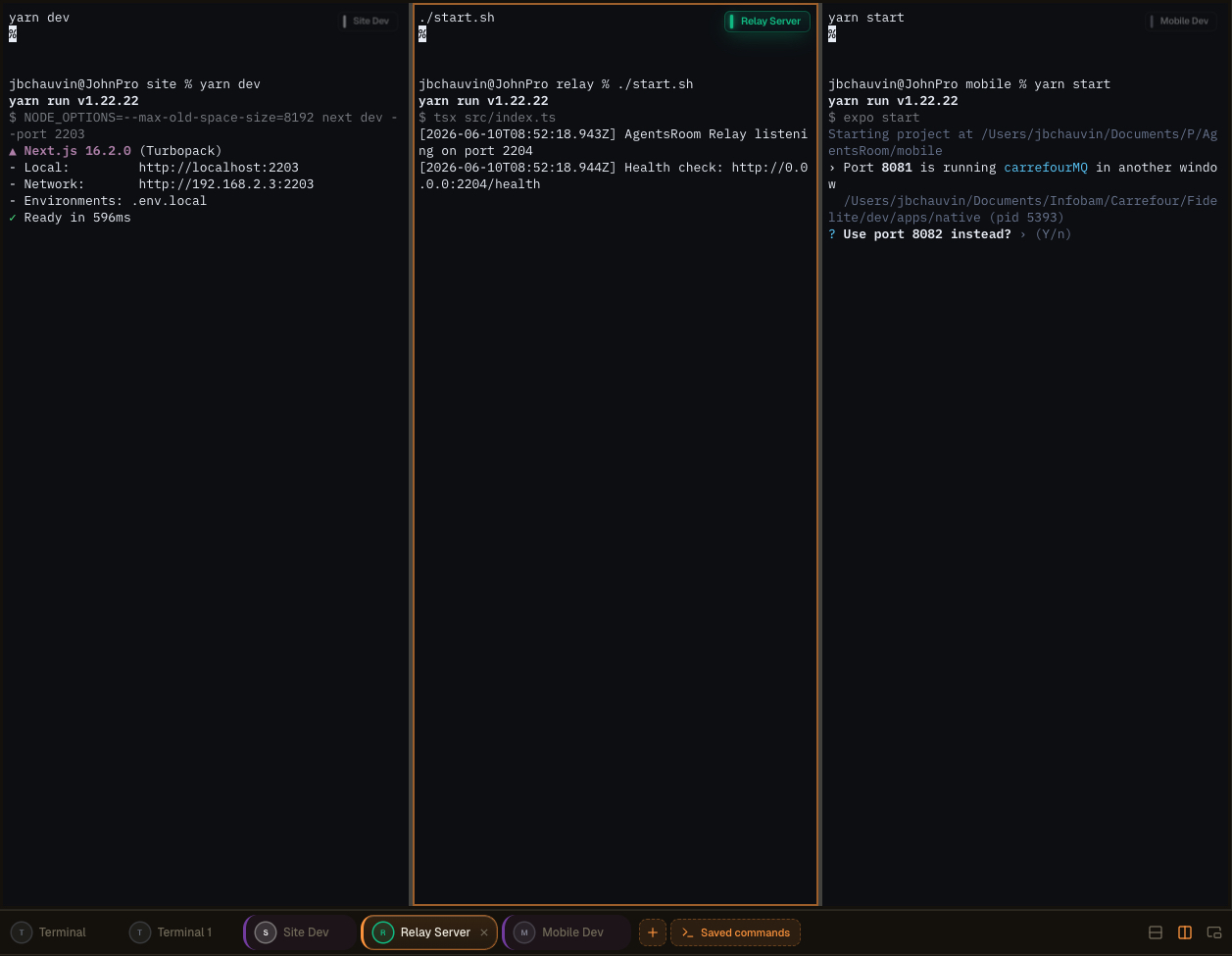
AgentsRoom의 멀티 창 터미널 레이아웃: 터미널을 분할하고, 두 번째 화면으로 분리한 후 에이전트, 로그, 빌드를 나란히 감독하세요.
장난감이 아닌 진짜 통합 터미널
각 명령어는 ANSI 색상, 스크롤백, 클릭 가능한 링크, PTY 크기 조정, 유니코드 지원을 갖춘 완전한 xterm.js 터미널을 엽니다. 가짜 로그 뷰어가 아닙니다: iTerm2나 Terminal.app에서 얻는 것과 동일한 진짜 의사 터미널이며, 대신 관리까지 해줍니다.
각 프로세스 상태가 실시간으로 표시됩니다: 실행 중, 시작 중, 중지됨, 충돌함. 개발 서버가 다운되면 즉시 확인할 수 있습니다. 클릭 한 번으로 재시작. 그리고 여러 터미널을 병렬로 실행해야 할 때(백엔드 + 프론트엔드 + 모바일 + relay), 전역 '전체 시작' 버튼이 모든 장기 실행 프로세스를 한 번에, 병렬로, 아무것도 입력하지 않고 시작합니다.
명령어는 폴더로 그룹화되고, 마우스로 순서를 바꿀 수 있으며, 프로젝트 루트의 `.agentsroom/commands.json`에 저장됩니다. 이 파일을 커밋하세요: 팀 전체가 동일한 터미널 설정을 물려받습니다. 개인 명령어(로컬 디버그 스크립트, 비공개 환경 변수)는 `commands-personal.json`에 저장되며, `.agentsroom` 안의 `.gitignore`에 자동으로 추가됩니다. 이제 새 레포에 합류할 때마다 `yarn dev --port 2203`을 외워서 입력할 필요가 없습니다.
마지막으로, 모든 것이 통합됩니다: AI 에이전트, 터미널, 프롬프트, 백로그, 라이브 프리뷰가 모두 같은 창에 있습니다. AgentsRoom, 터미널 에뮬레이터, IDE, 브라우저 사이를 오가는 일을 없애 막대한 시간을 절약합니다. 하나의 화면에서 모든 것이 클릭 한 번 거리에 있습니다.
분리된 명령어 창과 멀티 스크린 설정
Dev Commands는 이제 AgentsRoom 메인 인터페이스와 별도로 독립적인 창으로 완전히 분리될 수 있습니다. 터미널을 꺼내어 두 번째 디스플레이, 울트라와이드, 또는 모니터링, 로그, 빌드, AI 에이전트 전용 세로 모니터 등 작업에 가장 적합한 곳으로 이동하세요.
옆에 있는 세로 화면이 실행 중인 프로세스의 라이브 벽이 됩니다. 메인 창에는 에디터와 에이전트를 유지하고, 옆 패널에서 모든 서버, 모든 빌드, 모든 로그 스트림을 실시간으로 확인하세요. Alt-tab 없이, 컨텍스트 손실 없이.
더 나은 작업 공간 구성
메인 창을 코드와 에이전트를 위해 확보하세요. 분리된 터미널은 독립적으로 존재하므로 개발 공간이 하나의 패널에 답답하게 갇히지 않고 깔끔하고 집중된 상태를 유지합니다.
최적화된 멀티 스크린 레이아웃
분리된 창을 두 번째 디스플레이나 세로 모니터에 배치하세요. 빌드 출력, 개발 서버, 에이전트 로그가 전용 화면을 차지하면서 메인 화면에서는 계속 코딩할 수 있습니다.
실시간 모니터링
에이전트와 명령어를 항상 볼 수 있게 유지하세요. 프로세스가 시작되고, 스트리밍되고, 충돌하는 것을 사이드 화면에서 실시간으로 확인하고, 무언가 잘못되는 즉시 대응하세요.
높은 생산성
여러 프로젝트나 환경을 처리하는 개발자는 컨텍스트 전환을 멈춥니다. 감시가 필요한 모든 것이 가시적으로 유지되므로 더 적은 방해로 더 빠르게 배포할 수 있습니다.
드래그 앤 드롭으로 구성하는 고급 터미널 레이아웃
이제 매우 직관적인 드래그 앤 드롭 인터페이스를 통해 여러 터미널을 같은 창으로 합칠 수 있습니다. 터미널을 잡아서 원하는 위치에 드롭하면 AgentsRoom이 레이아웃을 구성합니다. 설정 파일 없이, 외울 단축키 없이.
눈앞의 작업에 맞는 작업 공간을 구성하세요:
세로 분할
두 터미널을 나란히 배치하여 백엔드와 프론트엔드를 동시에 확인하세요.
가로 분할
터미널을 위아래로 쌓아 같은 열에 로그와 실행 중인 서버를 유지하세요.
복합 조합 레이아웃
세로와 가로 분할을 혼합하여 스택에 맞는 터미널 전체 그리드를 구성하세요.
몇 초 만에 재구성
터미널을 새 위치로 드래그하면 레이아웃이 즉시 재배치됩니다. 몇 초 만에 전체 설정을 재구성하세요.
모든 것을 한 번에 감독
여러 에이전트, 서버, 로그, 명령어를 동시에 하나의 창 안에서 모두 볼 수 있게 유지하세요.
복잡한 설정 없이, tmux 설정을 배울 필요 없이. 이 경험은 즉각적이고 자연스럽게 느껴지도록 설계되어, 창을 배치하는 대신 코딩에 시간을 쏟을 수 있습니다.
터미널을 더 다양하게 활용하는 방법
분리 가능한 창, AI 명령어 생성, 모바일에서의 원격 실행은 모두 동일한 Dev Terminals 경험의 일부입니다. 원래 소개 영상을 확인하세요.
AgentsRoom 터미널 관리자: 두 번째 화면에 분리된 터미널, 모바일에서 원격으로 트리거되는 명령어, 프로젝트별 통합 xterm.js 터미널.
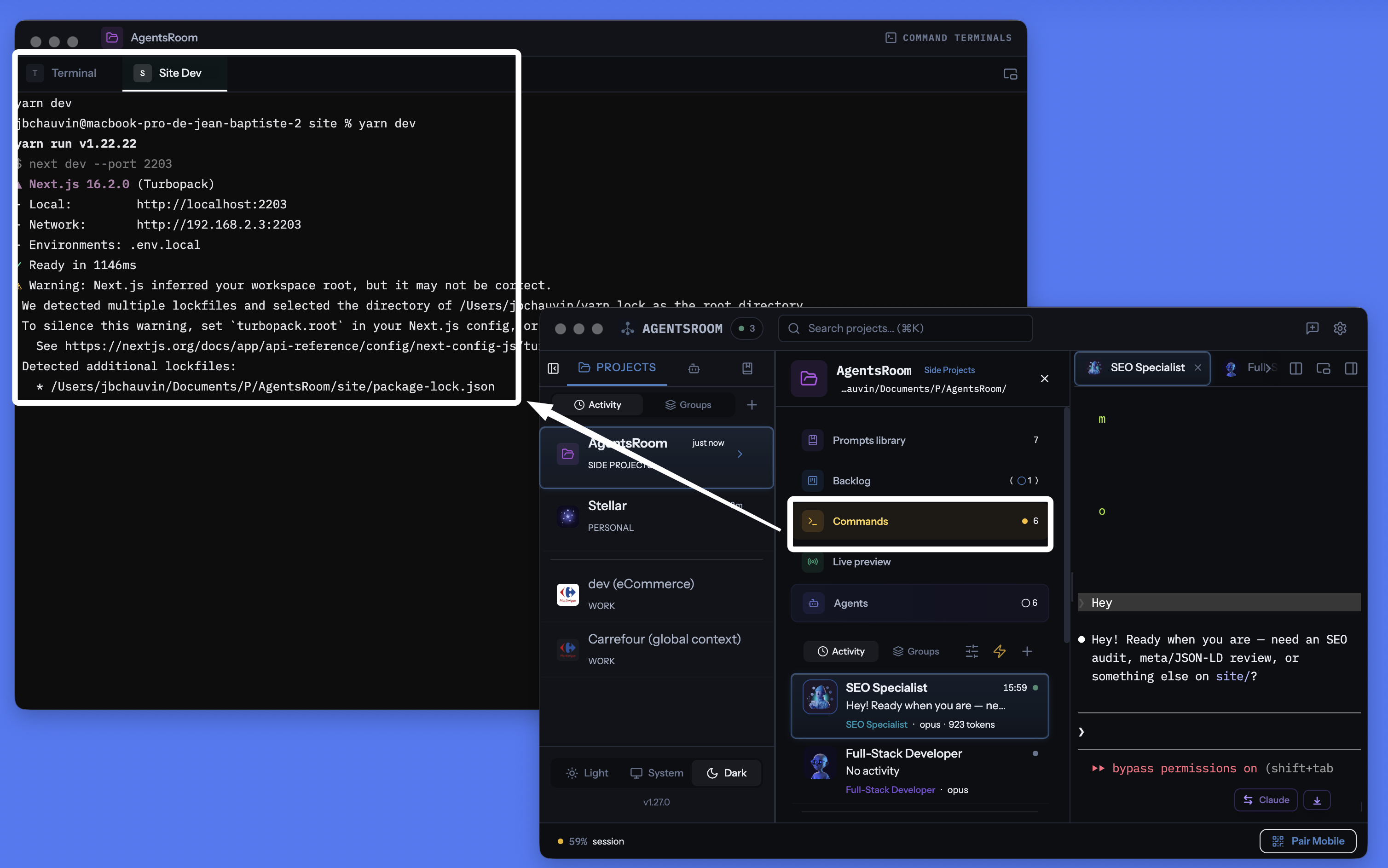
AgentsRoom 프로젝트별 터미널 관리자: 분리 가능한 창, 명령어별 통합 터미널, AI 생성 명령어, 모두 에이전트와 같은 공간에.
모든 터미널, 모든 명령어, 모든 서비스를 관리
장기 실행 프로세스, 빠른 스크립트, 빌드 명령어, 개발 서버. 모두 프로젝트별로 정리되며, 실시간 상태 추적, 통합 AI, 모바일 원격 제어를 지원합니다.
프로젝트별 터미널 관리자
각 프로젝트는 .agentsroom/commands.json에 저장된 고유한 명령어 목록을 가집니다. 프로젝트를 전환하면 명령어가 자동으로 바뀝니다. 레포 간 혼동 제로.
한 번의 클릭으로 전체 시작
하나의 재생 버튼이 모든 장기 실행 프로세스를 시작합니다: 백엔드, 프론트엔드, 모바일 번들러, relay 서버, worker, 데이터베이스. 더 이상 터미널 탭 다섯 개를 손으로 열 필요가 없습니다.
모바일에서 원격 실행
iOS 또는 Android 앱에서 명령어를 실행하세요: 터미널이 컴퓨터에서 생성되고, 출력이 4G, 5G 또는 Wi-Fi로 휴대폰에 실시간 스트리밍됩니다.
분리 가능한 터미널 창
터미널 섹션을 독립된 플로팅 창으로 분리하세요. 두 번째 모니터에 올려놓고 메인 창에서 코딩하는 동안 서버를 계속 주시하세요.
AI 명령어 생성
마법 지팡이를 클릭하세요: Claude가 레포를 스캔하여 package.json, Dockerfile, Makefile을 감지하고 모든 시작 명령어, 경로, 카테고리를 생성합니다.
실시간 프로세스 상태
어떤 서비스가 실행 중, 시작 중, 중지됨, 충돌함인지 확인하세요. 실패 시 종료 코드가 표시됩니다. 터미널 스크롤백을 잃지 않고 클릭 한 번으로 재시작.
프로세스 또는 스니펫
장기 실행 서버는 프로세스입니다. 일회성 빌드 스크립트, 마이그레이션, 배포는 스니펫입니다. 둘 다 같은 대시보드에 있고, 둘 다 클릭 한 번 거리에 있습니다.
명령어별 진짜 xterm.js 터미널
각 프로세스는 ANSI 색상, 스크롤백, 클릭 가능한 링크, 완전한 키보드 입력을 갖춘 진짜 의사 TTY 터미널을 엽니다. iTerm2나 Terminal.app과 비교해 타협이 없습니다.
localhost 라이브 프리뷰와 연동
AgentsRoom 터미널에서 localhost 사이트를 실행한 후, 내장된 HTTPS 터널을 통해 외부에서 접속하세요. 배포 없이 4G/5G로 휴대폰에서 테스트하세요.
30개 이상의 프레임워크 아이콘
React, Next.js, Vue, Nuxt, Angular, Svelte, Expo, Node.js, NestJS, Django, FastAPI, Rails, Laravel, Spring, Go, Rust, Docker, Redis 등 다양한 프레임워크, 각각 아이콘과 색상을 갖추고 있습니다.
git 네이티브 저장
공개 명령어는 .agentsroom/commands.json에 저장되어 레포에 커밋됩니다. 개인 명령어는 commands-personal.json에 저장되며 자동으로 gitignore 처리됩니다.
터미널과 AI 에이전트를 함께
터미널, Claude Code 에이전트, 프롬프트, 백로그, 라이브 프리뷰가 같은 앱을 공유합니다. 열 개의 서로 다른 도구 사이에서 길을 잃지 마세요.
휴대폰에서 컴퓨터의 터미널을 실행하세요
이것은 아마 AgentsRoom의 가장 독특한 기능일 것입니다. iOS 또는 Android 모바일 앱에서 어떤 프로젝트의 명령어 목록이든 둘러보고, 탭 한 번으로 원하는 명령어를 실행합니다. 명령어는 휴대폰에서 실행되지 않습니다: 올바른 작업 디렉토리의 진짜 PTY 터미널에서 컴퓨터에서 실행됩니다. 출력은 종단간 암호화된 relay를 통해 모바일로 실시간 스트리밍됩니다.
구체적으로: 지하철 안, 헬스장, 또는 지구 반대편에 있다고 합시다. 디자인을 확인하려고 로컬 사이트를 띄우거나, 자리를 비운 사이 충돌한 worker를 재시작하고 싶습니다. AgentsRoom 모바일을 열고 'yarn dev'를 탭하면, 집에 있는 컴퓨터에서 서버가 부팅됩니다. 휴대폰에서 터미널 키보드로 상호작용까지 할 수 있습니다.
통합된 localhost 프리뷰 터널과 결합하면, 배포 없이 4G나 5G로 모바일 브라우저에서 로컬 사이트를 열 수도 있습니다. 코딩하고, 시작하고, 테스트하고, 검증하는 일을 모두 주머니 속에서 합니다. AgentsRoom은 말 그대로 컴퓨터를 원격으로 조종하는 개발 서버로 바꿉니다.
긴 명령이 완료되면 알림을 받으세요
빌드, 테스트 스위트 또는 Docker 이미지가 몇 분 동안 실행될 수 있습니다. 다른 작업으로 전환하면 터미널은 완료된 상태로 10분 동안 그대로 있습니다. 터미널 탭에서 벨을 활성화하면 AgentsRoom이 명령이 완료되는 순간, 명령 이름과 실행 시간을 알려줍니다.
벨은 모든 터미널 창의 오른쪽 상단에 있는 작은 떠 있는 레이블에 있습니다. 한 번 클릭하면 활성화되고, 한 번 클릭하면 비활성화되며, 해당 터미널에 대해 활성화된 상태로 유지되어 동일한 빌드의 모든 실행이 보고됩니다. 알림을 클릭하면 해당 터미널 탭이 열립니다.
터미널당 하나의 벨
필요한 곳에서만 활성화하세요. 전역으로 구성할 것이 없고, 요청하지 않은 터미널에 대한 알림도 없습니다.
긴 명령만
1분 이하의 모든 것은 상호작용 사용으로 간주되어 조용히 유지되므로 cd, ls 및 git status는 결코 알림을 울리지 않습니다. 명령이 이미 실행 중일 때 벨을 활성화하면 그 명령은 항상 보고됩니다. 길이에 관계없이.
당신이 보고 있을 때는 결코
해당 터미널이 이미 화면에 있고 앱이 포커스를 가지고 있다면, 아무것도 팝업되지 않습니다. 알림은 당신이 자리를 비웠을 때를 위해 존재하며, 출력을 읽고 있는 순간을 위해 존재하지 않습니다.
macOS, Windows 및 Linux
감지는 터미널의 전경 프로세스를 읽으므로 zsh, bash, fish 또는 PowerShell 구성에 아무것도 추가되지 않으며, 이미 사용 중인 셸과 함께 작동합니다. 알림은 당신이 기계에서 멀리 있을 때 iOS 및 Android 앱에도 도달합니다.
당신의 AI 에이전트도 같은 대우를 받습니다: AI 에이전트 알림.
분리 모드: 두 번째 모니터의 터미널
터미널 패널은 독립된 플로팅 창으로 분리할 수 있습니다. 두 번째 화면으로 드래그하면 메인 AgentsRoom 창에서 코딩하는 동안 백엔드, 프론트엔드, 모바일 번들러 로그가 항상 보입니다. 이것은 진지한 개발자들이 tmux나 타일링 모드의 iTerm2로 하는 것과 정확히 같습니다. 다만 AgentsRoom에서는 설정할 것이 없습니다.
분리된 창은 모든 기능을 유지합니다: 실행, 중지, 재시작, AI, 카테고리, 멀티 프로젝트. 메인 창에서 Claude 에이전트가 작업하는 동안 보조 화면의 터미널에서 계속 입력할 수 있습니다. alt-tab 제로, 컨텍스트 손실 제로, 난해한 설정 제로.
iTerm2, Warp, Ghostty, WezTerm 대안
AgentsRoom Dev Terminals는 자신의 프로젝트를 작업할 때 기존 터미널 에뮬레이터보다 더 나은 선택입니다. 사용자들이 이미 이것으로 대체한 도구들을 소개합니다:
iTerm2는 수년간 macOS의 황금 기준이었으며 Terminal.app은 모든 Mac에 사전 설치되어 있습니다. Warp는 명령어 블록과 통합 AI를 대중화했습니다. Ghostty는 빠르고 네이티브합니다. Kitty는 GPU 가속을 지원합니다. Alacritty는 미니멀합니다. WezTerm은 Lua로 스크립팅할 수 있습니다. Hyper는 웹 기술로 구축되었습니다. Tabby는 크로스 플랫폼입니다. Wave Terminal과 Windows Terminal은 모두 현대적인 멀티 창 워크플로우를 지향합니다. 모두 훌륭한 제품입니다. AgentsRoom은 원시 렌더링 속도로 경쟁하려 하지 않습니다. 다른 가치를 제안합니다. 개발 환경에 통합되고, 각 프로젝트 범위로 한정되며, AI 에이전트와 동기화되고, 폰에서 조종할 수 있는 터미널입니다.
현대적인 터미널에 필요한 모든 것을 하나의 창에
AgentsRoom은 단순한 터미널 에뮬레이터가 아닙니다. 현대적인 코딩 워크플로우에 필요한 모든 것을 하나의 인터페이스 뒤에 모아놓습니다:
이미 'backend', 'frontend', 'mobile', 'relay'라는 이름의 여러 터미널 탭으로 프로젝트를 관리하고 있다면, Dev Terminals로 시간을 절약할 수 있습니다. 세션을 정리하는 데 tmux나 zellij를 사용한다면, 작성할 설정 파일 없이 같은 아이디어를 만나게 됩니다.
작동 방식
프로젝트 열기
프로젝트 뷰에서 Dev Terminals가 에이전트 및 프롬프트 옆에 표시됩니다. 아직 명령어가 없으면 프로젝트 루트에 기본 터미널이 자동으로 생성됩니다.
명령어 추가
+를 클릭하여 명령어를 추가하세요. 이름, 셸 명령어, 작업 디렉토리(프로젝트 루트 기준 상대 경로)를 설정하고 카테고리를 선택하세요. 장기 실행 프로세스인지 일회성 스니펫인지 지정합니다.
.agentsroom/commands.json또는 AI에게 맡기기
마법 지팡이 아이콘을 클릭하세요. Claude가 프로젝트 구조(package.json, Dockerfile, Makefile 등)를 분석하고 올바른 경로와 카테고리가 포함된 모든 명령어를 생성합니다. 결과를 검토하고, 필요하면 수정한 후 저장하세요.
전체 시작
전체 재생 버튼을 눌러 모든 프로세스를 한 번에 실행하세요. 또는 개별적으로 시작할 수도 있습니다. 각 프로세스는 로그를 확인하고 서비스와 상호작용할 수 있는 실제 터미널을 생성합니다.
모니터링 및 대응
상태 표시기가 어떤 서비스가 실행 중이고 어떤 서비스가 충돌했는지 보여줍니다. 서비스를 클릭하면 터미널 출력을 확인할 수 있습니다. 충돌한 서비스는 한 번의 클릭으로 재시작하세요. 빌드, 배포, 테스트 실행 같은 자주 사용하는 작업에는 스니펫을 활용하세요.
휴대폰에서 조종하세요
iOS나 Android에서 AgentsRoom을 열고, 프로젝트를 선택한 후, 명령어를 탭하세요: 컴퓨터에서 원격으로 실행되고, 종단간 암호화된 relay를 통해 4G, 5G 또는 Wi-Fi로 휴대폰에서 출력을 실시간으로 볼 수 있습니다.
모든 스택을 위한 아이콘
각 명령어에 프레임워크의 아이콘과 색상이 표시됩니다. React 프론트엔드, Django 백엔드, Docker 서비스를 한눈에 구분하세요.
AI 기반 명령어 설정
새 프로젝트를 시작하나요? 각 명령어를 수동으로 설정할 필요가 없습니다. 마법 지팡이를 클릭하면 Claude가 레포지토리 구조를 분석하여 모든 서비스, 빌드 스크립트, 시작 명령어를 감지합니다. 올바른 경로, 카테고리, 아이콘이 포함된 전체 명령어 목록을 생성합니다. 결과를 검토하고, 필요하면 수정한 후 저장하세요. 몇 분이 아닌 몇 초면 전체 설정이 완료됩니다.
기본 프롬프트
"내 프로젝트 구조를 분석하고 각 서비스, 각 하위 프로젝트, 각 빌드 단계에 대한 모든 시작 명령어를 생성해줘. 각 항목에 올바른 작업 디렉토리, 셸 명령어, 적절한 프레임워크 카테고리를 포함해줘."
에이전트가 dev 서버를 직접 시작하도록 하시겠어요 ?
AgentsRoom MCP는 여기에 저장하는 동일한 Terminal Commands를 MCP 도구로 노출합니다. AI 에이전트가 Terminal Commands MCP 서버를 통해 commands_list, commands_run, commands_create를 호출하여 dev 서버, API, worker를 직접 시작할 수 있습니다.
이는 4개의 AgentsRoom MCP 서버 중 하나일 뿐입니다. Backlog MCP, Prompt Library MCP, Browser MCP가 AgentsRoom IDE의 나머지를 에이전트 조종 가능 공간으로 바꿉니다.
AgentsRoom MCP 알아보기FAQ
iTerm2나 tmux와 어떻게 다른가요?
iTerm2나 tmux에서는 탭을 수동으로 열고, 각 디렉토리로 이동하고, 각 명령어를 입력합니다. 서비스가 충돌해도 해당 탭을 보기 전까지 알 수 없습니다. Dev Terminals는 프로젝트별로 명령어를 영구 저장하고, 각 서비스의 실시간 상태를 표시하며, 한 번의 클릭으로 전체를 시작할 수 있습니다. 명령어는 레포에 저장되므로 팀원 모두 같은 설정을 사용할 수 있습니다.
프로세스와 스니펫의 차이는 무엇인가요?
프로세스는 개발 서버, 백엔드, 파일 감시자 같은 장기 실행 서비스입니다. 중지하거나 충돌할 때까지 계속 실행됩니다. 스니펫은 빌드 스크립트, 데이터베이스 마이그레이션, 배포 단계 같은 일회성 명령어입니다. 둘 다 같은 대시보드에 저장되지만, '전체 시작' 버튼으로는 프로세스만 실행됩니다.
AI 명령어 생성은 어떻게 작동하나요?
마법 지팡이를 클릭하면 AgentsRoom이 프로젝트 구조를 읽는 Claude 인스턴스를 실행합니다. package.json, Dockerfile, Makefile 및 기타 설정 파일을 감지하여 각 서비스와 시작 명령어를 식별합니다. 결과는 경로, 카테고리, 추천 이름이 포함된 구조화된 명령어 목록입니다. 저장하기 전에 목록을 검토할 수 있습니다.
명령어를 팀과 공유할 수 있나요?
네. 공개 명령어는 프로젝트 디렉토리 내 .agentsroom/commands.json에 저장됩니다. 이 파일을 커밋하면 레포를 풀하는 모든 사람이 같은 명령어를 사용할 수 있습니다. 개인 명령어(로컬 디버그 스크립트 등)는 commands-personal.json에 저장되며, .agentsroom/.gitignore에 자동으로 추가됩니다.
Dev Terminals가 필요 없으면 비활성화할 수 있나요?
네. 설정을 열고 Feature Flags 섹션으로 이동하세요. Dev Terminals를 끄면 모든 프로젝트 뷰에서 해당 기능이 사라집니다. 저장된 명령어를 잃지 않고 언제든 다시 활성화할 수 있습니다.
명령어를 팀과 공유하나요?
네. 공개 명령어는 프로젝트 디렉토리 내 .agentsroom/commands.json에 저장됩니다. 이 파일을 커밋하면 레포를 풀하는 모든 사람이 같은 설정을 얻습니다. 개인 명령어(로컬 디버그 스크립트)는 commands-personal.json에 저장되며, .agentsroom/.gitignore에 자동으로 추가됩니다.
AI 명령어 생성은 어떻게 작동하나요?
마법 지팡이를 클릭하면 AgentsRoom이 프로젝트 구조(package.json, Dockerfile, Makefile, pyproject.toml, Cargo.toml…)를 읽는 Claude 인스턴스를 실행하여 각 장기 실행 서비스와 시작 명령어를 식별합니다. 결과는 경로, 카테고리, 폴더, 추천 이름이 포함된 구조화된 명령어 목록입니다. 저장하기 전에 목록을 검토합니다.
AgentsRoom이 터미널 명령이 완료되면 나에게 알림을 줄 수 있나요?
네. 모든 터미널 탭은 떠 있는 레이블에 벨을 가지고 있습니다. 활성화하면 AgentsRoom이 실행 중인 명령이 프롬프트로 돌아오는 순간 데스크탑 알림을 보냅니다. 명령 이름과 실행 시간, 그리고 당신이 기계에서 멀리 있을 때 iOS 및 Android 앱으로 푸시 알림이 전송됩니다. 알림을 클릭하면 해당 터미널 탭이 열립니다.
터미널이 열려 있는 상태에서 AgentsRoom은 명령이 완료되었는지 어떻게 알 수 있나요?
터미널 탭은 하나의 장기 지속 셸이므로 명령이 끝날 때 아무것도 종료되지 않습니다. AgentsRoom은 대신 터미널의 전경 프로세스 그룹을 감시합니다: 셸 자체로 돌아오면 프롬프트가 돌아오고 명령이 완료됩니다. 셸 구성에 아무것도 기록되지 않으므로 zsh, bash, fish 또는 PowerShell과 동일하게 작동하며, 수동으로 입력한 명령과 저장된 명령 모두에 대해 작동합니다.
내가 입력하는 모든 명령에 대해 알림을 받을 수 있나요?
아니요. 1분 이상 실행된 명령만 알림을 발생시키므로 일상적인 상호작용 사용은 조용히 유지됩니다. 한 가지 의도적인 예외: 명령이 이미 실행 중일 때 벨을 활성화하면 그 명령은 소요 시간에 관계없이 항상 보고됩니다. 터미널이 이미 화면에 있고 앱이 포커스를 가지고 있을 때도 아무것도 발생하지 않습니다.
명령을 모든 프로젝트에서 쓸 수 있나요?
네. 저장할 때 위치를 고릅니다: 이 프로젝트만, 또는 전역. 전역 명령은 계정에 속하며 여는 모든 프로젝트에 나타납니다. 터널, 공용 Docker 스택, 어디서나 띄우는 데이터베이스 데몬에 적합합니다. 명령 모달에는 검색창과 범위 필터(전체 / 이 프로젝트 / 전역)가 있어 목록이 길어져도 읽기 쉽습니다.
AI 에이전트가 이 명령들을 직접 실행할 수 있나요?
네, AgentsRoom MCP를 통해 가능합니다. 에이전트는 commands_list로 여기서 사용할 수 있는 모든 것(프로젝트 명령과 전역 명령, 각각 범위 표시)을 확인하고, commands_run으로 하나를 실제 터미널 탭에서 실행합니다. 여러분은 그 탭을 보고 언제든 중지할 수 있습니다. commands_create로 새 명령도 저장합니다. 원시 셸로 장시간 프로세스를 띄우는 것은 금지되어 있어, 실행되는 것은 항상 여러분이 통제하는 탭에 나타납니다. 그리고 에이전트 자신의 샌드박스가 명령을 거부할 때도, 이제 다른 터미널에 붙여넣도록 줄을 출력할 필요가 없습니다. commands_propose를 호출하면 해당 에이전트의 패널에 실행할 수 없는 이유와 함께 '이 명령을 실행할까요?' 카드가 나타나고, '실행'을 클릭하면 터미널 탭에서 명령이 실행되며 에이전트가 직접 그 결과를 읽습니다. 여러분이 결정하기 전에는 아무것도 실행되지 않고, 항상 허용 옵션은 없으며, 명령은 저장되지도 다시 실행되지도 않습니다.
더 알아보기
터미널 탭 사이를 오가지 마세요
AgentsRoom을 다운로드하고 모든 서비스를 하나의 대시보드에서 실행하세요. 2개 프로젝트까지 무료.
컴패니언 앱: 이동 중에도 에이전트를 모니터링
Claude, Codex, Antigravity CLI 또는 다른 AI 공급자를 사용하세요.
버그와 요청을 공개 백로그로 바로 보내세요.