Dev Terminals
すべてのサービスを一括管理
バックエンド、フロントエンド、モバイルアプリ、リレーサーバー。以前は4つのターミナルタブを開いて、それぞれの起動コマンドを手入力していました。今はボタンを1つ押すだけです。
そしてユニークなのはここから: iOSとAndroidのモバイルアプリを使えば、あなたのマシン上のコマンドをリモートでトリガーできます。地下鉄、ジム、カフェからlocalhostサイトを立ち上げ、内蔵のライブプレビュートンネルを通じて4G/5Gでスマートフォンから開けます。
複数のターミナルを同時に管理:ドラッグ&ドロップで分割ペインを作成し、縦横レイアウトを切り替え、エージェント、ログ、ビルドを専用監視スクリーンに移動できる完全デタッチウィンドウを利用できます。
Dev Terminalsは単なるターミナルエミュレーターをはるかに超えるものです。毎朝開くiTerm2、Warp、Ghostty、Kitty、Alacritty、Terminal.appのタブのジャングルを置き換えるために設計された、真のプロジェクト単位のコマンドマネージャーです。各プロジェクトには独自のコマンドリストがあります:開発サーバー、バックエンド、モバイルバンドラー、worker、データベース、内部スクリプト。一度名前を付ければ、ずっと起動できます。
UXとUIは、コマンド管理を可能な限り高速にするために意図的に磨き込まれています。各コマンドは、名前、シェルコマンド、作業ディレクトリ(プロジェクトルートからの相対パス)、フレームワークカテゴリ(React、Next.js、Django、Rails、Go、Rust、Docker…)、種別(常駐プロセスかワンショットスニペットか)を記憶します。実行中のコマンドはリストの上部に浮かび上がり、カラフルなフレームワークアイコンによって、Reactフロントエンド、Djangoバックエンド、Dockerサービスをひと目で識別できます。
AgentsRoom内に統合されたターミナルの大きな利点は、コマンドがプロジェクトの正確なコンテキストで実行されることです:同じパス、同じ環境、同じcwd。摩擦ゼロ、延々と続くcdゼロ、プロジェクトの取り違えゼロ。そしてすべてがClaude、Codex、AntigravityのAIエージェントの隣にあるため、コードを出荷するためだけに15種類ものツールを行き来する必要がなくなります。
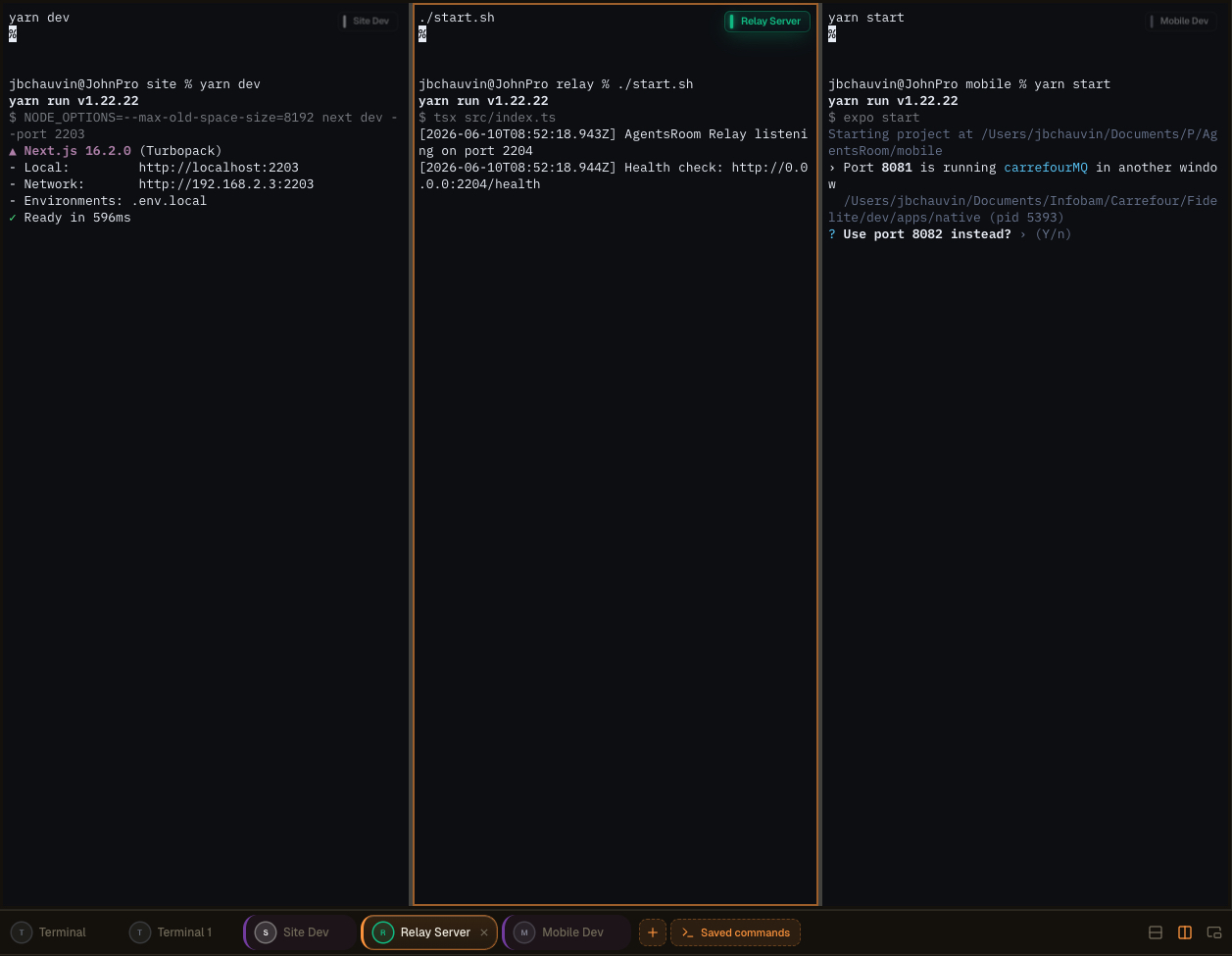
AgentsRoomのマルチペインターミナルレイアウト:ターミナルを分割してセカンドスクリーンにデタッチし、エージェント、ログ、ビルドを並べて監視できます。
おもちゃではない、本物の統合ターミナル
各コマンドは、ANSIカラー、スクロールバック、クリック可能なリンク、PTYリサイズ、Unicodeサポートを備えた完全なxterm.jsターミナルを開きます。これは偽のログビューアーではありません。iTerm2やTerminal.appで得られるものと同一の、本物の擬似ターミナルです。ただし管理はお任せ。
各プロセスのステータスはライブで表示されます:実行中、起動中、停止、クラッシュ。開発サーバーが落ちれば、すぐに気付きます。再起動はワンクリック。複数のターミナルを並列で必要とするとき(バックエンド + フロントエンド + モバイル + リレー)、グローバルな「すべて起動」ボタンが、すべての常駐プロセスを何も入力せずに一括かつ並列で起動します。
コマンドはフォルダにグループ化され、マウスで並べ替えでき、プロジェクトのルートにある.agentsroom/commands.jsonに保存されます。このファイルをコミットすれば、チーム全員が同じターミナル構成を引き継ぎます。個人用コマンド(ローカルデバッグスクリプト、プライベートな環境変数)はcommands-personal.jsonに保存され、.agentsroom内の.gitignoreに自動で追加されます。新しいリポジトリに参加するたびにyarn dev --port 2203を記憶から打ち込む必要は、もう誰にもありません。
最後に、すべてが統合されます: AIエージェント、ターミナル、プロンプト、バックログ、ライブプレビューがすべて同じウィンドウに収まります。AgentsRoom、ターミナルエミュレーター、IDE、ブラウザの間を行き来する手間をなくすことで、膨大な時間を節約できます。1つの画面で、すべてがワンクリックの距離に。
デタッチコマンドとマルチスクリーン設定
Dev Commandsは、AgentsRoomのメインインターフェースとは別の独立したウィンドウに完全デタッチできるようになりました。ターミナルを取り出して、最も作業しやすい場所に移動してください:セカンドディスプレイ、ウルトラワイド、または監視・ログ・ビルド・AIエージェント専用の縦型モニターなど。
横に置いた縦型スクリーンが、実行中プロセスのライブウォールになります。メインウィンドウにはエディタとエージェントを置き、すべてのサーバー、ビルド、ログストリームをリアルタイムで隣のパネルで確認できます。Alt-Tab不要、コンテキストロストなし。
ワークスペースの整理
メインウィンドウをコードとエージェントに開放します。デタッチされたターミナルは独立して動作するので、開発スペースが1つのパネルに詰め込まれることなく、クリーンで集中した状態を保てます。
マルチスクリーンレイアウトの最適化
デタッチウィンドウをセカンドディスプレイや縦型モニターに配置します。ビルド出力、開発サーバー、エージェントログが専用スクリーンを持ち、メインスクリーンでのコーディングを続けられます。
リアルタイム監視
エージェントとコマンドを常時確認できます。プロセスの起動、ストリーミング、クラッシュをサイドスクリーンでライブ確認し、問題が発生した瞬間に対応できます。
生産性の向上
複数のプロジェクトや環境を扱う開発者がコンテキスト切り替えを止められます。監視が必要なものがすべて見え続けるので、中断を最小限に抑えてより速く出荷できます。
ドラッグ&ドロップで構築する高度なターミナルレイアウト
直感的なドラッグ&ドロップインターフェースを通じて、複数のターミナルを同じペインに統合できるようになりました。ターミナルをつかんで任意の場所にドロップするだけで、AgentsRoomがレイアウトを構築します。設定ファイル不要、キーバインドの暗記不要。
目の前のタスクに合ったワークスペースを構成できます:
縦分割
2つのターミナルを並べて配置し、バックエンドとフロントエンドを同時に確認できます。
横分割
ターミナルを上下に積み重ねて、ログと実行中サーバーを同じ列に表示できます。
複合レイアウト
縦横の分割を組み合わせて、スタックに合わせたターミナルのフルグリッドを構築できます。
数秒で再配置
ターミナルを新しい位置にドラッグするだけで、レイアウトが瞬時に再配置されます。セットアップ全体を数秒で再構成できます。
すべてを同時に監視
複数のエージェント、サーバー、ログ、コマンドを同時に表示し、すべてを1つのペイン内に収められます。
複雑なセットアップ不要、tmuxの設定学習不要。エクスペリエンスは即座かつ自然に感じられるように設計されており、ウィンドウの整理ではなくコーディングに時間を使えます。
ターミナルを操作する追加の方法
デタッチ可能なウィンドウ、AIコマンド生成、モバイルからのリモート起動はすべて同じDev Terminalsエクスペリエンスの一部です。こちらはオリジナルのウォークスルーです。
AgentsRoomターミナルマネージャー:セカンドスクリーンへのデタッチターミナル、モバイルからリモートでトリガーされるコマンド、プロジェクトごとの統合xterm.jsターミナル。
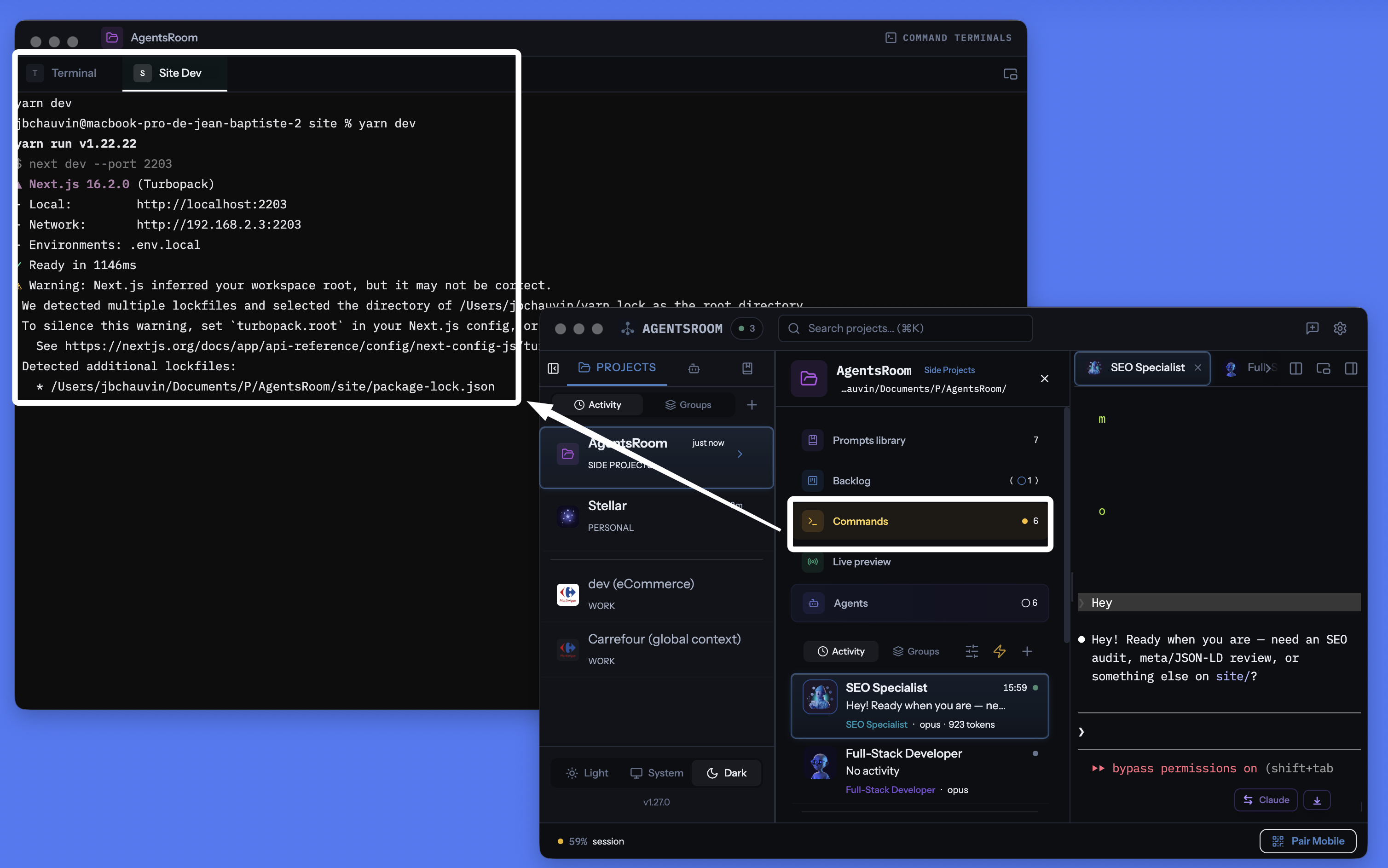
AgentsRoomプロジェクトごとのターミナルマネージャー:デタッチ可能なウィンドウ、コマンドごとの統合ターミナル、AI生成コマンド、すべてエージェントと同じ場所に。
すべてのサービス、すべてのコマンドを管理
常駐プロセス、簡易スクリプト、ビルドコマンド。プロジェクトごとに整理され、ステータス追跡とAIアシスタンス付き。
プロジェクトごとにスコープ
各プロジェクトは.agentsroom/commands.jsonに独自のコマンドを保存。プロジェクトを切り替えると、コマンドも切り替わります。混乱なし。
一括起動
ボタン1つでプロジェクト内のすべてのプロセスを起動。バックエンド、フロントエンド、モバイル、リレーが並列で開始されます。
モバイルからのリモート起動
iOSまたはAndroidアプリからコマンドをトリガー。ターミナルはあなたのマシン上で起動し、その出力が4G、5G、Wi-Fi経由でスマートフォンにライブでストリーミングされます。
デタッチ可能なターミナルウィンドウ
ターミナルセクションを独立したフローティングウィンドウにデタッチ。セカンドモニターに配置すれば、メインウィンドウでコーディングしながらサーバーを監視できます。
AIによるコマンド生成
マジックワンドをクリック。Claudeがプロジェクト構成をスキャンし、すべての起動コマンド、パス、カテゴリを自動生成します。
ライブプロセスステータス
どのサービスが実行中、起動中、停止、クラッシュかを確認。プロセスが失敗した場合は終了コードを表示。ワンクリックで再起動。
プロセスとスニペット
常駐サービスはプロセスです。ビルドスクリプトやデプロイコマンドなどのワンショット実行はスニペットです。どちらも同じダッシュボードに表示されます。
プロセスごとにフルターミナル
各プロセスはカラー表示、スクロールバック、クリック可能なリンク付きのxterm.jsターミナルを開きます。プロセス出力を直接操作できます。
localhostライブプレビューと連携
AgentsRoomのターミナルからlocalhostサイトを起動し、内蔵のHTTPSトンネルを通じて外部からアクセス。デプロイせずに4G/5Gでスマートフォンからテストできます。
30以上のフレームワークアイコン
React、Next.js、Django、Rails、Go、Rust、Docker、Expo、NestJS、Springなど。各コマンドにフレームワークのアイコンとカラーを表示。
gitに保存
コマンドは.agentsroom/commands.jsonに保存され、リポジトリにコミットできます。個人用コマンドはcommands-personal.jsonに保存され、自動でgitignoreされます。
ターミナルとAIエージェントを一体化
ターミナル、Claude Codeエージェント、プロンプト、バックログ、ライブプレビューがすべて同じアプリに集約。10種類ものツールを行き来して迷うことはもうありません。
スマートフォンからマシン上のターミナルを起動
これはおそらくAgentsRoomで最もユニークな機能です。iOSまたはAndroidのモバイルアプリから、任意のプロジェクトのコマンドリストを閲覧し、タップ1つでどれでも起動できます。コマンドはスマートフォン上では実行されません。あなたのマシン上の正しい作業ディレクトリで、本物のPTYターミナルとして実行されます。出力はエンドツーエンド暗号化されたリレーを通じてモバイルへライブでストリーミングされます。
具体的には、地下鉄の中、ジム、あるいは地球の反対側にいるとき。デザインを確認するためにローカルサイトを立ち上げたい、または外出中にクラッシュしたworkerを再起動したい。AgentsRoomモバイルを開いて「yarn dev」をタップすれば、自宅のマシンでサーバーが起動します。スマートフォンからターミナルのキーボード操作まで行えます。
統合されたlocalhostプレビュートンネルと組み合わせれば、4Gや5G経由でモバイルブラウザからローカルサイトを開くことすらできます。デプロイは一切不要。コーディング、起動、テスト、検証まですべてポケットの中から。AgentsRoomは文字通りあなたのマシンをリモート操作可能な開発サーバーに変えます。
長いコマンドが終了したときに通知を受け取る
ビルド、テストスイート、またはDockerイメージは数分間実行されることがあります。何か別のことに切り替えると、ターミナルは終了したまま10分間放置されてしまいます。ターミナルタブのベルを鳴らすと、AgentsRoomはコマンドが完了した瞬間を知らせてくれます。コマンド名と実行時間も表示されます。
ベルは、すべてのターミナルペインの右上にある小さな浮動ラベルにあります。1回クリックするとアームされ、もう1回クリックすると解除され、そのターミナルのためにアームされたままとなりますので、同じビルドのすべての実行が報告されます。通知をクリックすると、そのターミナルタブが開きます。
ターミナルごとに1つのベル
必要な場所だけでアームしてください。設定するものはなく、あなたが求めていないターミナルのアラートはありません。
長いコマンドのみ
1分未満のものはインタラクティブな使用と見なされ、静かに保たれますので、cd、ls、git statusは決して通知しません。コマンドがすでに実行中のときにベルをアームすると、そのコマンドは常に報告されます。
あなたが見ている間は決して
そのターミナルがすでに画面に表示されていて、アプリがフォーカスを持っている場合、何もポップアップしません。アラートは、あなたが離れた瞬間のために存在し、出力を読んでいる瞬間のためではありません。
macOS、Windows、Linux
検出はターミナルの前景プロセスを読み取りますので、zsh、bash、fish、またはPowerShellの設定に何も追加されず、すでに使用しているシェルで動作します。アラートは、あなたがマシンから離れているときにiOSおよびAndroidアプリにも届きます。
あなたのAIエージェントも同様の扱いを受けます: AIエージェント通知.
デタッチモード:ターミナルをセカンドモニターへ
ターミナルパネルは独立したフローティングウィンドウにデタッチできます。セカンドスクリーンにドラッグすれば、AgentsRoomのメインウィンドウでコーディングしている間も、バックエンド、フロントエンド、モバイルバンドラーのログが常に見える状態を保てます。これは本格的な開発者がtmuxやiTerm2のタイリングモードで行っていることそのものですが、AgentsRoomでは設定するものは何もありません。
デタッチウィンドウはすべての機能を維持します:起動、停止、再起動、AI、カテゴリ、マルチプロジェクト。メインウィンドウでClaudeエージェントが作業している間、セカンドスクリーンのターミナルで入力を続けられます。Alt-Tabゼロ、コンテキストロストゼロ、難解な設定ゼロ。
iTerm2、Warp、WezTermの代替としてのAgentsRoom
AgentsRoom Dev Terminalsは、従来のターミナルエミュレーターと比べて、プロジェクト作業においてより優れた選択肢です。ユーザーがすでにこれに置き換えたツールを紹介します:
iTerm2は長年macOSのゴールドスタンダードであり、Terminal.appはすべてのMacにプリインストールされています。Warpはコマンドブロックと統合AIを普及させました。Ghosttyは高速でネイティブです。KittyはGPUアクセラレーション対応です。Alacrittyはミニマリストです。WezTermはLuaでスクリプト可能です。HyperはWebテクノロジーで構築されています。Tabbyはクロスプラットフォームです。Wave TerminalとWindows Terminalはどちらもモダンなマルチペインワークフローを推進しています。これらはすべて優れた製品です。AgentsRoomは生のレンダリング速度での競争を目指しません。異なる価値提案を提供します。開発環境に統合され、各プロジェクトにスコープされ、AIエージェントと同期し、スマートフォンから操作できるターミナルです。
モダンなターミナルに必要なすべてを1つのウィンドウに
AgentsRoomはただのターミナルエミュレーターではありません。モダンなコーディングワークフローに必要なすべてを統合し、単一のインターフェースの背後に配置します:
すでに「backend」「frontend」「mobile」「relay」といった名前の複数のターミナルタブでプロジェクトを管理しているなら、Dev Terminalsで時間を節約できます。tmuxやzellijでセッションを整理しているなら、同じ発想を、設定ファイルを書くことなく見つけられます。
使い方
プロジェクトを開く
プロジェクトビューで、Dev Terminalsはエージェントやプロンプトと並んで表示されます。コマンドがまだない場合、プロジェクトルートにデフォルトターミナルが自動作成されます。
コマンドを追加
+をクリックしてコマンドを追加。名前、シェルコマンド、作業ディレクトリ(プロジェクトルートからの相対パス)を設定し、カテゴリを選択。常駐プロセスかワンショットスニペットかを指定します。
.agentsroom/commands.jsonAIに任せる
マジックワンドアイコンをクリック。Claudeがプロジェクト構成(package.json、Dockerfile、Makefileなど)を分析し、正しいパスとカテゴリですべてのコマンドを生成します。確認し、必要なら調整して保存。
すべてを起動
グローバル再生ボタンを押してすべてのプロセスを一括起動。個別に起動することもできます。各プロセスはログの確認やサービスとの対話が可能なターミナルを生成します。
パネルをデタッチ
デタッチアイコンをクリックすると、ターミナルセクションが独立したフローティングウィンドウで開き、セカンドモニターに配置できます。メインウィンドウでコーディングしている間も、サーバーは見える状態を保ちます。
スマートフォンから操作
iOSまたはAndroidでAgentsRoomを開き、プロジェクトを選んでコマンドをタップ。あなたのマシン上でリモート起動され、その出力をエンドツーエンド暗号化されたリレーを通じて4G、5G、Wi-Fi経由でスマートフォンからライブで確認できます。
あらゆるスタックのアイコン
各コマンドにフレームワークのアイコンとカラーを表示。Reactフロントエンド、Djangoバックエンド、Dockerサービスをひと目で識別。
AIによるコマンドセットアップ
新しいプロジェクトを始める時に、各コマンドを手動で設定する必要はありません。マジックワンドをクリックすると、Claudeがリポジトリ構成をスキャンして、すべてのサービス、ビルドスクリプト、起動コマンドを検出します。正しいパス、カテゴリ、アイコン付きのコマンドリストを生成。結果を確認し、必要なら調整して保存。セットアップ全体が数分ではなく数秒で完了します。
デフォルトプロンプト
"プロジェクト構成を分析し、各サービス、各サブプロジェクト、各ビルドステップのすべての起動コマンドを生成してください。各エントリに正しい作業ディレクトリ、シェルコマンド、適切なフレームワークカテゴリを含めてください。"
エージェントに dev サーバーを自分で起動させたい ?
AgentsRoom MCP はここで保存する同じ Terminal Commands を MCP ツールとして公開します。AI エージェントは Terminal Commands MCP サーバーを介して commands_list、commands_run、commands_create を呼び、dev サーバー、API、worker を自分で起動できます。
これは 4 つの AgentsRoom MCP サーバーの 1 つにすぎません。Backlog MCP、Prompt Library MCP、Browser MCP は AgentsRoom IDE の残りをエージェント操縦可能な空間に変えます。望めば手動、望まなければ自動。
AgentsRoom MCP を見るFAQ
iTerm2、Warp、Ghostty、Terminal.appとの違いは?
iTerm2、Warp、Ghostty、Kitty、Alacritty、WezTerm、Hyper、Terminal.appはどれも優れたターミナルエミュレーターです。AgentsRoom Dev Terminalsは、一般的なシステム作業でそれらを置き換えようとはしません。これはプロジェクト単位のターミナルマネージャーです。コマンドはプロジェクトごとに保存され、ワンクリックで起動でき、モバイルから操作可能で、AIエージェントの隣にあります。主に自分のプロジェクトで作業しているなら、ターミナル作業時間の90%をiTerm2を開くことなくAgentsRoom内で過ごすことになるでしょう。
AgentsRoomのターミナルは本当にxterm.jsを使っている?
はい。各コマンドは、Electron側の擬似TTYに支えられた本物のxterm.jsターミナルを開きます。ANSIカラー、スクロールバック、クリック可能なリンク、キーボード入力、動的リサイズ、Unicodeサポートを、ネイティブのターミナルエミュレーターとまったく同じように利用できます。
モバイルからのリモートコマンド起動はどう動作する?
iOSまたはAndroidアプリから、プロジェクトとコマンドを選びます。モバイルアプリはWebSocketリレーを通じてエンドツーエンド暗号化されたメッセージを送信。デスクトップアプリがコマンドを受け取り、あなたのマシン上の正しい作業ディレクトリで本物のPTYを起動し、出力をリアルタイムでモバイルへストリーミングして返します。コマンドはスマートフォンではなく、物理的にあなたのマシン上で実行されます。移動中にサーバーやworkerを再起動するのに最適です。
デタッチモードは複数画面で動作する?
はい。デタッチアイコンをクリックすると、Dev Terminalsセクションが独立したフローティングウィンドウで開き、セカンドモニターにドラッグできます。AgentsRoomのメインウィンドウでコーディングしている間も、ログとサーバーは常に見える状態を保ちます。
プロセスとスニペットの違いは?
プロセスは開発サーバー、バックエンド、ファイルウォッチャーなどの常駐サービスです。停止するかクラッシュするまで動き続けます。スニペットはビルドスクリプト、データベースマイグレーション、デプロイステップなどのワンショットコマンドです。どちらも同じダッシュボードに表示されますが、「すべて起動」ボタンで起動されるのはプロセスのみです。
コマンドはチームと共有できる?
はい。パブリックコマンドはプロジェクトディレクトリ内の.agentsroom/commands.jsonに保存されます。このファイルをコミットすれば、リポジトリをプルした全員が同じコマンドを使えます。個人用コマンド(ローカルデバッグスクリプトなど)はcommands-personal.jsonに保存され、自動で.agentsroom/.gitignoreに追加されます。
AIコマンド生成はどのように動作する?
マジックワンドをクリックすると、AgentsRoomがClaudeインスタンスを起動し、プロジェクト構成を読み取ります。package.json、Dockerfile、Makefileなどの設定ファイルを検出し、各サービスとその起動コマンドを特定します。結果はパス、カテゴリ、推奨名付きの構造化リストとして出力されます。保存前にリストを確認できます。
AgentsRoomはターミナルコマンドが終了したときに通知してくれますか?
はい。すべてのターミナルタブには浮動ラベルにベルがあります。アームすると、AgentsRoomは実行中のコマンドがプロンプトに戻った瞬間にデスクトップ通知を発信し、コマンド名とその実行時間、さらにあなたがマシンから離れているときにはiOSおよびAndroidアプリにプッシュ通知を送ります。通知をクリックすると、そのターミナルタブが開きます。
ターミナルが開いたままのとき、AgentsRoomはどうやってコマンドが終了したことを知るのですか?
ターミナルタブは1つの長寿命シェルなので、コマンドが終了しても何も終了しません。AgentsRoomはターミナルの前景プロセスグループを監視します:シェル自体に戻ると、プロンプトが戻り、コマンドが完了します。シェルの設定には何も書き込まれないため、zsh、bash、fish、またはPowerShellで同じように動作し、手動で入力したコマンドや保存されたコマンドの両方に対応します。
入力したすべてのコマンドについて通知を受け取りますか?
いいえ。1分以上実行されたコマンドのみがアラートを発生させるため、日常的なインタラクティブな使用は静かに保たれます。1つの意図的な例外:コマンドがすでに実行中のときにベルをアームすると、そのコマンドはどれだけ時間がかかっても常に報告されます。また、ターミナルがすでに画面に表示されていて、アプリがフォーカスを持っているときには何も発生しません。
コマンドをすべてのプロジェクトで使えますか?
はい。保存時に置き場所を選べます。このプロジェクトだけか、グローバルかです。グローバルコマンドはアカウントに属し、開いたどのプロジェクトにも表示されます。トンネル、共有の Docker スタック、どこでも起動するデータベースのデーモンなどに向いています。コマンドのモーダルには検索バーとスコープフィルター(すべて / このプロジェクト / グローバル)があるので、リストが長くなっても読めます。
AIエージェントはこれらのコマンドを自分で起動できますか?
はい、AgentsRoom MCP 経由で可能です。エージェントは commands_list でここで使えるすべて(プロジェクトのコマンドとグローバルのコマンド、それぞれスコープ付き)を確認し、commands_run で実際のターミナルタブとして起動します。あなたはその様子を見て、いつでも止められます。commands_create で新規保存もできます。生のシェルで長時間プロセスを起動することは禁じられているので、動いているものは必ずあなたが制御できるタブに現れます。そして、エージェント自身のサンドボックスがコマンドを拒否した場合も、もう別のターミナルに貼り付けてもらうための行を表示する必要はありません。commands_propose を呼び出すと、そのエージェントのペインに実行できない理由とともに「このコマンドを実行しますか?」というカードが表示され、「実行」をクリックするだけでターミナルタブでコマンドが実行され、エージェント自身がその結果を読み取ります。あなたが決めるまで何も実行されず、常に許可するオプションはなく、コマンドは保存も再実行もされません。
さらに詳しく
ターミナルタブの切り替えをやめよう
AgentsRoomをダウンロードして、すべてのサービスを1つのダッシュボードから起動。2プロジェクトまで無料。
コンパニオンアプリ:外出先でもエージェントを確認
Claude、Codex、Antigravity CLI、またはその他の AI プロバイダーを使用します。
バグや要望を公開バックログに直接送信できます。