Dev Terminals
per tutti i tuoi servizi
Il tuo progetto ha un backend, un frontend, un'app mobile, un relay server. Prima aprivi 4 tab del terminale e digitavi ogni comando a mano. Ora premi un pulsante.
E il vantaggio unico: con l'app mobile iOS e Android, attivi i comandi a distanza sul tuo computer. Avvia il tuo sito in localhost dalla metro, dalla palestra o da un bar, poi aprilo sul telefono in 4G/5G tramite il tunnel di anteprima live integrato.
Gestisci piu terminali contemporaneamente: split panes drag-and-drop, layout verticali e orizzontali, e una finestra completamente staccata che puoi spostare su uno schermo dedicato al monitoraggio dei tuoi agenti, log e build.
Dev Terminals e molto piu di un emulatore di terminale. E un vero gestore di comandi per progetto, pensato per sostituire la giungla di tab iTerm2, Warp, Ghostty, Kitty, Alacritty e Terminal.app che apri ogni mattina. Ogni progetto ha la propria lista di comandi: dev server, backend, bundler mobile, worker, database, script interni. Li nomini una volta, li lanci per sempre.
L'UX e la UI sono volutamente spinte al massimo per rendere la gestione dei comandi il piu veloce possibile. Ogni comando memorizza il suo nome, il comando shell, la directory di lavoro (relativa alla radice del progetto), la categoria framework (React, Next.js, Django, Rails, Go, Rust, Docker…) e il tipo (processo a lunga esecuzione o snippet una tantum). I comandi attivi salgono in cima alla lista e le icone colorate dei framework ti permettono di individuare il frontend React, il backend Django e i servizi Docker a colpo d'occhio.
Il grande vantaggio di un terminale integrato direttamente in AgentsRoom e che i comandi vengono eseguiti nel contesto esatto del tuo progetto: stesso percorso, stesso ambiente, stesso cwd. Zero attriti, zero cd infiniti, zero confusione tra progetti. E poiche tutto vive accanto ai tuoi agenti AI Claude, Codex e Antigravity, smetti di destreggiarti tra quindici strumenti diversi solo per scrivere codice.
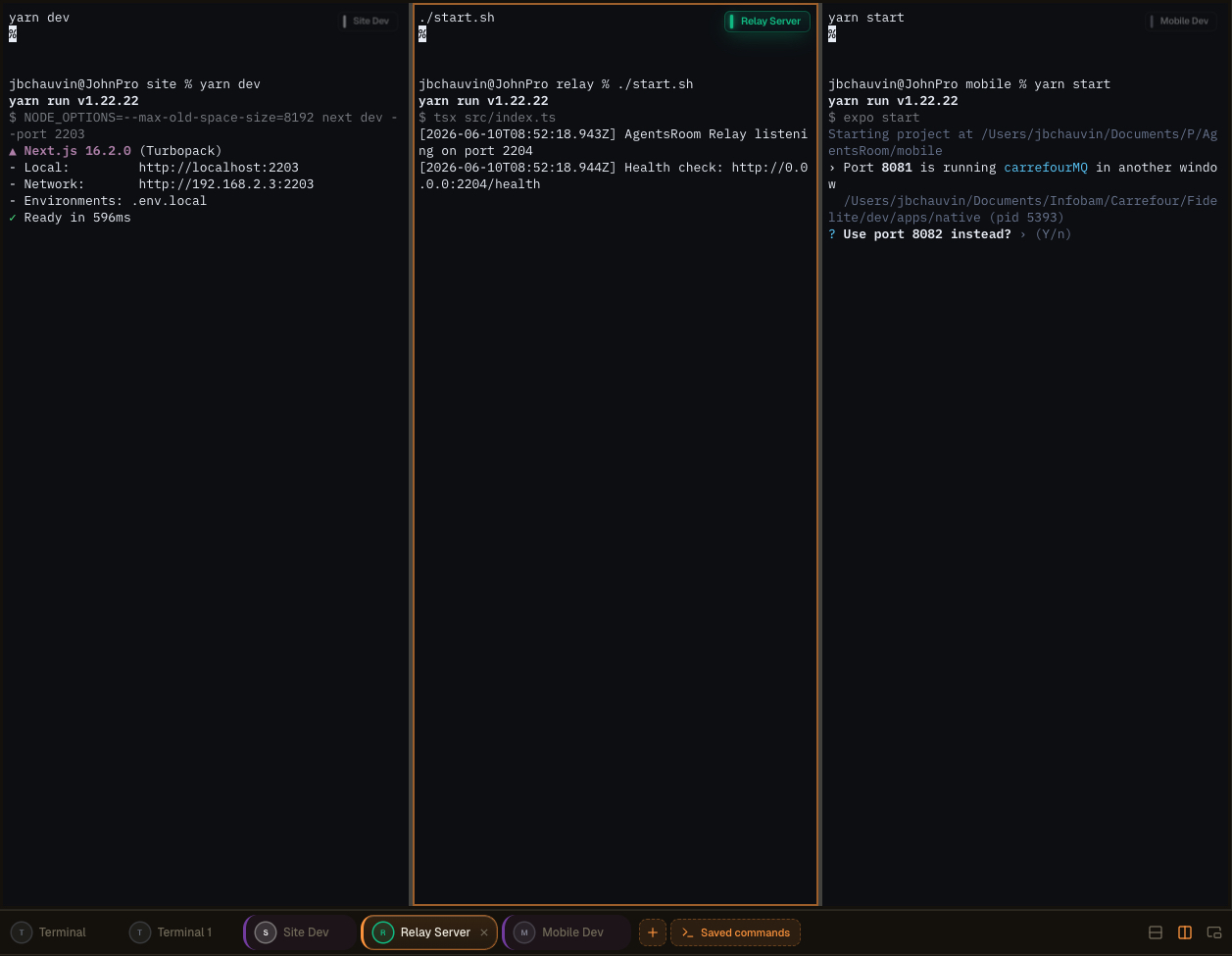
Layout multi-pannello di terminali in AgentsRoom: dividi i tuoi terminali, staccali su un secondo schermo e supervisiona agenti, log e build fianco a fianco.
Un vero terminale integrato, non un giocattolo
Ogni comando apre un terminale xterm.js completo con colori ANSI, scrollback, link cliccabili, ridimensionamento PTY e supporto Unicode. Non e un finto visualizzatore di log: e un vero pseudo-terminale, identico a quello che ottieni in iTerm2 o Terminal.app, ma gestito al posto tuo.
Lo stato di ogni processo e mostrato in tempo reale: in esecuzione, in avvio, fermato, crashato. Quando un dev server cade, lo vedi subito. Un clic per riavviarlo. E quando ti servono piu terminali in parallelo (backend + frontend + mobile + relay), il pulsante globale 'Avvia tutto' lancia tutti i processi a lunga esecuzione in una volta, in parallelo, senza digitare nulla.
I comandi sono raggruppati in cartelle, riordinabili con il mouse e memorizzati in `.agentsroom/commands.json` alla radice del tuo progetto. Committa questo file: tutto il team eredita la stessa configurazione di terminale. I comandi personali (script di debug locali, variabili d'ambiente private) vanno in `commands-personal.json`, aggiunto automaticamente al `.gitignore` dentro `.agentsroom`. Nessuno deve piu digitare `yarn dev --port 2203` a memoria ogni volta che entra in un nuovo repo.
Infine, tutto e unificato: i tuoi agenti AI, i tuoi terminali, i tuoi prompt, il tuo backlog e la tua anteprima live vivono nella stessa finestra. Risparmi un'enormita di tempo eliminando i continui passaggi tra AgentsRoom, il tuo emulatore di terminale, il tuo IDE e il browser. Un solo schermo, tutto a portata di clic.
Comandi staccati e configurazione multi-schermo
I Dev Commands possono ora essere completamente staccati in una finestra indipendente, separata dall'interfaccia principale di AgentsRoom. Porta i tuoi terminali fuori e spostali dove lavori meglio: un secondo display, un ultrawide o un monitor verticale dedicato al monitoraggio, ai log, alle build e agli agenti AI.
Uno schermo verticale di lato diventa una parete live per i tuoi processi in esecuzione. Tieni il tuo editor e i tuoi agenti nella finestra principale, e guarda ogni server, ogni build e ogni flusso di log in tempo reale sul pannello accanto. Niente alt-tab, niente contesto perso.
Migliore organizzazione dello spazio di lavoro
Libera la finestra principale per il codice e gli agenti. I terminali staccati vivono per conto loro, cosi la tua superficie di sviluppo rimane pulita e focalizzata invece di essere compressa in un singolo pannello.
Layout multi-schermo ottimizzato
Trascina la finestra staccata su un secondo display o un monitor verticale. L'output della build, i dev server e i log degli agenti ottengono uno schermo dedicato mentre continui a programmare su quello principale.
Monitoraggio in tempo reale
Mantieni una visione sempre attiva dei tuoi agenti e comandi. Guarda i processi avviarsi, trasmettere e crashare in diretta su uno schermo laterale, e reagisci nel momento in cui qualcosa va storto.
Produttivita piu alta
Gli sviluppatori che gestiscono piu progetti o ambienti smettono di cambiare contesto. Tutto cio che deve essere monitorato rimane visibile, cosi si lavora piu velocemente con meno interruzioni.
Layout avanzati per terminali, costruiti con drag-and-drop
Ora puoi unire piu terminali nello stesso pannello tramite un'interfaccia drag-and-drop estremamente intuitiva. Prendi un terminale, trascinalo dove vuoi e AgentsRoom costruisce il layout per te. Nessun file di configurazione, nessuna scorciatoia da memorizzare.
Componi lo spazio di lavoro adatto al compito che hai davanti:
Split verticali
Posiziona due terminali fianco a fianco per guardare backend e frontend contemporaneamente.
Split orizzontali
Impila i terminali uno sopra l'altro per tenere log e un server in esecuzione nella stessa colonna.
Layout combinati complessi
Combina split verticali e orizzontali per creare una griglia completa di terminali adattata al tuo stack.
Riorganizza in pochi secondi
Trascina qualsiasi terminale in una nuova posizione e il layout si riarrangia istantaneamente. Ristruttura tutta la tua configurazione in pochi secondi.
Supervisiona tutto in una volta
Tieni piu agenti, server, log e comandi in vista contemporaneamente, tutti all'interno di un singolo pannello.
Nessuna configurazione complessa, nessuna configurazione tmux da imparare. L'esperienza e progettata per essere immediata e naturale, cosi passi il tempo a programmare invece di organizzare finestre.
Altri modi per gestire i tuoi terminali
La finestra staccabile, la generazione comandi AI e il lancio remoto da mobile fanno tutti parte della stessa esperienza Dev Terminals. Ecco il walkthrough originale.
Gestore terminali AgentsRoom: terminale staccato su un secondo schermo, comandi attivati da remoto da mobile, terminale xterm.js integrato per progetto.
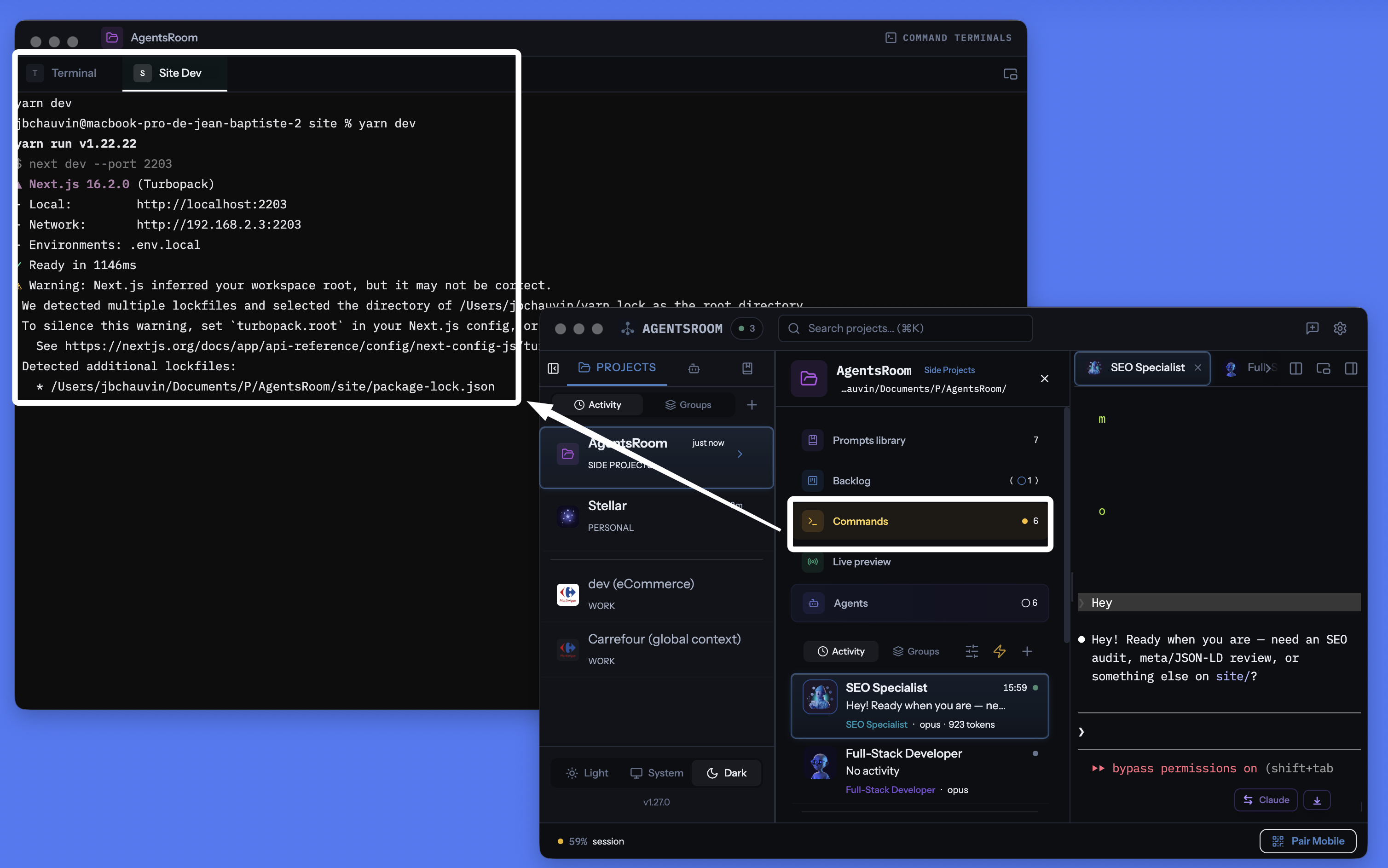
Gestore terminali per progetto di AgentsRoom: finestra staccabile, terminale integrato per comando, comandi generati dall'AI, tutto nello stesso posto dei tuoi agenti.
Gestisci ogni servizio, ogni comando
Processi a lunga esecuzione, script rapidi, comandi di build. Tutti organizzati per progetto, con monitoraggio dello stato e assistenza AI.
Specifici per progetto
Ogni progetto memorizza i propri comandi in .agentsroom/commands.json. Cambi progetto, ottieni comandi diversi. Zero confusione.
Avvia tutto in una volta
Un pulsante lancia ogni processo nel tuo progetto. Backend, frontend, mobile, relay: tutti avviati in parallelo.
Lancio remoto da mobile
Attiva i comandi dall'app iOS o Android: i terminali si avviano sul tuo computer e vedi l'output in diretta trasmesso sul telefono in 4G, 5G o Wi-Fi.
Finestra di terminale staccabile
Stacca la sezione terminali in una finestra fluttuante indipendente. Posizionala su un secondo monitor per tenere d'occhio i tuoi server mentre programmi nella finestra principale.
Generazione comandi AI
Clicca la bacchetta magica. Claude analizza la struttura del tuo progetto e genera tutti i comandi di avvio, i percorsi e le categorie per te.
Stato dei processi in tempo reale
Vedi quale servizio e in esecuzione, in avvio, fermato o crashato. I codici di uscita sono visualizzati quando un processo fallisce. Riavvia con un clic.
Processi e snippet
I servizi a lunga esecuzione sono processi. Script di build e comandi di deploy una tantum sono snippet. Entrambi vivono nella stessa dashboard.
Terminale completo per processo
Ogni processo apre un vero terminale xterm.js con colori, scrollback e link cliccabili. Interagisci direttamente con l'output del processo.
Collegato all'anteprima live localhost
Avvia il tuo sito in localhost da un terminale AgentsRoom, poi raggiungilo dall'esterno tramite il tunnel HTTPS integrato. Testa sul telefono in 4G/5G senza fare deploy.
Oltre 30 icone framework
React, Next.js, Django, Rails, Go, Rust, Docker, Expo, NestJS, Spring e altri. Ogni comando mostra l'icona e il colore del suo framework.
Memorizzati in git
I comandi vivono in .agentsroom/commands.json, committati nel tuo repo. I comandi personali vanno in commands-personal.json, automaticamente nel gitignore.
Terminali e agenti AI insieme
I tuoi terminali, i tuoi agenti Claude Code, i tuoi prompt, il tuo backlog e la tua anteprima live condividono la stessa app. Smetti di perderti tra dieci strumenti diversi.
Avvia i terminali sul tuo computer dal telefono
E probabilmente la funzionalita piu unica di AgentsRoom. Dall'app mobile iOS o Android, sfogli la lista di comandi di qualsiasi progetto e ne lanci uno con un tap. Il comando non viene eseguito sul telefono: gira sul tuo computer, nella directory di lavoro giusta, in un vero terminale PTY. L'output viene trasmesso in diretta al mobile tramite il relay cifrato end-to-end.
Concretamente: sei in metro, in palestra o dall'altra parte del mondo. Vuoi avviare il tuo sito locale per controllare un design, o riavviare un worker crashato mentre eri via. Apri AgentsRoom mobile, tocchi 'yarn dev', il server parte sul tuo computer a casa. Puoi persino interagire con la tastiera del terminale dal telefono.
Combinato con il tunnel di anteprima localhost integrato, puoi persino aprire il tuo sito locale nel browser mobile, in 4G o 5G, senza alcun deploy. Programmi, avvii, testi e convalidi, tutto dalla tasca. AgentsRoom trasforma letteralmente il tuo computer in un dev server pilotabile a distanza.
Ricevi notifiche quando un comando lungo termina
Una build, una suite di test o un'immagine Docker possono impiegare diversi minuti. Passi a qualcos'altro e il terminale rimane lì finito per dieci minuti prima che tu te ne accorga. Arma il campanello su una scheda del terminale e AgentsRoom ti avvisa nel momento esatto in cui il comando è completato, con il nome del comando e quanto è durato.
Il campanello si trova nella piccola etichetta flottante in alto a destra di ogni pannello del terminale. Un clic lo arma, un clic lo disarma, e rimane armato per quel terminale, quindi ogni esecuzione della stessa build riporta indietro. Cliccando sulla notifica si apre quella esatta scheda del terminale.
Un campanello per terminale
Arma solo dove ne hai bisogno. Non c'è nulla di globale da configurare e nessun avviso per i terminali di cui non hai mai chiesto.
Solo comandi lunghi
Qualsiasi cosa sotto un minuto conta come uso interattivo e rimane silenziosa, quindi cd, ls e git status non ti disturberanno mai. Arma il campanello mentre un comando è già in esecuzione e quello riporterà sempre, qualunque sia la sua lunghezza.
Mai mentre stai guardando
Se quel terminale è già sullo schermo e l'app ha il focus, nulla appare. L'avviso esiste per il momento in cui ti allontani, non per il momento in cui stai leggendo l'output.
macOS, Windows e Linux
Il rilevamento legge il processo in primo piano del terminale, quindi nulla viene aggiunto alla tua configurazione zsh, bash, fish o PowerShell e funziona con la shell che già usi. Gli avvisi raggiungono anche l'app iOS e Android quando sei lontano dalla tua macchina.
I tuoi agenti AI ricevono lo stesso trattamento: Notifiche degli agenti AI.
Modalita staccata: i tuoi terminali su un secondo monitor
Il pannello dei terminali puo essere staccato in una finestra fluttuante indipendente. Trascinala su un secondo schermo e i log di backend, frontend e bundler mobile restano sempre visibili mentre programmi nella finestra principale di AgentsRoom. E esattamente quello che fanno gli sviluppatori esperti con tmux o iTerm2 in modalita tiling, tranne che in AgentsRoom non c'e nulla da configurare.
La finestra staccata mantiene tutte le funzionalita: avvio, stop, riavvio, AI, categorie, multi-progetto. Puoi continuare a digitare nel terminale sullo schermo secondario mentre un agente Claude lavora nella finestra principale. Zero alt-tab, zero perdita di contesto, zero configurazioni oscure.
Un'alternativa a iTerm2, Warp e WezTerm
AgentsRoom Dev Terminals e l'opzione migliore per lavorare sui progetti rispetto ai classici emulatori di terminale. Ecco gli strumenti che i nostri utenti hanno gia sostituito con esso:
iTerm2 e stato lo standard di riferimento su macOS per anni e Terminal.app e preinstallato su ogni Mac. Warp ha reso popolari i blocchi di comandi e l'AI integrata. Ghostty e veloce e nativo. Kitty e accelerato dalla GPU. Alacritty e minimalista. WezTerm e scriptabile in Lua. Hyper e costruito su tecnologie web. Tabby e cross-platform. Wave Terminal e Windows Terminal spingono entrambi flussi di lavoro moderni con pannelli multipli. Sono tutti prodotti eccellenti. AgentsRoom non cerca di competere sulla velocita di rendering pura: porta una proposta di valore diversa, un terminale integrato nel tuo ambiente di sviluppo, limitato a ogni progetto, sincronizzato con i tuoi agenti AI e controllabile dal telefono.
Tutto cio di cui un terminale moderno ha bisogno, in un'unica finestra
AgentsRoom non e solo un altro emulatore di terminale. Riunisce tutto cio di cui un moderno flusso di lavoro di sviluppo ha bisogno e lo mette dietro un'unica interfaccia:
Se gestisci gia i tuoi progetti con piu tab del terminale chiamate 'backend', 'frontend', 'mobile', 'relay', risparmierai tempo con Dev Terminals. Se usi tmux o zellij per organizzare le sessioni, ritroverai la stessa idea, senza alcun file di configurazione da scrivere.
Come funziona
Apri il tuo progetto
Nella vista progetto, i Dev Terminals appaiono accanto ai tuoi agenti e prompt. Se non esistono ancora comandi, viene creato automaticamente un terminale predefinito alla radice del progetto.
Aggiungi i tuoi comandi
Clicca + per aggiungere un comando. Imposta il nome, il comando shell, la directory di lavoro (relativa alla radice del progetto) e scegli una categoria. Decidi se e un processo a lunga esecuzione o uno snippet una tantum.
.agentsroom/commands.jsonOppure lascia fare all'AI
Clicca l'icona della bacchetta magica. Claude analizza la struttura del tuo progetto (file package.json, Dockerfile, Makefile) e genera tutti i comandi con i percorsi e le categorie corretti. Rivedi, aggiusta se necessario e salva.
Avvia tutto
Premi il pulsante Play globale per lanciare tutti i processi contemporaneamente. Oppure avviali individualmente. Ogni processo genera un vero terminale dove puoi vedere i log e interagire con il servizio.
Stacca il pannello
Clicca l'icona di distacco: la sezione terminali si apre in una finestra fluttuante indipendente che puoi posizionare su un secondo monitor. I tuoi server restano visibili mentre programmi nella finestra principale.
Pilotalo dal telefono
Apri AgentsRoom su iOS o Android, scegli il tuo progetto, tocca un comando: si lancia a distanza sul tuo computer e ne vedi l'output in diretta dal telefono in 4G, 5G o Wi-Fi tramite il relay cifrato end-to-end.
Icone per ogni stack
Ogni comando mostra l'icona e il colore del suo framework. Individua a colpo d'occhio il tuo frontend React, il backend Django e i servizi Docker.
Configurazione comandi con AI
Nuovo progetto? Non configurare ogni comando manualmente. Clicca la bacchetta magica e Claude analizza la struttura del tuo repository per rilevare ogni servizio, ogni script di build e ogni comando di avvio. Genera la lista completa dei comandi con percorsi, categorie e icone corretti. Rivedi il risultato, aggiusta se necessario e salva. L'intera configurazione richiede secondi invece di minuti.
Prompt predefinito
"Analizza la struttura del mio progetto e genera tutti i comandi di avvio per ogni servizio, ogni sotto-progetto e ogni step di build. Includi la directory di lavoro corretta, il comando shell e la categoria framework appropriata per ogni voce."
Vuoi che i tuoi agenti avviino il dev server da soli ?
AgentsRoom MCP espone gli stessi Terminal Commands che salvi qui come strumenti MCP. I tuoi agenti IA chiamano commands_list, commands_run e commands_create tramite il server Terminal Commands MCP, poi avviano il dev server, l'API o il worker da soli.
È solo uno dei quattro server AgentsRoom MCP. Backlog MCP, Prompt Library MCP e Browser MCP rendono il resto dell'IDE AgentsRoom uno spazio pilotabile dagli agenti. Manuale quando vuoi, automatizzato quando no.
Scopri AgentsRoom MCPFAQ
In cosa si differenzia da iTerm2, Warp, Ghostty o Terminal.app?
iTerm2, Warp, Ghostty, Kitty, Alacritty, WezTerm, Hyper e Terminal.app sono tutti ottimi emulatori di terminale. AgentsRoom Dev Terminals non cerca di sostituirli per il lavoro di sistema generale: e un gestore di terminale orientato al progetto. I comandi vengono salvati per progetto, lanciati con un clic, pilotabili da mobile e vivono accanto ai tuoi agenti AI. Se lavori principalmente sui tuoi progetti, passerai il 90% del tuo tempo di terminale dentro AgentsRoom senza aprire iTerm2.
I terminali di AgentsRoom usano davvero xterm.js?
Si. Ogni comando apre un vero terminale xterm.js supportato da uno pseudo-TTY sul lato Electron. Ottieni colori ANSI, scrollback, link cliccabili, input da tastiera, ridimensionamento dinamico e supporto Unicode, esattamente come in un emulatore di terminale nativo.
Come funziona il lancio di comandi da remoto da mobile?
Dall'app iOS o Android, scegli un progetto e un comando. L'app mobile invia un messaggio cifrato end-to-end attraverso il relay WebSocket. L'app desktop riceve il comando, avvia un vero PTY sul tuo computer nella directory di lavoro corretta e trasmette l'output in tempo reale verso il mobile. Il comando viene eseguito fisicamente sul tuo computer, non sul telefono. Perfetto per riavviare un server o un worker mentre sei in movimento.
La modalita staccata funziona su piu schermi?
Si. Clicca l'icona di distacco: la sezione Dev Terminals si apre in una finestra fluttuante indipendente che puoi trascinare su un secondo monitor. I tuoi log e i tuoi server restano visibili in permanenza mentre programmi nella finestra principale di AgentsRoom.
Qual e la differenza tra un processo e uno snippet?
Un processo e un servizio a lunga esecuzione come un server di sviluppo, un backend o un file watcher. Resta attivo finche non lo fermi o crasha. Uno snippet e un comando una tantum come uno script di build, una migrazione del database o uno step di deploy. Entrambi sono memorizzati nella stessa dashboard, ma solo i processi vengono avviati con il pulsante 'Avvia Tutto'.
I comandi sono condivisi con il mio team?
Si. I comandi pubblici sono memorizzati in .agentsroom/commands.json dentro la directory del tuo progetto. Commetta questo file e chiunque faccia pull del repo ottiene gli stessi comandi. I comandi personali (come script di debug locali) vanno in commands-personal.json, che viene automaticamente aggiunto a .agentsroom/.gitignore.
Come funziona la generazione comandi AI?
Quando clicchi la bacchetta magica, AgentsRoom avvia un'istanza Claude che legge la struttura del tuo progetto. Rileva file package.json, Dockerfile, Makefile e altri file di configurazione per identificare ogni servizio e il suo comando di avvio. Il risultato e una lista strutturata di comandi con percorsi, categorie e nomi suggeriti. Rivedi la lista prima di salvare.
AgentsRoom può notificarmi quando un comando del terminale termina?
Sì. Ogni scheda del terminale porta un campanello nella sua etichetta flottante. Arma il campanello e AgentsRoom invia una notifica desktop nel momento in cui il comando in esecuzione restituisce il prompt, con il nome del comando e la sua durata, oltre a una push all'app iOS e Android quando sei lontano dalla tua macchina. Cliccando sulla notifica si apre quella scheda del terminale.
Come fa AgentsRoom a sapere che un comando è terminato se il terminale rimane aperto?
Una scheda del terminale è una shell a lungo termine, quindi nulla esce quando un comando termina. AgentsRoom osserva invece il gruppo di processi in primo piano del terminale: quando torna alla shell stessa, il prompt è di nuovo presente e il comando è completato. Nulla viene scritto nella tua configurazione della shell, motivo per cui si comporta allo stesso modo con zsh, bash, fish o PowerShell, e funziona per i comandi che hai digitato a mano così come per quelli salvati.
Riceverò una notifica per ogni comando che digito?
No. Solo i comandi che sono durati più di un minuto generano un avviso, quindi l'uso interattivo di routine rimane silenzioso. Un'eccezione deliberata: se armi il campanello mentre un comando è già in esecuzione, quel comando riporterà sempre indietro qualunque sia il tempo necessario. Nulla scatta nemmeno quando il terminale è già sullo schermo e l'app ha il focus.
Un comando può essere disponibile in tutti i miei progetti?
Sì. Al salvataggio scegli dove vive: solo questo progetto oppure globale. Un comando globale appartiene al tuo account e compare in ogni progetto che apri: ideale per un tunnel, uno stack Docker condiviso o un demone di database che avvii ovunque. La finestra Comandi ha una barra di ricerca e un filtro di ambito (Tutto / Questo progetto / Globale), così anche un elenco lungo resta leggibile.
I miei agenti IA possono avviare questi comandi da soli?
Sì, tramite AgentsRoom MCP. Gli agenti chiamano commands_list per vedere tutto ciò che è disponibile qui (comandi di progetto e globali, ognuno con il proprio ambito), commands_run per avviarne uno in una vera scheda di terminale che puoi guardare e fermare, e commands_create per salvarne uno nuovo. Non possono avviare un processo lungo da una shell grezza: ciò che gira finisce sempre in una scheda che controlli tu. E quando la sandbox di un agente rifiuta un comando, non deve più scriverne la riga perché tu la incolli in un altro terminale: chiama commands_propose, il comando compare nel suo pannello come una scheda «Eseguire questo comando?» con il motivo per cui non può eseguirlo, e un clic su Esegui lo avvia in una scheda di terminale che l'agente stesso legge in seguito. Niente parte finché non decidi tu, non esiste un'opzione «consenti sempre», e il comando non viene né salvato né rieseguito.
Approfondimenti
Troppi terminali, troppi agenti IA: il debito cognitivo che ti rallenta (e come uscirne)
Gestire dieci terminali di agenti IA genera un debito cognitivo, documentale e finanziario che ti costa tempo e token. Ecco come riprendere il controllo.
Il miglior terminale per l'agentic coding nel 2026: cmux, Warp, tmux e chi vince davvero
cmux, Warp, tmux, WezTerm, AgentsRoom: un confronto onesto sul miglior terminale per agentic coding e vibe coding quando lanci agenti AI in parallelo.
Smetti di destreggiarti tra le tab del terminale
Scarica AgentsRoom e lancia tutti i tuoi servizi da un'unica dashboard. Gratuito fino a 2 progetti.
App companion: monitora i tuoi agenti in movimento
Usa Claude, Codex, Antigravity CLI o un altro provider IA.
Invia bug e richieste direttamente nel tuo backlog pubblico.