Due account Claude Code.
Un solo AgentsRoom. Nessun trucco da shell.
Esegui un login Claude Code personale su un progetto e un login di lavoro su un altro, nella stessa finestra, nello stesso momento. Fissa un account Claude per progetto. Fai l'override per agente quando ti serve. Accedi direttamente dal pannello Impostazioni, senza export di CLAUDE_CONFIG_DIR, senza installare strumenti aggiuntivi.
Gratis · macOS · L'accesso resta sul tuo computer
Perché usare più account Claude Code
Le vere ragioni per cui gli sviluppatori usano più di un account Claude, dette in parole semplici.
Tieni il lavoro e il personale ben separati
L'account Claude Code del tuo datore di lavoro resta sui progetti di lavoro. Il tuo account personale resta sui progetti del fine settimana. Niente contaminazione accidentale dei prompt, niente credenziali di lavoro che finiscono su un progetto secondario, niente sessioni personali registrate sull'account di lavoro.
Fattura il consumo per cliente
Quando un cliente ti dà accesso a Claude, le sessioni di quel cliente girano sul suo account. Vengono consumati i suoi token, non i tuoi. Il monitor di consumo Claude di AgentsRoom tiene separati i totali per account, così la rifatturazione è semplice.
Evita le collisioni di quota
Se il tuo account di lavoro ha una quota Anthropic risicata, un lungo run di un agente su un progetto personale del fine settimana non la intacca. Ogni account ha i suoi limiti, il suo stato di rate-limiting, la sua cronologia di consumo.
Esegui un account di test accanto a uno di produzione
Crea un account Claude separato per esperimenti rumorosi, agenti usa e getta e bozze di prompt. Mantieni pulito l'account di produzione. Passa dall'uno all'altro per agente, per progetto, in due clic.
Org diverse, policy diverse
Alcuni account Claude sono legati a un SSO aziendale con logging o telemetria obbligatori. Tenere separato un account personale significa che il tuo lavoro di programmazione personale resta alle tue condizioni, con credenziali, sessioni e cronologia isolate a livello di cartella sul disco.
Pair programming per due persone su un solo computer
Se due sviluppatori condividono di tanto in tanto una postazione, ciascuno può accedere con il proprio account Claude Code. AgentsRoom li ricorda entrambi e avvia quello giusto a seconda del progetto o dell'agente.
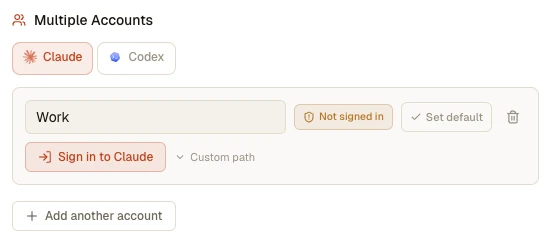
Il pannello Multiple Accounts nelle Impostazioni: aggiungi un account Claude per contesto, accedi dall'app o punta l'opzione Custom path a un profilo esistente.
Integrato direttamente in AgentsRoom
Nessuno switcher esterno, nessuno script shell, nessun balletto logout-login.
Un account Claude per progetto
Fissa un account Claude su un progetto. Ogni agente di quel progetto lo eredita per impostazione predefinita. Apri un progetto di Lavoro e uno Personale nella stessa finestra, ciascuno che gira sul proprio account Claude sotto il cofano.
Override per agente
Ti serve un singolo agente su un account diverso? Modifica l'agente, scegli un altro account Claude, salva. L'override si applica solo a quell'agente. Il resto del progetto mantiene l'account a livello di progetto.
Accedi dentro l'app
Clicca "Add an account" e AgentsRoom apre un mini terminale integrato che esegue claude con il giusto CLAUDE_CONFIG_DIR. Digiti /login, completi l'OAuth nel browser, incolli il codice. Il badge di stato passa a Signed in nel momento in cui le credenziali arrivano sul disco.
Account predefinito globale
Imposta un account Claude come predefinito globale. Ogni nuovo progetto parte su quell'account finché non fai l'override. Cambia il predefinito in seguito e ogni progetto non fissato lo segue automaticamente.
Compatibile con CCS
Usi già Claude Code Switcher? Punta un profilo su ~/.ccs/instances/work o su qualsiasi altra cartella CCS. AgentsRoom riutilizza le credenziali esistenti, senza fare di nuovo il login.
Isolamento rigoroso su disco
Ogni account vive nella propria cartella: token, sessioni, cronologia del progetto. Due account non condividono mai un'identità, ed eliminare un account in AgentsRoom non tocca mai i dati di un altro account. Le preferenze e le estensioni sono l'unica cosa che puoi scegliere di condividere, con un solo interruttore.
La tua configurazione personale condivisa tra gli account
Un solo interruttore carica i tuoi comandi slash, le tue skill, i tuoi sotto-agenti, il tuo CLAUDE.md, i tuoi hook, i tuoi plugin e i tuoi server MCP utente in ogni account a cui hai eseguito l'accesso, invece di lasciarne ognuno con un livello utente vuoto. Le credenziali e la cronologia restano isolate.
Tracciamento dei token per account
Il contatore di consumo dei token Claude Code in AgentsRoom legge i transcript JSONL di ogni account in modo indipendente. Totali per sessione, tasso di cache hit e avvisi funzionano allo stesso modo su ogni account.
Attribuzione dei file per agente
La revisione delle modifiche e il diff per agente continuano a funzionare tra gli account. I file modificati da un agente vengono attribuiti correttamente anche quando l'agente gira su un account Claude diverso da quello predefinito.
Un account per cartella di progetti
Fissa un account Claude su una cartella della barra laterale e ogni progetto archiviato al suo interno parte su quell'account, sottocartelle comprese. Una cartella Lavoro sull'account di lavoro, una cartella Personale su quello personale. Un progetto, o un singolo agente, può comunque fare l'override.
Un colore per account
Dai a ogni account Claude il suo colore nelle Impostazioni. Compare come un puntino sull'avatar dell'agente, sull'intestazione del terminale e sulla scheda del progetto, così quale account sta girando si legge a colpo d'occhio invece di doverlo cercare.
Il misuratore di utilizzo segue l'account giusto
Il misuratore nella barra di stato legge la quota dell'account su cui gira davvero l'agente che hai davanti, provider per provider. Un progetto fissato su Lavoro smette di mostrare la percentuale dell'account personale, e il tooltip nomina l'account che sta misurando.
Quota suddivisa per progetto e per agente
Attiva la suddivisione della quota nel pannello beta: il popover di utilizzo ripartisce allora il consumo di ogni account tra i tuoi progetti e i tuoi agenti per la finestra in corso, con ogni riga che porta il suo marchio di provider e il colore del suo account.
Override temporaneo mirato su un account
Quando cambi temporaneamente il modello o il livello di ragionamento, scegli a cosa si applica: tutti i progetti, solo i progetti che indichi, oppure solo gli agenti che altrimenti girerebbero su un dato account.
Passaggio temporaneo a un altro account
Un override temporaneo può anche cambiare l'account su cui girano i nuovi agenti: credito esaurito su quello personale, si continua su quello di lavoro, e alla scadenza tutto torna come prima.
Sposta un agente in corso su un altro account
Cambia l'account dalla finestra Cambia provider, dalla scheda dell'agente, dal progetto o da una cartella: gli agenti già in esecuzione si adeguano subito. Ripartono sul nuovo account con il contesto trasferito, invece di aspettare il lancio successivo.
Come funziona sotto il cofano
Costruito sul meccanismo multi-account ufficiale di Claude Code.
CLAUDE_CONFIG_DIR controlla tutto
Claude Code legge i suoi token, i metadati di sessione e la cronologia del progetto dalla cartella puntata da CLAUDE_CONFIG_DIR. Il valore predefinito è ~/.claude. Impostare questa variabile su un'altra cartella cambia l'account attivo. AgentsRoom usa questo meccanismo ufficiale per alimentare il supporto multi-account.
Ogni account è una cartella gestita
Quando clicchi "Add an account", AgentsRoom crea ~/.agentsroom/claude-profiles/<id>/ e ci fa l'accesso dentro. Puoi anche puntare un account su una cartella esistente, inclusa una cartella di istanza CCS come ~/.ccs/instances/work.
Il flusso di accesso è integrato nelle Impostazioni
AgentsRoom avvia un mini PTY che esegue claude con CLAUDE_CONFIG_DIR impostato sul nuovo profilo. Digiti /login, il browser si apre, incolli il codice. AgentsRoom interroga .credentials.json una volta al secondo così il badge Signed in compare nel momento in cui il file arriva sul disco.
Risoluzione a cascata al momento dello spawn
Quando un agente parte, AgentsRoom risolve l'account Claude effettivo in quest'ordine: override dell'agente, pin del progetto, predefinito delle impostazioni, predefinito di sistema ~/.claude. Il giusto CLAUDE_CONFIG_DIR viene impostato nell'ambiente del PTY prima che claude venga lanciato.
Tracciamento dei token e dei file restano corretti
I lettori interni di AgentsRoom (consumo dei token, attribuzione dei file, monitor delle sessioni) scorrono tutte le cartelle di account note, più ~/.claude come fallback. Il metafile di sessione giusto vince per PID, così i contatori per agente e i diff restano accurati a prescindere dall'account che ha avviato l'agente.
Cosa contiene ogni cartella di account
Ogni cartella di account Claude contiene le credenziali OAuth, i metafile dei metadati di sessione indicizzati per PID, i transcript JSONL per progetto, le impostazioni di Claude e la cronologia del progetto. AgentsRoom non copia mai l'identità dall'una all'altra. Significa anche che un account parte con un livello utente vuoto: è "Usare la mia configurazione CLI personale" nelle Impostazioni a caricare i tuoi comandi, le tue skill, i tuoi sotto-agenti, il tuo CLAUDE.md, i tuoi hook, i tuoi plugin e i tuoi server MCP utente in ognuno di essi.
Contenuto per account
- • Credenziali OAuth (.credentials.json)
- • Metafile di sessione in sessions/<pid>.json
- • Transcript JSONL in projects/<encoded-cwd>/<sessionId>.jsonl
- • Impostazioni e cronologia per account e, a meno che tu non lo condivida, il tuo livello utente
Alternative ad AgentsRoom
Altri modi per gestire più account Claude Code, e cosa fa AgentsRoom in modo diverso.
CCS (Claude Code Switcher)
CCS è un wrapper shell che mantiene cartelle di profili Claude separate sotto ~/.ccs/instances/<nome> e cambia CLAUDE_CONFIG_DIR prima di eseguire claude. Funziona, ma vive fuori dall'IDE: cambi profilo globalmente per l'intera shell, non per progetto né per agente. AgentsRoom è pienamente compatibile con i profili CCS. Punta un account AgentsRoom su un'istanza CCS e riutilizza le credenziali direttamente.
CLAUDE_CONFIG_DIR a mano
Il metodo ufficiale supportato da Anthropic: export CLAUDE_CONFIG_DIR=/percorso prima di lanciare claude. Manuale, soggetto a errori, e nel momento in cui apri una seconda scheda dimentichi su quale account sei. AgentsRoom gestisce questa variabile al posto tuo, per progetto e per agente, e ti mostra l'account attivo nel selettore ogni volta.
Due macchine separate o due sessioni utente
Alcuni team usano una macchina separata o una sessione utente di sistema separata per account Claude. Pesante, lento, e non puoi eseguire un agente di lavoro e uno personale in parallelo. AgentsRoom li esegue entrambi nello stesso momento sullo stesso computer, nella stessa finestra.
Logout e login ogni volta
Digiti claude /logout, poi claude /login sul nuovo account, poi di nuovo per tornare indietro. Perdi le tue sessioni, costa minuti a ogni cambio e rompe --resume su ogni sessione precedente. AgentsRoom tiene ogni account connesso in modo permanente, cambia con un clic e non invalida mai una sessione.
Script shell e alias personalizzati
Alcuni sviluppatori avvolgono claude in una funzione shell che esporta CLAUDE_CONFIG_DIR in base alla cartella corrente. Fragile, fatto a mano e invisibile dall'IDE. AgentsRoom codifica la stessa idea in modo dichiarativo a livello di progetto, con un badge nell'interfaccia che ti dice sempre quale account è attivo.
Cosa fa AgentsRoom che gli altri non fanno
AgentsRoom è l'unico IDE che porta in primo piano i più account Claude Code come concetto di prima classe, con un pin per progetto, un override per agente, un flusso di accesso integrato, un badge di stato per account e la piena compatibilità con i profili CCS. Accedi una volta per account, fissi gli account per progetto, fai l'override per agente, e smetti di preoccuparti di quale account sia caricato. Più account E più provider nello stesso progetto: un agente Claude Lavoro, un agente Claude Personale e un agente Codex possono girare tutti fianco a fianco.
FAQ
Quanti account Claude Code posso aggiungere ad AgentsRoom?
Non c'è un limite rigido. Ogni account è una cartella sul disco. Aggiungi un account Lavoro, un account Personale, un account per cliente, un account di test: AgentsRoom li elenca tutti nel pannello Impostazioni e ti lascia sceglierne uno qualsiasi per progetto o per agente.
Devo installare CCS o un altro strumento per usare più account Claude in AgentsRoom?
No. AgentsRoom gestisce direttamente il meccanismo CLAUDE_CONFIG_DIR di Claude Code. Nessuno switcher esterno, nessun wrapper shell, nessuna dipendenza aggiuntiva. Il flusso di accesso è completamente integrato nel pannello Impostazioni.
Uso già CCS. Posso mantenere i miei profili CCS esistenti?
Sì. Quando aggiungi un account in AgentsRoom, clicca "Custom path" e punta alla cartella del tuo profilo CCS esistente, per esempio ~/.ccs/instances/work. AgentsRoom riutilizza le credenziali già salvate lì. Non serve fare di nuovo il login.
Due agenti diversi nello stesso progetto possono girare su due account Claude diversi nello stesso momento?
Sì. Il progetto fissa un account predefinito, ma ogni agente può fare l'override. Apri un progetto fissato sull'account Lavoro, modifica un agente specifico perché usi l'account Personale, e i due agenti girano in parallelo su account Claude diversi nella stessa finestra.
I contatori dei token e l'attribuzione dei file sono accurati quando un agente gira su un account Claude diverso da quello predefinito?
Sì. AgentsRoom scansiona ogni cartella di account configurata, più ~/.claude come fallback, quando legge i metadati di sessione. I PID sono globalmente univoci, quindi il metafile di sessione di ogni agente viene trovato in esattamente una cartella. I conteggi dei token per sessione, il tasso di cache hit e i diff per agente funzionano in modo identico tra gli account.
Cosa succede se elimino un account a cui alcuni agenti fanno ancora riferimento?
Non si rompe nulla. Gli agenti ripiegano silenziosamente sull'account Claude predefinito. La cartella eliminata resta sul disco nel caso tu voglia puntarci un altro profilo in seguito. Puoi ricollegare gli agenti orfani a un altro account in qualsiasi momento dalla finestra di modifica dell'agente.
Le credenziali vengono condivise con altri utenti di AgentsRoom o inviate a un server?
No. Ogni cartella di account resta sulla tua macchina locale. AgentsRoom non legge, non copia e non trasmette mai le credenziali. Il flusso di accesso esegue il CLI ufficiale claude in un PTY locale, l'OAuth avviene tra Anthropic e il tuo browser come al solito.
La funzione resume funziona dopo che ho cambiato l'account Claude di un agente?
Quando l'account di un agente cambia, la sua sessione precedente vive nella vecchia cartella di account e non può essere ripresa nella nuova. AgentsRoom rileva il fallimento e avvia automaticamente una nuova sessione. Nessuna pulizia manuale necessaria.
Posso combinare due abbonamenti Claude per avere più margine sui rate limit?
Ogni account Claude mantiene la propria quota e i propri rate limit: gli account separati non condividono nulla e non si rallentano a vicenda, quindi un'esecuzione intensiva di agenti su un account lascia l'altro intatto. Se usare più abbonamenti a pagamento sia adatto alla tua situazione dipende dai termini di servizio di Anthropic per il tuo tipo di account. AgentsRoom si limita a gestire gli accessi e a mantenere isolata su disco l'identità di ogni account.
Posso fissare un account Claude su un intero gruppo di progetti?
Sì. Le cartelle della barra laterale hanno le proprie impostazioni predefinite, e l'account Claude è una di queste. Fissa Lavoro sulla cartella che contiene i tuoi repository di lavoro e ogni progetto al suo interno parte su quell'account, compresi i progetti aggiunti in seguito e quelli nelle sottocartelle. L'ordine di risoluzione è: override dell'agente, account fissato sul progetto, cartella più vicina che fissa un account, predefinito globale, poi ~/.claude.
Con più account connessi, quale mostra il misuratore di utilizzo?
Quello che stai davvero consumando, risolto separatamente per ogni provider: prima l'account dell'agente in primo piano, altrimenti l'account su cui questo progetto verrebbe lanciato, altrimenti il tuo account principale. Il tooltip del misuratore lo nomina, e il popover di utilizzo elenca una sezione per ogni account connesso, così una quota di lavoro e una personale non vengono mai sommate in un unico numero.
Posso vedere quanta quota di un account ha consumato un singolo progetto o un singolo agente?
Sì, con la suddivisione della quota attivata nel pannello beta. AgentsRoom prende la percentuale pubblicata dall'account per la finestra in corso e la ripartisce tra i tuoi progetti e i tuoi agenti, pesata sul costo locale di ogni sessione. È una stima, ed è dichiarata come tale: i consumi che AgentsRoom non può vedere, da un altro computer o da claude.ai, mancano al calcolo, quindi non è mai una fattura.
I miei comandi slash, le mie skill e il mio CLAUDE.md funzionano su un secondo account?
Sì, una volta che attivi "Usare la mia configurazione CLI personale" nelle Impostazioni. Accedere con un account gli dà la propria cartella di configurazione di Claude Code, e Claude Code legge da lì tutto il suo livello utente: senza quell'interruttore un nuovo account parte vuoto, quindi i tuoi comandi slash, le tue skill, i tuoi sotto-agenti, il tuo CLAUDE.md, i tuoi hook, i tuoi plugin e i tuoi server MCP a livello utente non vengono caricati. L'interruttore li collega a tutti gli account in una volta sola e li tiene aggiornati, mentre credenziali, sessioni, transcript e utilizzo restano isolati per ogni account. AgentsRoom elenca anche esattamente ciò che ha trovato nella tua configurazione, così non devi mai indovinare se qualcosa è in uso.
Posso essere connesso a due account Claude contemporaneamente sullo stesso computer?
Sì, è esattamente quello che fa questa funzionalità. Ogni account Claude che aggiungi riceve la propria cartella di configurazione di Claude Code, e ogni agente viene avviato con l'account che hai scelto per il suo progetto. Un agente di lavoro e un agente personale girano così fianco a fianco, nella stessa finestra, ciascuno connesso al proprio account, senza alcun logout nel mezzo. Il limite in cui potresti esserti imbattuto è quello dell'app web di Claude, che mantiene un solo accesso per profilo del browser; la riga di comando non ha questo limite, una volta che ogni account ha la propria cartella.
Posso unire due account Claude in uno solo?
No. Nel momento in cui scriviamo, Anthropic non offre alcun modo per unire due account Claude: ciascuno mantiene il proprio abbonamento, la propria cronologia delle conversazioni e la propria quota. AgentsRoom fa l'opposto, e non ha bisogno di alcuna unione: tieni entrambi gli account, accedi a ciascuno una sola volta, ne fissi uno per progetto o per agente, e li usi dalla stessa app. Ottieni quello che di solito ci si aspetta da un'unione, un unico posto per tutto, mentre i due account e le loro quote restano separati.
Potrebbe piacerti anche: Multi-Provider
I più account Claude ti danno diversi login Claude in una sola app. Multi-Provider ti dà diversi motori IA in una sola app: Claude, Codex, GitHub Copilot CLI, Cursor e altre 10 CLI di agenti. Stessa idea, applicata al provider IA anziché all'account. Fissa un provider per progetto, fai l'override per agente, cambia a metà conversazione mantenendo il contesto.
Scopri la feature Multi-ProviderIl tuo agente raggiunge un limite di utilizzo. Continua a lavorare lo stesso.
Quando l'account Claude o Codex su cui gira un agente esaurisce la quota, AgentsRoom passa la stessa conversazione a un altro account a cui hai già effettuato l'accesso, e il lavoro prosegue.
Guarda come funzionaApprofondimenti
Claude Code mantiene un solo accesso alla volta. Ecco come farne convivere diversi.
Guida sul campo per far convivere un account di lavoro e uno personale sulla stessa macchina: l'unica variabile d'ambiente che decide quale accesso è attivo, perché il metodo via shell si rompe appena hai più di due terminali aperti, e come fissare un account per progetto.
Come controllare l'uso dei token di Claude Code: 4 modi per vedere quanto spendono i tuoi agenti
Quattro modi per controllare l'uso dei token di Claude Code: il comando /cost, le trascrizioni delle sessioni, il CLI ccusage e un misuratore live per sessione. Vedi esattamente quanto spende ogni agente.
Come Ridurre i Costi dei Token di Claude Code Senza Rallentare
Claude Code ti addebita per token, e la maggior parte della spesa è invisibile: contesto gonfiato, modello sbagliato, PDF grezzi, agenti che leggono di nuovo gli stessi file. Ecco dove va realmente il denaro e come ridurlo, con le abitudini e gli strumenti che mantengono la tua bolletta bassa senza rallentarti.
Smetti di destreggiarti con le variabili shell. Scegli l'account da un selettore.
Esegui un account Claude Lavoro, un account Claude Personale e un account cliente in AgentsRoom, fianco a fianco, già da oggi.
App companion: monitora i tuoi agenti in movimento
Usa Claude, Codex, Antigravity CLI o un altro provider IA.
Invia bug e richieste direttamente nel tuo backlog pubblico.