AgentsRoom vs CMUX
CMUX is a solid CLI tool for running parallel Claude sessions via git worktrees. But if you want to actually see what your agents are doing — across all your projects — you need a visual interface.
AgentsRoom is a native macOS IDE for Claude agents. Visual status tracking, macOS notifications, multi-project management, drag & drop organization — everything CMUX doesn't have.
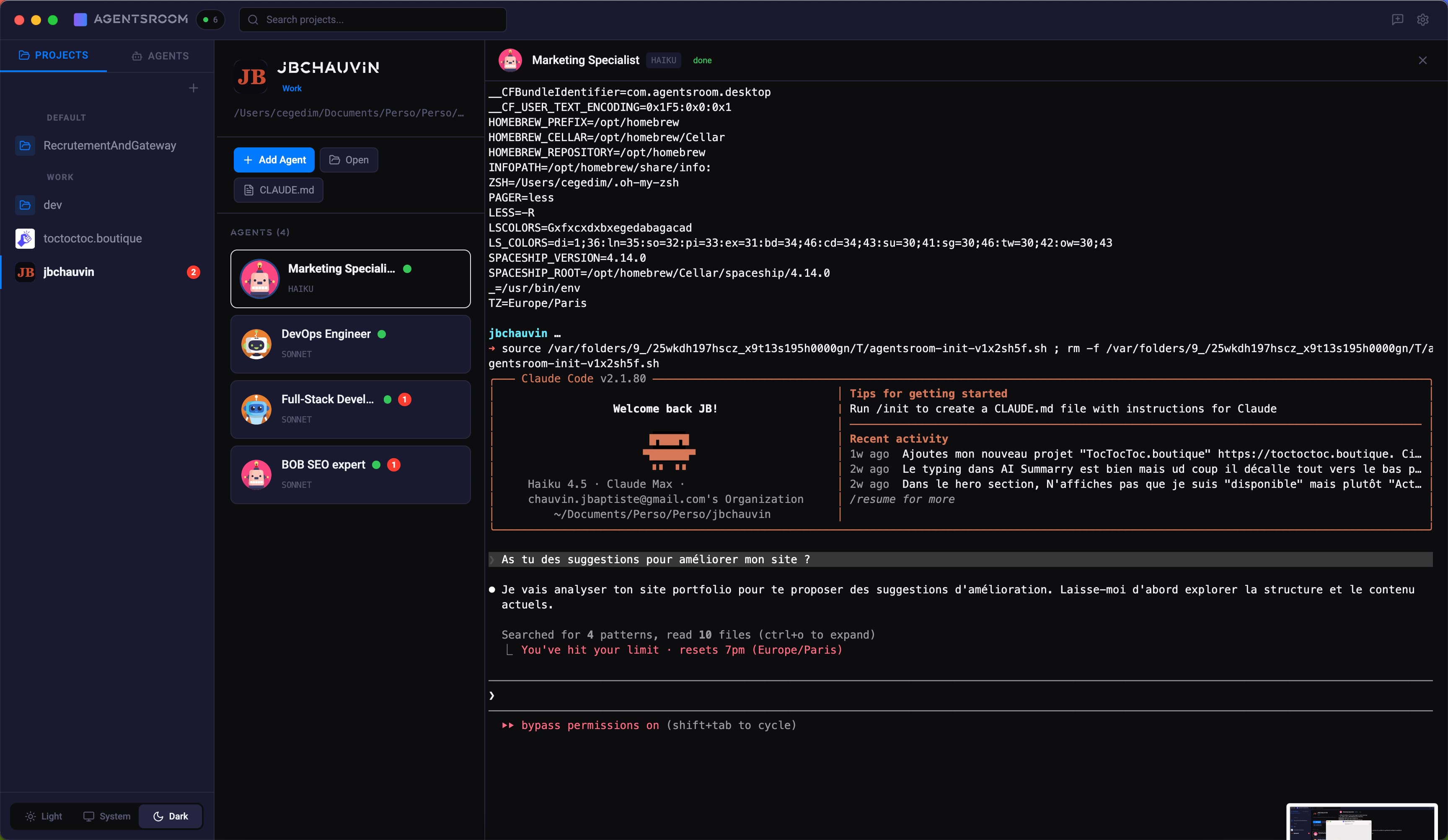
AgentsRoom — all your projects and agents in one visual interface
The difference at a glance
With CMUX
- -Terminal-only — no visual overview of your agents
- -No real-time status — you don't know if an agent is thinking, coding, or stuck
- -One project at a time — switching requires manual navigation
- -No macOS notifications — you have to check terminals manually
- -No drag & drop — everything is command-line based
- -No role system — all agents look the same
With AgentsRoom
- +Full visual GUI — see all agents across all projects at a glance
- +Real-time status — thinking, coding, done, or needs input
- +Multi-project view — switch between projects in one click
- +macOS notifications — get alerted when agents finish or get stuck
- +Drag & drop — organize projects into zones (Work, Personal, Side projects)
- +13 specialized roles — DevOps, Frontend, Backend, QA, Architect, and more
Feature-by-feature comparison
How AgentsRoom and CMUX stack up on the features that matter for managing Claude agents.
| Feature | AgentsRoom | CMUX |
|---|---|---|
| Visual GUI | ✓ | ✗ |
| Agent status (thinking/done/stuck) | ✓ | ✗ |
| macOS notifications | ✓ | CLI only |
| Multi-project view | ✓ | ✗ |
| Built-in terminal per agent | ✓ | ✓ |
| Edit CLAUDE.md from UI | ✓ | ✗ |
| Drag & drop organization | ✓ | ✗ |
| Specialized agent roles | ✓ | ✗ |
| Model per agent | ✓ | ✗ |
| Setup time | 30 sec | 5 min |
See AgentsRoom in action
Watch how AgentsRoom manages multiple Claude agents across projects — no terminal juggling required.
When CMUX might be the better choice
We believe in honest comparisons. Here are scenarios where CMUX could be a better fit.
You prefer pure CLI workflows
If you live in the terminal and don't want a GUI, CMUX's command-line approach fits your existing workflow. No context switching.
You need strict git worktree isolation
CMUX's core feature is per-session git worktrees. If you need each Claude agent in a completely isolated branch copy, CMUX handles this natively.
You're on Linux
AgentsRoom is macOS-only (for now). If you're on Linux, CMUX works anywhere with a terminal. We're working on cross-platform support.
Switching from CMUX takes 30 seconds
No migration needed. Your code stays where it is.
Download AgentsRoom
Download the app and drop it in your Applications folder. That's the install.
Add your project folders
Point AgentsRoom to the same directories you used with CMUX. Your CLAUDE.md files are picked up automatically.
Add agents and launch
Pick roles for your agents (DevOps, Frontend, QA...), assign models, and hit launch. You'll see live status in seconds.
Frequently asked questions
Is AgentsRoom really better than CMUX?+
Can I migrate from CMUX to AgentsRoom?+
Is AgentsRoom free?+
Does AgentsRoom work without CMUX?+
Will AgentsRoom support Linux?+
Ready to upgrade from CMUX?
Download AgentsRoom and see the difference in 30 seconds. Your agents deserve a visual interface.
Download AgentsRoomFree — 3 projects, unlimited agents